

I want to change the DNS to 1.1.1.1
But I cannot find the setting? Is it banned by Tmnet?

Update:
I found this thanks to Jeffreynsx.

This post has been edited by LonelyHart16: Sep 10 2024, 07:23 AM
Unifi new Skyworth combo router banned DNS?, I mean, cannot manual configure?
|
|
 Sep 10 2024, 06:22 AM, updated 2y ago Sep 10 2024, 06:22 AM, updated 2y ago
Show posts by this member only | IPv6 | Post
#1
|
 
Junior Member
175 posts Joined: Apr 2016  
|
I got the GN630V Skyworth router from Unifi.
I want to change the DNS to 1.1.1.1 But I cannot find the setting? Is it banned by Tmnet? Update: I found this thanks to Jeffreynsx. This post has been edited by LonelyHart16: Sep 10 2024, 07:23 AM |
|
|
|
|
|
Sep 10 2024, 09:50 AM
Show posts by this member only | IPv6 | Post
#2
|

Senior Member
1,873 posts Joined: Nov 2010 
|
You are using IPv6, so you gonna setup to DHCPv6 or stateless v6 as well, so far I only found out TP-link allow you to do that(old buggy ac1200v2 lol)
Else, setup the DNS relay setting, so your device still check via router v6, then router relay you to 2606:4700:4700::1111. |
|
|
Sep 10 2024, 09:56 AM
Show posts by this member only | Post
#3
|
|
Senior Member
9,050 posts Joined: Jan 2003
|
Telco routers usually locked down the features. Get a third party open router or build one yourself using Opnsense.
|
|
|
Sep 10 2024, 10:06 AM
Show posts by this member only | IPv6 | Post
#4
|
|
Junior Member
175 posts Joined: Apr 2016
|
QUOTE(BenYeeHua @ Sep 10 2024, 09:50 AM) You are using IPv6, so you gonna setup to DHCPv6 or stateless v6 as well, so far I only found out TP-link allow you to do that(old buggy ac1200v2 lol) Else, setup the DNS relay setting, so your device still check via router v6, then router relay you to 2606:4700:4700::1111.   Like this? I dont know what to enter for Prefix and Prefix length, haha. Any idea? |
|
|
Sep 10 2024, 12:20 PM
Show posts by this member only | IPv6 | Post
#5
|
|
Senior Member
1,873 posts Joined: Nov 2010
|
QUOTE(LonelyHart16 @ Sep 10 2024, 10:06 AM) Like this? I dont know what to enter for Prefix and Prefix length, haha. Any idea? https://youtu.be/4rxH5oVW5js?t=74 Config here, saw the "IP Version"? Change it to IPv4, then save, and only change this one. The bad side is you will disabled IPv6, it is useful when you need torrenting or playing p2p games on Steam, else it should be fine. --- Or, just change all secure DNS/DoH/DoT on all of your device la.  Still, better seek a better router la. --- https://browserleaks.com/dns Then use this to check which DNS you are using, should be Google. This post has been edited by BenYeeHua: Sep 10 2024, 12:21 PM |
|
|
Sep 10 2024, 01:05 PM
Show posts by this member only | Post
#6
|

Junior Member
554 posts Joined: Nov 2006
|
QUOTE(BenYeeHua @ Sep 10 2024, 12:20 PM) Done checking, there is none, I recommend you change router, but if you still wanna use it, then... Agree with you..seek a better router to solve all these problem once and for all https://youtu.be/4rxH5oVW5js?t=74 Config here, saw the "IP Version"? Change it to IPv4, then save, and only change this one. The bad side is you will disabled IPv6, it is useful when you need torrenting or playing p2p games on Steam, else it should be fine. --- Or, just change all secure DNS/DoH/DoT on all of your device la. Still, better seek a better router la. --- https://browserleaks.com/dns Then use this to check which DNS you are using, should be Google.  |
|
|
|
|
|
Sep 10 2024, 01:10 PM
Show posts by this member only | IPv6 | Post
#7
|
|
Senior Member
1,873 posts Joined: Nov 2010
|
QUOTE(BladeRider88 @ Sep 10 2024, 01:05 PM) Agree with you..seek a better router to solve all these problem once and for all IPv6 rare useful, I tell you, most DNS send you to SG server instead of MY, which slow you down.Only when you need Public IP address and you are CGNAT as 100M sub customer, then it is quite useful. Else, UPnP + public IPv4 is better solution for all. --- And yes, Asus router with regular maintenance update + Secure DNS + custom ROM anywhere is the best, there is no need to keeping up WiFi 7 or WiFi 8, unless you got a big house or wanna play with VR, lol. |
|
|
Sep 10 2024, 01:16 PM
Show posts by this member only | Post
#8
|
|
Junior Member
554 posts Joined: Nov 2006
|
QUOTE(BenYeeHua @ Sep 10 2024, 01:10 PM) IPv6 rare useful, I tell you, most DNS send you to SG server instead of MY, which slow you down. Dude you basically spot on everything Only when you need Public IP address and you are CGNAT as 100M sub customer, then it is quite useful. Else, UPnP + public IPv4 is better solution for all. --- And yes, Asus router with regular maintenance update + Secure DNS + custom ROM anywhere is the best, there is no need to keeping up WiFi 7 or WiFi 8, unless you got a big house or wanna play with VR, lol. True. IPv6 is meant for us to prepare to embrace the future, as for SG server, i am just a casual web surfer, so i can accept the response time Yes..ASUS router with merlin firmware is the basic steps to enter custom rom for router, OpenWRT is next level, then x86 router is another level, and i am still using wifi 6 lol, for me, cable still the best & rock solid. Now preparing myself to enter 2.5G & 10G LAN WiFi is just meant for my casual browsing p.s: some people might not like asus router, so don't get offended with me  |
|
|
Sep 10 2024, 01:29 PM
Show posts by this member only | IPv6 | Post
#9
|
|
Junior Member
175 posts Joined: Apr 2016
|
» Click to show Spoiler - click again to hide... « But I found this setting, can use? I don't know the prefix and prefix length value.  |
|
|
Sep 10 2024, 01:31 PM
|
|
Senior Member
2,613 posts Joined: Nov 2020
|
QUOTE(LonelyHart16 @ Sep 10 2024, 01:29 PM) » Click to show Spoiler - click again to hide... « But I found this setting, can use? I don't know the prefix and prefix length value. BenYeeHua liked this post
|
|
|
Sep 10 2024, 01:44 PM
Show posts by this member only | IPv6 | Post
#11
|
|
Senior Member
1,873 posts Joined: Nov 2010
|
QUOTE(PRSXFENG @ Sep 10 2024, 01:31 PM) what options are there, just auto and manual? That's the problem, which mode got.For reference, TP-Link got such options, which only change the DNS for IPv6. QUOTE(aniq8676 @ May 7 2021, 12:44 PM) DNS settings for Archer C1200 (Unifi) IPV4 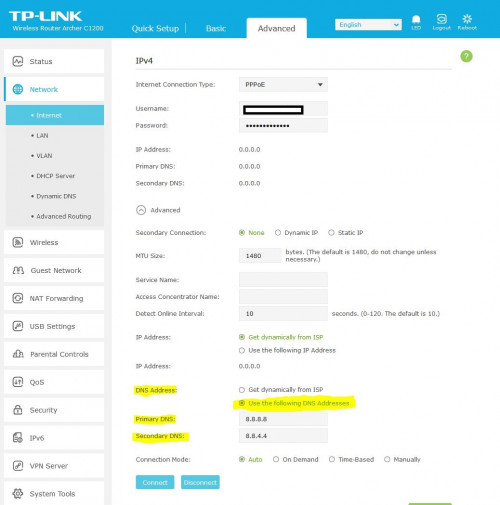 IPV6 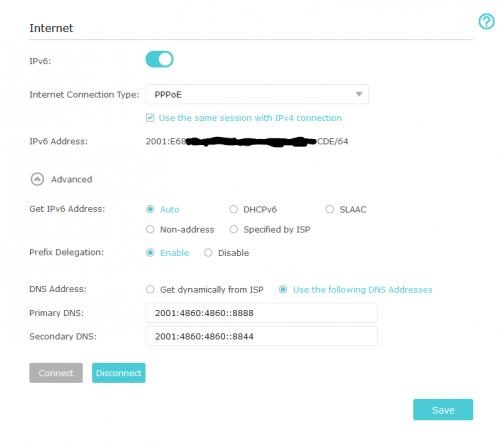 |
|
|
Sep 10 2024, 02:06 PM
Show posts by this member only | IPv6 | Post
#12
|
|
Junior Member
175 posts Joined: Apr 2016
|
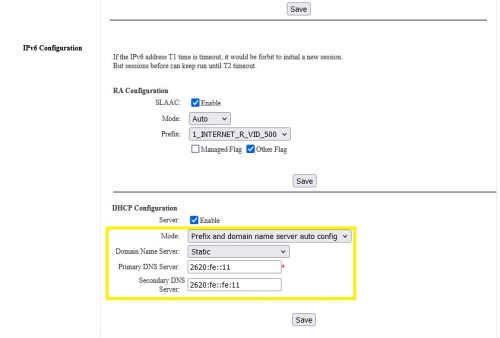
QUOTE(PRSXFENG @ Sep 10 2024, 01:31 PM) what options are there, just auto and manual?  Just found this, got extra two options. Don't know which one correct? |
|
|
Sep 10 2024, 05:09 PM
|
|
Senior Member
2,613 posts Joined: Nov 2020
|
QUOTE(LonelyHart16 @ Sep 10 2024, 02:06 PM) Just found this, got extra two options. Don't know which one correct? |
|
|
|
|
|
Sep 10 2024, 07:49 PM
Show posts by this member only | IPv6 | Post
#14
|
|
Senior Member
1,873 posts Joined: Nov 2010
|
QUOTE(LonelyHart16 @ Sep 10 2024, 02:06 PM) Just found this, got extra two options. Don't know which one correct? QUOTE The Google Public DNS IPv6 addresses are as follows: 2001:4860:4860::8888 2001:4860:4860::8844 Some devices require explicit values for all eight fields of IPv6 addresses and cannot accept the abbreviated :: IPv6 address syntax. For such devices enter: 2001:4860:4860:0:0:0:0:8888 2001:4860:4860:0:0:0:0:8844 https://developers.google.com/speed/public-dns/docs/using This post has been edited by BenYeeHua: Sep 10 2024, 07:50 PM |
|
|
Sep 11 2024, 07:24 AM
|
|
Junior Member
175 posts Joined: Apr 2016
|
QUOTE(BenYeeHua @ Sep 10 2024, 07:49 PM) As above, first, and rmb enable back your IPv6. okey dokey, I will try this.https://developers.google.com/speed/public-dns/docs/using |
|
|
Sep 11 2024, 01:09 PM
|
|
Junior Member
219 posts Joined: Nov 2021
|
U juz go google which dns with ipv6 then key in there . Another option is in ur windows go network there disable ur LAN ipv6 so ur PC will only use ipv4 and DNS from ur ipv4 setting in that skyworth router
 or 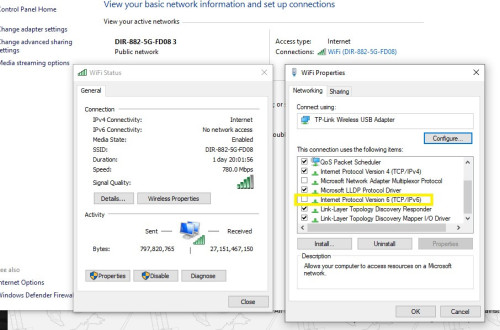 |
|
|
Sep 11 2024, 05:17 PM
Show posts by this member only | IPv6 | Post
#17
|

Senior Member
913 posts Joined: Dec 2008 From: Nusa Indah, Johor Bahru 
|
maxis call me 3 times suggest to change modem to skyworth (will support up to 2.5g). i’m on 1gbps tm infra. they said current modem will have problem later and modem replacement queue will be high if not change now. do i need to change to this modem? currently using fiberhome modem. Don’t fix if not broken?😁
This post has been edited by tyja: Sep 11 2024, 05:18 PM |
|
|
Sep 11 2024, 05:46 PM
Show posts by this member only | IPv6 | Post
#18
|
|
Senior Member
2,613 posts Joined: Nov 2020
|
QUOTE(tyja @ Sep 11 2024, 05:17 PM) maxis call me 3 times suggest to change modem to skyworth (will support up to 2.5g). i’m on 1gbps tm infra. they said current modem will have problem later and modem replacement queue will be high if not change now. do i need to change to this modem? currently using fiberhome modem. Don’t fix if not broken?😁 I would accept it, it is a Skyworth 2.5Gbps modemyou would be ready for 2 gig in the future if you got 2.5gig router you might even be able to squeeze out a little bit more speed It is a this, cant find it on skyworth's site but can find it rebranded locally here as this https://www.nanominds.cc/lyra-gn630e.html |
|
|
Sep 11 2024, 06:20 PM
Show posts by this member only | IPv6 | Post
#19
|
|
Senior Member
913 posts Joined: Dec 2008 From: Nusa Indah, Johor Bahru
|
QUOTE(PRSXFENG @ Sep 11 2024, 05:46 PM) I would accept it, it is a Skyworth 2.5Gbps modem i see. i will accept it if they call me again. my router is 2.5Gbps wan port, sadly only 1Gbps 4 lan port.you would be ready for 2 gig in the future if you got 2.5gig router you might even be able to squeeze out a little bit more speed It is a this, cant find it on skyworth's site but can find it rebranded locally here as this https://www.nanominds.cc/lyra-gn630e.html |
|
|
Mar 14 2025, 07:08 PM
Show posts by this member only | IPv6 | Post
#20
|

Senior Member
566 posts Joined: Oct 2006
|
just renew my Unifi contract and got this dual Skyworth BTU Router.
sorry i didn't get the infos here. so TS have you successfully input Google DNS in? i've tried but thru Wifi i still can't access the drama streaming site which required Google DNS. how to go about it? or i need to use back my old BTU + TP-Link router? This post has been edited by quintesson: Mar 14 2025, 07:19 PM |
| Change to: |  0.0193sec 0.0193sec
 0.90 0.90
 5 queries 5 queries
 GZIP Disabled GZIP Disabled
Time is now: 18th December 2025 - 05:28 AM |
 Quote
Quote