

what is the test to show if my dns is under poisoned?
It seems TM Unifi has finally implemented, transparent DNS proxy
It seems TM Unifi has finally implemented, transparent DNS proxy
|
|
 Sep 2 2024, 05:27 PM Sep 2 2024, 05:27 PM
Return to original view | Post
#1
|
 
Junior Member
680 posts Joined: Sep 2010 
|
what is the test to show if my dns is under poisoned?
|
|
|
|
|
|
Sep 6 2024, 08:28 AM
Return to original view | Post
#2
|
|
Junior Member
680 posts Joined: Sep 2010
|
QUOTE(alexander3133 @ Sep 6 2024, 08:22 AM) Confirmed Johor side home and business line, adguard dns kena blocked. I followed some instructions to do DNS over TLS. It works. If I turn it off. Cannot access iherb. lurkingaround liked this post
|
|
|
Sep 6 2024, 03:44 PM
Return to original view | Post
#3
|
|
Junior Member
680 posts Joined: Sep 2010
|
QUOTE(soonwai @ Sep 6 2024, 03:35 PM) I've got a friend now running around reconfiguring clients who were using DoH with 8.8.8.8 since TM stole the IP. Sure kena kaw kaw by them. So access to iherb means I am not yet being blocked right? |
|
|
Sep 6 2024, 08:38 PM
Return to original view | Post
#4
|
|
Junior Member
680 posts Joined: Sep 2010
|
QUOTE(soonwai @ Sep 6 2024, 03:56 PM) Not necessarily. mine is issued to common name one.one.one -- cert is validtry https//1.1.1.1 or https://8.8.8.8 or https://cloudflare.com. If your browser gives you an error, check the SSL cert, you'll see they are not Google's nor Cloudflare. If so, means you're affected already. If you can reach iherb then it means your DNS is setup ok to circumvent the DNS blocks. 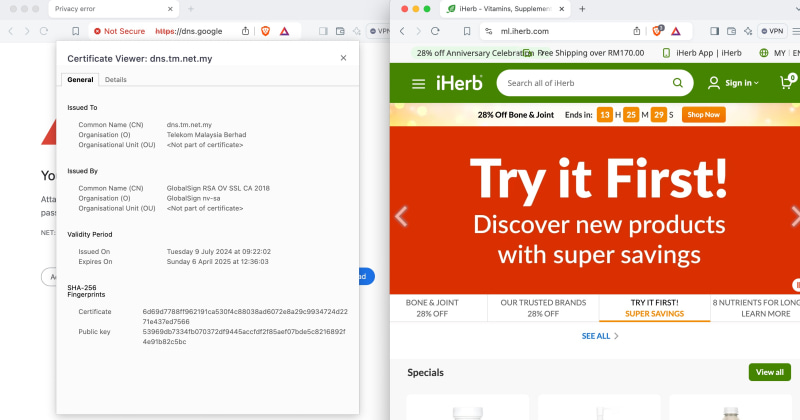 You probably get the same result as mine. organiation = Google Trust Services. dns.google for 8888 -- cert is valid. organization is google trust services as well. I guess I am set for the moment till they bomb the port. |
|
|
Sep 6 2024, 08:55 PM
Return to original view | Post
#5
|
|
Junior Member
680 posts Joined: Sep 2010
|
QUOTE(JohnLai @ Sep 6 2024, 08:43 PM) Okay, when you received SMS on the speed upgrade out of nowhere, that means you are "hijacked". I have to agree, my area is probably among the 1st phase of code wipe out private dns servers.the top have their policy, the bottom have their patterns.  |
|
|
Sep 6 2024, 09:16 PM
Return to original view | Post
#6
|
|
Junior Member
680 posts Joined: Sep 2010
|
QUOTE(soonwai @ Sep 6 2024, 08:59 PM) That means you OK, not affected yet. So far you're the 2nd person to report this. Confirm that you're not on any vpn right? What location? I am down south. dns d o h is setup in my router. used the instruction that was initially posted when dns poisoning was discovered 1-2-3 weeks ago.n= E= x=== t= d= = n =s= got verify cert too. also had import a cert to get it up and running. so not exactly not affected. it is as you said, the setup is currently working till the cat decide to eat the next mouse. I get the following in my log though. 6.9.2024 MEMORY dns,warning .- doh max concurrent queries reached, ignoring query.[ignoring repeated messages]] 6.9.2024 memory dns, error - doh server connection error; network unreachable [ignoring repeated messages] . yup no vpn yet. This post has been edited by skywardsword: Sep 6 2024, 09:19 PM |
|
|
Sep 6 2024, 09:37 PM
Return to original view | Post
#7
|
|
Junior Member
680 posts Joined: Sep 2010
|
QUOTE(JohnL77 @ Sep 6 2024, 09:06 PM) Based on what other members said, that SMS is old SMS that kena stuck for some reason. When they did this DNS hijacking, suddenly all those backdated SMS were sent out. There's no speed upgrade, just stuck SMS finally being sent out. for my case, when doing cloudflare speed test, I can also see upload is 100mbps. so that is a 500mbps line right? and 2ndly, whatismyip = previously is private tm nat ip, now = a public ip. so seems like it did upgrade.  that being said, day time speedtest is 470mbps. now peak hour is 6mbps... so you tell me lah... got upgraddde, no upgrade... at this time watch youtube I also vomit blood. |
| Change to: |  0.0187sec 0.0187sec
 0.92 0.92
 7 queries 7 queries
 GZIP Disabled GZIP Disabled
Time is now: 18th December 2025 - 03:16 PM |
 Quote
Quote