QUOTE(poooky @ Sep 4 2024, 08:53 PM)
is there a simple solution around this? or need to us VPN?

https://youtu.be/jKINA-ikgE4It seems TM Unifi has finally implemented, transparent DNS proxy
|
|
 Sep 4 2024, 08:56 PM Sep 4 2024, 08:56 PM
Show posts by this member only | IPv6 | Post
#321
|
 
Senior Member
1,887 posts Joined: Mar 2013  
|
QUOTE(poooky @ Sep 4 2024, 08:53 PM) is there a simple solution around this? or need to us VPN? https://youtu.be/jKINA-ikgE4 |
|
|
|
|
|
Sep 4 2024, 08:58 PM
Show posts by this member only | IPv6 | Post
#322
|

Junior Member
790 posts Joined: Aug 2022
|
So far can tengok udang hub lagi
|
|
|
Sep 4 2024, 08:58 PM
|

Junior Member
739 posts Joined: Jun 2014
|
So many sites cannot access anymore…
|
|
|
Sep 4 2024, 09:00 PM
|

Junior Member
500 posts Joined: Dec 2019
|
-
This post has been edited by loserguy: Sep 4 2024, 09:03 PM |
|
|
Sep 4 2024, 09:19 PM
Show posts by this member only | IPv6 | Post
#325
|

Senior Member
7,066 posts Joined: Sep 2019 From: South Klang Valley suburb 
|
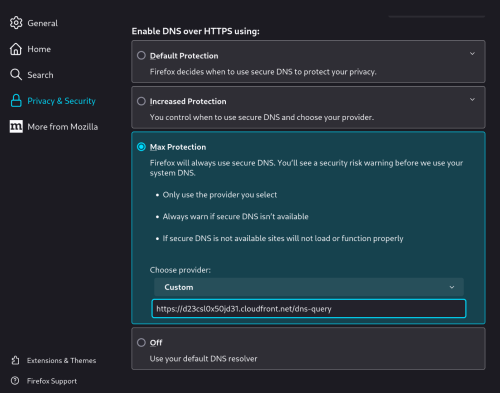
QUOTE(poooky @ Sep 4 2024, 08:53 PM) is there a simple solution around this? or need to us VPN? .AFAIK, no need VPN to bypass the ISPs' Transparent DNS proxy blocking by redirecting our DNS servers, ie only need Secure DNS over HTTPS, ....... https://imap.sinarproject.org/news/internet...lic-dns-servers - 6 Aug 2024 .... Securing DNS services Users being redirected to unauthenticated websites and services that are different from that intended can pose a security risk and result in unexpected technical issues. Standard DNS queries are also unencrypted and addresses requested by users can be viewed and logged. Users that are affected, can configure their browser settings to enable DNS over HTTPS to secure their DNS lookups by using direct encrypted connection to private or public trusted DNS servers. This will also bypass transparent DNS proxy interference and provide warning of interference. Firefox Web Browser Users using Firefox web browser and enable DNS over HTTPS via Settings and the Privacy & Security Tab. Enable Max Protection to use DNS over HTTPs when browning all sites. Chrome Web Browser Users using Chrome Web Browser can enable DNS over HTTPS via Settings and the Security tab. Enable Use secure DNS and then select one of the public DNS servers such as Google or Cloudflare ... For Android Firefox, use the Nightly Release, not the Stable Release, which the former can still access about:config for custom settings, ....... https://www.reddit.com/r/firefox/comments/r...tps_in_firefox/ - Steps to Enable DOH (DNS-OVER-HTTPS) in Firefox NIGHTLY Mobile/Desktop via about:config - 3 yr ago . |
|
|
Sep 4 2024, 09:33 PM
|

Junior Member
49 posts Joined: Feb 2015
|
QUOTE(lurkingaround @ Sep 4 2024, 09:19 PM) . DoH does not work anymore with those common DNS servers.AFAIK, no need VPN to bypass the ISPs' Transparent DNS proxy blocking by redirecting our DNS servers, ie only need Secure DNS over HTTPS, ....... ... |
|
|
|
|
|
Sep 4 2024, 09:36 PM
Show posts by this member only | IPv6 | Post
#327
|

Senior Member
2,843 posts Joined: Jun 2005 From: Seasaw 
|
QUOTE(raynman @ Sep 2 2024, 05:23 AM) My Cloudfare secure DNS on TM Unifi does not work anymore After disabling Cloudflare secure DNS in my browser, most of my ahem websites are inaccessible. Anyone facing the same problem? It seems VPN is the only way out now |
|
|
Sep 4 2024, 09:41 PM
|

Senior Member
1,010 posts Joined: Apr 2005
|
QUOTE(s@ni @ Sep 4 2024, 09:36 PM) Wah.. Even during td 2nd stint pun didn't do like this 1. dey...adguard dns no more work.kena cari alternative. PM |
|
|
Sep 4 2024, 09:51 PM
Show posts by this member only | IPv6 | Post
#329
|
|
Senior Member
7,066 posts Joined: Sep 2019 From: South Klang Valley suburb
|
QUOTE((lurkingaround @ Sep 4 2024, 09:19 PM) . AFAIK, no need VPN to bypass the ISPs' Transparent DNS proxy blocking by redirecting our DNS servers, ie only need Secure DNS over HTTPS, ....... https://imap.sinarproject.org/news/internet...lic-dns-servers - 6 Aug 2024 .... Securing DNS services Users being redirected to unauthenticated websites and services that are different from that intended can pose a security risk and result in unexpected technical issues. Standard DNS queries are also unencrypted and addresses requested by users can be viewed and logged. Users that are affected, can configure their browser settings to enable DNS over HTTPS to secure their DNS lookups by using direct encrypted connection to private or public trusted DNS servers. This will also bypass transparent DNS proxy interference and provide warning of interference. Firefox Web Browser Users using Firefox web browser and enable DNS over HTTPS via Settings and the Privacy & Security Tab. Enable Max Protection to use DNS over HTTPs when browning all sites. Chrome Web Browser Users using Chrome Web Browser can enable DNS over HTTPS via Settings and the Security tab. Enable Use secure DNS and then select one of the public DNS servers such as Google or Cloudflare ... For Android Firefox, use the Nightly Release, not the Stable Release, which the former can still access about:config for custom settings, ....... https://www.reddit.com/r/firefox/comments/r...tps_in_firefox/ - Steps to Enable DOH (DNS-OVER-HTTPS) in Firefox NIGHTLY Mobile/Desktop via about:config - 3 yr ago . QUOTE(smallgiant @ Sep 4 2024, 09:33 PM) DoH does not work anymore with those common DNS servers. .Maybe Secure DoH not working only for TM Fibre Unifi if using Secure Google8888, Cloudflare1111 and Quad9999 DNS servers = use other secure public DNS servers, eg Level3DNS, ComodoDNS and many others. It's still working for me on U Mobile with Secure Google8888 DNS server. ....... Secure DoH server can be manually set in the browser Settings or Android System Settings. Fyi, a long list of public DNS servers to choose from, ....... https://github.com/curl/curl/wiki/DNS-over-...ailable-servers - DNS-over-HTTPS#publicly-available-servers Can public Proxy servers be also used to bypass this "Great Firewall Of Malaysia".? . This post has been edited by lurkingaround: Sep 4 2024, 10:06 PM |
|
|
Sep 4 2024, 09:53 PM
|

Junior Member
78 posts Joined: Nov 2006 From: Bandar Sungai Long
|
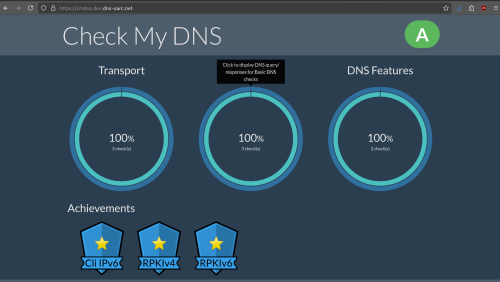
refer to the photo below. this site test dns by running query from client side (so it's like you manually change dns server) affected dns server all show as 'unavailable' 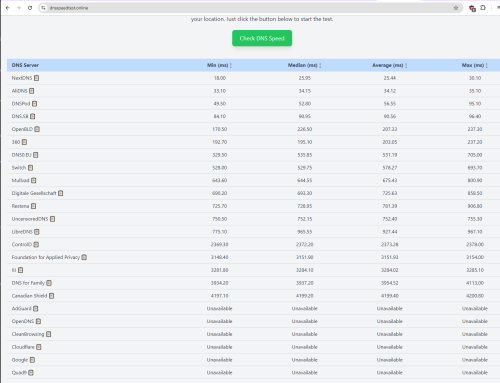 tigerporc, lurkingaround, and 1 other liked this post
|
|
|
Sep 4 2024, 09:59 PM
|

Senior Member
1,635 posts Joined: May 2005
|
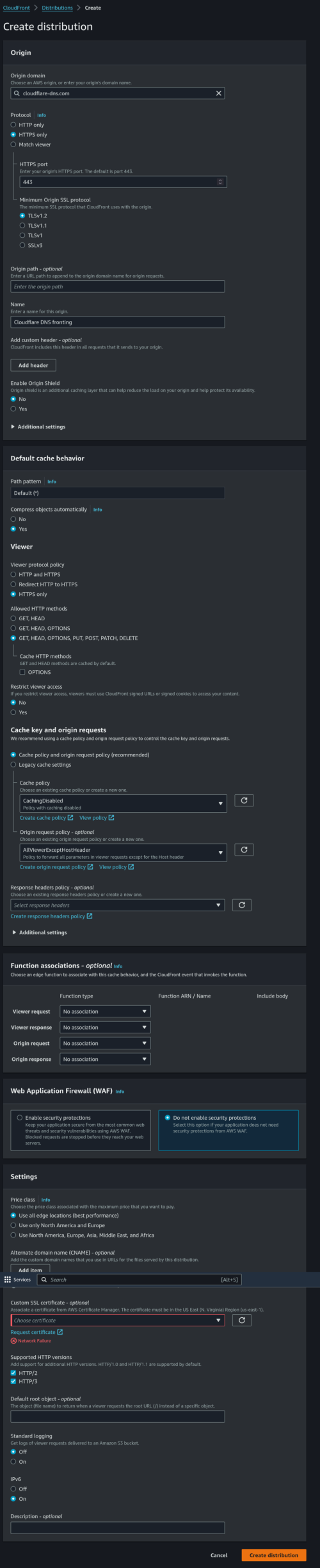
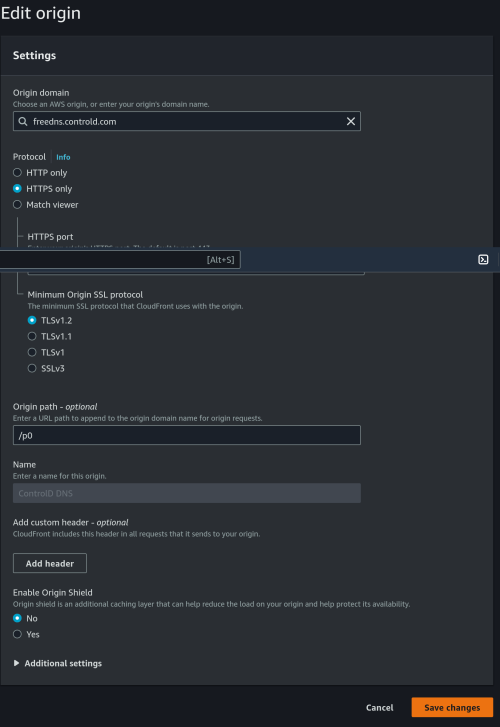
» Click to show Spoiler - click again to hide... « Thanks for sharing the Cloudfront method. How do you secure and prevent other to use your Cloudfront as DNS? |
|
|
Sep 4 2024, 10:17 PM
|
|
Senior Member
7,617 posts Joined: Mar 2009
|
I've been using adguard dns as it block ads. Any alternative to block ads?
QUOTE(NAQD @ Sep 4 2024, 09:53 PM) refer to the photo below. this site test dns by running query from client side (so it's like you manually change dns server) This post has been edited by annoymous1234: Sep 4 2024, 10:18 PMaffected dns server all show as 'unavailable' |
|
|
Sep 4 2024, 10:23 PM
Show posts by this member only | IPv6 | Post
#333
|
|
Senior Member
1,208 posts Joined: Aug 2018
|
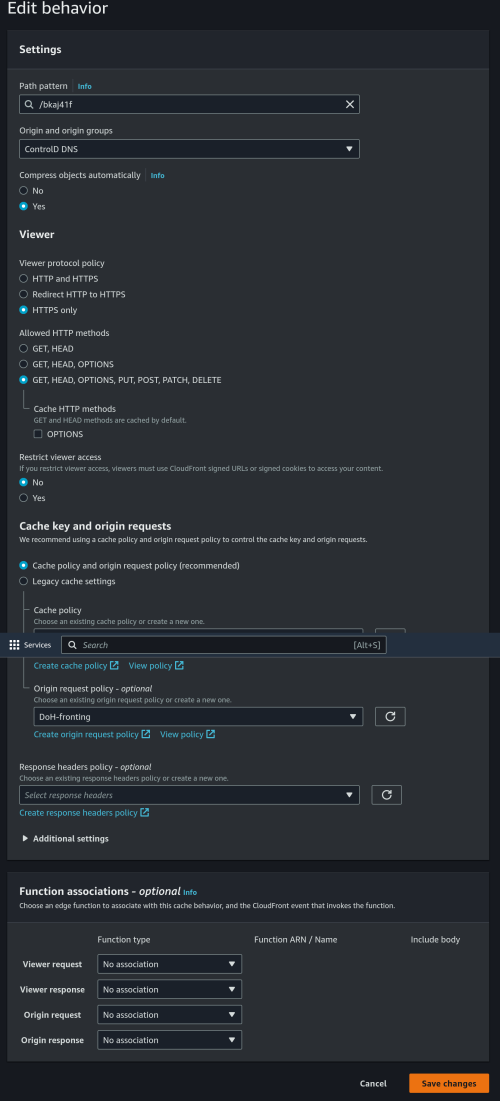
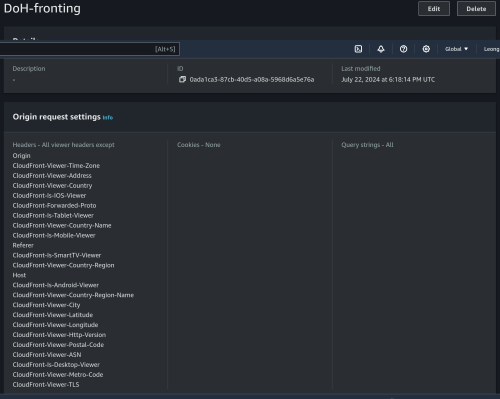
QUOTE(loonsave @ Sep 4 2024, 09:59 PM) » Click to show Spoiler - click again to hide... « Thanks for sharing the Cloudfront method. How do you secure and prevent other to use your Cloudfront as DNS? 1. Keep the generated URL secret. (first tutorial) 2. Create another Origin with path, then assign a Behavior with "password" as your new path (second tutorial) 3. Use signed URL: https://docs.aws.amazon.com/AmazonCloudFron...igned-urls.html tigerporc liked this post
|
|
|
|
|
|
Sep 4 2024, 10:28 PM
Show posts by this member only | IPv6 | Post
#334
|
|
Senior Member
1,208 posts Joined: Aug 2018
|
QUOTE(annoymous1234 @ Sep 4 2024, 10:17 PM) I've been using adguard dns as it block ads. Any alternative to block ads? I'm using Control D. Personal opinion: Better than adguard. xin.047 liked this post
|
|
|
Sep 4 2024, 11:06 PM
|
|
Senior Member
7,617 posts Joined: Mar 2009
|
QUOTE(kwss @ Sep 4 2024, 10:28 PM) I'm using Control D. Personal opinion: Better than adguard. thanks will try |
|
|
Sep 4 2024, 11:13 PM
|
|
Senior Member
1,635 posts Joined: May 2005
|
QUOTE(kwss @ Sep 4 2024, 10:23 PM) From low tech to high tech: Since TM blackhole 1.1.1.1, wouldn't be it still fail to resolve since the Cloudfront URL origin is cloudflare-dns.com, which is 1.1.1.11. Keep the generated URL secret. (first tutorial) 2. Create another Origin with path, then assign a Behavior with "password" as your new path (second tutorial) 3. Use signed URL: https://docs.aws.amazon.com/AmazonCloudFron...igned-urls.html This post has been edited by loonsave: Sep 4 2024, 11:16 PM |
|
|
Sep 4 2024, 11:20 PM
Show posts by this member only | IPv6 | Post
#337
|
|
Senior Member
2,843 posts Joined: Jun 2005 From: Seasaw
|
QUOTE(alpha33 @ Sep 4 2024, 09:41 PM) dey...adguard dns no more work. Pmx at russiakena cari alternative. PM |
|
|
Sep 4 2024, 11:21 PM
Show posts by this member only | IPv6 | Post
#338
|
|
Senior Member
7,066 posts Joined: Sep 2019 From: South Klang Valley suburb
|
Fyi, .......
zerorating,Sep 3 2024, 10:51 PM sometime openly discussing makes the situation even worse. last few months got people so bangga that dns-over-tls(DOT) or dns-over-https(DOH) can overcome this proxy, didnt awared that TM already one step ahead  if everything is blocked, looks like its time for me to setup http proxy via VPS, or aws compute resource, with authentication or allowed IP lists of course. sorry, if i setup a proxy, it wont be shared resource, i dont want to be responsible of anyone vile action. . QUOTE((zerorating @ Sep 3 2024, 11:41 PM) IP level la boss, meaning plaintext, dot, doh all redirected. doh will not work without valid cert. anyway, i will move to "not widely" known public dns service, koff koff ans1.Singapore3.Level3.net,ans2.Singapore3.Level3.net AIMS also have DNS server that not filtering ahem site. IP is 110.74.147.67 alibaba also (47.254.217.105), (may send data to CCP) QUOTE((soonwai @ Sep 4 2024, 01:03 AM) everything stop working. even Google dns website also they berani hantam. cos TM curi the whole 8.8.8.8 IP. 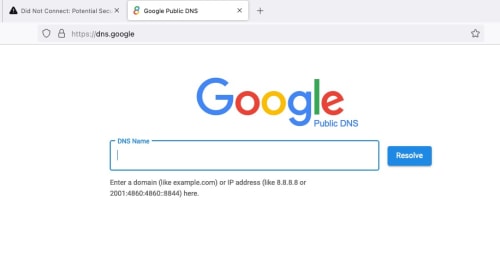 Before 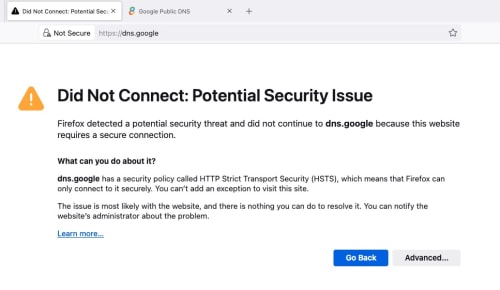 After. You can also click Advanced to look at the SSL cert. QUOTE((zerorating @ Sep 4 2024, 01:13 AM) they just add static route,have a server that was assigned with IP 8.8.8.8,8.8.4.4, 1.1.1.1(not internet facing) with its job were redirecting all traffic meant for port 53,443 to their DNS server (dns.tm.net.my). totally blocks doh and dot service. tm dns dont support dot and doh, so it wont work at all. .anyway, the leftover workaround were just the alternative public dns, hopefully TM dont block it too. zerorating,Sep 4 2024, 01:25 AM TM have dns server that dont follow mcmc guideline. 175.139.1.45 175.139.156.45 QUOTE((zerorating @ Sep 4 2024, 02:10 PM) i am currently plan to have dns server that are not using standard port 53, will like masquerade as port 443 good thing openwrt accept non standard port dns service as upstream  QUOTE((soonwai @ Sep 4 2024, 05:40 PM) We all are overthinking it. .TM is not doing any DNS proxy, DNS redirection, DoH or DoT blocking. I don't think the committee assigned to this knows how or even what those terms are. All they are doing is taking over the IP addresses. 8.8.8.8 or 9.9.9.9 or 1.1.1.1 no longer goes to Google or Quad9 or Cloudflare respectively. Those addresses now go to TM's Mickey Mouse DNS server which only has port 53 working, no DoH or DoT here. Easy job done and wait for bonus. = DoH and DoT can bypass Transparent DNS Proxy blocking. So TM is using IP address blocking to stop DoH bypass using Public Google8888, Cloudflare1111, Quad9999 and other common Public Secure DNS servers. ....... https://surfshark.com/blog/how-do-isps-block-sites - How do ISPs block sites & how to access them anyway - Martynas Klimas in Internet censorship - 2022, February 17 .... How to remove ISP blocking – and do it successfully You can bypass ISP blocking (but not remove the fact that they’re blocking stuff) by using the right tool for the right issue. We will discuss what to do if your ISP is engaging in: DNS blocking IP blocking Deep packet inspection ... You can bypass IP blocking by: using a Proxy using a VPN ... Affected TM users can Google for the lists of free Proxy servers. See can bypass or not. . This post has been edited by lurkingaround: Sep 4 2024, 11:33 PM |
|
|
Sep 4 2024, 11:25 PM
Show posts by this member only | IPv6 | Post
#339
|
|
Senior Member
1,208 posts Joined: Aug 2018
|
QUOTE(loonsave @ Sep 4 2024, 11:13 PM) Since TM blackhole 1.1.1.1, wouldn't be it still fail to resolve since the Cloudfront URL origin is cloudflare-dns.com, which is 1.1.1.1 Basically we put Amazon CDN in front of whatever DoH resolver we want to use.We then connect to Amazon CDN to get to our preferred DoH, effectively bypassing all blocking. Bonus: Nobody can block this method without blocking AWS. So this will works for a very long time, until AWS exit Malaysia. That's why I am sharing this without the slightest worry. |
|
|
Sep 4 2024, 11:28 PM
Show posts by this member only | IPv6 | Post
#340
|
|
Senior Member
1,208 posts Joined: Aug 2018
|
Everyone needing a no hassle setup can use this:
https://sky.rethinkdns.com/dns-query It runs on Cloudflare Workers on all edge location and cannot be IP blocked. If it's DNS bootstrap blocked, just put lowyat.net IP in your HOST file and it should work again |
| Change to: |  0.0289sec 0.0289sec
 0.30 0.30
 6 queries 6 queries
 GZIP Disabled GZIP Disabled
Time is now: 22nd December 2025 - 01:09 AM |
 Quote
Quote