Welcome Guest ( Log In | Register )

Outline · [ Standard ] · Linear+

 Help on pfSense and VLAN settings

views
     
SUSeds2
post Aug 15 2024, 04:51 PM, updated 2y ago

Getting Started
**
Junior Member
101 posts

Joined: Jul 2022
From: Kelantan

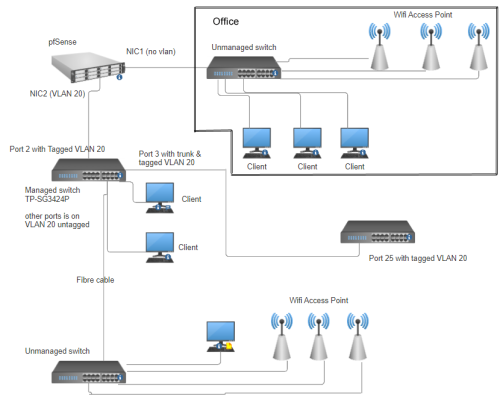
First thing, let me show you the network topology

user posted image

i inherit this network settings recently and was requested to seperate the office section from others. there are many more stuff in office section such as fileservers, accounting db server, printers, etc.

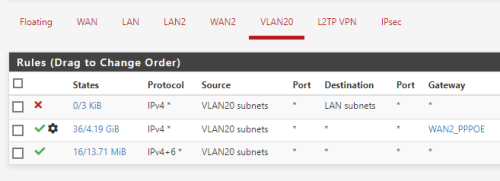
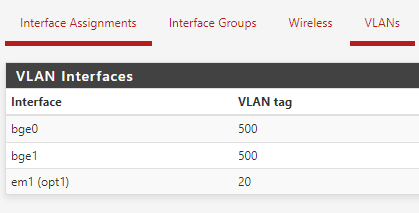
anyways, since router is pfsense, i tag NIC2 as VLAN20 and set the rules as below
user posted image

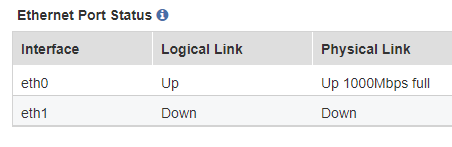
user posted image

1. pfsense NIC2 is connected at port 2 of sg3424p and port 2 is set as VLAN 20, general and tagged
2. port 24 (sfp fibre) of sg3424p is set as VLAN 20, general and untagged. this is connected to unmanaged switch
3. port 3 of sg3424p is set as VLAN 20, trunk and tagged. this is connected to port 25 of 3com superstack switch
4. other ports on sg3424p is set as VLAN 20, general and untagged
5. port 25 of 3com superstack switch is set as VLAN 20 and tagged
6. other port of 3com superstack switch is set as VLAN 20 and untagged

when i connect my laptop to sg3424p and 3com superstack switch, dhcp and internet works.

i can access the web GUI of the wifi access point on VLAN 20 (on both vlan 20 network and office section network) but, access points and PC connected to the unmanaged switch (after the sg3424p) only connected at 10mbps. already changed the cables and its the same. fibre uplink (from sg3424p to the unmanaged) is 1gbps. if the unmanaged is disconnected from network entirely, all ports is at 1gbps.

from the setup, am i doing it right? also, dont suggest on replacing equipment just yet.

This post has been edited by eds2: Aug 15 2024, 04:56 PM
wailam
post Aug 15 2024, 05:03 PM

Apa benda ini?
*****
Junior Member
976 posts

Joined: Nov 2014
From: Sandakan, Sabah


unmanaged switch model?
Also if you got another switch for test?
SUSeds2
post Aug 15 2024, 05:15 PM

Getting Started
**
Junior Member
101 posts

Joined: Jul 2022
From: Kelantan

QUOTE(wailam @ Aug 15 2024, 05:03 PM)
unmanaged switch model?
Also if you got another switch for test?
*
i tried with DGS-F1026P-E and TL-SG1218MP. both also same

twiteroll
post Aug 15 2024, 05:21 PM

Getting Started
**
Junior Member
91 posts

Joined: Jan 2011
From: Auto City


this is not 'no connection' case right? like bottle neck or limitation somehwere ka? sfp speed same with switch support speed? 1G or 10G ?
alextan99
post Aug 15 2024, 05:22 PM

Wassup
*******
Senior Member
2,660 posts

Joined: Jan 2003
From: Somewhere in the world
Check the rules/settings in pfsense for untagged network/VLAN have any thing that limits the speed.
kwss
post Aug 15 2024, 05:26 PM

Regular
******
Senior Member
1,208 posts

Joined: Aug 2018
Do you have flow control enabled anywhere?
Wireshark and look for pause frame
SUSeds2
post Aug 20 2024, 09:20 PM

Getting Started
**
Junior Member
101 posts

Joined: Jul 2022
From: Kelantan

just an update for this

well, this is quite embarrassing. after tinkering here and there, i found out two issue:

1. apparently previous installer crimp the rj45 not according to the color code (A or B).
2. the dip switch on DGS-F1026P-E is broken. this switch have 'AI extend' feature that allow PoE to work beyond 100 meters (250 meters max, used primarily for PoE cameras). enabling it causes the speed to drop to 10Mbps. i resoldered a new dip switch and all is ok.

thanks.

user posted image


Change to:
| Lo-Fi Version
0.0155sec    0.97    5 queries    GZIP Disabled
Time is now: 19th December 2025 - 01:52 PM