Outline ·
[ Standard ] ·
Linear+
Do TM's individual users have to pay for IPV6
|
TSsixguyz_jayhan
|
 Aug 14 2024, 08:08 AM, updated 2y ago Aug 14 2024, 08:08 AM, updated 2y ago
|
Getting Started


|
Can we get our IPV6 address? Do we have to pay for it? I turned on my TENDA's router IPv6 function (using PPPoe6, I guess is the same thing when we set the conventional ones?), but didn't get any IP6 address response from ISP. IPv6 checked fail.
|
|
|
|
|
|
sadlyfalways
|
Aug 14 2024, 08:34 AM
|
|
|
no
|
|
|
|
|
|
MR_alien
|
Aug 14 2024, 08:48 AM
|
|
|
your IP is V4 or V6 depends on luck because of dymanic ip address
|
|
|
|
|
|
PRSXFENG
|
Aug 14 2024, 08:51 AM
|
|
|
Try using DHCPv6 on IPV6 interface?
|
|
|
|
|
|
PRSXFENG
|
Aug 14 2024, 08:52 AM
|
|
|
QUOTE(MR_alien @ Aug 14 2024, 08:48 AM) your IP is V4 or V6 depends on luck because of dymanic ip address That's not how it works... You get both IPV4 and IPv6 addresses... |
|
|
|
|
|
melz84
|
Aug 14 2024, 08:54 AM
|
|
|
QUOTE(sixguyz_jayhan @ Aug 14 2024, 08:08 AM) Can we get our IPV6 address? Do we have to pay for it? I turned on my TENDA's router IPv6 function (using PPPoe6, I guess is the same thing when we set the conventional ones?), but didn't get any IP6 address response from ISP. IPv6 checked fail. That's odd.. years ago when i was still using unifi, i can get external IPV6. Cos the tech support said i need to turn it on for my hypp tv to work. Not the STB but on web browser. I can straightaway get into the hypp tv sitr without needing to login in when i use ipv6. |
|
|
|
|
|
yenchenje
|
Aug 14 2024, 09:07 AM
|
|
|
Use SLAAC/Track Interface/DHCPv6 with IPv6
TM IPv6 is delegated to user end via IPv4 PPPoE interface afaik
|
|
|
|
|
|
MR_alien
|
Aug 14 2024, 09:25 AM
|
|
|
QUOTE(PRSXFENG @ Aug 14 2024, 08:52 AM) That's not how it works... You get both IPV4 and IPv6 addresses... not everytime because if that's the case, you look at this thread alone....look at the top right of every post...every post should have that IPV6 logo on the fact that some have some don't have meaning it depends on luck due to dynamic ip address |
|
|
|
|
|
ChenKaiWen
|
Aug 14 2024, 09:53 AM
|
|
|
QUOTE(MR_alien @ Aug 14 2024, 09:25 AM) not everytime because if that's the case, you look at this thread alone....look at the top right of every post...every post should have that IPV6 logo on the fact that some have some don't have meaning it depends on luck due to dynamic ip address that’s due to ur browser preferred to connect via ipv4/ipv6. It doesn’t connect twice. 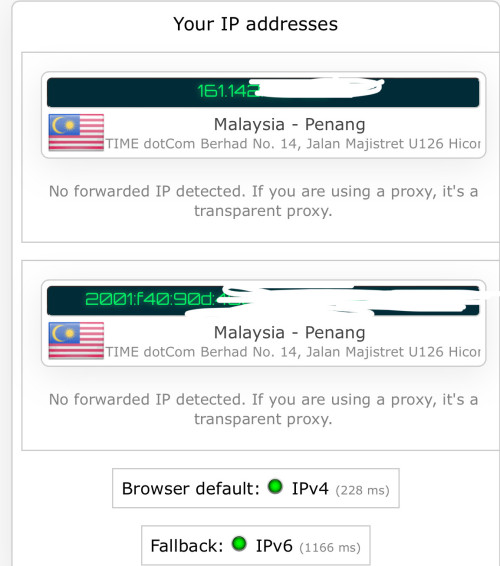 |
|
|
|
|
|
sHawTY
|
Aug 14 2024, 10:38 AM
|
|
|
QUOTE(MR_alien @ Aug 14 2024, 09:25 AM) every post should have that IPV6 logo on You do know that some users disable IPv6 in their router? |
|
|
|
|
|
PJng
|
Aug 14 2024, 10:50 AM
|
|
|
I just turn on IP V6 on router, is work
Follow some very old thread here
|
|
|
|
|
|
Zot
|
Aug 14 2024, 11:45 AM
|
|
|
QUOTE(sixguyz_jayhan @ Aug 14 2024, 08:08 AM) Can we get our IPV6 address? Do we have to pay for it? I turned on my TENDA's router IPv6 function (using PPPoe6, I guess is the same thing when we set the conventional ones?), but didn't get any IP6 address response from ISP. IPv6 checked fail. Basically it is not something to be sold unless you want to pay for fixed IP address. A site can has both IPv4 and IPv6 resolved to it or it can only have IPv4 or IPv6 only. So, it depends on service providers. Since the IPv4 is becoming congested, many addresses have gone behind NAT thus take more time to resolve. I think now the IPv6 address get to resolve first and when cannot be found, it goes to IPv4. Since TM has provide the IPv6 service already, all you need to do is to enable your IPv6 addressing. I believe you will be assigned both IPv4 and IPv6 to your address while online. |
|
|
|
|
|
TSsixguyz_jayhan
|
Aug 15 2024, 10:49 AM
|
Getting Started
|
QUOTE(PRSXFENG @ Aug 14 2024, 08:51 AM) Try using DHCPv6 on IPV6 interface? kenot DHCPv6 won't work, tried. |
|
|
|
|
|
TSsixguyz_jayhan
|
Aug 15 2024, 10:52 AM
|
Getting Started
|
QUOTE(melz84 @ Aug 14 2024, 08:54 AM) That's odd.. years ago when i was still using unifi, i can get external IPV6. Cos the tech support said i need to turn it on for my hypp tv to work. Not the STB but on web browser. I can straightaway get into the hypp tv sitr without needing to login in when i use ipv6. Ahhh i see, maybe my account is from ancient days~ perhaps no IP6 if we didn't appeal.......? |
|
|
|
|
|
TSsixguyz_jayhan
|
Aug 15 2024, 10:54 AM
|
Getting Started
|
QUOTE(Zot @ Aug 14 2024, 11:45 AM) Basically it is not something to be sold unless you want to pay for fixed IP address. A site can has both IPv4 and IPv6 resolved to it or it can only have IPv4 or IPv6 only. So, it depends on service providers. Since the IPv4 is becoming congested, many addresses have gone behind NAT thus take more time to resolve. I think now the IPv6 address get to resolve first and when cannot be found, it goes to IPv4. Since TM has provide the IPv6 service already, all you need to do is to enable your IPv6 addressing. I believe you will be assigned both IPv4 and IPv6 to your address while online. Enabled, but not working. IP4 is tooo congesting, I wanna try the IPv6 but won't help at the first step  |
|
|
|
|
|
ChenKaiWen
|
Aug 15 2024, 11:06 AM
|
|
|
QUOTE(sixguyz_jayhan @ Aug 15 2024, 10:54 AM) Enabled, but not working. IP4 is tooo congesting, I wanna try the IPv6 but won't help at the first step Have u tried DHCP instead of PPPoEv6 |
|
|
|
|
|
TSsixguyz_jayhan
|
 Aug 15 2024, 04:28 PM Aug 15 2024, 04:28 PM
|
Getting Started
|
QUOTE(ChenKaiWen @ Aug 15 2024, 11:06 AM) Have u tried DHCP instead of PPPoEv6 Already tried. DHCPv6 on, internet won't work. Swtich to PPPoev6, internet reconnect, green light but not working under ip6. |
|
|
|
|
|
The.Lucas.DaY
|
Aug 15 2024, 10:39 PM
|
|
|
This is my setting in Unifi stock router, that's default setting » Click to show Spoiler - click again to hide... « This post has been edited by The.Lucas.DaY: Aug 15 2024, 10:40 PM |
|
|
|
|
|
Zot
|
Aug 16 2024, 08:24 AM
|
|
|
QUOTE(sixguyz_jayhan @ Aug 15 2024, 10:54 AM) Enabled, but not working. IP4 is tooo congesting, I wanna try the IPv6 but won't help at the first step How you know? If the network is congested, IPv4 or IPv6 makes no difference. It is just benefit the service and content providers more the way I see it. Yes, your request get resolved faster but the network bandwidth will limit the data speed.  |
|
|
|
|
|
OlgaC4
|
Aug 16 2024, 08:50 AM
|
|
|
QUOTE(Zot @ Aug 16 2024, 08:24 AM) How you know? If the network is congested, IPv4 or IPv6 makes no difference. It is just benefit the service and content providers more the way I see it. Yes, your request get resolved faster but the network bandwidth will limit the data speed. There is a big diffrence. You just don't notice it only. |
|
|
|
|
|
JLA
|
Aug 16 2024, 11:14 AM
|
|
|
https://inonius.net/speedtest/dual stack IPv4 and IPv6 speed test
|
|
|
|
|
|
yenchenje
|
Aug 16 2024, 11:32 AM
|
|
|
QUOTE(Zot @ Aug 16 2024, 08:24 AM) How you know? If the network is congested, IPv4 or IPv6 makes no difference. It is just benefit the service and content providers more the way I see it. Yes, your request get resolved faster but the network bandwidth will limit the data speed. TM v4 and v6 actually has different peering path afaik, depending on what you’re trying to connect to, it might offer a tangible improvement to the loading times |
|
|
|
|
|
Zot
|
Aug 16 2024, 11:57 AM
|
|
|
QUOTE(yenchenje @ Aug 16 2024, 11:32 AM) TM v4 and v6 actually has different peering path afaik, depending on what you’re trying to connect to, it might offer a tangible improvement to the loading times The IPv^ is faster in such a way that it has faster routing due to lack of NAT and faster packet processing. So, you will have lower latency. That's about it. So, if you are doing FTP/IP with handshaking on packets, then you will likely see improvement on speed. However if you are streaming data on UDP/IP, then probably nothing much significant in speed. This is because speed difference between IPv4 and IPv6 can vary depending on network configurations, hardware, and other factors which can be negligible. |
|
|
|
|
|
OlgaC4
|
Aug 17 2024, 09:59 AM
|
|
|
QUOTE(Zot @ Aug 16 2024, 11:57 AM) The IPv^ is faster in such a way that it has faster routing due to lack of NAT and faster packet processing. So, you will have lower latency. That's about it. So, if you are doing FTP/IP with handshaking on packets, then you will likely see improvement on speed. However if you are streaming data on UDP/IP, then probably nothing much significant in speed. This is because speed difference between IPv4 and IPv6 can vary depending on network configurations, hardware, and other factors which can be negligible. I concur but malaysia IPV6 got sucky routing. IPV4 still the best in term of latency |
|
|
|
|
|
TSsixguyz_jayhan
|
Aug 19 2024, 10:48 AM
|
Getting Started
|
QUOTE(The.Lucas.DaY @ Aug 15 2024, 10:39 PM) This is my setting in Unifi stock router, that's default setting » Click to show Spoiler - click again to hide... « Thanks for your help, but can't view your attachment.... |
|
|
|
|
|
TSsixguyz_jayhan
|
Aug 19 2024, 10:51 AM
|
Getting Started
|
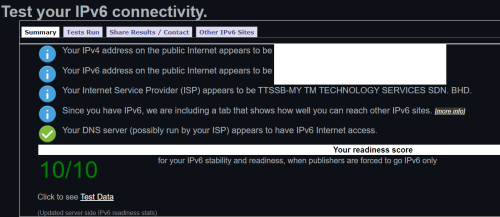
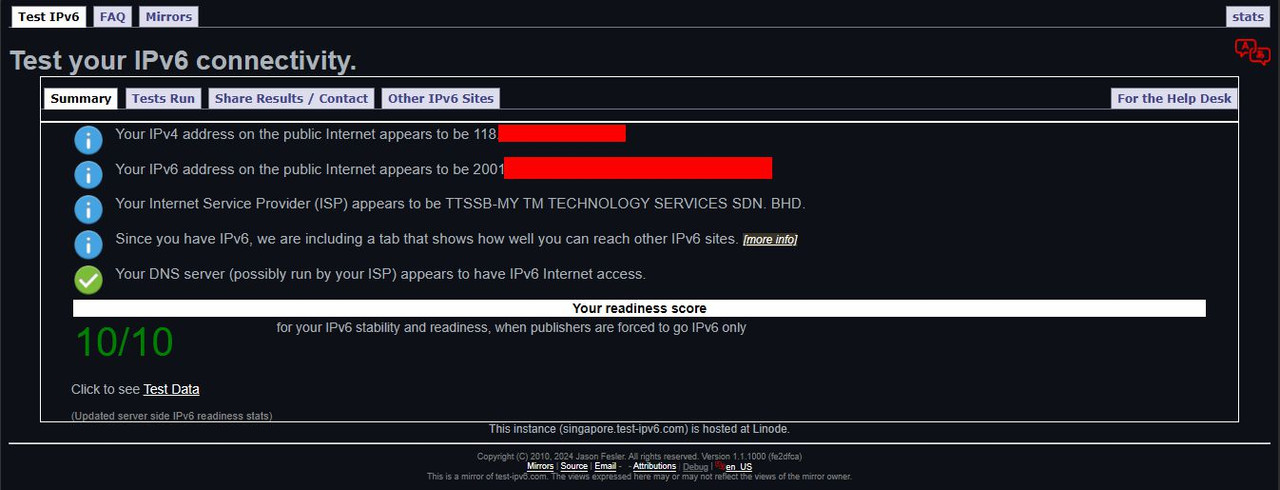
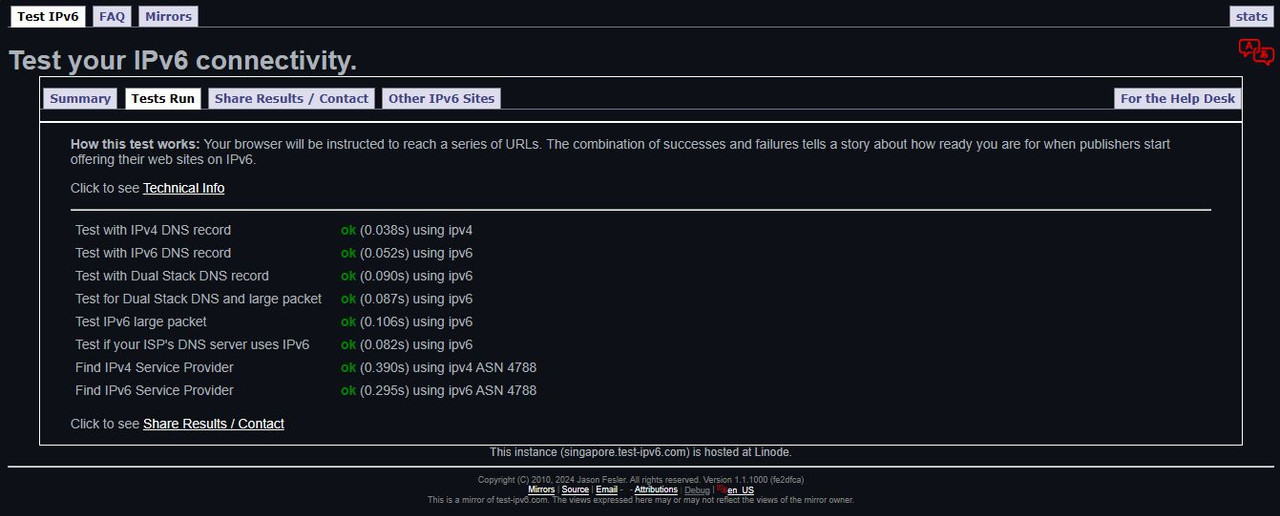
QUOTE(Zot @ Aug 16 2024, 08:24 AM) How you know? If the network is congested, IPv4 or IPv6 makes no difference. It is just benefit the service and content providers more the way I see it. Yes, your request get resolved faster but the network bandwidth will limit the data speed. I use this https://test-ipv6.com/ for checking. I don't know is it formal... |
|
|
|
|
|
Epic_winner091
|
Aug 20 2024, 03:05 PM
|
|
|
Also, if you're on a plan below 500 Mbps (or is it 800 Mbps now?), IPv6 means you're not behind a CGNAT.
|
|
|
|
|
|
PJng
|
Aug 20 2024, 04:36 PM
|
|
|
|
|
|
|
|
|
yenchenje
|
Aug 20 2024, 05:24 PM
|
|
|
QUOTE(Epic_winner091 @ Aug 20 2024, 03:05 PM) Also, if you're on a plan below 500 Mbps (or is it 800 Mbps now?), IPv6 means you're not behind a CGNAT. CGNAT doesn’t apply to TM IPv6, I was using IPv6 to host stuff back then to bypass CGNAT when I was still on 30Mbps |
|
|
|
|
|
TSsixguyz_jayhan
|
Aug 23 2024, 04:28 PM
|
Getting Started
|
QUOTE(Epic_winner091 @ Aug 20 2024, 03:05 PM) Also, if you're on a plan below 500 Mbps (or is it 800 Mbps now?), IPv6 means you're not behind a CGNAT. Do you mind to elaborate more? |
|
|
|
|
|
TSsixguyz_jayhan
|
Aug 23 2024, 04:29 PM
|
Getting Started
|
QUOTE(PJng @ Aug 20 2024, 04:36 PM) Thanks! I'll try it later and update with you. |
|
|
|
|
|
ChenKaiWen
|
Aug 23 2024, 04:46 PM
|
|
|
QUOTE(sixguyz_jayhan @ Aug 23 2024, 04:28 PM) Do you mind to elaborate more? That’s purely false information. CGNAT(usually on lower plan) is a way for ISPs to use a single IPv4 address for multiple customers as we are running out of IPv4. Being on CGNAT or not, doesn’t affect IPv6. |
|
|
|
|
|
TSsixguyz_jayhan
|
Aug 23 2024, 10:47 PM
|
Getting Started
|
QUOTE(PJng @ Aug 20 2024, 04:36 PM) QUOTE(sixguyz_jayhan @ Aug 23 2024, 04:29 PM) Thanks! I'll try it later and update with you. My case might not same as urs, lots of functions not available. 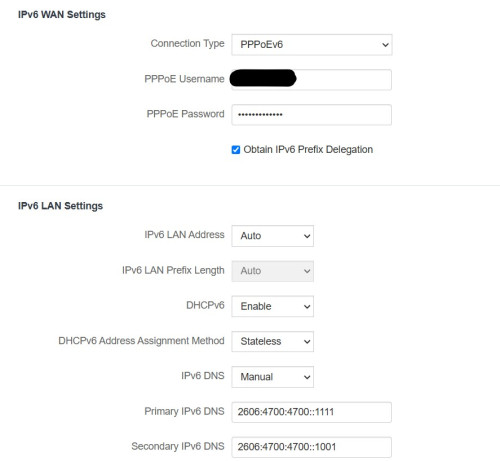 |
|
|
|
|
|
PJng
|
Aug 24 2024, 12:48 AM
|
|
|
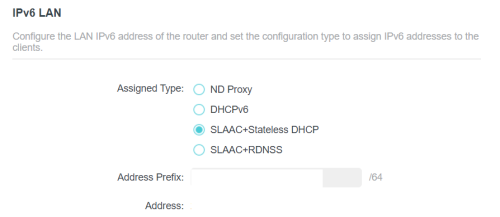
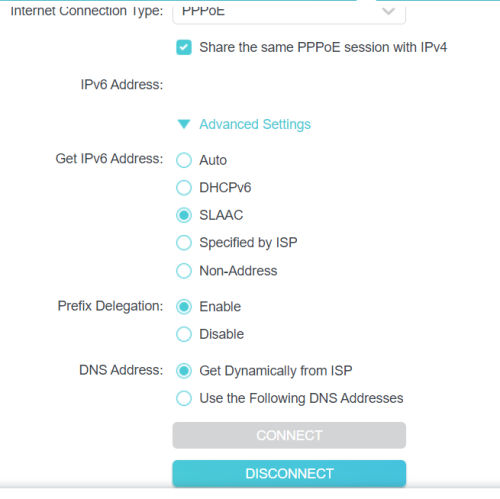
QUOTE(sixguyz_jayhan @ Aug 23 2024, 10:47 PM) My case might not same as urs, lots of functions not available. what is those drop down menu? or someone can help? the first auto got SLAAC? prefix length /64? mine look like is box that hardcoded /64 |
|
|
|
|
|
kwss
|
Aug 24 2024, 05:43 AM
|
|
|
QUOTE(sixguyz_jayhan @ Aug 23 2024, 10:47 PM) My case might not same as urs, lots of functions not available. Change connection type from PPPoEv6 to DHCPv6. The rest of the setting looks correct. |
|
|
|
|
|
TSsixguyz_jayhan
|
Aug 24 2024, 02:59 PM
|
Getting Started
|
QUOTE(PJng @ Aug 24 2024, 12:48 AM) what is those drop down menu? or someone can help? the first auto got SLAAC? prefix length /64? mine look like is box that hardcoded /64 Nothing much inside, most options got tried. 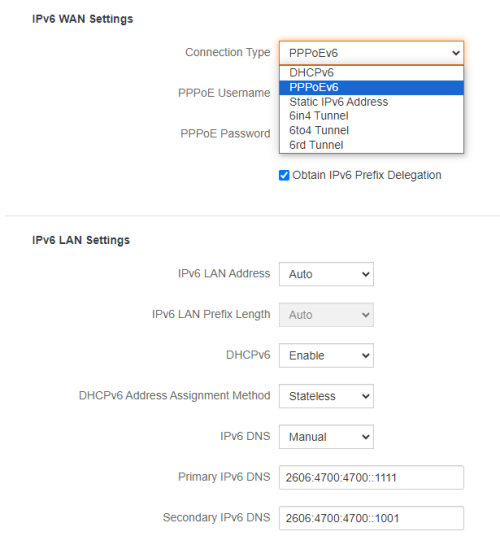 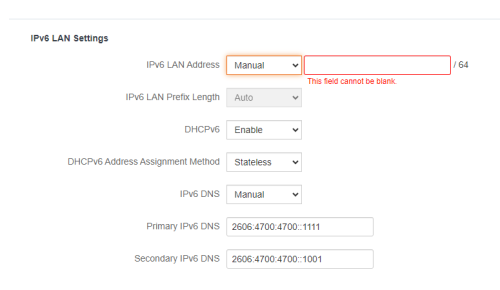 QUOTE(kwss @ Aug 24 2024, 05:43 AM) Change connection type from PPPoEv6 to DHCPv6. The rest of the setting looks correct. Nope. not working. It will cause network down. |
|
|
|
|
|
PJng
|
Aug 24 2024, 03:03 PM
|
|
|
Sorry, is posted, edit later
This post has been edited by PJng: Aug 24 2024, 03:04 PM
|
|
|
|
|
|
kwss
|
Aug 24 2024, 03:35 PM
|
|
|
QUOTE(sixguyz_jayhan @ Aug 24 2024, 02:59 PM) Nothing much inside, most options got tried. Nope. not working. It will cause network down. Your screenshot is the IPv6 tab right? There's another tab called Internet Setting, you put your PPPoE there. |
|
|
|
|
|
PJng
|
Aug 24 2024, 09:01 PM
|
|
|
what your router model? i try on emulator to check setting
|
|
|
|
|
|
TSsixguyz_jayhan
|
Aug 25 2024, 10:44 AM
|
Getting Started
|
QUOTE(PJng @ Aug 24 2024, 09:01 PM) what your router model? i try on emulator to check setting Tenda, AC23. Thanks dude. |
|
|
|
|
|
TSsixguyz_jayhan
|
Aug 25 2024, 10:45 AM
|
Getting Started
|
QUOTE(kwss @ Aug 24 2024, 03:35 PM) Your screenshot is the IPv6 tab right? There's another tab called Internet Setting, you put your PPPoE there. Yup. In internet setting, all fine, using pppoe. This tab, IPv6, I tried using DHCP mode but not working, so I changed to PPPoE mode ya. |
|
|
|
|
|
TSsixguyz_jayhan
|
Aug 25 2024, 10:49 AM
|
Getting Started
|
Yestd I asked TM's staff, they encourage us to use SLAAC+Stateless mode. However, my router (AC23) doesn't provide the option for SLAAC but DHCPv6, they got no way to help. They recommended me to use their new router (RG6) as they only have certain manual instruction on hand.
I think the SLAAC make the diff, which cause the IPv6 won't work on my network access.
|
|
|
|
|
|
PJng
|
Aug 25 2024, 10:55 AM
|
|
|
QUOTE(sixguyz_jayhan @ Aug 25 2024, 10:44 AM) Tenda, AC23. Thanks dude. Just checked emulator, no such setting, as compare to my TP Link |
|
|
|
|
|
kwss
|
Aug 25 2024, 03:49 PM
|
|
|
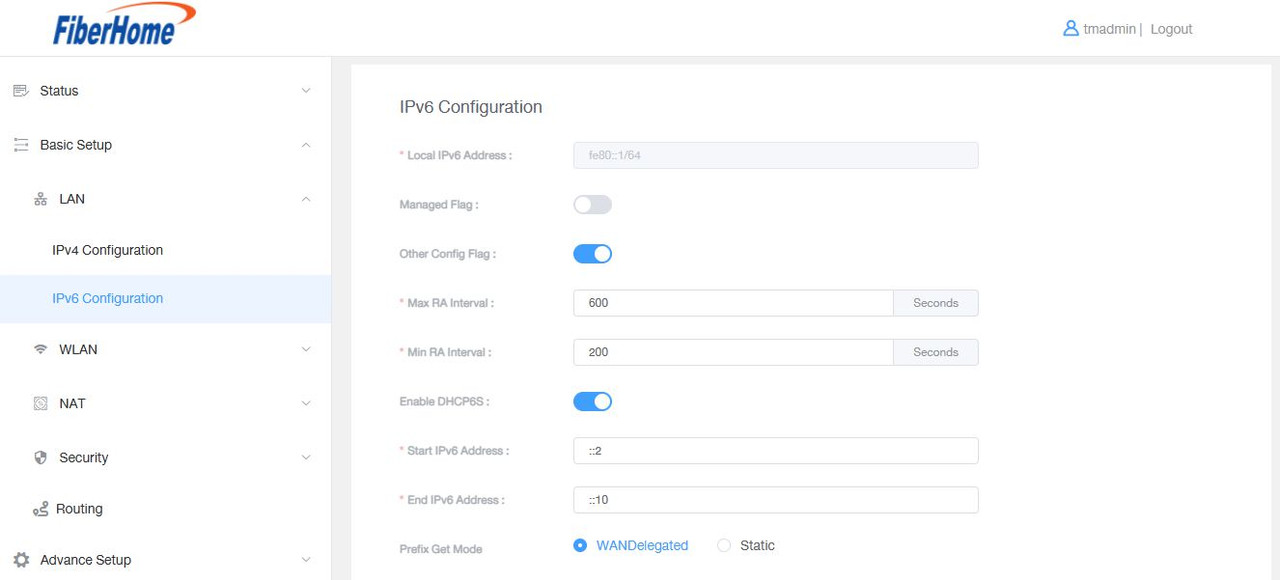
QUOTE(sixguyz_jayhan @ Aug 25 2024, 10:45 AM) Yup. In internet setting, all fine, using pppoe. This tab, IPv6, I tried using DHCP mode but not working, so I changed to PPPoE mode ya. DHCPv6 with prefix delegation is the correct setting. Just wondering if you tried updating the firmware of your Tenda? What device you use to test the IPv6? Only Android needs SLAAC. Windows and other OS can work with DHCP. Did you check if you enable IPv6 in your network adapter? |
|
|
|
|
|
TSsixguyz_jayhan
|
Aug 27 2024, 09:39 AM
|
Getting Started
|
QUOTE(kwss @ Aug 25 2024, 03:49 PM) DHCPv6 with prefix delegation is the correct setting. Just wondering if you tried updating the firmware of your Tenda? What device you use to test the IPv6? Only Android needs SLAAC. Windows and other OS can work with DHCP. QUOTE Did you check if you enable IPv6 in your network adapter? QUOTE Just wondering if you tried updating the firmware of your Tenda? Yes. QUOTE What device you use to test the IPv6? PC. QUOTE Did you check if you enable IPv6 in your network adapter? Yes. Refer to prev attachment, I enabled it. Don't work. |
|
|
|
|
|
kwss
|
Aug 30 2024, 03:02 AM
|
|
|
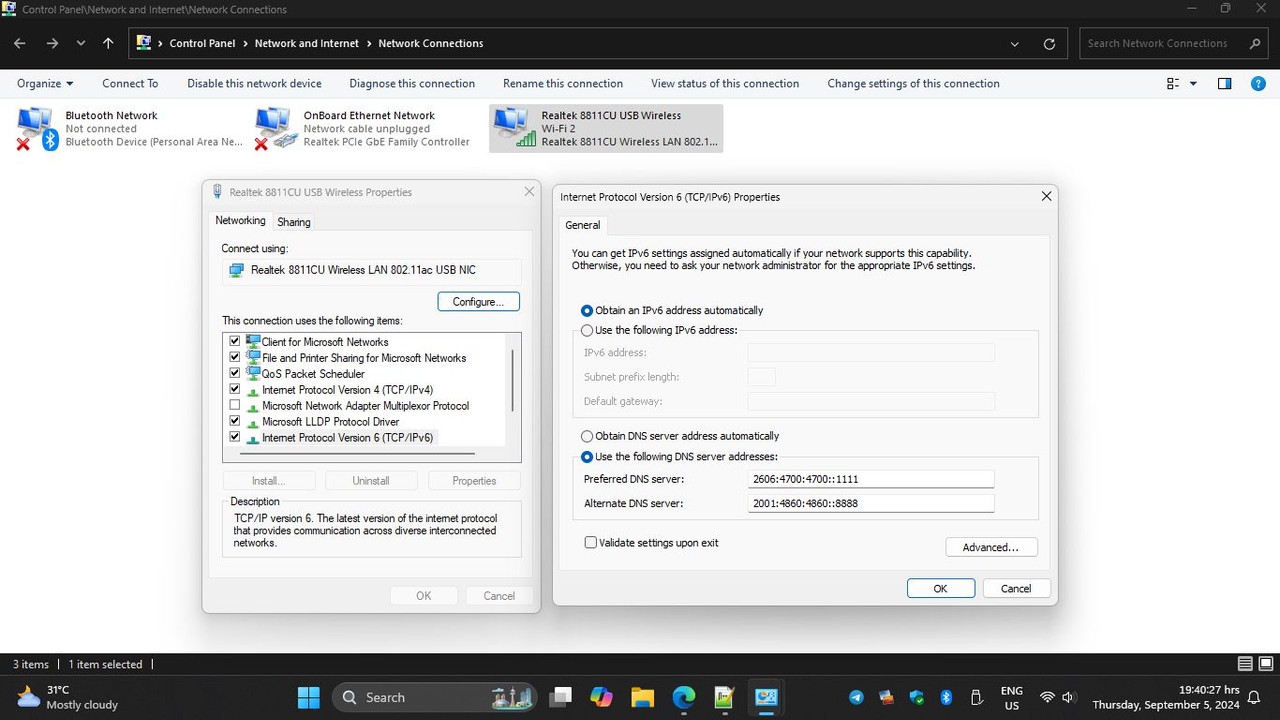
QUOTE(sixguyz_jayhan @ Aug 27 2024, 09:39 AM) Yes. Refer to prev attachment, I enabled it. Don't work. I read back all your posts but it isn't obvious to me that you confirm to have enabled IPv6 in your PC network adapter. Could you double check on that? Other than that I suspect the way Tenda requests IPv6 is not compatible with TM. eg: Tenda sends DHCPv6-IA_NA + PD. This will get you IPv6 on Time and Maxis, but not TM. With TM, the router must only request PD and nothing else. This post has been edited by kwss: Aug 30 2024, 03:02 AM |
|
|
|
|
|
TSsixguyz_jayhan
|
Aug 31 2024, 11:51 AM
|
Getting Started
|
QUOTE(kwss @ Aug 30 2024, 03:02 AM) I read back all your posts but it isn't obvious to me that you confirm to have enabled IPv6 in your PC network adapter. Could you double check on that? Other than that I suspect the way Tenda requests IPv6 is not compatible with TM. eg: Tenda sends DHCPv6-IA_NA + PD. This will get you IPv6 on Time and Maxis, but not TM. With TM, the router must only request PD and nothing else. QUOTE Could you double check on that? Let me update with you once Im on that network. Just to clarify ya, you want me to show the Properties of Network Connection in Network Adapter? Sorry if I can't get your doubt  QUOTE Other than that I suspect the way Tenda requests IPv6 is not compatible with TM. Yep. I guess it is...maybe certain model of router would do |
|
|
|
|
|
kwss
|
Aug 31 2024, 10:51 PM
|
|
|
QUOTE(sixguyz_jayhan @ Aug 31 2024, 11:51 AM) Let me update with you once Im on that network. Just to clarify ya, you want me to show the Properties of Network Connection in Network Adapter? Sorry if I can't get your doubt Yep. I guess it is...maybe certain model of router would do Yes I meant that. I suspect it might be disabled in Windows. |
|
|
|
|
|
TSsixguyz_jayhan
|
Sep 5 2024, 07:32 PM
|
Getting Started
|
QUOTE(kwss @ Aug 31 2024, 10:51 PM) Yes I meant that. I suspect it might be disabled in Windows. Sorry for the late reply By default, the option was on. But I didn't use any manual input DNS. Attached thumbnail(s)
|
|
|
|
|
|
Xploit Machine
|
Sep 5 2024, 07:42 PM
|
|
|
all new routers have IPv4 and IPv6, mine all ok .. i keep all the same settings since the day 1 installed TM UnFi fibre .. |
|
|
|
|
|
PRSXFENG
|
Sep 5 2024, 08:06 PM
|
|
|
I feel like the solution is just... replace the Tenda router.
|
|
|
|
|
|
kwss
|
Sep 5 2024, 11:02 PM
|
|
|
QUOTE(sixguyz_jayhan @ Sep 5 2024, 07:32 PM) Sorry for the late reply By default, the option was on. But I didn't use any manual input DNS. I suspect the way the Tenda does DHCPv6 is not compatible with TM then. TM DHCPv6 server is very picky on the options. It will not hand out IPv6 if you request anything more than PD. |
|
|
|
|



 Quote
Quote









 0.0378sec
 0.47
0.47
 6 queries
 GZIP Disabled