Welcome Guest ( Log In | Register )

Outline · [ Standard ] · Linear+

 Time and Maxis started to hijack dns query

views
     
kwss
post Aug 9 2024, 12:11 AM

Regular
******
Senior Member
1,207 posts

Joined: Aug 2018
QUOTE(PRSXFENG @ Aug 8 2024, 09:11 PM)
MCMC Statment

https://x.com/Soya_Cincau/status/1821520438973116758

So, they say it's for "safety"

But the thing is

Ok, sure, feel free to block on TM/Maxis/TIME DNS

But if the user has made a conscious effort to CHANGE their DNS to CF/Google/etc
DON'T HIJACK IT BACK
*
Papa said don't try to climb walls. It's bad for you, your family and your kids. Pretty good advice overall.
Big brother don't want you to land in hospital je....
kwss
post Aug 9 2024, 08:00 PM

Regular
******
Senior Member
1,207 posts

Joined: Aug 2018
QUOTE(laihuhng @ Aug 9 2024, 06:45 PM)
This will not slow down the internet, right?
*
Based on my testing using Control D, encrypted and unencrypted DNS has the same resolution time.
However, the first lookup will be much slower at 112ms vs 20ms unencrypted due to the need to establish the secure connection.

I do recommend prioritizing security over pure speed as DNS poisoning is one of the many ways to install malware on your device.

The performance penalty only happen once during connection establishment, it is not critical.
kwss
post Aug 9 2024, 09:30 PM

Regular
******
Senior Member
1,207 posts

Joined: Aug 2018
QUOTE(laihuhng @ Aug 9 2024, 09:07 PM)
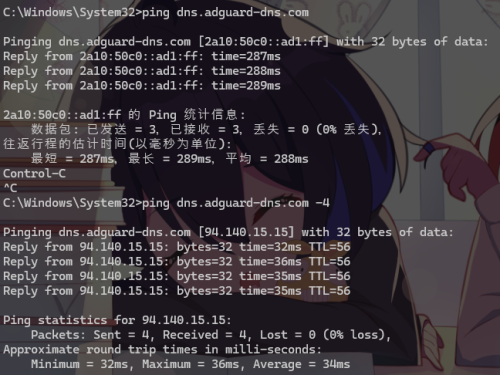
user posted image

Let me know if I've configured it correctly. I disabled my ipv6. Thus, I didn't include the ipv6 address. Thanks.
*
Based on my nmap scan, the domain should be:
dns.adguard.com
EDIT:
If you connect without SNI it will serve you certificate with dns.adguard.com.
With SNI it will serve certificate with dns.adguard-dns.com.
So both works.

Prevent client auto DoH must be set to off. Otherwise Encrypted Client Hello won't work. You want ECH to work on a highly censored network because it prevent the censor from snooping on your SNI.

Unknown:
Did anyone actually MITM or pen test this thing? Given the recent development of TM where they MITM DoH and DoT, the router must absolutely verify the certificate properly.
On Mikrotik, none of this is done!

This post has been edited by kwss: Aug 9 2024, 09:41 PM
kwss
post Aug 10 2024, 12:25 AM

Regular
******
Senior Member
1,207 posts

Joined: Aug 2018
QUOTE(Kadaj @ Aug 10 2024, 12:11 AM)
Did you miss anything and caused the dns leak? maybe check the firewall rules.
https://youtu.be/w4erB0VzyIE
*
Nope, it is how Mikrotik works.
You can read about the solution here:
https://forum.mikrotik.com/viewtopic.php?f=...=160243#p787643

I continue to have problem where I cannot import Amazon Root CA for my DoH. I have since turned off Mikrotik DNS resolver and stick to tried and true systemd-resolved for my laptop and stubby for my home server.

I use DoH exclusively for browser due to it being a requirement for ECH to work.

My point being, I don't know if any of those router aka IoT device do security properly. To the user they are doing DoT / DoH but behind the scene they might fall apart from actual attack.

UPDATE:
I give it another go but this time I download the certificates from
https://www.amazontrust.com/repository/

It works!
Not sure why the download from browser view certificate didn't works.

This post has been edited by kwss: Aug 10 2024, 12:47 AM
kwss
post Aug 10 2024, 02:31 AM

Regular
******
Senior Member
1,207 posts

Joined: Aug 2018
I play a bit with Celcom's implementation. Basically they catch all UDP port 53 on IPv4 and IPv6

Test with fc00:: which is a non-routable local address
CODE

dig @fc00:: pornhub.com

; <<>> DiG 9.18.28 <<>> @fc00:: pornhub.com
; (1 server found)
;; global options: +cmd
;; Got answer:
;; ->>HEADER<<- opcode: QUERY, status: NOERROR, id: 29836
;; flags: qr aa rd ra; QUERY: 1, ANSWER: 1, AUTHORITY: 0, ADDITIONAL: 1

;; OPT PSEUDOSECTION:
; EDNS: version: 0, flags:; udp: 1232
;; QUESTION SECTION:
;pornhub.com.   IN A

;; ANSWER SECTION:
pornhub.com.  3600 IN A 175.139.142.25

;; Query time: 37 msec
;; SERVER: fc00::#53(fc00::) (UDP)
;; WHEN: Sat Aug 10 02:16:04 +08 2024
;; MSG SIZE  rcvd: 56


Test with 10.10.10.10 which is also non-routable:
CODE

dig @10.10.10.10 pornhub.com

; <<>> DiG 9.18.28 <<>> @10.10.10.10 pornhub.com
; (1 server found)
;; global options: +cmd
;; Got answer:
;; ->>HEADER<<- opcode: QUERY, status: NOERROR, id: 28827
;; flags: qr aa rd ra; QUERY: 1, ANSWER: 1, AUTHORITY: 0, ADDITIONAL: 1

;; OPT PSEUDOSECTION:
; EDNS: version: 0, flags:; udp: 1232
;; QUESTION SECTION:
;pornhub.com.   IN A

;; ANSWER SECTION:
pornhub.com.  3600 IN A 175.139.142.25

;; Query time: 44 msec
;; SERVER: 10.10.10.10#53(10.10.10.10) (UDP)
;; WHEN: Sat Aug 10 02:16:19 +08 2024
;; MSG SIZE  rcvd: 56


Using non-routable IPv6 address but with TCP:
CODE

dig @fc00:: pornhub.com +tcp
;; Connection to fc00::#53(fc00::) for pornhub.com failed: host unreachable.
;; no servers could be reached

;; Connection to fc00::#53(fc00::) for pornhub.com failed: host unreachable.
;; no servers could be reached

;; Connection to fc00::#53(fc00::) for pornhub.com failed: host unreachable.
;; no servers could be reached


Using non-routable IPv4 address but with TCP:
CODE

dig @10.10.10.10 pornhub.com +tcp
;; Connection to 10.10.10.10#53(10.10.10.10) for pornhub.com failed: timed out.
;; no servers could be reached

;; Connection to 10.10.10.10#53(10.10.10.10) for pornhub.com failed: timed out.
;; no servers could be reached

;; Connection to 10.10.10.10#53(10.10.10.10) for pornhub.com failed: timed out.
;; no servers could be reached


This means that using TCP should work, even if it is plain text. Yes it does!
CODE

dig @1.1.1.1 pornhub.com +tcp

; <<>> DiG 9.18.28 <<>> @1.1.1.1 pornhub.com +tcp
; (1 server found)
;; global options: +cmd
;; Got answer:
;; ->>HEADER<<- opcode: QUERY, status: NOERROR, id: 48352
;; flags: qr rd ra; QUERY: 1, ANSWER: 1, AUTHORITY: 0, ADDITIONAL: 1

;; OPT PSEUDOSECTION:
; EDNS: version: 0, flags:; udp: 1232
;; QUESTION SECTION:
;pornhub.com.   IN A

;; ANSWER SECTION:
pornhub.com.  14400 IN A 66.254.114.41

;; Query time: 69 msec
;; SERVER: 1.1.1.1#53(1.1.1.1) (TCP)
;; WHEN: Sat Aug 10 02:20:20 +08 2024
;; MSG SIZE  rcvd: 56


However, I found that they block by IP address too for pornhub.com and xvideos.com. murrayhunter.substack.com didn't have their IP blocked so it is not quite consistent.
Reason is murrayhunter.substack.com uses Cloudflare CDN. They cannot block the CDN without blocking everyone else.

This post has been edited by kwss: Aug 10 2024, 02:44 AM

kwss
post Aug 13 2024, 04:53 PM

Regular
******
Senior Member
1,207 posts

Joined: Aug 2018
QUOTE(haya @ Aug 13 2024, 10:24 AM)
Interesting that Celcom(Digi) is now hijacking all DNS53. What about things like Quad9dns? If Quad9dns blocks a malicious domain, and Celcom(Digi) is now hijacking all DNS53 packets to them, will Celcom(Digi) resolve the domain blocked by Quad9dns?
*
From my testing with Celcom (AS10030), all DNS is hijacked, including microsoft.com, lowyat.net, etc. They all resolved via some non-routable IP address.
kwss
post Aug 13 2024, 04:55 PM

Regular
******
Senior Member
1,207 posts

Joined: Aug 2018
QUOTE(The.Lucas.DaY @ Aug 13 2024, 10:36 AM)
What should i worry about, as a normal user, if i don't use DoT/DoH?
*
Maybe like one day when Ergodan is unhappy Meta removed his post, he went and block Instagram nationwide.
kwss
post Aug 13 2024, 11:42 PM

Regular
******
Senior Member
1,207 posts

Joined: Aug 2018
QUOTE(haya @ Aug 13 2024, 05:19 PM)
» Click to show Spoiler - click again to hide... «
It is hijacked.
CODE

dig @9.9.9.9 googie-anaiytics.com

; <<>> DiG 9.18.28 <<>> @9.9.9.9 googie-anaiytics.com
; (1 server found)
;; global options: +cmd
;; Got answer:
;; ->>HEADER<<- opcode: QUERY, status: NOERROR, id: 736
;; flags: qr rd ra; QUERY: 1, ANSWER: 2, AUTHORITY: 0, ADDITIONAL: 1

;; OPT PSEUDOSECTION:
; EDNS: version: 0, flags:; udp: 1232
;; QUESTION SECTION:
;googie-anaiytics.com.  IN A

;; ANSWER SECTION:
googie-anaiytics.com. 600 IN A 15.197.148.33
googie-anaiytics.com. 600 IN A 3.33.130.190

;; Query time: 405 msec
;; SERVER: 9.9.9.9#53(9.9.9.9) (UDP)
;; WHEN: Tue Aug 13 23:39:48 +08 2024
;; MSG SIZE  rcvd: 81


Using the TXT query test method:
CODE

$ dig +short txt proto.on.quad9.net @9.9.9.9
(no output)

$dig +short txt proto.on.quad9.net @9.9.9.9 +tcp
do53-tcp.

$ dig +short txt proto.on.quad9.net @9.9.9.9 +tls
dot.

$ dig +short txt proto.on.quad9.net @9.9.9.9 +https=/dns-query
doh.

$ dig +short ch txt id.server. @9.9.9.9
(no output)

$ dig +short ch txt id.server. @9.9.9.9 +tcp
"res100.kul.rrdns.pch.net"

$ dig +short ch txt id.server. @9.9.9.9 +tls
"res100.kul.rrdns.pch.net"

$ dig +short ch txt id.server. @9.9.9.9 +https=/dns-query
"res100.kul.rrdns.pch.net"


Using traceroute, you can see !X (communication administratively prohibited)
CODE

$ traceroute 9.9.9.9
traceroute to 9.9.9.9 (9.9.9.9), 30 hops max, 60 byte packets
1  _gateway (192.168.137.30)  1.218 ms  1.478 ms  1.730 ms
2  * * *
3  10.223.95.65 (10.223.95.65)  72.996 ms  72.976 ms  72.966 ms
4  10.223.39.171 (10.223.39.171)  60.468 ms 10.223.39.163 (10.223.39.163)  60.453 ms  60.436 ms
5  203.82.65.113 (203.82.65.113)  72.887 ms  72.879 ms  72.944 ms
6  203.82.83.217 (203.82.83.217)  89.017 ms 203.82.83.219 (203.82.83.219)  66.107 ms  162.729 ms
7  203.82.83.34 (203.82.83.34)  199.869 ms  193.638 ms 203.82.83.32 (203.82.83.32)  199.943 ms
8  pch.myix.my (218.100.44.20)  193.591 ms  193.449 ms  193.421 ms
9  dns9.quad9.net (9.9.9.9)  193.383 ms !X  193.319 ms !X  193.282 ms !X


Let's see where they start redirecting UDP 53. Looks like the very first hop:
CODE

# traceroute -U -p53 9.9.9.9
traceroute to 9.9.9.9 (9.9.9.9), 30 hops max, 60 byte packets
1  _gateway (192.168.137.30)  2.118 ms  2.572 ms  2.818 ms
2  * * *
3  * * *
4  * * *
5  * * *
6  * * *
7  * * *
8  * * *
9  * * *
10  * * *
11  * dns9.quad9.net (9.9.9.9)  72.977 ms *

# traceroute -T -p53 9.9.9.9
traceroute to 9.9.9.9 (9.9.9.9), 30 hops max, 60 byte packets
1  _gateway (192.168.137.30)  4.822 ms  5.259 ms *
2  * * *
3  * * *
4  * * *
5  * * *
6  * 203.82.83.219 (203.82.83.219)  54.024 ms 203.82.83.217 (203.82.83.217)  39.621 ms
7  203.82.83.34 (203.82.83.34)  59.608 ms 203.82.83.32 (203.82.83.32)  59.631 ms  59.565 ms
8  pch.myix.my (218.100.44.20)  59.553 ms  59.537 ms  59.524 ms
9  dns9.quad9.net (9.9.9.9)  65.218 ms  65.206 ms  65.193 ms

# traceroute -T -p443 9.9.9.9
traceroute to 9.9.9.9 (9.9.9.9), 30 hops max, 60 byte packets
1  _gateway (192.168.137.30)  1.799 ms  1.763 ms *
2  * * *
3  * * *
4  * * *
5  * * *
6  * dns9.quad9.net (9.9.9.9)  65.581 ms  65.325 ms

TCP port 53 and TCP port 443 have vastly different hop count. This needs further investigation.

I have done a packet capture. Looks like it is man-on-the-side attack?

This post has been edited by kwss: Aug 14 2024, 01:17 AM


Attached File(s)
Attached File  quad_https_celcom_as10030.pcapng.gz ( 8.12k ) Number of downloads: 6
kwss
post Aug 15 2024, 06:17 PM

Regular
******
Senior Member
1,207 posts

Joined: Aug 2018
QUOTE(dev/numb @ Aug 15 2024, 06:03 PM)
Question; visiting https://www.ssllabs.com/ssltest/index.html and inputting dns.adguard-dns.com as an example, which one of the two SHA256 lines I’ve pointed at with the red arrow in this screenshot would be the equivalent of the SPKI fingerprint needed in order to do certificate pinning?
*
BF+fS5RPhZQggn38wZ6lqii8lxPNWQPzU2VVVqbLhqM=
It is actually public key pinning. The certificate can renew as long as the public key is the same.
I checked and it is same for both DoH and DoT.

This post has been edited by kwss: Aug 15 2024, 06:18 PM
kwss
post Aug 16 2024, 08:15 AM

Regular
******
Senior Member
1,207 posts

Joined: Aug 2018
Cross posting from Unifi thread for those who didn't go there. Running cost should be less than USD $0.60 per month

DNS wall climbing for beginner
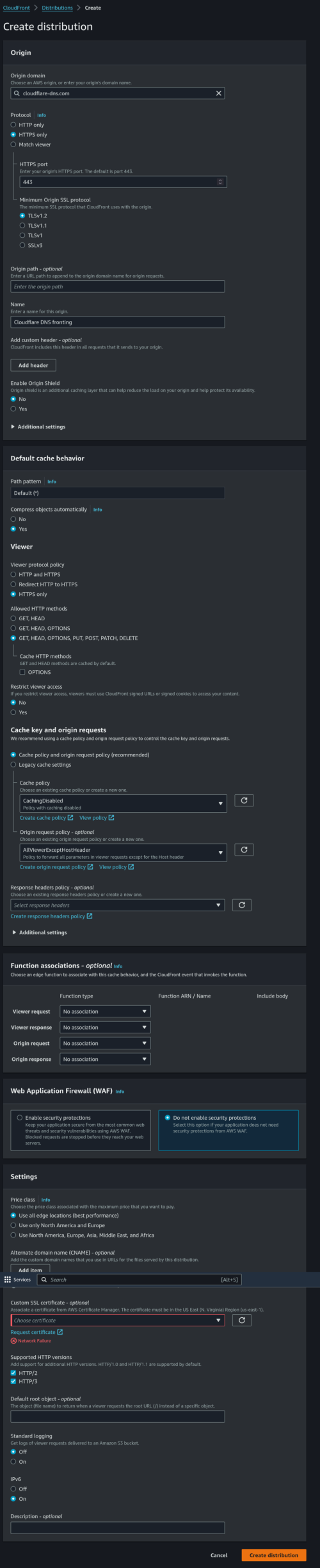
This quick guide will teach you how to use CDN to front DoH server using Amazon CloudFront.
The benefit this provides over other method is the difficulty of the censor to block this kind of setup without blocking the whole CDN provider.

Requirements:
AWS Account
Browser / OS / resolver supporting DoH

Login to your AWS account and search for CloudFront. Create a new distribution.
Refer to the setting below and put in your desired DoH server:
user posted image

After you are done creating the distribution, wait for it to finish deploying:
user posted image

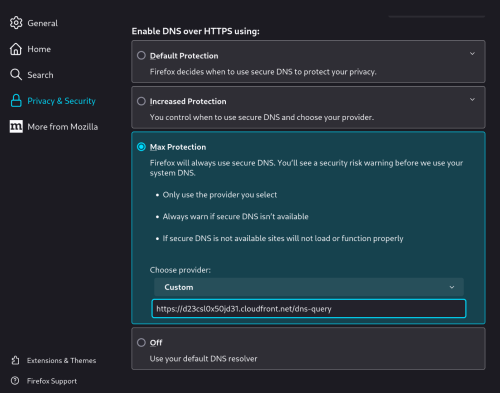
Put the address and the full path into your browser / OS / resolver:
user posted image

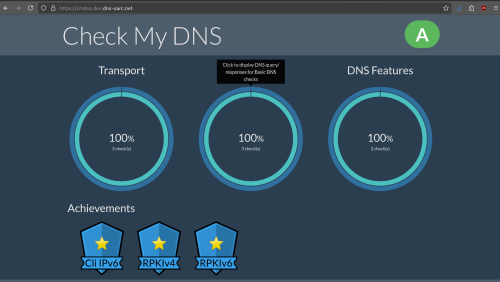
Finally test your resolver:
user posted image

DNS wall climbing stealth setup
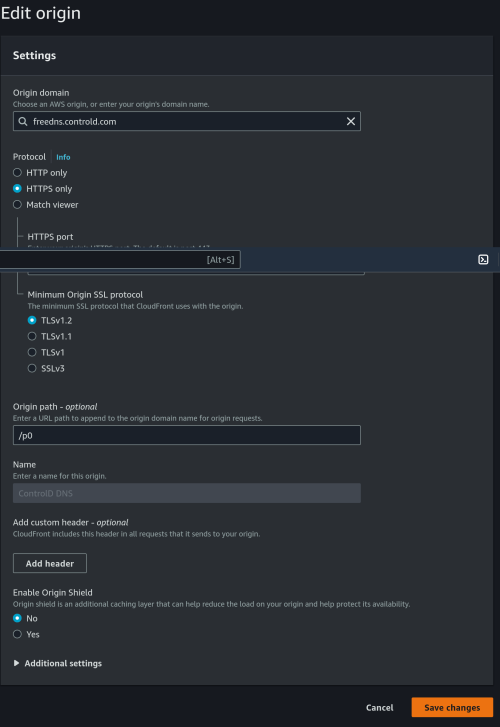
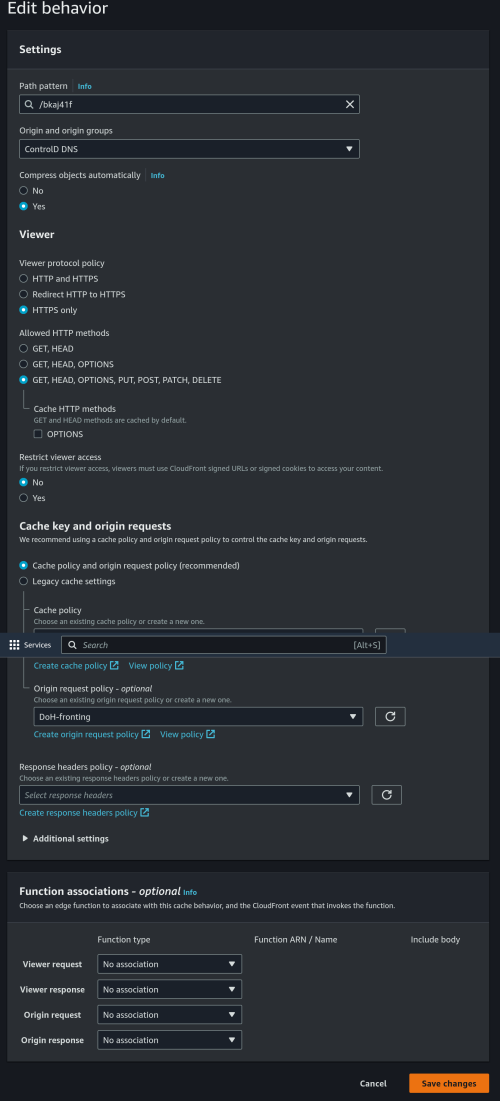
This is a setup for people who are already using CloudFront for their business and wish to hide DoH inside it.
I am using ControlD here instead of Cloudflare DNS. The "/dns-query" in cloudflare is "/p0" in controld.

First add an Origin like below:
user posted image

Then add a Behavior:
user posted image

Wait for it to finish deploying. You will access it via https://mydomain.com/bkaj41f

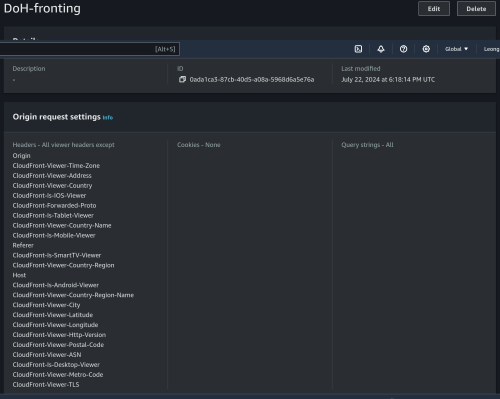
For people wondering what is my "DoH-fronting" policy, here is it:
user posted image

This post has been edited by kwss: Aug 16 2024, 08:16 AM
kwss
post Aug 16 2024, 12:48 PM

Regular
******
Senior Member
1,207 posts

Joined: Aug 2018
One thing I want to mention is never underestimate the censor. Look at countries that are poor yet they can throw a lot of money into building nuclear bomb and rocket. All it takes is one guy to come into power.

As for plaintext DNS traffic, my personal opinion is that we should all just kill it. Not just for the sake of anti-censorship, but for the sake of your personal security.

It is the same as killing plaintext HTTP and anything less than TLS v1.2. Merely moving to HTTPS/3 aka QUIC will increase the difficulty of the censor to snoop your SNI, even without Encrypted Client Hello.

Increasing your network security should be the ultimate goal.
kwss
post Aug 16 2024, 01:36 PM

Regular
******
Senior Member
1,207 posts

Joined: Aug 2018
QUOTE(Anime4000 @ Aug 16 2024, 01:28 PM)
it will happen if ISP started to Blackhole 1.1.1.1/32 or any dns/32 address route?

like this need create own DNS server?
*
The most censorship resistant method is to CDN whatever DNS or proxy you use.
The censor can block individual VPS, but they cannot afford to block CDN.
kwss
post Aug 16 2024, 02:13 PM

Regular
******
Senior Member
1,207 posts

Joined: Aug 2018
QUOTE(Anime4000 @ Aug 16 2024, 02:04 PM)
If hosting own BIND9 and connecting to Root Server, this method also being poisoned?

I wondering Malaysia blocking Root Server to prevent hosting own BIND9 at home
*
Your method won't work if they redirect port 53. Reason is root server / authoritative server lookup only works on plaintext DNS.
Celcom is using this exact method of blocking. However you can still bypass it by telling your recursive resolver to use TCP.

It is not authenticated / encrypted and I no longer recommend this. I see no benefit of running a recursive resolver other than for lab purpose. You can find many third party resolver with QNAME Minimization.
Resolver logging you is a question but ISP snooping and tampering with your DNS query is now happening.
kwss
post Sep 3 2024, 12:53 AM

Regular
******
Senior Member
1,207 posts

Joined: Aug 2018
QUOTE(QuantumEdge @ Sep 2 2024, 10:49 PM)
user posted image
I think Adguard's IPV6 went boom?
*
TM sent the IPv6 to AS9121 Turk Telekomunikasyon Anonim Sirketi.
IPv4 ends up in Singapore.
kwss
post Sep 7 2024, 07:48 AM

Regular
******
Senior Member
1,207 posts

Joined: Aug 2018
QUOTE(BladeRider88 @ Sep 7 2024, 07:44 AM)
Sadly no 😭
I did not block those sites
Anyway, just an alert to you all
*
Care to post of output of the command:
CODE
nmap -sCV -Pn -p 53,443,853 dns.google

kwss
post Sep 7 2024, 07:58 AM

Regular
******
Senior Member
1,207 posts

Joined: Aug 2018
QUOTE(Sam Leong @ Sep 7 2024, 07:53 AM)
» Click to show Spoiler - click again to hide... «
Looks okay.
kwss
post Sep 7 2024, 08:07 AM

Regular
******
Senior Member
1,207 posts

Joined: Aug 2018
QUOTE(BladeRider88 @ Sep 7 2024, 08:02 AM)
This is with my paid private DNS server
» Click to show Spoiler - click again to hide... «

This is with CF, Google DNS server
» Click to show Spoiler - click again to hide... «

Jeezzz now it working back to normal, but i managed to keep the screenshot the moment when it is not working
user posted image
*
Actually all looks fine. The slight difference in output is expected depending on which server you hit.
The only thing nmap cannot tell is the certificate signature and issuer.


Change to:
| Lo-Fi Version
0.0216sec    0.50    7 queries    GZIP Disabled
Time is now: 1st December 2025 - 01:42 PM