Outline ·
[ Standard ] ·
Linear+
stuck in booting, when installing/updating win11
|
TSturtleundersea
|
 Jul 27 2024, 11:29 PM, updated 2y ago Jul 27 2024, 11:29 PM, updated 2y ago
|
Getting Started


|
using gigabyte gaming md7, comes with win10 home single language
have been getting win11 update from Windows Update but never once able to install it
reason being my laptop always stuck at booting
tried create bootable usb drive with win11 iso
still facing same issue, stuck at booting
done some trying using google but none available...
out of idea now...
can give ideas and solution?
note:
tried search in this new section and specific "Windows 11" thread...cant find anything helpful
|
|
|
|
|
|
Xploit Machine
|
Jul 28 2024, 12:52 AM
|
|
|
forget upgrades .. just download original W11 ISO from Microsoft and burn it via RUFUS, fresh install and login with your existing Microsoft Account for automated activation .. done!
|
|
|
|
|
|
TSturtleundersea
|
Jul 28 2024, 04:22 PM
|
Getting Started
|
QUOTE(Xploit Machine @ Jul 28 2024, 12:52 AM) forget upgrades .. just download original W11 ISO from Microsoft and burn it via RUFUS, fresh install and login with your existing Microsoft Account for automated activation .. done! done this and my laptop still stuck loading/booting screen.. tried google about UEFI and FAST BOOT but doesnt seems to affect / caused the booting problem... |
|
|
|
|
|
Xploit Machine
|
Jul 28 2024, 04:29 PM
|
|
|
QUOTE(turtleundersea @ Jul 28 2024, 04:22 PM) done this and my laptop still stuck loading/booting screen.. tried google about UEFI and FAST BOOT but doesnt seems to affect / caused the booting problem... does your computer supports UEFI booting? .. try burn using MBR method in RUFUS |
|
|
|
|
|
TSturtleundersea
|
Jul 28 2024, 09:31 PM
|
Getting Started
|
QUOTE(Xploit Machine @ Jul 28 2024, 04:29 PM) does your computer supports UEFI booting? .. try burn using MBR method in RUFUS yes, i think all new pc supports UEFI. and yes, i use MBR method in RUFUS (got only one method anyway) |
|
|
|
|
|
Xploit Machine
|
Jul 28 2024, 10:50 PM
|
|
|
QUOTE(turtleundersea @ Jul 28 2024, 09:31 PM) yes, i think all new pc supports UEFI. and yes, i use MBR method in RUFUS (got only one method anyway) for my laptop, I can only burn using MBR since the lappy is over 15 years old and doesnt support TPM & Secure Boot .. Rufus have 2 burning method; GPT -> UEFI non-CSM (this method only works on newer model computer mainboards) 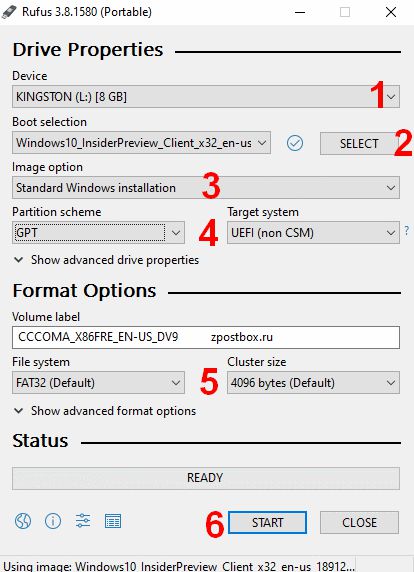 MBR -> BIOS or UEFI (this method works on all old and new computer mainboards but Windows will run on lower performance) 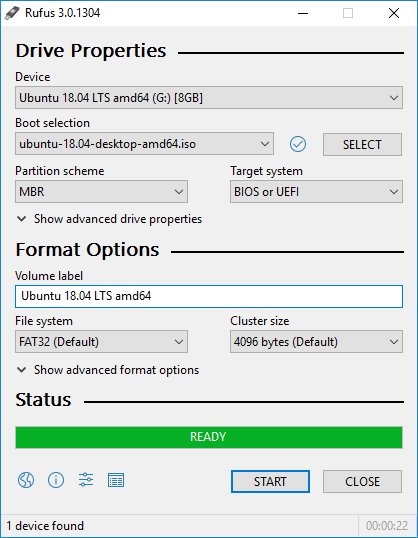 This post has been edited by Xploit Machine: Jul 28 2024, 10:51 PM This post has been edited by Xploit Machine: Jul 28 2024, 10:51 PM |
|
|
|
|
|
Satori 14118a
|
Jul 28 2024, 10:52 PM
|
|
|
Make sure you boot the right drive partition in bios
|
|
|
|
|
|
Xploit Machine
|
Jul 28 2024, 10:58 PM
|
|
|
and follow below suggestion .. I have burnt almost 6 to 7 builds so far without any problem;
Use the lates Rufus 4.5.xxxx
Image Option -> Standard Windows Installation
Partition Scheme -> MBR
Target System -> BIOS or UEFI
File System -> NTFS
Cluster Size -> 4096 or anything stated as (Default)
|
|
|
|
|
|
TSturtleundersea
|
Jul 28 2024, 11:19 PM
|
Getting Started
|
dont think its rufus problem and i am sure the rufus setting i used is correct... anyway, i have tried update bios from gigabyte website and i tried to goto recovery options in current windows 10 and try to chose fix startup repair options, end up my laptop stuck at booting screen  based on the image above, three options on the left i have chosen and all three of it stuck at booting screen |
|
|
|
|
|
TSturtleundersea
|
Jul 28 2024, 11:20 PM
|
Getting Started
|
QUOTE(Xploit Machine @ Jul 28 2024, 10:50 PM) for my laptop, I can only burn using MBR since the lappy is over 15 years old and doesnt support TPM & Secure Boot .. Rufus have 2 burning method; GPT -> UEFI non-CSM (this method only works on newer model computer mainboards) MBR -> BIOS or UEFI (this method works on all old and new computer mainboards but Windows will run on lower performance) the rufus i downloaded can only choose UEFI non-CSM and yes, based on the screen from ur replies, i have applied identical setting in rufus i created the usb installation media |
|
|
|
|
|
TSturtleundersea
|
Jul 28 2024, 11:21 PM
|
Getting Started
|
QUOTE(turtleundersea @ Jul 28 2024, 11:19 PM) dont think its rufus problem and i am sure the rufus setting i used is correct... anyway, i have tried update bios from gigabyte website and i tried to goto recovery options in current windows 10 and try to chose fix startup repair options, end up my laptop stuck at booting screen based on the image above, three options on the left i have chosen and all three of it stuck at booting screen i was following this bootrecthats why i come to recovery options |
|
|
|
|
|
Xploit Machine
|
Jul 28 2024, 11:23 PM
|
|
|
QUOTE(turtleundersea @ Jul 28 2024, 11:20 PM) the rufus i downloaded can only choose UEFI non-CSM and yes, based on the screen from ur replies, i have applied identical setting in rufus i created the usb installation media its funny that ure Rufus shows only one option  .. it should show both MBR and GPT .. Download latest Rufus https://github.com/pbatard/rufus/releases/d.../rufus-4.5p.exe |
|
|
|
|
|
TSturtleundersea
|
Jul 28 2024, 11:36 PM
|
Getting Started
|
QUOTE(Xploit Machine @ Jul 28 2024, 11:23 PM) its funny that ure Rufus shows only one option .. it should show both MBR and GPT .. Download latest Rufus https://github.com/pbatard/rufus/releases/d.../rufus-4.5p.exeu r right, i stand corrected, i am too tired for solving this and caused me looking at wrong selection anyway, last try today, using MBR method...but still i think its gigabyte bios/uefi problem |
|
|
|
|
|
Xploit Machine
|
Jul 29 2024, 12:01 AM
|
|
|
QUOTE(turtleundersea @ Jul 28 2024, 11:36 PM) u r right, i stand corrected, i am too tired for solving this and caused me looking at wrong selection anyway, last try today, using MBR method...but still i think its gigabyte bios/uefi problem dont trouble ureself instead going back on recovery sections which never ends .. just follow basic Microsoft ISO + Rufus burning method and freshly install  see mine got MBR & GPT option .. even u can bypass TPM requirements if want .. 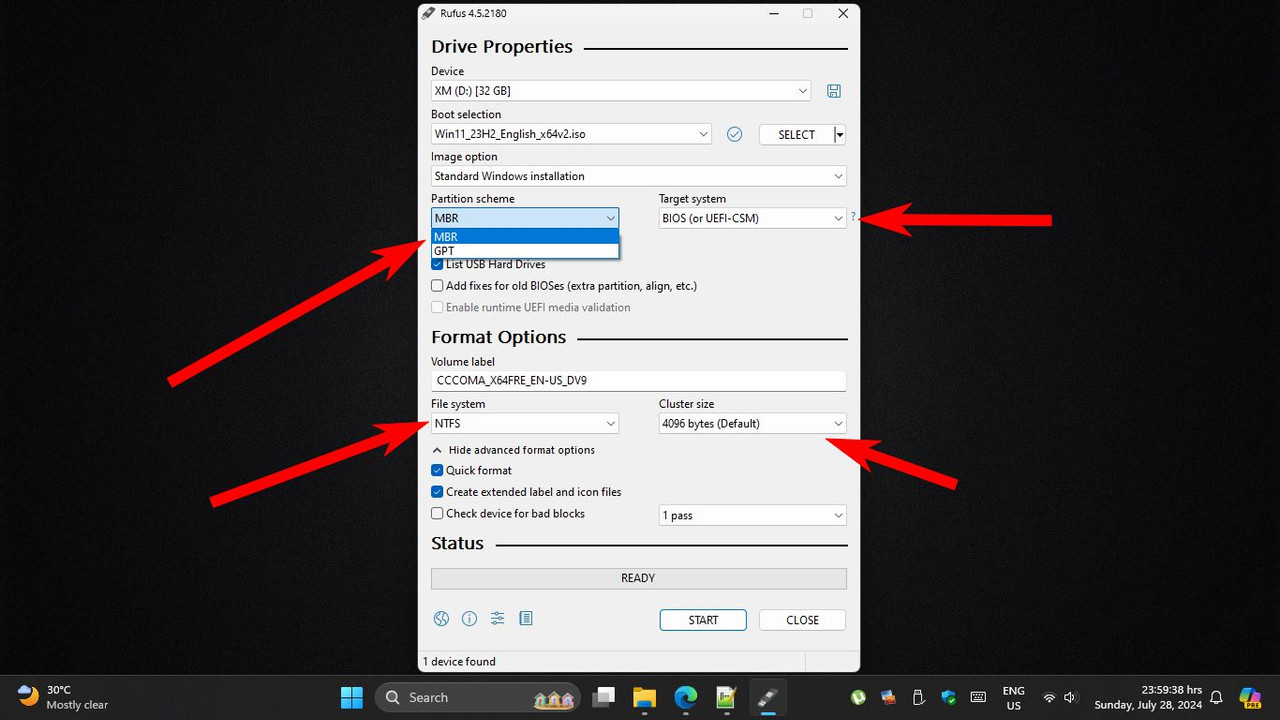 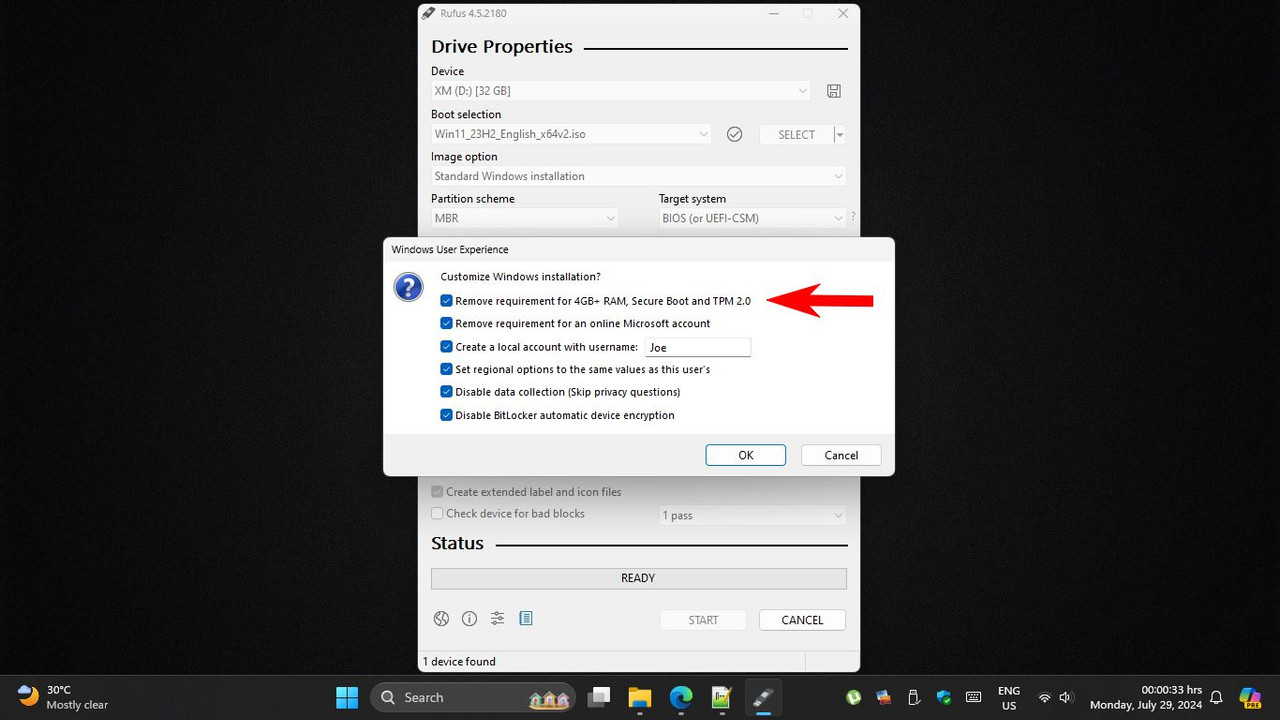 |
|
|
|
|
|
TSturtleundersea
|
Jul 29 2024, 12:03 AM
|
Getting Started
|
QUOTE(Xploit Machine @ Jul 29 2024, 12:01 AM) dont trouble ureself instead going back on recovery sections which never ends .. just follow basic Microsoft ISO + Rufus burning method and freshly install see mine got MBR & GPT option .. even u can bypass TPM requirements if want .. done this and tried to boot into my usb stick just now... still same, stuck at boot screen where i can only see "Gigabyte" word and a half circle round once or twice then hang... |
|
|
|
|
|
Xploit Machine
|
Jul 29 2024, 12:06 AM
|
|
|
QUOTE(turtleundersea @ Jul 29 2024, 12:03 AM) done this and tried to boot into my usb stick just now... still same, stuck at boot screen where i can only see "Gigabyte" word and a half circle round once or twice then hang... are u on SSD? .. did the BIOS selection is properly done? .. take the screenshot of ure BIOS boot up and HDD settings  |
|
|
|
|
|
TSturtleundersea
|
Jul 29 2024, 12:26 AM
|
Getting Started
|
QUOTE(Xploit Machine @ Jul 29 2024, 12:06 AM) are u on SSD? .. did the BIOS selection is properly done? .. take the screenshot of ure BIOS boot up and HDD settings 
am i missing anything? |
|
|
|
|
|
Xploit Machine
|
Jul 29 2024, 12:38 AM
|
|
|
QUOTE(turtleundersea @ Jul 29 2024, 12:26 AM)
am i missing anything? EFI USB is fine and just disable the Windows Boot Manager and EFI PXE 0 .. and where's you HDD / SSD? .. its not in the list |
|
|
|
|
|
Xploit Machine
|
Jul 29 2024, 12:41 AM
|
|
|
goto MAIN and see SATA PORT 0 is showing ure SSD?
|
|
|
|
|
|
Xploit Machine
|
Jul 29 2024, 12:48 AM
|
|
|
|
|
|
|
|



 Quote
Quote



 0.0647sec
 1.16
1.16
 6 queries
 GZIP Disabled