Welcome Guest ( Log In | Register )

Outline · [ Standard ] · Linear+

 Time Fibre Home and Ubiquiti Hardware, Home internet

views
     
TSzhehong79
post Jun 4 2024, 09:29 AM, updated 2y ago

New Member
*
Newbie
5 posts

Joined: Mar 2011


Hello Sifus, I have just subscribed to TIME Fibre Home 600mps package for my home and was issued with 2 units of Huawei Optixstar HG8145x6 routers. One of the unit functions as the GPON connection unit with Wifi and the other was labled as a MESH unit to placed at 1st floor of my house to provide better coverage.

I have a plan to upgrade the hardwares to the following:

2 units of Flex Mini (USW-Flex-Mini)
2 units of U6+ (U6-PLUS)
2 units of PPOE Injector

The plan is to have 1 unit of switch paired to 1 AP for the ground floor and another switch paired to another AP at 1st floor. PPOE injector will provide power to the AP.

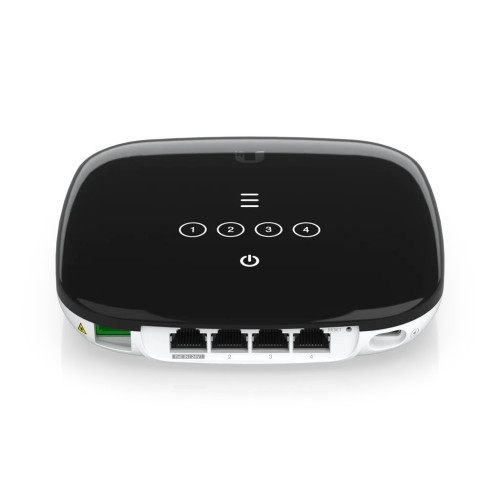
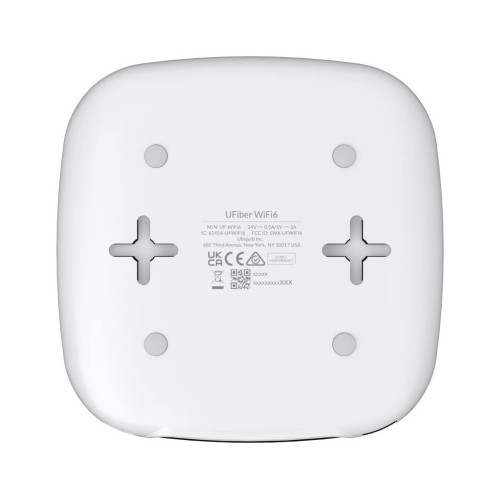
I am keen to get an Ubiquiti UFiber 4 Port Wifi6 GPON CPE (UF-Wifi6) to bypass the Huawei router all together. In my opinion this better than running a connection from the Huawei router to the swithces via LAN.
user posted image
user posted image

My calls to TIME technical support are not very helpful, mostly commenting that they cannot guarantee it will work.

Anyone here have tried using any hardware other than TIME's that is working? Or have used Ubiquiti hardware as such?


Thank you and Apprecaite your comments and advice.
Mickz
post Jun 4 2024, 10:18 AM

New Member
*
Junior Member
23 posts

Joined: Jan 2003


can't really comment on the UFiber 4 Port Wifi6 GPON CPE (UF-Wifi6), never really used it before to bypass the ISP GPON, and i would think it will either not work, or would require quite a bit of testing to get it up and running.

Your other ubiquiti hardware should work just fine, but not too sure why you are running it in that fashion (flex mini to AP). Will you be needing additional network ports on each floor?

Both the AP, as well as the flex mini can be powered by POE, so instead of an injector, get a POE switch (a 4 port poe + 4 port gigabit one would cost around RM250). That way you save the hassle of having to have power points for the switch, or for the AP.
ChenKaiWen
post Jun 4 2024, 10:27 AM

Casual
***
Junior Member
387 posts

Joined: May 2019


QUOTE(zhehong79 @ Jun 4 2024, 09:29 AM)
Hello Sifus, I have just subscribed to TIME Fibre Home 600mps package for my home and was issued with 2 units of Huawei Optixstar HG8145x6 routers. One of the unit functions as the GPON connection unit with Wifi and the other was labled as a MESH unit to placed at 1st floor of my house to provide better coverage.

I have a plan to upgrade the hardwares to the following:

2 units of Flex Mini (USW-Flex-Mini)
2 units of U6+ (U6-PLUS)
2 units of PPOE Injector

The plan is to have 1 unit of switch paired to 1 AP for the ground floor and another switch paired to another AP at 1st floor. PPOE injector will provide power to the AP.

I am keen to get an  Ubiquiti UFiber 4 Port Wifi6 GPON CPE (UF-Wifi6) to bypass the Huawei router all together. In my opinion this better than running a connection from the Huawei router to the swithces via LAN.

user posted image
user posted image

My calls to TIME technical support are not very helpful, mostly commenting that they cannot guarantee it will work.

Anyone here have tried using any hardware other than TIME's that is working? Or have used Ubiquiti hardware as such?
Thank you and Apprecaite your comments and advice.
*
No, you cannot use the Ubiquiti GPON. If the OLT detects an unknown ONT, they will ban your ONT. If you really want to use different ONT, head to https://forum.lowyat.net/topic/4925452
Anime4000 sells SFP GPON stick that has been confirmed to work.
PRSXFENG
post Jun 4 2024, 10:42 AM

Look at all my stars!!
*******
Senior Member
2,616 posts

Joined: Nov 2020


QUOTE(zhehong79 @ Jun 4 2024, 09:29 AM)
snip
*
everything else should work except for the Fiber GPON
just use TIME's provided one in bridge mode (ask them to change for you)

Time uses Huawei only in their network, your ubitquiti ont will stick out as it doesn't understand huawei proprietary commands sent to it


TSzhehong79
post Jun 4 2024, 10:50 AM

New Member
*
Newbie
5 posts

Joined: Mar 2011


QUOTE(Mickz @ Jun 4 2024, 10:18 AM)
can't really comment on the UFiber 4 Port Wifi6 GPON CPE (UF-Wifi6), never really used it before to bypass the ISP GPON, and i would think it will either not work, or would require quite a bit of testing to get it up and running.

Your other ubiquiti hardware should work just fine, but not too sure why you are running it in that fashion (flex mini to AP). Will you be needing additional network ports on each floor?

Both the AP, as well as the flex mini can be powered by POE, so instead of an injector, get a POE switch (a 4 port poe + 4 port gigabit one would cost around RM250). That way you save the hassle of having to have power points for the switch, or for the AP.
*
Yeah, you are right about the setting part, they were non committal at all.

As for the swithces, yes, I need to hardwire some of the older equipments via LAN. and as for the POE swithces, i did think about it but thank you for bringing this up again.

Thank you for the feedback
TSzhehong79
post Jun 4 2024, 10:51 AM

New Member
*
Newbie
5 posts

Joined: Mar 2011


QUOTE(PRSXFENG @ Jun 4 2024, 10:42 AM)
everything else should work except for the Fiber GPON
just use TIME's provided one in bridge mode (ask them to change for you)

Time uses Huawei only in their network, your ubitquiti ont will stick out as it doesn't understand huawei proprietary commands sent to it
*
Noted, thank you for that confirmation.

That sounds like the best solution moving forward.
TSzhehong79
post Jun 4 2024, 10:52 AM

New Member
*
Newbie
5 posts

Joined: Mar 2011


QUOTE(ChenKaiWen @ Jun 4 2024, 10:27 AM)
No, you cannot use the Ubiquiti GPON. If the OLT detects an unknown ONT, they will ban your ONT. If you really want to use different ONT, head to https://forum.lowyat.net/topic/4925452
Anime4000 sells SFP GPON stick that has been confirmed to work.
*
Ok, I will take a look
yenchenje
post Jun 4 2024, 01:23 PM

Enthusiast
*****
Junior Member
932 posts

Joined: Dec 2019
QUOTE(zhehong79 @ Jun 4 2024, 09:29 AM)
Hello Sifus, I have just subscribed to TIME Fibre Home 600mps package for my home and was issued with 2 units of Huawei Optixstar HG8145x6 routers. One of the unit functions as the GPON connection unit with Wifi and the other was labled as a MESH unit to placed at 1st floor of my house to provide better coverage.

I have a plan to upgrade the hardwares to the following:

2 units of Flex Mini (USW-Flex-Mini)
2 units of U6+ (U6-PLUS)
2 units of PPOE Injector

The plan is to have 1 unit of switch paired to 1 AP for the ground floor and another switch paired to another AP at 1st floor. PPOE injector will provide power to the AP.

I am keen to get an  Ubiquiti UFiber 4 Port Wifi6 GPON CPE (UF-Wifi6) to bypass the Huawei router all together. In my opinion this better than running a connection from the Huawei router to the swithces via LAN.

user posted image
user posted image

My calls to TIME technical support are not very helpful, mostly commenting that they cannot guarantee it will work.

Anyone here have tried using any hardware other than TIME's that is working? Or have used Ubiquiti hardware as such?
Thank you and Apprecaite your comments and advice.
*
If you’re going Ubiquiti, get a Lite 8 PoE (RM550~), U6 Plus and you’re done, run the Unifi software on your PC periodically to update and configure.

For UFiber it’s self explanatory, no. If you have to go for an AIO, you will still need a router with the GPON SFP ONU. APs are not routers. Just keep the Huawei and run the APs separately, as changing that out would require a converter if your router doesn’t have SFP+ ports

But Unifi is pricey and is somewhat like a drug so proceed with caution, if you are interested, go for Omada since you only need APs and those have their own robust web UI to configure, downside is no mesh and fast roaming

This post has been edited by yenchenje: Jun 4 2024, 01:24 PM

ChenKaiWen
post Jun 4 2024, 06:14 PM

Casual
***
Junior Member
387 posts

Joined: May 2019


QUOTE(yenchenje @ Jun 4 2024, 01:23 PM)
If you’re going Ubiquiti, get a Lite 8 PoE (RM550~), U6 Plus and you’re done, run the Unifi software on your PC periodically to update and configure.

For UFiber it’s self explanatory, no. If you have to go for an AIO, you will still need a router with the GPON SFP ONU. APs are not routers. Just keep the Huawei and run the APs separately, as changing that out would require a converter if your router doesn’t have SFP+ ports

But Unifi is pricey and is somewhat like a drug so proceed with caution, if you are interested, go for Omada since you only need APs and those have their own robust web UI to configure, downside is no mesh and fast roaming
*
Omada has pushed a firmware update for fast roaming support on my EAP613. It also has mesh function.
yenchenje
post Jun 4 2024, 07:50 PM

Enthusiast
*****
Junior Member
932 posts

Joined: Dec 2019
QUOTE(ChenKaiWen @ Jun 4 2024, 06:14 PM)
Omada has pushed a firmware update for fast roaming support on my EAP613. It also has mesh function.
*
Without software SDN or hardware?
ChenKaiWen
post Jun 4 2024, 11:09 PM

Casual
***
Junior Member
387 posts

Joined: May 2019


QUOTE(yenchenje @ Jun 4 2024, 07:50 PM)
Without software SDN or hardware?
*
Mesh as far as I know, doesn’t need Omada software. Fast roaming yes
cyberic
post Jun 5 2024, 09:50 AM

Regular
******
Senior Member
1,132 posts

Joined: Jan 2003


With bridge mode, you probably can consider Cloud Gateway Ultra + 2 AP (add Ultra switch if need more port and POE). Everything managed from Cloud Gateway Ultra.
TSzhehong79
post Jun 5 2024, 10:04 AM

New Member
*
Newbie
5 posts

Joined: Mar 2011


Thanks all for all the suggestion and feedback.

At least I am certain now to keep the Huawei unit and convert it into bridge mode. nod.gif
yenchenje
post Jun 5 2024, 11:28 AM

Enthusiast
*****
Junior Member
932 posts

Joined: Dec 2019
QUOTE(ChenKaiWen @ Jun 4 2024, 11:09 PM)
Mesh as far as I know, doesn’t need Omada software. Fast roaming yes
*
Interesting, is it a recent change? Only swapped out my EAP670 a few mths ago at this point

This post has been edited by yenchenje: Jun 5 2024, 11:28 AM
ChenKaiWen
post Jun 5 2024, 02:22 PM

Casual
***
Junior Member
387 posts

Joined: May 2019


QUOTE(yenchenje @ Jun 5 2024, 11:28 AM)
Interesting, is it a recent change? Only swapped out my EAP670 a few mths ago at this point
*
I can’t seem to find the update with fast roaming. But the mesh feature was available out of the box.


Change to:
| Lo-Fi Version
0.0163sec    0.97    5 queries    GZIP Disabled
Time is now: 24th December 2025 - 02:43 PM