
Welcome Guest ( Log In | Register )

Outline · [ Standard ] · Linear+

 Suggestion & Advice for Factory Business Network, Suggestion & Advice for Factory Business

views
     
TSAbuSaaim20 P
post May 28 2024, 12:54 AM, updated 2y ago

New Member
*
Probation
1 posts

Joined: Dec 2021
From: Johor Bahru


Hi, I'm seeking suggestions and advice from all the networking professionals here. I'm a beginner at networking & learned everything online on YT and ChatGpt.

My father's business (textile-related OEM baby product manufacturing) is getting UniFi Biz 500Mbps Fibre soon. I thought of installing a proper network in his factory so that I'll be better managed, secure and scalable in the future.
Currently, we use Maxis Business 4G Wifi 138 with TP-Link AC750 LTE Router. The internet is slow, a lot of work on the internet takes time and there's a lot of complaints from everyone in the factory.
We have 3 office staff (4 organisation computers & approx. 6 other devices) and around 12 general workers (approx. 12~15 devices)
It's a Double-story terrace factory of approx. 5500sft. The top floor is all for production. Half of the ground floor is office space and the other half is a warehouse with racks of fabric rolls & finished goods.

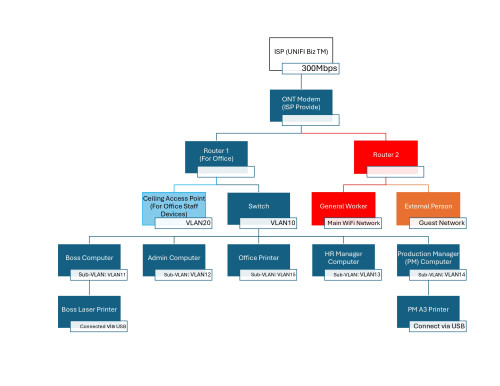
This is the Network Diagram that I came up with.
user posted image

I separated into Router 1 (Office Network) & Router 2 (General Network) to avoid external persons & non-administration staff from accessing the internal network.

Router 1 is further separated to AP & Switch using VLAN.
AP is for the office personnel's devices (phones, laptops, etc). The switch is to connect all the organisation's computers. The reason for this setup is if the office staff device's security is compromised, the organisation's computers will still have some protection.
Computers connected to the switch will be further separated into sub-VLANS. So, if any department's computer is compromised, the others still have some protection.
There'll be 4 printers in Office Network.
1 for the Boss computer connected via USB and 1 for the Production manager's computer connected via USB.
1 connects to the switch network in a sub-VLAN and will be accessible to everyone connected to the switch.
1 connect to the AP's wireless network for everyone in the network to use.

Router 2 is for general production workers & external persons.
Main WiFi network is for general workers & a Guest Network will be set up for external persons.

This is the setup that I came up with. I got recommendations for using TP-Link Omada network devices from a few people I asked.
So for Office Network, I'll buy 1 router, 1 switch & 1 AP from TP-Link Omada. For General Network, I have a spare TP-Link Archer AC1200 that I'm considering using with the current AC750 as a mesh for the top floor.

I have a budget of RM2000 to RM3000 for the networking equipment and RM 750 for wiring as we had issues with rats chewing wires before.

Last time, I told my father to consult an expert before but he mcm not so keen. But now since we are upgrading to faster speeds, I feel like it's better to have a proper setup that can be scaled in the future. Now he's overseas, so using this opportunity, I'm using my own money to buy & configure this network setup. Later when he's back, I'm sure I can claim back the expenses from him. That time got fast speed ma, I'm sure he'll be impressed. So this planning needs to be done right or else I'll burn my money & end up with useless equipment.

So, is the network possible to implement? I still don't know how & if it can be configured. I've got very little knowledge

I'd also love some suggestions for the Office network's routers, switches & AP combinations. I've spent the whole day on the TP-Link website and can't decide which combination and equipment to choose. So far, I have narrowed it down to Router (ER7210PC, ER706W, ER605) and switch (SG3428MP, SG2428P) but unsure if my choices are correct.
ER7210PC for example is a 3-in-1 router with 8 ports and saves a lot of money compared to 1 router + 1 switch combo. But.. I'm not sure if can set it up as I planned or if it's generally wise to use a 3-in-1 router. I hope those experienced in all these enterprise networking can help me out biggrin.gif

For AP, honestly didn't expect it to be expensive until same as some routers. WiFi 7 is not in mind for obvious money reasons. I'll be happy to settle down with WiFi 6/6e. Can I get some suggestions on this also biggrin.gif

Thanks a lot for replying and taking the time to read all this. Appreciate everyone's effort to help me out very much. Looking forward to learn more new things from you guys esp the sifus
chkwong
post May 28 2024, 08:15 AM

Casual
***
Junior Member
411 posts

Joined: Mar 2013
IMHO, you don't need Wifi 6 or 7 router. What you need is a good enterprise grade router (and mesh equipment) that can do the following network throttling for each user and throttle on streaming services. Coz these are the one that will consume your network bandwidth.

Typically the more expensive one, will have the higher db antenna output.

Try to avoid "daisy chain" routers / repeater as the lag will slow down the internet experience.

You also need to do walk around and do a wifi scan around the whole area to check for signal strength and band conflicts.

If your factory is metal sheet construction wall and roof, this will have an impact on the wifi signal and spread. The racking steel shelfs where you place your textile goods or materials can impact your wifi signal strength.

Also, sometimes it will just far easier to install 2 UniFi incoming, then trying to get 1 high bandwidth incoming connection.

I have also seen some factory / warehouse uses a lowly router and everyone still get the connection wifi they needed. They just place it at the most suitable location.

Just my 2 cents inputs ya.

This post has been edited by chkwong: May 28 2024, 08:17 AM
aneip
post May 28 2024, 12:07 PM

Look at all my stars!!
*******
Senior Member
2,466 posts

Joined: Nov 2004


Forgot all mesh. Setup proper lan wiring with poe switch. Go for enterprise device. 3k really a bit a low side. Single AP almost 1k or more. POE switch also around 1k, a router also 1k+.

Also never see every single pc required own vlan. Need to setup whole network stuff for every single vlan (for ip/routing setup). Also ipv6 will be a headache.

Beside TPlink omoda do see whether ubiquiti brand interest you.
yenchenje
post May 28 2024, 12:58 PM

Enthusiast
*****
Junior Member
932 posts

Joined: Dec 2019
Seems you’re just keen on having things just work instead of staying on the bleeding edge

Go for used (Referring to everything Omada), if not available go new

Enterprise AP, in general most factories are using older AC router from the likes of Cisco. TP-Link is cheaper but their catalogue is a lot smaller than you expect, maybe just go for all EAP265 HD or the sorts

Omada Controller - OC200

Router - TL-ER7206 (Since by the looks of it you will have maximum of 7 VLANs, but some of those VLAN can be consolidated into a single VLAN)

Switch - TL-SG2218P (For all the possible connections for AP you will need)

However, for my previous At home “budget” setup, I have gone for

OPNSense
One managed switch (L2)
2x Enterprise grade AP

Why? As I didn’t need any remote management or cloud stuff on my router. Sure it will be more tedious and hard to setup as you will require some prior IT knowledge but I’ve spent around 1.5-1.6K for all those. But do note that I’ve went bleeding edge with 10G switch and 2.5G AP. So you will definitely be able to save quite a bit compared to using my setup, since you will at most just need gigabit to all devices
kwss
post May 29 2024, 01:01 AM

Regular
******
Senior Member
1,208 posts

Joined: Aug 2018
How do you intent to secure your VLAN? Having VLAN won't directly increase security as you will have to deal with ACL for inter-VLAN traffic.

On top of that you have to do IP address planning (not difficult for your network size), first hop security and documenting all of them down. As someone mentioned, you will also likely not able to use IPv6.

My suggestion:
- You don't need 2 routers. Based on your network, you can even use TM provided router.
- Buy a switch that can do Port Isolation. Basically you just set all the port to isolated, except the port to router and maybe network printer. Using this method, you don't need to do IP address planning, IPv6 will work and no ACL needed.
- Make sure your switch has a dedicated management port. In case you got hacked, it is not possible to remove the Port Isolation setting.
- Buy Wi-Fi AP that support client isolation as well and just enable them for everyone. You may put your AP on different VLAN without port isolation. This is so that the controller / master can see each other. This protects the management interface from being accessed. Also protects inter-AP traffic from being sniffed / poisoned.
- If you decided to buy a router, make sure it can be configured with a management port as well. This way, nobody can mess with it without physical access.

Outcome:
- All devices on the network will not be able to see each other
- In the event any of the device got hacked, they will only see the router and the network printer. Nothing else!
- Security is enforced by switch chip and cannot be bypassed without physical access to management port
- In the event you have an insider attack trying to mess with your network port, you are still secure (different story if they have physical access to the switch)
- Port Isolation is known to protect against all L2 attack without the need of expensive switch to provide First Hop Security (need additional configuration on top of inter-VLAN ACL)

Assumption:
- Since you don't have any server, I assume you don't intent to connect directly to each other. If you decide to add server later on, just group them in their own VLAN.
- You use managed services like Google Workspace, Office 365 SharePoint, etc, which are all in the cloud.
- Don't depend on perimeter security. Do zero trust as much as possible

This post has been edited by kwss: May 29 2024, 02:31 AM
PRSXFENG
post May 29 2024, 10:46 AM

Look at all my stars!!
*******
Senior Member
2,614 posts

Joined: Nov 2020


can 2 routers 1 ont even work? the 1st router has to authenticate with the tm provided ont

just utilize guest networks features provided by the router, which segments the entire network off just for guests

vlans might be overkill, at most you just need a vlan for "untrusted" devices like staff own devices (but I suppose they could use guest network) or iot devices

if you vlan off your printer then your devices cant see the printer....


NoobHacker
post Jun 22 2024, 12:44 PM

Regular
******
Senior Member
1,753 posts

Joined: Dec 2010
QUOTE
That time got fast speed ma, I'm sure he'll be impressed.

I'm not sure if he can actually feel the speed, my dad can't tell if he is on 4G or unifi. but what you can do for sure, is to make all the staff happy with the reliability.

AP I would recommend EAP225, really cheap and robust AP. worst case conditions (3 walls) was faster and stabler than my AC86U. It comes with it's own poe injector as well.

If you are willing to spend more, I would recommend EAP660, a high-density AP, which is on the luxurious side. I have several friends use it and couldn't turn back due to its robustness even with inteferences from neighbours.

Router can consider mikrotik. hex or ax3. rb5009 if u r willing to spend.

ax3 comes with its own wifi so u can put other APs further away. rb5009 poe doesn't work with EAP225 unless you use a 24v adapter, which make rb5009 lost its POE+ functionality (48V).

Cheap setup
Stock router
Managed switch
Numerous EAP225.

Moderate setup
Hex/ax3
Managed switch
EAP660 for workers+guest and EAP225 for staff (i assume it is a smaller space and less devices)

OR

ER7212PC
EAP660 + EAP225 if needed

More luxurious setup
rb5009 POE
EAP660*2


Change to:
| Lo-Fi Version
0.0239sec    0.53    5 queries    GZIP Disabled
Time is now: 20th December 2025 - 05:55 AM