Outline ·
[ Standard ] ·
Linear+
Sound Systems issues, I have no sound with my web browser.
|
TSXarzu
|
 May 5 2024, 01:30 AM, updated 2y ago May 5 2024, 01:30 AM, updated 2y ago
|
New Member


|
I invite you to join me on a journey of discovery and problem solving!
So far, this is the first post I have made on any web forum about this issue but I might cast a large net to see what I find. If I find anything elsewhere, I will share what is found here.
The bottom line is that I don't have any sound on my web browsers. Youtube and other websites are silent.
But the interesting thing is that I have audo capacity on other programs like audacity and skype.
Any ideas?
The problem started the day that one of my computer monitors went out (the display physically stopped working -- that is, it was receiving power and even the cursor behaved as if it was being displayed on the monitor but the display was physically blank). But I was able to go buy a better monitor and install it. During the process of doing this I knocked my graphics card (the only card on my mother board, by the way) out and I had to put it back.
But i got the monitor working. and visually everything is fine
There is not a sound card in the mother board. So that is not the issue.
But there are many cables and wires coming out of the power source that are not connected to anything. The motherboard manufacturer is MSi. Maybe I can contact them.
Anyway, this post is just the start of my journey. I hope I can solve this soon and your input is valuable towards this goal.
|
|
|
|
|
|
LarryPizzaGuy
|
May 5 2024, 04:01 AM
|
|
|
Sounds like a software issue.
Have you tried turning up the software volume for your web browser?
E.g.,
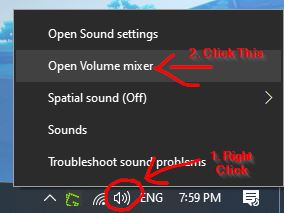
1. Hover your mouse to volume control on the corner right of the task bar.
2. Right Mouse Click > Volume Control > Open Volume Mixer.
3. Under Apps > Google Chrome (or any web browse) > Adjust volume slider.
or
1. Go to System > Sound > Volume Mixer
2. Under Apps > Google Chrome (or any web browse) > Adjust volume slider.
|
|
|
|
|
|
xxboxx
|
May 5 2024, 12:27 PM
|
|
|
Windows 11? Try check this setting in Windows 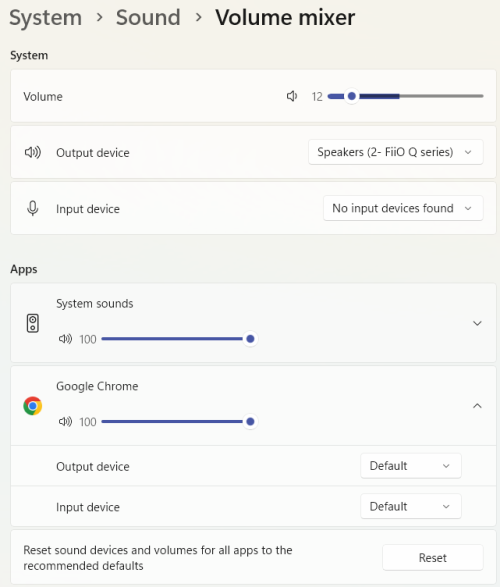 If still cannot, try that reset button in Volume Mixer |
|
|
|
|
|
TSXarzu
|
May 6 2024, 07:54 PM
|
New Member
|
QUOTE(LarryPizzaGuy @ May 5 2024, 04:01 AM) Sounds like a software issue. Have you tried turning up the software volume for your web browser? E.g., 1. Hover your mouse to volume control on the corner right of the task bar. 2. Right Mouse Click > Volume Control > Open Volume Mixer. 3. Under Apps > Google Chrome (or any web browse) > Adjust volume slider. or 1. Go to System > Sound > Volume Mixer 2. Under Apps > Google Chrome (or any web browse) > Adjust volume slider. Well, for Chrome, I don't see where there is a sound or volume setting. What am I missing? Is your instruction for an Android device? 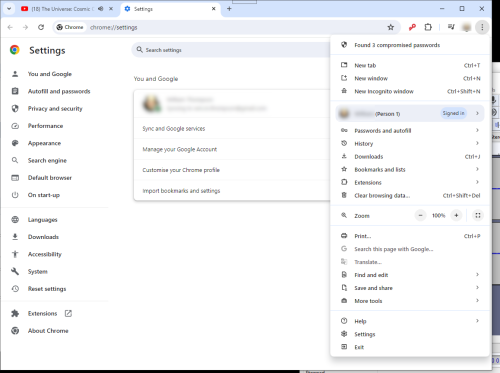 |
|
|
|
|
|
TSXarzu
|
May 6 2024, 08:01 PM
|
New Member
|
QUOTE(xxboxx @ May 5 2024, 12:27 PM) Windows 11? Try check this setting in Windows If still cannot, try that reset button in Volume Mixer This brought success !!   The output had to be adjusted and when I changed it, I heard youtube coming through my headphones. YAY This was solved faster than I thought they would be 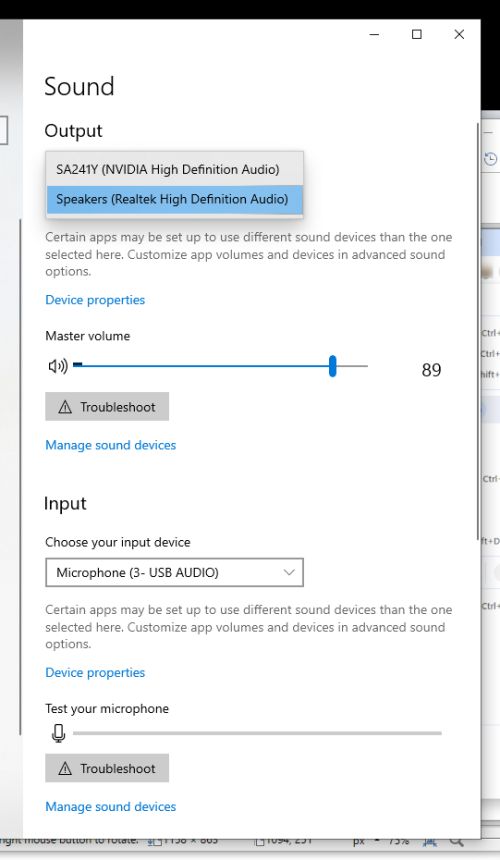 |
|
|
|
|
|
shinichi88
|
May 6 2024, 08:02 PM
|
|
|
|
|
|
|
|



 Quote
Quote




 0.0158sec
 1.62
1.62
 5 queries
 GZIP Disabled