Welcome Guest ( Log In | Register )

Outline · [ Standard ] · Linear+

 Looking for advice for 2 storey home

views
     
TSdigicube
post Apr 30 2024, 01:54 AM, updated 2y ago

New Member
*
Junior Member
5 posts

Joined: Jul 2009


I live in a small 2 storey home, about 1500 sf per floor. My main problem is that the main router is placed upstairs in the hall and most of the equipment I have is on the ground floor.

I have tried various methods in improving the speed downstairs on the ground floor but the best I could do is about 180 Mbps. My subscription is 800 Mbps. The reason why I want to increase the speed downstairs is because most of my stuff e.g. TV, karaoke, laptops, gaming system are all downstairs. The PC in my room on the first floor averages out at about 650 Mbps and I have nothing much to complain about that, using an Archer TX20U connected via USB 3.0

Then again, all the stuffs on the first floor are working fine with no lags whatsoever. I just want to know that I am getting the highest speeds possible wherever I am in the house.

My equipment:

Fiberhome SR1041Y x 3 (WiFi 6 - 1 as main router and two on the ground floor as mesh)
Deco M5 x 1 and M4 x 2 (WiFi 5) - separate SSID for these as I had them around and do not want to waste it

As you can see, my home is cluttered with all these routers and meshes and I don't mind discarding all of it and getting a complete new overhaul, with a budget of around 1k.

Any recommendations?

Thanks in advance.

user posted image
firdausbhari
post Apr 30 2024, 03:10 AM

Look at all my stars!!
*******
Senior Member
2,281 posts

Joined: Feb 2012


» Click to show Spoiler - click again to hide... «

If it were me, I'd pull RJ45 cable to ground floor. U will have full speed without issue. Deco M5 as main router connect LAN to M4 as mesh node.

But if u have money to spend, get WIFI 6 mesh.
westlife
post Apr 30 2024, 07:40 AM

10k Club
********
All Stars
14,312 posts

Joined: Jan 2011
QUOTE(digicube @ Apr 30 2024, 01:54 AM)
I live in a small 2 storey home, about 1500 sf per floor. My main problem is that the main router is placed upstairs in the hall and most of the equipment I have is on the ground floor.

I have tried various methods in improving the speed downstairs on the ground floor but the best I could do is about 180 Mbps. My subscription is 800 Mbps. The reason why I want to increase the speed downstairs is because most of my stuff e.g. TV, karaoke, laptops, gaming system are all downstairs. The PC in my room on the first floor averages out at about 650 Mbps and I have nothing much to complain about that, using an Archer TX20U connected via USB 3.0

Then again, all the stuffs on the first floor are working fine with no lags whatsoever. I just want to know that I am getting the highest speeds possible wherever I am in the house.

My equipment:

Fiberhome SR1041Y x 3 (WiFi 6 - 1 as main router and two on the ground floor as mesh)
Deco M5 x 1 and M4 x 2 (WiFi 5) - separate SSID for these as I had them around and do not want to waste it

As you can see, my home is cluttered with all these routers and meshes and I don't mind discarding all of it and getting a complete new overhaul, with a budget of around 1k.

Any recommendations?

Thanks in advance.

user posted image
*
Ur main prob should be due to the fact that ur mesh is not tri-band also I guess. This will significant reduce the speed as u are doing wireless backhaul.

U use ur tp-link mesh nodes with the tm given wifi router as mesh? U mean ur tp-link nodes support Easymesh that can work with other brand mesh? I dun recall that the tp-link mesh nodes support easymesh though. Anyway for mesh node u should just stick to the same brand for best compatibility and performance.

Solutions:
1) ditch the tm given device, just use tp-link nodes, one for upstairs and one for downstairs, connect one of them to tm modem and functions like main mesh node. Pull a cable from the main node to connect to the child node downstairs (in this case it is supposed that ur house u do not have ethernet port, so it will have exposed cable and u may need to put casing to cover it) not an ideal solution if u dun want to see a running cable but this is the cheapest and best way to get a consistent good connection downstairs and upstairs and cheapest costs.

2) if u did not want to see running cable, u can only stick to wireless backhaul. Again. Still ditch the tm device.

Now check ur tp-links mesh nodes to see if they are tri-band or dual-band, if it is dual-band, buy a new tri-band nodes even they are only wifi-5 will be better than ur current dual-band wifi-5 mesh. Of course if possible, buy tri-band mesh wifi 6 for future proof.

Position both the nodes with minimum brick wall blocking in between especially urs is upstairs and downstairs.dun put them like one directly on top of another one at different levels.

Wrong position will be like this

A


B


It should be like below and all place at the centre of the house.


A


——————- B


For example A can be at the upstairs family hall area while B is the stair case… within light of line.

This post has been edited by westlife: Apr 30 2024, 07:40 AM
OlgaC4
post Apr 30 2024, 09:17 AM

Look at all my stars!!
*******
Senior Member
5,296 posts

Joined: Nov 2006
QUOTE(digicube @ Apr 30 2024, 01:54 AM)
I live in a small 2 storey home, about 1500 sf per floor. My main problem is that the main router is placed upstairs in the hall and most of the equipment I have is on the ground floor.

I have tried various methods in improving the speed downstairs on the ground floor but the best I could do is about 180 Mbps. My subscription is 800 Mbps. The reason why I want to increase the speed downstairs is because most of my stuff e.g. TV, karaoke, laptops, gaming system are all downstairs. The PC in my room on the first floor averages out at about 650 Mbps and I have nothing much to complain about that, using an Archer TX20U connected via USB 3.0

Then again, all the stuffs on the first floor are working fine with no lags whatsoever. I just want to know that I am getting the highest speeds possible wherever I am in the house.

My equipment:

Fiberhome SR1041Y x 3 (WiFi 6 - 1 as main router and two on the ground floor as mesh)
Deco M5 x 1 and M4 x 2 (WiFi 5) - separate SSID for these as I had them around and do not want to waste it

As you can see, my home is cluttered with all these routers and meshes and I don't mind discarding all of it and getting a complete new overhaul, with a budget of around 1k.

Any recommendations?

Thanks in advance.

user posted image
*
Cat6A or cat8 cable the best solution.
eclectice
post Apr 30 2024, 11:50 AM

Look at all my stars!!
*******
Senior Member
2,734 posts

Joined: Mar 2008
I have two wireless home setups, each with two or three stories. I use a tri-band mesh system for wireless backhaul.

https://forum.lowyat.net/index.php?showtopi...0&p=108972954&#
https://forum.lowyat.net/topic/2651405/+15720#

This post has been edited by eclectice: Apr 30 2024, 11:51 AM
sHawTY
post Apr 30 2024, 02:20 PM

Frequent Reporter
********
All Stars
14,909 posts

Joined: Jul 2005

If it's your own house, simply hire a contractor to cut into the walls and install Ethernet cables throughout.
It may be a bit pricey initially, but it'll be incredibly beneficial in the long run, saving you the hassle of dealing with MESH setup issues.

This post has been edited by sHawTY: Apr 30 2024, 02:20 PM
Omochao
post Apr 30 2024, 06:56 PM

Enthusiast
*****
Junior Member
835 posts

Joined: Nov 2007
From: Land of Forgotten
Ditch the M4 and M5s, deprecating tech of Wifi5.

for your speed of 800mbps, you should be considering wifi6 routers.

For so many devices that you are using at home ,i would suggest to use either TpLink or Asus, their firmware has options to manually adjust connection preference of 2.4/5Ghz and signal source selection for the mesh .

For tp link,I can recommend you to take Deco X50 and above.


Asus wise , no idea. but as long WiFi 6 should be fine.

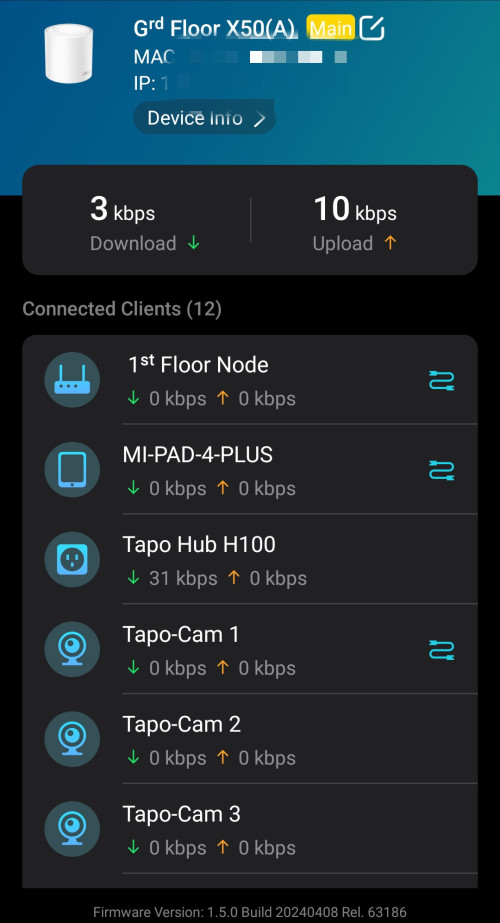
As for the fiberhome Sr1041y which is AX1800, i would suggest to keep it and remain it as a satellite node and if possible hard wire it, so that whatever device at home connects to it, you will still be able to see from your deco app, if you are using Decos, for Asus am not sure if the UI will be able to do so, but for sure can mesh.

Here's an example of my app showing me what devices is connected to my FiberHome SR1041F node when I backhaul it with ethernet.
user posted image

But if I use wireless backhaul, I can only see the fiberhome node, but not the devices.

So do consider also using ethernet cable as your option to wire backhaul to ground floor.

with a budget of 1k and selling off the m5s m4s, it shouldn't be a problem for you.

or you can instead choose to sell off the fiberhome and remain the m5 and m4, but you have mixed of wifi5 and 6 at home.

maybe remain the m5 or m4 at places that you do not need high speed at all times, just enough for basic functions like IoT.

triband, i dont really recommend unless you want to go full wireless backhaul, but your budget of 1k wouldn't be sufficient as you may need at least 3 or 4 nodes for it work.


Change to:
| Lo-Fi Version
0.0251sec    1.24    5 queries    GZIP Disabled
Time is now: 20th December 2025 - 02:20 PM