Outline ·
[ Standard ] ·
Linear+
how to install sandbox on my win 10 home?
|
1024kbps
|
 Mar 7 2024, 10:34 PM Mar 7 2024, 10:34 PM
|

|
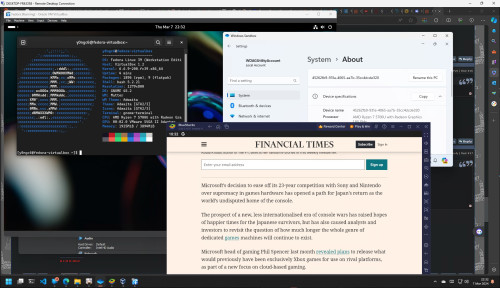
QUOTE(PRSXFENG @ Mar 7 2024, 04:39 PM) sandbox is quite literally a vm as well, it is a Microsoft Hyper-V VM and if you turn on sandbox you turn on Microsoft Hyper-V as well it may affect other software that use a vm like bluestacks or other vm software like virtualbox or vmware the benefits of sandbox would be it is faster to boot and is self resetting but a fully featured vm would allow you to save stuff Not entirely true as i can run 3 at the same time. Hyper-v enabled too » Click to show Spoiler - click again to hide... « |
|
|
|
|
|
TSplumberly
|
Mar 8 2024, 09:36 AM
|
|
|
QUOTE(PRSXFENG @ Mar 7 2024, 09:26 PM) you may use web scanners such as https://www.virustotal.com/gui/home/uploadhttps://metadefender.opswat.com/https://analyze.intezer.com/However, most of them have small file upload size limits and quite a few pieces of malware today intentionally make themselves be larger than those limits to avoid being uploaded to these scanners and what you likely want based on your question is https://app.any.run/a web sandbox that logs every single action the program has done but dont just blindly accept the MALICIOUS verdict at the end, some suspiscious activities will make it flag as malicious even if it isnt now again, unfortunately free tier is limited to windows 7 32bit, which a lot of software may refuse to run on and unfortunately, paid tiers for these services are usually VERY expensive as they expect you to be a malware analyst/researcher/professional, not a causal user checking a file Thanks, useful links! But some are for business emails only. |
|
|
|
|
|
TSplumberly
|
Mar 8 2024, 10:25 AM
|
|
|
By the way, a side issue.
Glad that I have upgraded to Win 11. Find it cleaner and easier to use than Win 10. The upgrade took 3 hrs but was smooth without any input from me. They used the settings in my Win 10.
Try it and see.
They relocated the shutdown button. So have to remember that.
By the way, can clean up a drive via Explorer - properties in Win 10. Now cannot. How now?
Thanks.
|
|
|
|
|
|
1024kbps
|
Mar 8 2024, 01:27 PM
|
|
|
QUOTE(plumberly @ Mar 8 2024, 10:25 AM) By the way, a side issue. Glad that I have upgraded to Win 11. Find it cleaner and easier to use than Win 10. The upgrade took 3 hrs but was smooth without any input from me. They used the settings in my Win 10. Try it and see. They relocated the shutdown button. So have to remember that. By the way, can clean up a drive via Explorer - properties in Win 10. Now cannot. How now? Thanks. you search for clean up the legacy clean up program will appear, or go to System > Storage, all the storage option are there |
|
|
|
|
|
TSplumberly
|
Mar 8 2024, 01:35 PM
|
|
|
QUOTE(1024kbps @ Mar 8 2024, 01:27 PM) you search for clean up the legacy clean up program will appear, or go to System > Storage, all the storage option are there Thanks. Will try that. |
|
|
|
|
|
PRSXFENG
|
Mar 8 2024, 05:04 PM
|
|
|
QUOTE(1024kbps @ Mar 7 2024, 10:34 PM) Not entirely true as i can run 3 at the same time. Hyper-v enabled too » Click to show Spoiler - click again to hide... « well I guess it's better now but back then bluestacks wanted me to uninstall and reinstall a made for hyper-v variant of bluestacks |
|
|
|
|
|
1024kbps
|
Mar 8 2024, 06:34 PM
|
|
|
QUOTE(PRSXFENG @ Mar 8 2024, 05:04 PM) well I guess it's better now but back then bluestacks wanted me to uninstall and reinstall a made for hyper-v variant of bluestacks yeah, back then it was real pain in the butt to use all of them together. Perhaps Bluestack finally fixed the issue, There's an Android Studio emulator too, but the stability was questionable, and the gigantic download size is not worth the problem unless you are an app developer |
|
|
|
|





 Quote
Quote


 0.0182sec
 0.55
0.55
 5 queries
 GZIP Disabled