Outline ·
[ Standard ] ·
Linear+
Ways to Automate restart router if internet down?
|
TScts0418
|
 Mar 3 2024, 05:41 PM, updated 2y ago Mar 3 2024, 05:41 PM, updated 2y ago
|
Getting Started


|
hi all, so recently I'm using 5g router and noticed that sometimes when idle for too long the internet will be down and the only way to solve it is restart the router, so just wondering is there any way to solve this except restarting the router myself? I looked into smart plug as well but seems like none of them can check for internet connection and restart the power, I'm not looking into custom router firmware as well, not sure is there any other way?
|
|
|
|
|
|
Chanwsan
|
Mar 3 2024, 05:42 PM
|
|
|
What lousy router is that?
|
|
|
|
|
|
TScts0418
|
Mar 3 2024, 05:45 PM
|
Getting Started
|
QUOTE(Chanwsan @ Mar 3 2024, 05:42 PM) What lousy router is that? tapo deco 5g, but don't really think this is related to the router, more like how the telco handle the connection, if I stay at home whole day using the internet this never happen |
|
|
|
|
|
RT8081
|
Mar 3 2024, 05:58 PM
|
|
|
QUOTE(cts0418 @ Mar 3 2024, 05:41 PM) hi all, so recently I'm using 5g router and noticed that sometimes when idle for too long the internet will be down and the only way to solve it is restart the router, so just wondering is there any way to solve this except restarting the router myself? I looked into smart plug as well but seems like none of them can check for internet connection and restart the power, I'm not looking into custom router firmware as well, not sure is there any other way? Asus has a setting where you can schedule to restart based on prefered time. I always set mine to restart at 3 am every day 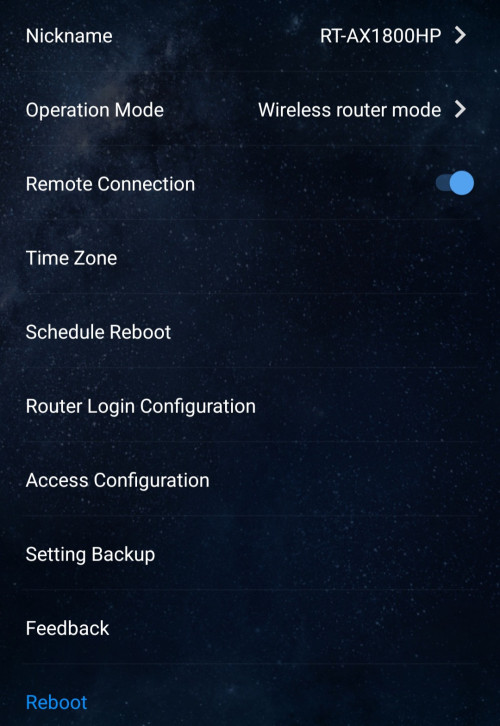 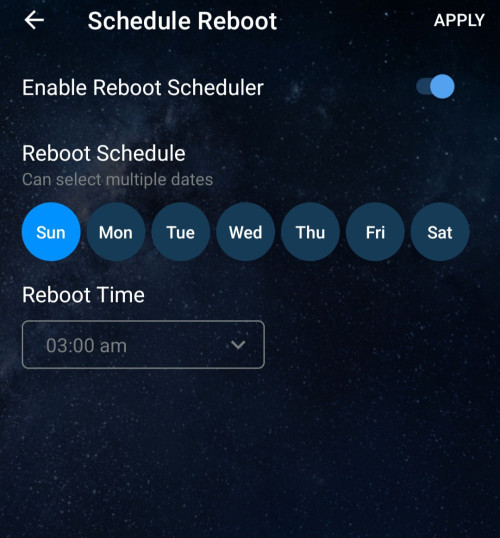 This post has been edited by RT8081: Mar 3 2024, 06:00 PM This post has been edited by RT8081: Mar 3 2024, 06:00 PM |
|
|
|
|
|
Satori 14118a
|
Mar 3 2024, 05:58 PM
|
|
|
If your router (gateway) kotak, there's no way to reach any other device on the network, much less to reboot your device remotely.
So get a better router.
|
|
|
|
|
|
acbc
|
Mar 3 2024, 06:01 PM
|
|
|
Use a timer switch.
Been using this Tesco-branded one for 15 years now. Just input the time and day and it will cycle the power for 30 seconds.
This post has been edited by acbc: Mar 3 2024, 06:03 PM
|
|
|
|
|
|
moiskyrie
|
Mar 3 2024, 06:02 PM
|
|
|
Like old time I use tplink repeater....
If ON too long and overheat....
The connection will die....
Need restart...
Same as unifi router....
I use fan under to cold it off...
As for you case,
Maybe some setting cause it as it may disconnected after some time no activity to save data....
|
|
|
|
|
|
TScts0418
|
Mar 3 2024, 06:30 PM
|
Getting Started
|
for restart, yes my router does have the option to restart at a set interval, I set it at midnight 4am now, but if lets say the internet is down at 8am in the morning, I have to wait long time until it restart and I will lost access to my cctv for quite some time. Just thinking is there any other tools that can help automate this or not, http://resetplug.com/ is the only one I found, but technically I believe any smart plug should be able to do this if they allowed us to do that kind of customization. |
|
|
|
|
|
RT8081
|
Mar 3 2024, 06:38 PM
|
|
|
QUOTE(cts0418 @ Mar 3 2024, 06:30 PM) for restart, yes my router does have the option to restart at a set interval, I set it at midnight 4am now, but if lets say the internet is down at 8am in the morning, I have to wait long time until it restart and I will lost access to my cctv for quite some time. Just thinking is there any other tools that can help automate this or not, http://resetplug.com/ is the only one I found, but technically I believe any smart plug should be able to do this if they allowed us to do that kind of customization. U can try this. QUOTE This 5GStore IP power switch automatically pings five different targets; when it is unable to do so, it will power-cycle any devices that are connected to its power source.
Ideal for both home and business networks, this IP power switch from 5GStore prevents connections from timing out or going dormant. This remote switch for outlets also allows you to create an automatic power schedule. Contact us if you have any questions about IP Power Switches and how these items can benefit your network continuity. https://www.amazon.com/dp/B0C6YCQ2ZV/ref=vp...0631630ad&psc=1Another similar device QUOTE Perfect for Smart Homes - Keep all of your Connected Devices (Home Security, Smart Thermostats, Door Locks, Leak Sensors, etc.) Online
Automatic Reboots - Constantly monitors internet connection 24/7/365 and issues reboots whenever failure is detected.
Scheduled Reboots - Use our Auto Reset feature to schedule reboots at a fixed interval to ensure fresh connections and router/modem software caches
SMS/Email Notifications - Enable SMS/Email Notifications to stay in the know with how Keep Connect is performing on your network
Simple, Yet Configurable - Our out-of-the-box configuration works great for most users. If you're a more advanced user or have a custom application, there are many user configurable settings to adjust nearly all aspects of operations from timing intervals, scheduled reboot periods, monitoring modes, etc.
Master/Follower Coordinated Reboots - You can coordinate multiple units to communicate and reboot together for applications where you would like to reboot a router and modem simultaneously while then bringing the modem back online before the router.
No App Needed - All setup and configuration is done without requiring an app. Just connect to Keep Connect's WiFi SSID (similar to connecting to airport/public WiFi) to trigger an auto-launch configuration page to get you up and running quickly.
Subscription Based Cloud Monitoring Available - Our Keep Connect Cloud Services Platform (sold separately) allows monitoring and control of many devices at different locations all from within one place. We offer an iOS/Android app and also a browser based web app. Our Keep Connect Cloud Services Platform will even monitor heartbeats from your Keep Connect units and send you notifications if any Keep Connect becomes unreachable due to an Internet Service Provider (ISP) outage or similar event. This post has been edited by RT8081: Mar 3 2024, 06:45 PM |
|
|
|
|
|
andrekua2
|
Mar 3 2024, 07:13 PM
|
|
|
Dismantle it and change the thermal pad...
Most likely thermal pad failed and caused overheating.
|
|
|
|
|
|
Skylinestar
|
Mar 4 2024, 07:59 AM
|
|
|
DDWRT based firmware normally have option to schedule ping to a website and restart if no connection.
It's sad that this feature is not common on typical router firmwares make by big companies.
|
|
|
|
|



 Quote
Quote








 0.0164sec
 0.62
0.62
 5 queries
 GZIP Disabled