Welcome Guest ( Log In | Register )

Outline · [ Standard ] · Linear+

Home Networking Network plans for my new home, Yay or Nay?

views
     
TSnles
post Mar 2 2024, 12:41 PM, updated 2y ago

♥ It's not about the girl ♥ It's the G-Shock
*******
Senior Member
2,125 posts

Joined: Jan 2003


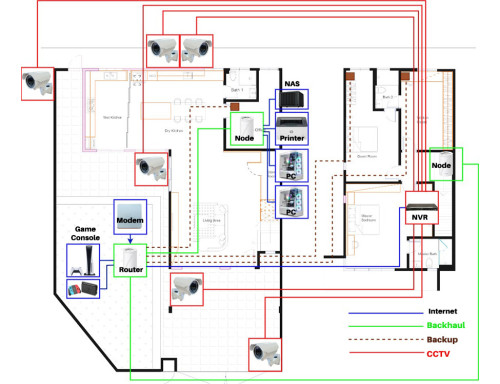
user posted image

Hi Sifus, what you think about my current network planning?

Some info and context:

1. Fiber port at TV console area, thought of moving under stair storeroom, cost about RM500-RM600 for relocating the fiber port.
2. 10G network doesn't seem to be value and worth it at the moment, 2.5G should be sufficient I guess although Asus GT-BE98 look sweet.
3. Ubiquiti with surveillance sounds like too much hassle.
4. Currently using Unifi 800Mbps.
5. Use for streaming and content creation.
6. Planning smart home as well.

Appreciate all sifus advices and comments.
Satori 14118a
post Mar 2 2024, 12:58 PM

Regular
******
Senior Member
1,006 posts

Joined: Sep 2014


wired logically ok.

you may want to review your wireless coverage and add AP accordingly.
acbc
post Mar 2 2024, 01:07 PM

Look at all my stars!!
*******
Senior Member
9,050 posts

Joined: Jan 2003
Ensure U put the finer cable inside a thick metal pipe to prevent thieves from cutting the cable and disable the internet at home. Nowadays thieves only need to cut the fiber cable outside the house to gain entry. Without the internet, security cameras and sensors unable to notify the owner.
lucaswjk
post Mar 2 2024, 01:30 PM

~im coming~
*******
Senior Member
3,817 posts

Joined: May 2008
From: The other side...
1. centralised all network equipment into single area.
modem, router, nvr, nas, etc etc
2. consider add conduit for cabling on ur ceiling and wall trunking for maintenanbility.
3. Use PoE for everything, CCTV, AP (dont use Mesh), door bell, auto gate, etc. U will need CAT6 23AWG.
4. For smarthome, add Neutral wiring to ALL ur wall switch.
5. Plan for power saving or go green...
Electric appliances, consider use inverter for everything.
Ceiling fan, air con, refrigerator, washing machine.
6. For landed, consider wiring grid for solar panel.
If u planned for EV car, start plan to tap the power directly there.

yenchenje
post Mar 2 2024, 01:52 PM

Enthusiast
*****
Junior Member
932 posts

Joined: Dec 2019
Just my two cents

1) Don't use mesh as switches, use proper switching gear (2.5GBe from China quite cheap if you want to get into those)
2) Putting main fibre at TV console might be fine for now, but if you want to expand in the future, it might get really cramped if you decide to extend your network in the future. Consider dedicating a spot (Storeroom, small part of porch, any other space for a small 6U-18U rack) - (Unifi rack if you have the budget, if not just buy any other floor server rack with wheels)
3) IF it's a multi-story house, maybe consider a centralized point in each floor to where your main network gear is going to be at first floor
4) Cameras coverage looks fine but some spots might be redundant, if you need advice I can probably offer some via DM
5) Consider using BE550 (If you NEED 2.5G, if not go like AX72 or smth) + EAP650/EAP653 (BE550 - Switch w/ PoE - EAP), run the Omada controller on your NAS via Docker, ASUS is good but I don't think they offer any ceiling mount APs locally

My current setup is as below:

Server rack (24U floor)
Patch Panel 24 Port
1GB 16 Port unmanaged PoE Switch from China powering all GBe equipment
Patch Panel 24 Port
8 Port 10GBe L2 (Iirc) Switch from China powering all equipment higher than GBe (2.5G + 10G)
Rack Tray (Housing Unifi Cloud Key Gen 2 Plus as NVR+ DPN-FX3060V as ATA)
2U Server Chassis running OPNSense (With GPON ONU SFP+ as PPPoE/fiber in + 10GB RJ45 transceiver to 10GBe switch as uplink)
Empty till bottom
4U 24 bay server chassis running Proxmox with NAS+Game servers

All my cables (Schneider Cat6 Actassi) goes and terminate into my store room
TSnles
post Mar 2 2024, 03:35 PM

♥ It's not about the girl ♥ It's the G-Shock
*******
Senior Member
2,125 posts

Joined: Jan 2003


QUOTE(Satori 14118a @ Mar 2 2024, 12:58 PM)
wired logically ok.

you may want to review your wireless coverage and add AP accordingly.
*
Most of my neighbours only use 1 ground floor and another 1st floor, I plan extra ethernet cable to each room for backups.

QUOTE(acbc @ Mar 2 2024, 01:07 PM)
Ensure U put the finer cable inside a thick metal pipe to prevent thieves from cutting the cable and disable the internet at home. Nowadays thieves only need to cut the fiber cable outside the house to gain entry. Without the internet, security cameras and sensors unable to notify the owner.
*
Right now the original fiber cable is underground, not exposed. If I relocate then need to put inside pipe.

QUOTE(lucaswjk @ Mar 2 2024, 01:30 PM)
1. centralised all network equipment into single area.
modem, router, nvr, nas, etc etc
2. consider add conduit for cabling on ur ceiling and wall trunking for maintenanbility.
3. Use PoE for everything, CCTV, AP (dont use Mesh), door bell, auto gate, etc. U will need CAT6 23AWG.
4. For smarthome, add Neutral wiring to ALL ur wall switch.
5. Plan for power saving or go green...
Electric appliances, consider use inverter for everything.
Ceiling fan, air con, refrigerator, washing machine.
6. For landed, consider wiring grid for solar panel.
If u planned for EV car, start plan to tap the power directly there.
*
1. Ideally yes, everything at store room with a server rack but cost is a concern.
2. Add conduit and wall trunking, still not easy to replace faulty cable right? that's why I plan extra cable for important area.
3. CCTV planned for POE. Will explore TP link omada or unifi product but it all also boiled down to cost.
4. Yeap, discussing with my electrician, neutral wire also need to pull from the correct spot if not mistaken.
5. refrigerator yes, aircon mix.
6. Hmm right now didn't plan for solar panel, advice from other is that because only 2 of us staying, it will take too long for ROI.


QUOTE(yenchenje @ Mar 2 2024, 01:52 PM)
Just my two cents

1) Don't use mesh as switches, use proper switching gear (2.5GBe from China quite cheap if you want to get into those)
2) Putting main fibre at TV console might be fine for now, but if you want to expand in the future, it might get really cramped if you decide to extend your network in the future. Consider dedicating a spot (Storeroom, small part of porch, any other space for a small 6U-18U rack) - (Unifi rack if you have the budget, if not just buy any other floor server rack with wheels)
3) IF it's a multi-story house, maybe consider a centralized point in each floor to where your main network gear is going to be at first floor
4) Cameras coverage looks fine but some spots might be redundant, if you need advice I can probably offer some via DM
5) Consider using BE550 (If you NEED 2.5G, if not go like AX72 or smth) + EAP650/EAP653 (BE550 - Switch w/ PoE - EAP), run the Omada controller on your NAS via Docker, ASUS is good but I don't think they offer any ceiling mount APs locally

My current setup is as below:

Server rack (24U floor)
Patch Panel 24 Port
1GB 16 Port unmanaged PoE Switch from China powering all GBe equipment
Patch Panel 24 Port
8 Port 10GBe L2 (Iirc) Switch from China powering all equipment higher than GBe (2.5G + 10G)
Rack Tray (Housing Unifi Cloud Key Gen 2 Plus as NVR+ DPN-FX3060V as ATA)
2U Server Chassis running OPNSense (With GPON ONU SFP+ as PPPoE/fiber in + 10GB RJ45 transceiver to 10GBe switch as uplink)
Empty till bottom
4U 24 bay server chassis running Proxmox with NAS+Game servers

All my cables (Schneider Cat6 Actassi) goes and terminate into my store room
*
1. I research on unifi product, but quite costly.
2. Same, that's why I mentioned about relocating cost. Also the procedure, I asked both my electrician and tm contractor. TM say can ask my electrician to lay the piping, then TM can pull from the manhole and depends exposed fiber or concealed fiber the price may vary. Exposed fiber starting from RM500 to relocate.
3. Centralized as in, if I put network gear below stairs, and above stairs on 1st floor?
4. Camera coverage for now I simply plot only.
5. If I use BE550 as my main, then EAP650 as AP. So BE550 to switch and from switch will split to AP and 2 more switches, 1 at tv console and another at home office to support all the other devices?

Obviously if cost isn't a concern, sure can done it nicely, better yet if cost no issue just hire professional to do laugh.gif I'm thinking if I can do everything +-RM5000 for the network alone. As I know the electrician charge RM100 for each cable, not yet negotiate.
If I buy my own cable, terminate myself just ask him to lay the cable put the conduit and wall trunking wonder how much.

This post has been edited by nles: Mar 2 2024, 03:35 PM

yenchenje
post Mar 3 2024, 03:54 PM

Enthusiast
*****
Junior Member
932 posts

Joined: Dec 2019
QUOTE(nles @ Mar 2 2024, 03:35 PM)
1. I research on unifi product, but quite costly.
2. Same, that's why I mentioned about relocating cost. Also the procedure, I asked both my electrician and tm contractor. TM say can ask my electrician to lay the piping, then TM can pull from the manhole and depends exposed fiber or concealed fiber the price may vary. Exposed fiber starting from RM500 to relocate.
3. Centralized as in, if I put network gear below stairs, and above stairs on 1st floor?
4. Camera coverage for now I simply plot only.
5. If I use BE550 as my main, then EAP650 as AP. So BE550 to switch and from switch will split to AP and 2 more switches, 1 at tv console and another at home office to support all the other devices?

Obviously if cost isn't a concern, sure can done it nicely, better yet if cost no issue just hire professional to do laugh.gif  I'm thinking if I can do everything +-RM5000 for the network alone. As I know the electrician charge RM100 for each cable, not yet negotiate.
If I buy my own cable, terminate myself just ask him to lay the cable put the conduit and wall trunking wonder how much.
*
Yep, unless you have the long term budget to commit to their ecosystem, don't

Actually iirc you can get reno contractor to run fiber, and TM can come and terminate from outdoor to indoor. That's how mine was done, the fiber was layed by reno con and TM just come and connect it to their own.

Basically don't use switches if possible and just put it all to one location instead of separating it. And doing it right below and above can also save cost to run the cables.

thumbup.gif

Looks about right, you can consider using one 5 port or 8 port 2.5G PoE switch as your core switch, connect it to both/three of your APs. Extra ports to connect to any downstream switches or direct connection at your rack/centralized location. If you don't plan to do any management stuff on your network and just PnP, can be done for quite cheap. I got a 2.5G PoE switch for about RM220 shipped, and it's managed by default.
QuantumEdge
post Mar 3 2024, 06:56 PM

Regular
******
Senior Member
1,602 posts

Joined: Jan 2016


QUOTE(yenchenje @ Mar 3 2024, 03:54 PM)
Yep, unless you have the long term budget to commit to their ecosystem, don't

Actually iirc you can get reno contractor to run fiber, and TM can come and terminate from outdoor to indoor. That's how mine was done, the fiber was layed by reno con and TM just come and connect it to their own.

Basically don't use switches if possible and just put it all to one location instead of separating it. And doing it right below and above can also save cost to run the cables.

thumbup.gif

Looks about right, you can consider using one 5 port or 8 port 2.5G PoE switch as your core switch, connect it to both/three of your APs. Extra ports to connect to any downstream switches or direct connection at your rack/centralized location. If you don't plan to do any management stuff on your network and just PnP, can be done for quite cheap. I got a 2.5G PoE switch for about RM220 shipped, and it's managed by default.
*
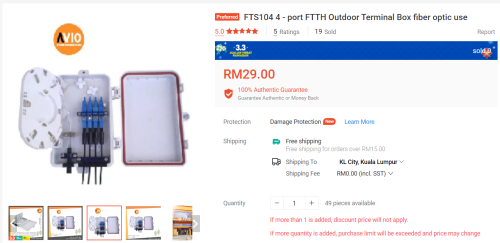
Or he can be a bit crazy like me, I got an outdoor fiber termination box outside for the fiber coming from DP
That fiber connected to an adapter, and then another cable that comes into the house through celling and wall into the single port wall socket behind the TV
In the future no need to cut the cable when changing ISP/moving socket brows.gif

user posted image
TSnles
post Mar 4 2024, 12:24 AM

♥ It's not about the girl ♥ It's the G-Shock
*******
Senior Member
2,125 posts

Joined: Jan 2003


QUOTE(yenchenje @ Mar 3 2024, 03:54 PM)
Yep, unless you have the long term budget to commit to their ecosystem, don't

Actually iirc you can get reno contractor to run fiber, and TM can come and terminate from outdoor to indoor. That's how mine was done, the fiber was layed by reno con and TM just come and connect it to their own.

Basically don't use switches if possible and just put it all to one location instead of separating it. And doing it right below and above can also save cost to run the cables.

thumbup.gif

Looks about right, you can consider using one 5 port or 8 port 2.5G PoE switch as your core switch, connect it to both/three of your APs. Extra ports to connect to any downstream switches or direct connection at your rack/centralized location. If you don't plan to do any management stuff on your network and just PnP, can be done for quite cheap. I got a 2.5G PoE switch for about RM220 shipped, and it's managed by default.
*
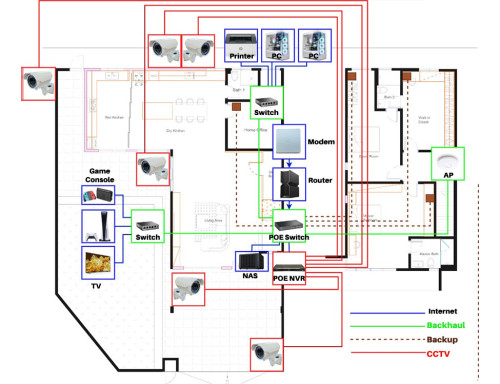
user posted image

How bout this, not really clear on the picture, place Modem/router/poe switch/nvr/nas in store room. Actually if my office have a few devices, should I just lay 4 ethernet cable to there, and 4 ethernet cable to the tv console area instead of using another switch there?

QUOTE(QuantumEdge @ Mar 3 2024, 06:56 PM)
Or he can be a bit crazy like me, I got an outdoor fiber termination box outside for the fiber coming from DP
That fiber connected to an adapter, and then another cable that comes into the house through celling and wall into the single port wall socket behind the TV
In the future no need to cut the cable when changing ISP/moving socket brows.gif

user posted image
*
My fiber box currently looks like the one you showed, I haven't open it up, right now it's at my kitchen area. From there they connect to the TV console area, I think.
So If I want to centralized everything in my storeroom, will connect from this box at my kitchen area to the storeroom.

Tomorrow will discuss the M&E plan with my ID.

This post has been edited by nles: Mar 4 2024, 12:26 AM
niakulah
post Mar 4 2024, 09:24 AM

Senior Artisan
******
Senior Member
1,277 posts

Joined: Jun 2012
QUOTE(nles @ Mar 4 2024, 12:24 AM)
» Click to show Spoiler - click again to hide... «
This one looks better than the first IMO, but a single AP at the side is not good enough.

Try to imagine WiFi as a sound system. If you want full floor coverage and a pleasant sound, you want more speakers, not louder speakers. So for something this size, you would want at least 3 decent speakers/APs. 4 or 5 even better. You can add them on later, just have the cabling ready.

LAN speed-wise, the equipment is easily changed later if you find 1Gb not good enough. Just make sure your cabling supports 10Gb and you should be good for the foreseeable future. I would personally go for CAT6A. Pull more than you need if your budget permits, (e.g. 2 ports/cables per location).
yenchenje
post Mar 4 2024, 10:40 AM

Enthusiast
*****
Junior Member
932 posts

Joined: Dec 2019
QUOTE(QuantumEdge @ Mar 3 2024, 06:56 PM)
Or he can be a bit crazy like me, I got an outdoor fiber termination box outside for the fiber coming from DP
That fiber connected to an adapter, and then another cable that comes into the house through celling and wall into the single port wall socket behind the TV
In the future no need to cut the cable when changing ISP/moving socket brows.gif

user posted image
*
Good idea for this. But unless he wants to switch ISP in the future, might be a bit redundant tbh

QUOTE(nles @ Mar 4 2024, 12:24 AM)
user posted image

How bout this, not really clear on the picture, place Modem/router/poe switch/nvr/nas in store room. Actually if my office have a few devices, should I just lay 4 ethernet cable to there, and 4 ethernet cable to the tv console area instead of using another switch there?
*
Okay, if you have more than 2 devices at a place realistically, use a switch

If you want to save on some cabling, look into just getting USW Flex Minis (Can skip using management functions) for those, and power it via PoE if you don’t need anything beyond 2.5G to save on needing power plugs nearby.
OlgaC4
post Mar 4 2024, 11:06 AM

Look at all my stars!!
*******
Senior Member
5,296 posts

Joined: Nov 2006
Waste a lot of resources. TS got to much money. Too many switch. Better just direct all ethernet cable from the Router as you need.
Too many Poe Nvr camera. Use stand alone camera. Switch on and off at the door entrance. Those with big loud siren for 10min cut off. 4g backup when they cut your fiber outside.
OlgaC4
post Mar 4 2024, 11:17 AM

Look at all my stars!!
*******
Senior Member
5,296 posts

Joined: Nov 2006
Find a good signal spot for 4g or 5g modem for back up. Main died then you can use then. Check the tower direction for maximum signal.

This post has been edited by OlgaC4: Mar 4 2024, 11:19 AM
OlgaC4
post Mar 4 2024, 11:27 AM

Look at all my stars!!
*******
Senior Member
5,296 posts

Joined: Nov 2006
Additional tips.

Outside water filter.
Drinking water tube cabling.
Water tank pump cut off power. tp link smart plug.
Smart door bell.
Place to receive big parcel.
Baby area and stuff. where to place water for making milk and changing diaper
Water inflow to shower kitchen washing machine direct and to other place from the tank. Best to install water filter.
If no water still can shower just have to improvise.

This post has been edited by OlgaC4: Mar 4 2024, 11:43 AM
OlgaC4
post Mar 4 2024, 11:51 AM

Look at all my stars!!
*******
Senior Member
5,296 posts

Joined: Nov 2006
Asus is just overrated. Tp link value for money. Pakai buang 2-3 years max

This post has been edited by OlgaC4: Mar 4 2024, 11:51 AM
PRSXFENG
post Mar 4 2024, 04:26 PM

Look at all my stars!!
*******
Senior Member
2,615 posts

Joined: Nov 2020


QUOTE(OlgaC4 @ Mar 4 2024, 11:51 AM)
Asus is just overrated. Tp link value for money. Pakai buang 2-3 years max
*
their products are certainly at a premium but asuswrt is far more powerful than tplink ui, especially if the device supports asuswrt-merlin

plus, asus supports their products for far longer than tplink, the ol RT-AC68U is nearing a decade old and is still going strong (though it is ending soon)

Meanwhile something like the tplink ax20 or ax50 is already eol

(with that said, Asus has also eol-ed the ax56u and ax92u which is odd since it got a very short life compared to other asus routers)
blacktubi
post Mar 4 2024, 10:56 PM

-
Group Icon
Elite
8,421 posts

Joined: Jul 2008

1- Buy good LAN cable
2- Hikvision / Dahua > Ubiquiti, even TP-Link VIGI is pretty good
3- Buy those NVR with built-in PoE switch, dont put CCTV into your normal switch
4- Ask contractor to trunk LAN cable separately, don't mix them with power cable. High voltage and low voltage shouldn't mix. The last thing you want is a wire torn somewhere sending 240V to your Ethernet jack.
5- Dont mix and match brand / product series for your WiFi access solution, stick to a brand if you want your roaming to work seamlessly


This post has been edited by blacktubi: Mar 4 2024, 11:00 PM
TSnles
post Mar 5 2024, 12:37 AM

♥ It's not about the girl ♥ It's the G-Shock
*******
Senior Member
2,125 posts

Joined: Jan 2003


QUOTE(niakulah @ Mar 4 2024, 09:24 AM)
This one looks better than the first IMO, but a single AP at the side is not good enough.

Try to imagine WiFi as a sound system. If you want full floor coverage and a pleasant sound, you want more speakers, not louder speakers. So for something this size, you would want at least 3 decent speakers/APs. 4 or 5 even better. You can add them on later, just have the cabling ready.

LAN speed-wise, the equipment is easily changed later if you find 1Gb not good enough. Just make sure your cabling supports 10Gb and you should be good for the foreseeable future. I would personally go for CAT6A. Pull more than you need if your budget permits, (e.g. 2 ports/cables per location).
*
Yeah, don't want to overdo first because right now my main area of activity is still living/office/master room. The other room upstairs I just lay cable first if coverage is not good then will add AP. My electrician is from my ID, so you can imagine price of pulling one cable ain't that cheap rclxub.gif

QUOTE(yenchenje @ Mar 4 2024, 10:40 AM)
Good idea for this. But unless he wants to switch ISP in the future, might be a bit redundant tbh
Okay, if you have more than 2 devices at a place realistically, use a switch

If you want to save on some cabling, look into just getting USW Flex Minis (Can skip using management functions) for those, and power it via PoE if you don’t need anything beyond 2.5G to save on needing power plugs nearby.
*
I think right now a better option is to make the home office as the centralized network.


QUOTE(OlgaC4 @ Mar 4 2024, 11:06 AM)
Waste a lot of resources. TS got to much money. Too many switch. Better just direct all ethernet cable from the Router as you need.
Too many  Poe Nvr camera. Use stand alone camera. Switch on and off at the door entrance. Those with big loud siren for 10min cut off. 4g backup when they cut your fiber outside.
*
Hmm, if too much money I won't ask here I just let network specialist kaw tim all lol.
Direct all ethernet cable from the router, my electrician also calculate by each cable. Stand alone camera I also need to lay power source.

QUOTE(OlgaC4 @ Mar 4 2024, 11:17 AM)
Find a good signal spot for 4g or 5g modem for back up. Main died then you can use then. Check the tower direction for maximum signal.
*
My area has bad mobile coverage, new area maybe will improve in the future but right now signal is bad.

QUOTE(OlgaC4 @ Mar 4 2024, 11:27 AM)
Additional tips.

Outside water filter.
Drinking water tube cabling.
Water tank pump cut off power. tp link smart plug.
Smart door bell.
Place to receive big parcel.
Baby area and stuff. where to place water for making milk and changing diaper
Water inflow to shower kitchen washing machine direct and to other place from the tank. Best to install water filter.
If no water still can shower just have to improvise.
*
Everything you mentioned planned except 2 things.
Baby area and place to receive big parcel. I saw australia has those parcel box very nice. Shopee has some parcel box for sale as well.

QUOTE(OlgaC4 @ Mar 4 2024, 11:51 AM)
Asus is just overrated. Tp link value for money. Pakai buang 2-3 years max
*
I used both tplink and asus before, so far both is ok.

QUOTE(PRSXFENG @ Mar 4 2024, 04:26 PM)
their products are certainly at a premium but asuswrt is far more powerful than tplink ui, especially if the device supports asuswrt-merlin

plus, asus supports their products for far longer than tplink, the ol RT-AC68U is nearing a decade old and is still going strong (though it is ending soon)

Meanwhile something like the tplink ax20 or ax50 is already eol

(with that said, Asus has also eol-ed the ax56u and ax92u which is odd since it got a very short life compared to other asus routers)
*
I used to have asus at my shop, now using tplink archer at home.

QUOTE(blacktubi @ Mar 4 2024, 10:56 PM)
1- Buy good LAN cable
2- Hikvision / Dahua > Ubiquiti, even TP-Link VIGI is pretty good
3- Buy those NVR with built-in PoE switch, dont put CCTV into your normal switch
4- Ask contractor to trunk LAN cable separately, don't mix them with power cable. High voltage and low voltage shouldn't mix. The last thing you want is a wire torn somewhere sending 240V to your Ethernet jack.
5- Dont mix and match brand / product series for your WiFi access solution, stick to a brand if you want your roaming to work seamlessly
*
1. Belden/Schneider
2. Hikvision/Dahua flooded the market, it's going to be either one.
3. Definitely
4. Noted, thanks for this input.
5. So now is either Asus or TP-Link, Ubiquiti I think a little overkill and costly.
wong_86
post Mar 5 2024, 09:53 AM

DUDE
****
Junior Member
565 posts

Joined: Oct 2007
From: MARS


Centralize all in one place ( small server room) , home network should be as simple as possible, once something fail, can easy to fix.
stick in one brand, seamless connectivity.

This post has been edited by wong_86: Mar 5 2024, 09:55 AM
yenchenje
post Mar 5 2024, 09:58 AM

Enthusiast
*****
Junior Member
932 posts

Joined: Dec 2019
QUOTE(nles @ Mar 5 2024, 12:37 AM)
I think right now a better option is to make the home office as the centralized network.
*
If you have the space then go for it. For now I can foresee only these equipment being in there from your plan

Router & ONU from TM/Time/whichever ISP you decide to use
NVR
8/16 Port GBe/2.5G PoE Switch
Patch Panel (Maybe?) or just direct connection without going through patch panel

That’s basically it and it’s probably only going to take up like 4-6U at most

2 Pages  1 2 >Top
 

Change to:
| Lo-Fi Version
0.0204sec    0.20    5 queries    GZIP Disabled
Time is now: 21st December 2025 - 06:51 PM