Welcome Guest ( Log In | Register )

Outline · [ Standard ] · Linear+

 xiaomi AX3000 help needed, Nodes only connect to main router

views
     
TSalpha33
post Feb 26 2024, 11:49 AM, updated 2y ago

Regular
******
Senior Member
1,010 posts

Joined: Apr 2005


Hello ppl.
Any xiaomi AX3000 mesh users here?I need some help and google is not helping much.

Added a new satellite to my current 2-pack AX3000 mesh system.
The newly added satellite does not connect to the nearest node, instead its connecting to the main node which is further upstairs, resulting in bad signal.

Is there any workaround for this?Lan cable method will not work for me in this situation due to the massive job needed.

or the other solution is to change to another Mesh system instead?

Thanks in advance!


*seems everyone is having this problem, and also guest network only works on main node instead of all nodes.
marcus_bread
post Feb 26 2024, 12:00 PM

On my way
****
Junior Member
506 posts

Joined: May 2010
im not any expert in this. but i do use Xiaomi AX3200 and considering to add AX3000 in the mesh system.
in ur situation am i right that u ady using xiaomi router as main router n now add on 2 AX3000 as mesh into the wifi system? but one of AX3000 not connecting to the nearest AX3000 but instead must connect to the main router?
SUSifourtos
post Feb 26 2024, 12:07 PM

Look at all my stars!!
*******
Senior Member
2,256 posts

Joined: Feb 2012


Not using Xiaomi AX

but this is not how MESH work ( should work )


MESH is auto
TSalpha33
post Feb 26 2024, 12:19 PM

Regular
******
Senior Member
1,010 posts

Joined: Apr 2005


QUOTE(marcus_bread @ Feb 26 2024, 12:00 PM)
im not any expert in this. but i do use Xiaomi AX3200 and considering to add AX3000 in the mesh system.
in ur situation am i right that u ady using xiaomi router as main router n now add on 2 AX3000 as mesh into the wifi system? but one of AX3000 not connecting to the nearest AX3000 but instead must connect to the main router?
*
no. I bought the two pack xiaomi mesh AX3000(Lets name node 1 primary, node 2 secondary) and connect to the main router of my internet via lan.
everything works fine this way since i did not notice any issue with it.

then i bought a single pack node(node 3), and connect it to the mesh system. placed it in a room which is far away from main node 1.
and from here i noticed, the node 3 is not connecting to node 2(which is nearer), but connecting to node 1 instead. end up low signal at node 3.

My advice if you plan to add AX3000 to your current router, i think you might want to reconsider. The guest network (if u use it) will not be available on all nodes. Its only available on node 1.
If there is no solution available for my case, i think i will have to change to another brand.
TSalpha33
post Feb 26 2024, 12:20 PM

Regular
******
Senior Member
1,010 posts

Joined: Apr 2005


QUOTE(ifourtos @ Feb 26 2024, 12:07 PM)
Not using Xiaomi AX

but this is not how MESH work ( should work )
MESH is auto
*
thats what i thought too when i first got the mesh.
even when yesterday when i bought this node, the seller also says it will connect to the nearest node. but it didnt.
marcus_bread
post Feb 27 2024, 11:54 AM

On my way
****
Junior Member
506 posts

Joined: May 2010
QUOTE(alpha33 @ Feb 26 2024, 12:19 PM)
no. I bought the two pack xiaomi mesh AX3000(Lets name node 1 primary, node 2 secondary) and connect to the main router of my internet via lan.
everything works fine this way since i did not notice any issue with it.

then i bought a single pack node(node 3), and connect it to the mesh system. placed it in a room which is far away from main node 1.
and from here i noticed, the node 3 is not connecting to node 2(which is nearer), but connecting to node 1 instead. end up low signal at node 3.

My advice if you plan to add AX3000 to your current router, i think you might want to reconsider. The guest network (if u use it) will not be available on all nodes. Its only available on node 1.
If there is no solution available for my case, i think i will have to change to another brand.
*
what brand of main router u using. if ur xiaomi AX3000 is global version, u may do away with the main router (assuming non-xiaomi router). as im using xiaomi AX3200 as my main router, but i don have mesh yet (just planning to get 1 only as my house is not super big)
4WD_er
post Feb 27 2024, 12:25 PM

On my way
****
Junior Member
572 posts

Joined: Aug 2018


QUOTE(marcus_bread @ Feb 26 2024, 12:00 PM)
im not any expert in this. but i do use Xiaomi AX3200 and considering to add AX3000 in the mesh system.
in ur situation am i right that u ady using xiaomi router as main router n now add on 2 AX3000 as mesh into the wifi system? but one of AX3000 not connecting to the nearest AX3000 but instead must connect to the main router?
*
Hi bro, I am currently using Xiaomi AX1800 router which connects to my 5G router right now. Thought of adding a Xiaomi AX3200 soon, is the AX3200 router good ?

The current AX1800 has a weak rannge / reach, surprisingly.
TSalpha33
post Feb 27 2024, 02:22 PM

Regular
******
Senior Member
1,010 posts

Joined: Apr 2005


QUOTE(marcus_bread @ Feb 27 2024, 11:54 AM)
what brand of main router u using. if ur xiaomi AX3000 is global version, u may do away with the main router (assuming non-xiaomi router). as im using xiaomi AX3200 as my main router, but i don have mesh yet (just planning to get 1 only as my house is not super big)
*
main router is Asus rt18u something which is not set to transmit wifi.
previously wifi was through another router, then now upgraded to the mesh AX3000.
so all wifi are handled by the AX3000.


Omochao
post Feb 29 2024, 05:54 PM

Enthusiast
*****
Junior Member
835 posts

Joined: Nov 2007
From: Land of Forgotten
QUOTE(alpha33 @ Feb 27 2024, 02:22 PM)
main router is Asus rt18u something which is not set to transmit wifi.
previously wifi was through another router, then now upgraded to the mesh AX3000.
so all wifi are handled by the AX3000.
*
tried to google for you but it seems a few of them also suffering this issue, the only forum that say he manage to solve it but did not mention, and that was from a forum mainly on xiaomi OS firmwares.
TSalpha33
post Feb 29 2024, 07:44 PM

Regular
******
Senior Member
1,010 posts

Joined: Apr 2005


QUOTE(Omochao @ Feb 29 2024, 05:54 PM)
tried to google for you but it seems a few of them also suffering this issue, the only forum that say he manage to solve it but did not mention, and that was from a forum mainly on xiaomi OS firmwares.
*
yea, i found this too.
i suspect he connected a lan cable between the two secondary nodes.
Omochao
post Feb 29 2024, 08:05 PM

Enthusiast
*****
Junior Member
835 posts

Joined: Nov 2007
From: Land of Forgotten
QUOTE(alpha33 @ Feb 29 2024, 07:44 PM)
yea, i found this too.
i suspect he connected a lan cable between the two secondary nodes.
*
As i see on youtube, there aren't many options that you can play with, I do not own this mesh, so I can't say whether is a firmware related or settings issues.

Maybe you can either try to update the firmware or play around with beamforming or fast roaming options?
marcus_bread
post Mar 1 2024, 08:34 PM

On my way
****
Junior Member
506 posts

Joined: May 2010
QUOTE(4WD_er @ Feb 27 2024, 12:25 PM)
Hi bro, I am currently using Xiaomi AX1800 router which connects to my 5G router right now.  Thought of adding a Xiaomi AX3200 soon, is the AX3200 router good ?

The current AX1800 has a weak rannge / reach, surprisingly.
*
so far as router it is still ok. but coverage is only good for condominium size house. if landed then need mesh it but i have no idea how good is there mesh.

goolias
post Mar 5 2024, 09:43 PM

Casual
***
Junior Member
321 posts

Joined: Jan 2003
HI,

Can you share how you connect the AX3000 main node and slave node?

1. Router mode?

ISP BTU->AX3000 router mode->wireless->AX3000 slave node 1
>wireless-> AX3000 salve node 2

2. AP mode?
ISP BTU->ISP router->AX3000 ap mode->wireless->AX3000 slave node 1
->wireless-> AX3000 slave node 2

This post has been edited by goolias: Mar 5 2024, 09:43 PM
TSalpha33
post Mar 6 2024, 03:22 PM

Regular
******
Senior Member
1,010 posts

Joined: Apr 2005


QUOTE(goolias @ Mar 5 2024, 09:43 PM)
HI,

Can you share how you connect the AX3000 main node and slave node?

1. Router mode?

ISP BTU->AX3000 router mode->wireless->AX3000 slave node 1
                                              >wireless-> AX3000 salve node 2

2. AP mode?
ISP BTU->ISP router->AX3000 ap mode->wireless->AX3000 slave node 1
                                                          ->wireless-> AX3000 slave node 2
*
yes, step 1, router mode.
both nodes connect back to AX3000 wireless.

goolias
post Mar 6 2024, 10:59 PM

Casual
***
Junior Member
321 posts

Joined: Jan 2003
QUOTE(alpha33 @ Mar 6 2024, 03:22 PM)
yes, step 1, router mode.
both nodes connect back to AX3000 wireless.
*
Did you try ap mode before?
iinm, in router mode all slave nodes need to link master node in order to have routing and NAT functions.
TSalpha33
post Mar 7 2024, 07:29 AM

Regular
******
Senior Member
1,010 posts

Joined: Apr 2005


QUOTE(goolias @ Mar 6 2024, 10:59 PM)
Did you try ap mode before?
iinm, in router mode all slave nodes need to link master node in order to have routing and NAT functions.
*
i am not sure about the function.
since it just run as it is out from the box and with the app pairing.
will try to research into this and see.

maybe will need to go mi service center for their help on this.
goolias
post Mar 7 2024, 08:24 AM

Casual
***
Junior Member
321 posts

Joined: Jan 2003
QUOTE(alpha33 @ Mar 7 2024, 07:29 AM)
i am not sure about the function.
since it just run as it is out from the box and with the app pairing.
will try to research into this and see.

maybe will need to go mi service center for their help on this.
*
Hi, you should be able to change the operation mode in mi apps.


TSalpha33
post Mar 7 2024, 04:23 PM

Regular
******
Senior Member
1,010 posts

Joined: Apr 2005


QUOTE(Omochao @ Feb 29 2024, 05:54 PM)
tried to google for you but it seems a few of them also suffering this issue, the only forum that say he manage to solve it but did not mention, and that was from a forum mainly on xiaomi OS firmwares.
*
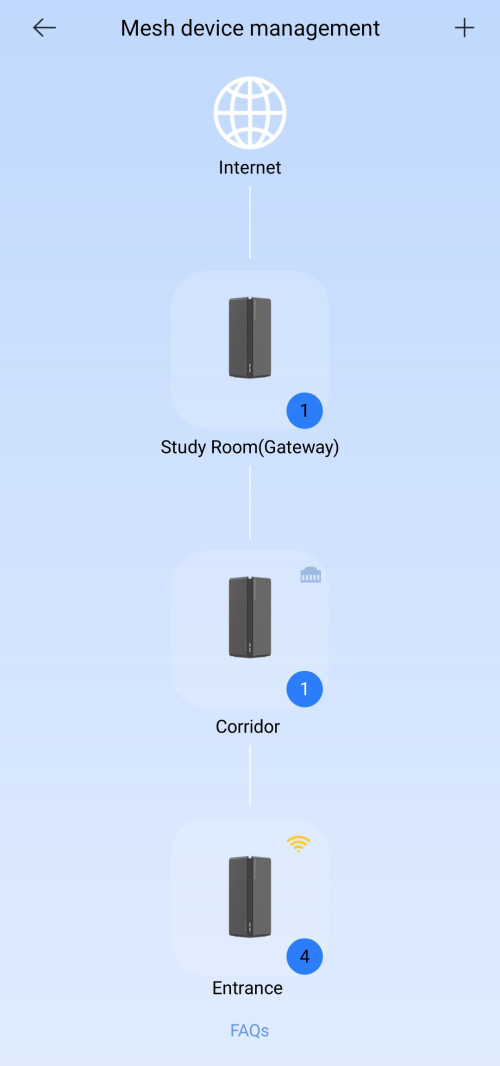
user posted image

after looking at this picture again.
judging from the home/lan socket icon at his corridor node, i think he indeed connected his corridor node with a LAN cable to his gateway.
and the entrance node connected via wireless to corridor node..

thats how he got it to work.

In my case, LAN cable is not possible. my only solution is to save up for a new mesh system to replace this MI mesh.


thanks for all the inputs!

This post has been edited by alpha33: Mar 7 2024, 04:24 PM
Omochao
post Mar 7 2024, 05:21 PM

Enthusiast
*****
Junior Member
835 posts

Joined: Nov 2007
From: Land of Forgotten
QUOTE(alpha33 @ Mar 7 2024, 04:23 PM)
user posted image

after looking at this picture again.
judging from the home/lan socket icon at his corridor node, i think he indeed connected his corridor node with a LAN cable to his gateway.
and the entrance node connected via wireless to corridor node..

thats how he got it to work.

In my case, LAN cable is not possible. my only solution is to save up for a new mesh system to replace this MI mesh.
thanks for all the inputs!
*
Truth to be told, there is no other brands comparable to Tp-Link or Asus at the moment, not trying to be fanboi for them ,but huawei mesh, xiaomi mesh, best leave it, not much reviews or even guidelines online. Very troublesome when you facing minor issues like this as there will not be any guidelines or even user sharing input on how to get around for it.
4WD_er
post Mar 13 2024, 12:15 PM

On my way
****
Junior Member
572 posts

Joined: Aug 2018


Haiz.... I went and bought one of this AX3000 router.

After set up I let the firmware be automatically updated, and once that happened, it no longer broadcast 5Ghz ssid. Damn sad.gif

Edit : problem solved, sent in the modem at Paradigm Mall (JB) service center, and later was informed by them that they will replace me a new modem wink.gif

This post has been edited by 4WD_er: Mar 26 2024, 08:56 AM

2 Pages  1 2 >Top
 

Change to:
| Lo-Fi Version
0.0232sec    0.82    5 queries    GZIP Disabled
Time is now: 18th December 2025 - 11:44 AM