I oso of the opinion with lolzcalvin that you might be overthinking too much on small details, like say if you run a CPU burntest maybe Cinebench R20/23 for 3-4 hours and you dont see a big change in CPU temps, coolant temps, & clockspeed by much it would tell me your CPU isnt throttling at all and your AIO is capable to handle it.
But if you still doubt that AIO, maybe its best to settle your mind and get another AIO (the best is Arctic LF2 or 3) to do comparison test. If they perform around the same then at least you know.
The CPU will slowly increase the clock speed to about 5.2 - 5.5GHz and when it reaches 95°C then the clock speeds drop to around 4.8 and then the cycle starts again. Up then down then up then down. I was hoping to slow down this cyclic behaviour by improving cooling so that it will stay at higher clock speeds longer.
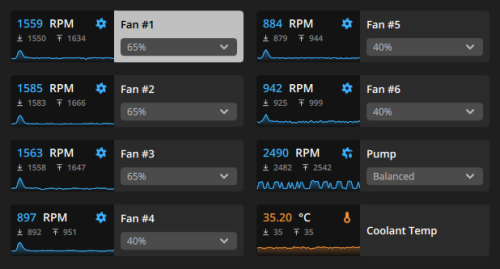
during load, u say it barely reaches 32°C right? the previous 29°C coolant temp was also 1-2 hours long load? if that's the case then it doesn't seem the heat is transferred properly, or the coolant in the AIO is magical.
what TIM r u using? Kryonaut? PTM7950?
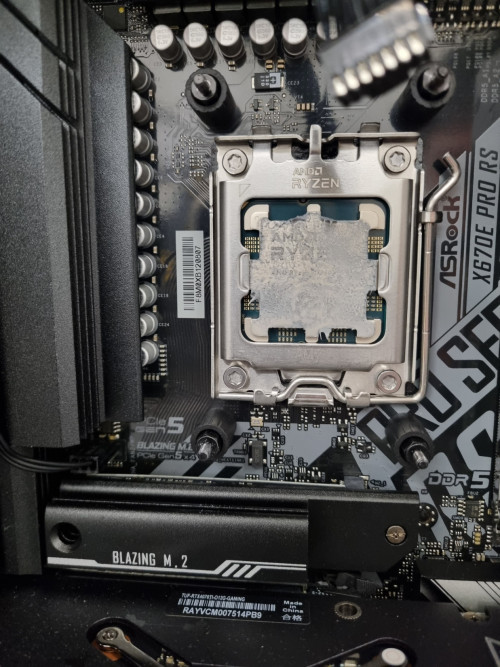
there may still be a chance the contact between the pump and ur CPU is uneven, or there's a problem with the paste (which is unusual).
if pump malfunctions, can be easily tested by touching the 2 tubes to ur radiator if u suspect the rpm number is a lie. if one is hotter than the other then there ain't got no malfunction.
if ur reseating the pump, wipe the thermal paste away with alcohol pad then reapply it, preferably stuffs like Noctua NT-H2, Honeywell PTM7950, Corsair XTM70 etc. can use Kryonaut if u have it, just that it has issues of pumping out down the road after a while, essentially degrading performance.
no need to apply too much, more thermal paste does not equate to better heat transfer. better yet just make a fine thin layer on the IHS with a spreader.
when u mount ur pump make sure to put even pressure to all 4 corners, criss-cross pattern (top-left -> bottom-right -> top-right -> bottom-left and repeat). using ur screwdriver, just fasten until ur 2 fingers turning the screwdriver no longer has the force to turn the screw on all 4 corners.
then it's time to actually tighten it, again criss-cross pattern, with even revolution. like spin 3 times on each side and repeat.
but don't overtighten it to the point u have a hard time turning the screws with ur wrist. just tighten them to the point of the force of ur wrist (not the force of ur arm). when it feels like it's stopping, just stop.
then recheck the coolant temp during load, see how slow or fast it passes 30°C
At first I used the TIM that came with the AIO. Then I tried changing the mounting position by rotating it 90° so that the pipes come out from the side and not the bottom. When I did that, I switched to Cooler Master Mastergel Pro V2 as I had some left over. I am actually interested to try the PTM7950 but worried buying fake stuff. Any recomendded sources?


 May 16 2024, 10:34 AM


 Quote
Quote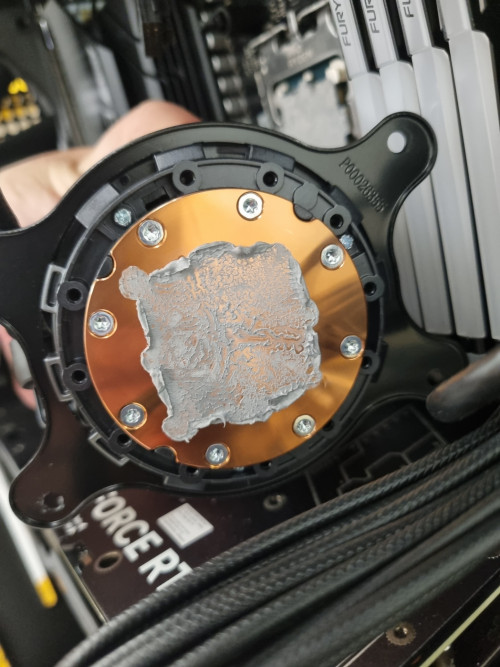

 0.0209sec
 0.35
0.35
 7 queries
 GZIP Disabled