Welcome Guest ( Log In | Register )

Outline · [ Standard ] · Linear+

 Does higher mhz ram works on lower mhz motherboard

views
     
TSheinlein
post Jan 29 2024, 08:15 PM, updated 2y ago

Regular
******
Senior Member
1,798 posts

Joined: Jun 2010
Want to ask sifu question. I use Asus PRIME H410M-K motherboard.

This is the spec for ram support:
2 x DIMM, Max. 64GB, DDR4 2933/2800/2666/2400/2133 MHz Non-ECC, Un-buffered Memory *
Dual Channel Memory Architecture
Supports Intel® Extreme Memory Profile (XMP)
OptiMem
* 10th Gen Intel® Core™i9/i7 CPUs support 2933/2800/2666/2400/2133 natively, Refer to www.asus.com for the Memory QVL (Qualified Vendors Lists).

My question is can it work on ddr4 3000 or 3200 mhz ram?
TSheinlein
post Jan 29 2024, 08:40 PM

Regular
******
Senior Member
1,798 posts

Joined: Jun 2010
QUOTE(hadith_corner @ Jan 29 2024, 08:28 PM)
Maybe will work on single channel. I've tried this personally. Using 3600 ram on a mobo that only support up to 3200. Single stick ram with xmp ok can boot. But if put two stick and turn on xmp, cannot post. If no turned on xmp, then only can boot, but at base 2400 speed only lah.
*
is it impossible to adjust it to 3200 mhz? 2400 is really slow.

QUOTE(Wedchar2912 @ Jan 29 2024, 08:28 PM)
yes, the rams will just run at the lower speed the motherboard can support.
*
My motherboard can support up to 64gb ram but 2400 or 2666 mhz ram I saw only up to 16gb sweat.gif

Do you guys know any shop that willing to take second hand ram and let my buy new one?
TSheinlein
post Jan 29 2024, 08:41 PM

Regular
******
Senior Member
1,798 posts

Joined: Jun 2010
QUOTE(AthrunIJ @ Jan 29 2024, 08:40 PM)
It will use the lowest speed of the 2 rams
*
Meaning if I buy 2 sticks 3200 mhz ram and put on my motherboard, it will run at 2133mhz?
TSheinlein
post Jan 29 2024, 09:06 PM

Regular
******
Senior Member
1,798 posts

Joined: Jun 2010
QUOTE(AthrunIJ @ Jan 29 2024, 08:53 PM)
If not mistaken it is 2933MHz. Though you might wanna double check.
*
QUOTE(PRSXFENG @ Jan 29 2024, 08:59 PM)
It will run at the highest speed that the ram itself, the motherboard and the cpu supports

so, you ram is the highest, at 3200
your motherboard only supports 2933
your CPU was not mentioned, I will assume you are using i5 10th gen, that cpu supports a max of 2666

so, the lowest number is 2666, and that's what the entire system will run at

if you have i7/i9, then it supports a max of 2933, and that's what it will run at

Just make sure XMP is turned on in BIOS

and no, you cant go beyond the limits, it will run at the max it can support

example, here im using a i5 10th gen laptop, this i5 supports 2933 ram, I inserted 3200 ram, they run at 2933 speeds

also, watch out for scams/fake ram if you are buying ram online, drop a link here before buying
they will have real capacity but fail to run at high speeds
*
I'm using i5 10400F, I didn't cpu is affected as well. So if my buy 3200, my max speed will be limited at 2666 then. Am I correct?
TSheinlein
post Jan 29 2024, 09:30 PM

Regular
******
Senior Member
1,798 posts

Joined: Jun 2010
QUOTE(AthrunIJ @ Jan 29 2024, 09:11 PM)
Ah then only 2666.
*
Thanks. I learn so much, all these while I thought the ram will always run at its fastest speed i bought and only bottleneck by the motherboard
TSheinlein
post Jan 30 2024, 12:55 PM

Regular
******
Senior Member
1,798 posts

Joined: Jun 2010
QUOTE(babylon52281 @ Jan 30 2024, 01:30 AM)
Depends on what speed you want it to run at. If its are RAM Jedec 2133/2400 then its near certainty no problem whatsoever.

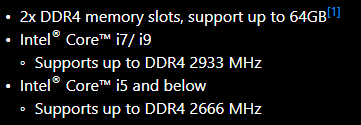
But if you want it to run at your mobo max limit (2933 MHZ) then it depends on a lot of factors; ie silicon lottery, RAM QVL compatibility, and while Asus was unclear below you can see MSI version states very clearly how the highest RAM speed can be supported only by a few CPUs

user posted image

Another is RAM itself. Currently the regular speeds you can easily buy is 3200 & 3600MHZ at XMP, neither which will work if you set to XMP AUTO for your mobo likely it will fail post. Most of these kits do not have secondary slower XMP table so its either your stuck at the RAM Jedec settings (2133/2400) or else you will have to manually downtune the XMP profile to match your mobo speed limit.
*
Sound so risky, I'm so hesitant to upgrade my ram now. Things obsolete so fast.


Change to:
| Lo-Fi Version
0.3704sec    0.42    6 queries    GZIP Disabled
Time is now: 24th December 2025 - 11:35 AM