

Anyone know how to fix a brightness level for the X6 ? Whenever I set a customised level, then if I enable and disable Auto brightness , the customised brightness is not remembered.
Poco X6 n X6 pro
Poco X6 n X6 pro
|
|
 Feb 27 2024, 12:20 PM Feb 27 2024, 12:20 PM
Return to original view | IPv6 | Post
#1
|
 
Senior Member
4,350 posts Joined: Sep 2005 
|
Anyone know how to fix a brightness level for the X6 ? Whenever I set a customised level, then if I enable and disable Auto brightness , the customised brightness is not remembered.
|
|
|
|
|
|
Mar 22 2024, 07:20 PM
Return to original view | Post
#2
|
|
Senior Member
4,350 posts Joined: Sep 2005
|
Got Hyper o.s update for X6 today. Really screwed up o.s.
|
|
|
Mar 22 2024, 07:28 PM
Return to original view | Post
#3
|
|
Senior Member
4,350 posts Joined: Sep 2005
|
QUOTE(Optizorb @ Mar 22 2024, 07:21 PM) care to explain? Maybe need some getting used to. Drag down top right I get this, no names of Icons. Like gone back to the 50s black and white. Maybe need to set something. 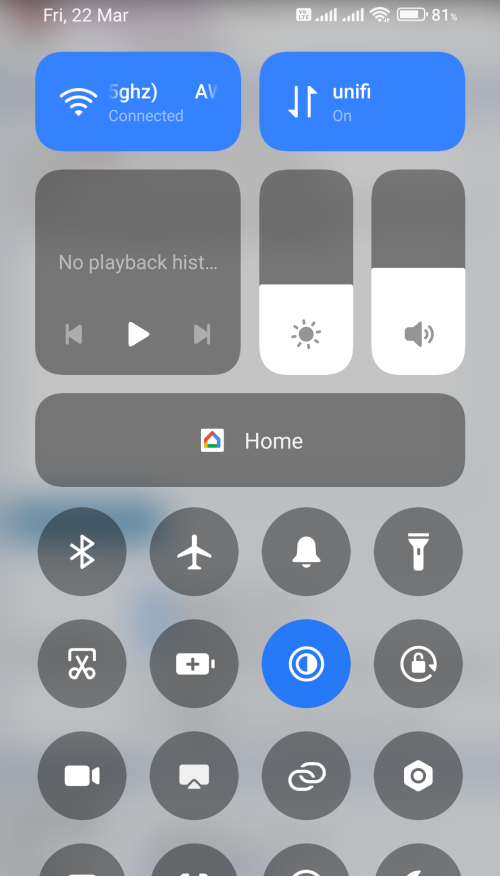 This post has been edited by Ngto: Mar 22 2024, 07:31 PM |
|
|
Mar 22 2024, 07:44 PM
Return to original view | Post
#4
|
|
Senior Member
4,350 posts Joined: Sep 2005
|
QUOTE(Optizorb @ Mar 22 2024, 07:35 PM) In the settings - notification & status bar. Thanks, later adjust. Need to go out for dinner.Scroll down - Don't show icon labels -> turn off |
|
|
Mar 23 2024, 11:24 AM
Return to original view | Post
#5
|
|
Senior Member
4,350 posts Joined: Sep 2005
|
Hidden folder also gone. Can no longer access.
|
|
|
Mar 23 2024, 02:27 PM
Return to original view | Post
#6
|
|
Senior Member
4,350 posts Joined: Sep 2005
|
QUOTE(Optizorb @ Mar 23 2024, 12:32 PM) ??? Thank you, thank you. You are a lifesaver 😀🙏. Previously Miui 14, I had to swipe right twice at the drawer screen to access the hidden folder.just swipe down in file manager Do you know how I can enable some sort of indicator light while the phone is charging and a different light or sound when the phone is fully charged ? (Besides installing an APK) One more thing, is there a way to save a fixed brightness level, so that whenever Auto Brightness is enabled, and disabled, it will return to the saved level. This post has been edited by Ngto: Mar 23 2024, 02:33 PM |
|
|
|
|
|
Mar 23 2024, 04:01 PM
Return to original view | Post
#7
|
|
Senior Member
4,350 posts Joined: Sep 2005
|
QUOTE(Optizorb @ Mar 23 2024, 02:58 PM) besides using an app, no other way. Anyway for me not important because of fast charging. Can fully charge phone from 0 in 45 mins. Thank you. I prefer to enable Auto brightness in sunlight. When home I prefer to set a certain brightness level. Thanks anyway.If need a quick top up, 20 minutes also enough to get more than 60%. After charging a while, you will sort of know how long you need to charge the phone for. You will get used to it in no time. As for brightness level, cant answer you cause i dont use it. I hate auto-brightness. So its manual adjustment for me all the way. Btw, it takes me to charge from 30 to 100% in about 50min. I wonder why mine so slow. This post has been edited by Ngto: Mar 23 2024, 04:04 PM |
|
|
Mar 24 2024, 03:08 AM
Return to original view | Post
#8
|
|
Senior Member
4,350 posts Joined: Sep 2005
|
QUOTE(Optizorb @ Mar 23 2024, 12:32 PM) ??? I realised this isn't what I was looking for. What I meant was the hidden App folder in the Apps drawer screen. . There was a hidden app folder feature in Miui14 where you can put apps you don't want others to see or access. It disappeared when upgraded to HyperOS.just swipe down in file manager |
|
|
Mar 24 2024, 07:55 AM
Return to original view | Post
#9
|
|
Senior Member
4,350 posts Joined: Sep 2005
|
QUOTE(Optizorb @ Mar 24 2024, 04:19 AM) oh to hide apps: On home screen do a zoom out I did try many times before. It just brings you to the widget screen and for selecting apps for deleting or to create new folder to move to . No sign of any hidden folder to move to..This post has been edited by Ngto: Mar 24 2024, 08:06 AM |
|
|
Mar 24 2024, 09:31 AM
Return to original view | Post
#10
|
|
Senior Member
4,350 posts Joined: Sep 2005
|
Today observed the charging speed again. From 31% to 100% took 59 mins. So slow.
Max charging speed already enabled in settings. |
|
|
Mar 24 2024, 01:32 PM
Return to original view | Post
#11
|
|
Senior Member
4,350 posts Joined: Sep 2005
|
QUOTE(Optizorb @ Mar 24 2024, 12:11 PM) then go to settings > security > look for hide apps That's the problem. After the update there is no Security option in settings. I searched all over, nothing.after hiding some apps, then the homescreen zoom out shortcut should work I can only lock app one by one in the Apps option, but it won't put them in any hidden folder or hide them. This post has been edited by Ngto: Mar 24 2024, 01:39 PM |
|
|
Mar 24 2024, 04:15 PM
Return to original view | IPv6 | Post
#12
|
|
Senior Member
4,350 posts Joined: Sep 2005
|
QUOTE(Optizorb @ Mar 24 2024, 01:57 PM) try Security app That's just the same as locking app in the settings I mentioned earlier. It's just a shortcut. And the video is for MIUI not HyperOS. you know... a lot of your issues can be solved easily if you just took time to find answers on reddit or youtube..  And no, it doesn't put the apps in the hidden locker for my HyperOS update like in the video for MIUI.. And no, I can't open any hidden locker in the home screen either. I tell you this HyperOS update for PocoX6 has disabled this feature. You can only lock apps, but they cannot be hidden in a hidden locker, because it no longer exists. They must have removed it by design. ---------------------- Update Ok, I have found it. After the lock app option, have to exit , and there will be further option available to hide app. Have to enable this as well only then can make another round of selection to hide apps. They could have combined this as an extra option within the Lock App option to avoid duplicate work This post has been edited by Ngto: Mar 24 2024, 06:40 PM |
|
|
Mar 25 2024, 01:42 AM
Return to original view | Post
#13
|
|
Senior Member
4,350 posts Joined: Sep 2005
|
QUOTE(Optizorb @ Mar 24 2024, 09:27 PM) because lock app =/= hide apps ??? Whatt I was saying they could have combined both into one operation. Choose to hide or lock or both. No need to do lock and exit and then do hide all over again.1) i might want to lock some sensitive apps but i dont need to hide it. example whatsapp, you might want to lock it but you definitely dont want to hide the app 2) vice versa i want to hide useless apps that i dont use and cant be uninstalled but i dont need to lock it with a password. example: system apps/bloatware 3) i want to lock AND hide apps for maximum privacy. example: tinder |
| Change to: |  0.0229sec 0.0229sec
 0.46 0.46
 7 queries 7 queries
 GZIP Disabled GZIP Disabled
Time is now: 18th December 2025 - 05:46 AM |
 Quote
Quote