

How to coding this?
I want to put more dns server.
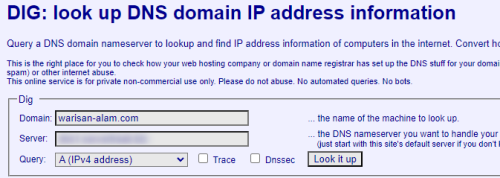
Please advise.
This post has been edited by UbuntuClient: Jan 2 2024, 11:34 AM
Dig interface, More customs dns server
|
|
 Jan 2 2024, 11:33 AM, updated 2y ago Jan 2 2024, 11:33 AM, updated 2y ago
Show posts by this member only | Post
#1
|
 
Senior Member
1,418 posts Joined: Jun 2007 From: /puchong/cyberjaya/klang   
|
Hi,
How to coding this? I want to put more dns server. Please advise. This post has been edited by UbuntuClient: Jan 2 2024, 11:34 AM |
|
|
|
|
|
Jan 2 2024, 11:59 AM
Show posts by this member only | Post
#2
|

Junior Member
355 posts Joined: Aug 2021
|
You may rephrase your question or provide more details.
|
|
|
Jan 2 2024, 03:02 PM
Show posts by this member only | Post
#3
|
|
Senior Member
1,418 posts Joined: Jun 2007 From: /puchong/cyberjaya/klang
|
I have more than 100 VMs running domain.
The easy way to check domain is using dns that assign to the server. I have several dns server that running. It's difficult to check on dns server to seek a domain. The idea is put multiple dns server so i can on which server domain is located. |
|
|
Jan 2 2024, 04:39 PM
Show posts by this member only | Post
#4
|
|
Senior Member
1,418 posts Joined: Jun 2007 From: /puchong/cyberjaya/klang
|
|
|
|
Jan 2 2024, 05:22 PM
Show posts by this member only | Post
#5
|

Junior Member
518 posts Joined: May 2008
|
Are you trying to do nslookup with custom dns servers?
|
|
|
Jan 2 2024, 06:02 PM
Show posts by this member only | Post
#6
|
|
Senior Member
1,418 posts Joined: Jun 2007 From: /puchong/cyberjaya/klang
|
QUOTE(jkfoong @ Jan 2 2024, 05:22 PM) Are you trying to do nslookup with custom dns servers? Sort of .. |
|
|
|
|
|
Jan 2 2024, 08:55 PM
Show posts by this member only | IPv6 | Post
#7
|
|
Senior Member
2,643 posts Joined: Jan 2003
|
dig is a dns lookup program found in linux.
https://manpages.ubuntu.com/manpages/xenial/en/man1/dig.1.html You just need to hook it up to some kind of scripting language to run the program and format the output. There is a batch mode included in dig that would help in cutting down the code required. |
|
|
Jan 3 2024, 03:00 PM
Show posts by this member only | Post
#8
|
|
Senior Member
1,418 posts Joined: Jun 2007 From: /puchong/cyberjaya/klang
|
Let say i have a few dns server like node1.cloudns.cc, dns1. cloudns.cc, msc111.cloudns.cc, how to put on dig?
|
|
|
Jan 3 2024, 04:49 PM
Show posts by this member only | Post
#9
|

Junior Member
636 posts Joined: Jul 2006
|
CODE for n in "1.1.1.1" "8.8.8.8" "1.32.57.161"; do dig @$n a pornhub.com | grep pornhub.com.; done Above example queries several popular DNS (cloudflare; google; TMNet) and you can see they give different IP addresses for a popular website. CODE for n in node1.cloudns.cc dns1.cloudns.cc msc111.cloudns.cc; do dig @$n a $queryme | grep $queryme; done Edit the above to your liking. Bonus points for others if they figured out how to use GNU Parallel. Ask GPT/Bard for help in for loops in bash, if you can't program it. Also refer to dig's man pages, after you understood the low level DNS record queries. This post has been edited by angch: Jan 3 2024, 04:51 PM UbuntuClient liked this post
|
|
|
Jan 3 2024, 05:53 PM
Show posts by this member only | IPv6 | Post
#10
|
|
Senior Member
2,643 posts Joined: Jan 2003
|
QUOTE(UbuntuClient @ Jan 3 2024, 03:00 PM) Let say i have a few dns server like node1.cloudns.cc, dns1. cloudns.cc, msc111.cloudns.cc, how to put on dig? You don't. dig can only do a single query from a single name server at a time. You would need to use something like the code provided by angch to go through each of them separately. |
|
|
Jan 3 2024, 06:00 PM
|
|
Senior Member
1,418 posts Joined: Jun 2007 From: /puchong/cyberjaya/klang
|
QUOTE(angch @ Jan 3 2024, 04:49 PM) CODE for n in "1.1.1.1" "8.8.8.8" "1.32.57.161"; do dig @$n a pornhub.com | grep pornhub.com.; done Above example queries several popular DNS (cloudflare; google; TMNet) and you can see they give different IP addresses for a popular website. CODE for n in node1.cloudns.cc dns1.cloudns.cc msc111.cloudns.cc; do dig @$n a $queryme | grep $queryme; done Edit the above to your liking. Bonus points for others if they figured out how to use GNU Parallel. Ask GPT/Bard for help in for loops in bash, if you can't program it. Also refer to dig's man pages, after you understood the low level DNS record queries. |
| Change to: |  0.0196sec 0.0196sec
 1.25 1.25
 5 queries 5 queries
 GZIP Disabled GZIP Disabled
Time is now: 23rd December 2025 - 08:48 PM |
 Quote
Quote