Welcome Guest ( Log In | Register )

Outline · [ Standard ] · Linear+

 CPU temp, Is it normal ?

views
     
TSelmo666
post Dec 28 2023, 11:19 AM, updated 2y ago

Casual
***
Junior Member
451 posts

Joined: Jul 2009
From: JB <> SG


Dear seniors / sifus / mods ,

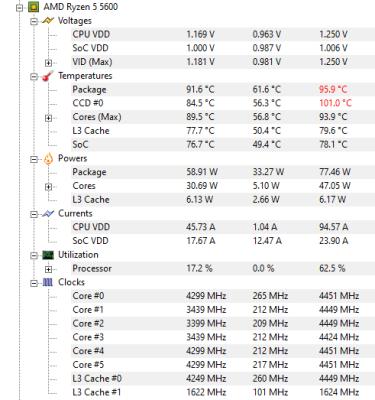
Is it normal if CPU temp reach 90-100C when play games?

I just play Crysis 3 and this is temperature I am getting :
» Click to show Spoiler - click again to hide... «


This is my current setup:
» Click to show Spoiler - click again to hide... «


I guess I will need a better cpu cooler since I am using AMD stock cooler.

Any suggestion which cpu cooler is the best ? Probably looking AIO with 240cm since my case is quite small now. sweat.gif

Thanks in advance guys. icon_rolleyes.gif


asdasd
post Dec 28 2023, 11:30 AM

Casual
***
Junior Member
337 posts

Joined: Nov 2004


Try opening the casing panel to check for air flow problem. If temp still high with open case, can try get better hsf...
AthrunIJ
post Dec 28 2023, 11:31 AM

Look at all my stars!!
*******
Senior Member
2,992 posts

Joined: Feb 2015

Well stock cooler. Can try if have a switch to go performance mode in that cooler.

If not a standard good after market cooler is more than sufficient.

Deepcool AK500 series for that or better.

As for AIO, I don't prefer water in my rig. You might need others forum member recommendations.

While it is design to boost to 95 Celsius. Try to get under it as much as possible. 60 to 80 would be nice.

Make sure to have enough good fans, thermal paste and airflow.

Cheers mate

This post has been edited by AthrunIJ: Dec 28 2023, 11:33 AM
loki
post Dec 28 2023, 11:32 AM

Look at all my stars!!
*******
Senior Member
2,109 posts

Joined: Jan 2003
From: Damansara Damai, PJ


1. change thermal paste.
2. normal temperatures reported around the web is around 70-75deg.. yours way too high.
3. use software to set fan speed higher.
mashagane
post Dec 28 2023, 12:00 PM

New Member
*
Newbie
17 posts

Joined: Jun 2013
100c at 78w is definitely not normal. Even my low profile cooler can do better. If it just happen recently, then maybe you can check the cooler fans speed or thermal paste first.
kingkingyyk
post Dec 28 2023, 01:43 PM

10k Club
Group Icon
Elite
15,694 posts

Joined: Mar 2008
QUOTE(elmo666 @ Dec 28 2023, 11:19 AM)
Any suggestion which cpu cooler is the best ? Probably looking AIO with 240cm since my case is quite small now.  sweat.gif
*
Use a single tower 120mm heatsink will do, like C.M. Hyper 212 series. icon_idea.gif
Going all out on 5600 is useless since the bottleneck is on the heat transfer from CCD die to the heatspreader, not heatsink. The processor will still boost until the 95C wall.

Also let us know what case you are using / show a picture. icon_idea.gif Seems like your stock cooler is eating a lot of heat from 3070.

This post has been edited by kingkingyyk: Dec 28 2023, 01:47 PM
jkfoong
post Dec 28 2023, 04:07 PM

Long time member
****
Junior Member
518 posts

Joined: May 2008
Don't think stock cooler can handle 5600
babylon52281
post Dec 28 2023, 05:20 PM

Look at all my stars!!
*******
Senior Member
2,681 posts

Joined: Apr 2017
QUOTE(elmo666 @ Dec 28 2023, 11:19 AM)
Dear seniors / sifus / mods ,

Is it normal if CPU temp reach 90-100C when play games?

I just play Crysis 3 and this is temperature I am getting :
» Click to show Spoiler - click again to hide... «


This is my current setup:
» Click to show Spoiler - click again to hide... «


I guess I will need a better cpu cooler since I am using AMD stock cooler.

Any suggestion which cpu cooler is the best ? Probably looking AIO with 240cm since my case is quite small now.  sweat.gif

Thanks in advance guys. icon_rolleyes.gif
*
No need AIO its not an 8core beast. Get IDC SE224XT/XTS / Jonsbo CR1400 cheap but good
TristanX
post Dec 28 2023, 07:54 PM

Where is my stars?
Group Icon
Elite
24,340 posts

Joined: Nov 2004
From: Setapak, Kuala Lumpur


Having RTX 3070 dumping 220W of heat inside the case will increase temperatures. Upgrade the cooler to Thermalright Peerless Assassin 120 SE. It will get the job done.

Upgrading the case fans to Arctic Cooling P12 Max (assuming that your case is using 120mm fans) will also help.

This post has been edited by TristanX: Dec 28 2023, 07:57 PM
TSelmo666
post Dec 29 2023, 07:13 AM

Casual
***
Junior Member
451 posts

Joined: Jul 2009
From: JB <> SG


QUOTE(asdasd @ Dec 28 2023, 11:30 AM)
Try opening the casing panel to check for air flow problem. If temp still high with open case, can try get better hsf...
*
I did try open the side panel but the temp still in that range. Stock cooler problem I guess. sweat.gif

QUOTE(AthrunIJ @ Dec 28 2023, 11:31 AM)
Well stock cooler. Can try if have a switch to go performance mode in that cooler.

If not a standard good after market cooler is more than sufficient.

Deepcool AK500 series for that or better.

As for AIO, I don't prefer water in my rig. You might need others forum member recommendations.

While it is design to boost to 95 Celsius. Try to get under it as much as possible. 60 to 80 would be nice.

Make sure to have enough good fans, thermal paste and airflow.

Cheers mate
*
Thank you for your suggestion bro. Appreciate it. Will start digging more info on this. icon_rolleyes.gif

QUOTE(loki @ Dec 28 2023, 11:32 AM)
1. change thermal paste.
2. normal temperatures reported around the web is around 70-75deg.. yours way too high.
3. use software to set fan speed higher.
*
I will probably go to the nearest PC shop later and get this done. Tq for your suggestion bro. icon_rolleyes.gif
What software you recommend?

TSelmo666
post Dec 29 2023, 07:45 AM

Casual
***
Junior Member
451 posts

Joined: Jul 2009
From: JB <> SG


QUOTE(mashagane @ Dec 28 2023, 12:00 PM)
100c at 78w is definitely not normal. Even my low profile cooler can do better. If it just happen recently, then maybe you can check the cooler fans speed or thermal paste first.
*
I just bought this pc mid Dec. Will keep monitoring the temp first and if still in that range, will get it done at nearest PC shop. Tq for you suggestion bro. icon_rolleyes.gif

QUOTE(kingkingyyk @ Dec 28 2023, 01:43 PM)
Use a single tower 120mm heatsink will do, like C.M. Hyper 212 series. icon_idea.gif
Going all out on 5600 is useless since the bottleneck is on the heat transfer from CCD die to the heatspreader, not heatsink. The processor will still boost until the 95C wall.

Also let us know what case you are using / show a picture.  icon_idea.gif Seems like your stock cooler is eating a lot of heat from 3070.
*
Understood. I am using Tecware Infinity M2 case. Here is the picture.
» Click to show Spoiler - click again to hide... «


QUOTE(jkfoong @ Dec 28 2023, 04:07 PM)
Don't think stock cooler can handle 5600
*
A better cooler is needed indeed. sweat.gif

QUOTE(babylon52281 @ Dec 28 2023, 05:20 PM)
No need AIO its not an 8core beast. Get IDC SE224XT/XTS / Jonsbo CR1400 cheap but good
*
I got these in my list as per others suggestion as well:
» Click to show Spoiler - click again to hide... «

Tq for you suggestion bro. icon_rolleyes.gif

QUOTE(TristanX @ Dec 28 2023, 07:54 PM)
Having RTX 3070 dumping 220W of heat inside the case will increase temperatures. Upgrade the cooler to Thermalright Peerless Assassin 120 SE. It will get the job done.

Upgrading the case fans to Arctic Cooling P12 Max (assuming that your case is using 120mm fans) will also help.
*
My current case fan is the one come with Tecware Infinity M2 case. Probably will get those Artic Cooling fans too. Thank you for the suggestion bro. Appreciate it. icon_rolleyes.gif

This post has been edited by elmo666: Dec 29 2023, 07:46 AM

AthrunIJ
post Dec 29 2023, 08:17 AM

Look at all my stars!!
*******
Senior Member
2,992 posts

Joined: Feb 2015

QUOTE(elmo666 @ Dec 29 2023, 07:45 AM)
I just bought this pc mid Dec. Will keep monitoring the temp first and if still in that range, will get it done at nearest PC shop. Tq for you suggestion bro.  icon_rolleyes.gif
Understood. I am using Tecware Infinity M2 case. Here is the picture.
» Click to show Spoiler - click again to hide... «

A better cooler is needed indeed.  sweat.gif
I got these in my list as per others suggestion as well:
» Click to show Spoiler - click again to hide... «

Tq for you suggestion bro.  icon_rolleyes.gif
My current case fan is the one come with Tecware Infinity M2 case. Probably will get those Artic Cooling fans too. Thank you for the suggestion bro. Appreciate it.  icon_rolleyes.gif
*
Ah well.

That case has no airflow so it might be hard but do try to get better cooler.

Might be possible to just change the 2 top fan to be intake fans instead of exhaust.

This post has been edited by AthrunIJ: Dec 29 2023, 08:45 AM
kingkingyyk
post Dec 29 2023, 09:09 AM

10k Club
Group Icon
Elite
15,694 posts

Joined: Mar 2008
QUOTE(elmo666 @ Dec 29 2023, 07:45 AM)
Understood. I am using Tecware Infinity M2 case.
*
That's unfortunate. biggrin.gif
2 options :
- Get a 240mm AIO cooler
- Get a 120mm cooler and add 2 fans at the bottom to get more intake of fresh air. Air cooler works well when the case can breath.

This post has been edited by kingkingyyk: Dec 29 2023, 09:10 AM
Baconateer
post Dec 29 2023, 09:13 AM

Meh..... (TM)
*******
Senior Member
5,088 posts

Joined: Jun 2013
From: Blue Planet


nice case but airflow seems bad

the left intake fan sucking in air from the outside immediately expelled by the exhaust fan

only ur right intake fan is providing some airflow

This post has been edited by Baconateer: Dec 29 2023, 09:13 AM
babylon52281
post Dec 29 2023, 10:11 AM

Look at all my stars!!
*******
Senior Member
2,681 posts

Joined: Apr 2017
QUOTE(elmo666 @ Dec 29 2023, 07:45 AM)
I just bought this pc mid Dec. Will keep monitoring the temp first and if still in that range, will get it done at nearest PC shop. Tq for you suggestion bro.  icon_rolleyes.gif
Understood. I am using Tecware Infinity M2 case. Here is the picture.
My current case fan is the one come with Tecware Infinity M2 case. Probably will get those Artic Cooling fans too. Thank you for the suggestion bro. Appreciate it.  icon_rolleyes.gif
*
LOL Fish tank case no wonder your having high temps issue. The top fan I am guessing is outtake fans? In this case (pun intended) yeah you need to go AIO as tower coolers will also be hampered by zero air flow inside the case.

My new reco would be get a 240/280 AIO top mount blowing the air out. Then move the current top fans to the above PSU cover (just below GPU) to intake air from below.
TristanX
post Dec 29 2023, 10:24 AM

Where is my stars?
Group Icon
Elite
24,340 posts

Joined: Nov 2004
From: Setapak, Kuala Lumpur


QUOTE(elmo666 @ Dec 29 2023, 07:45 AM)
My current case fan is the one come with Tecware Infinity M2 case. Probably will get those Artic Cooling fans too. Thank you for the suggestion bro. Appreciate it.  icon_rolleyes.gif
*
QUOTE
FANS
Rear: 1 x 120mm (included)
Top: 2 x 120mm (included)
Bottom: 2 x 120mm (optional

Add 2 fans at the bottom as intake. It should help.

This post has been edited by TristanX: Dec 29 2023, 10:24 AM
TSelmo666
post Dec 31 2023, 11:44 AM

Casual
***
Junior Member
451 posts

Joined: Jul 2009
From: JB <> SG


QUOTE(AthrunIJ @ Dec 29 2023, 08:17 AM)
Ah well.

That case has no airflow so it might be hard but do try to get better cooler.

Might be possible to just change the 2 top fan to be intake fans instead of exhaust.
*
Understood. Will look on this later on. Thank you for your suggestion. icon_rolleyes.gif

QUOTE(kingkingyyk @ Dec 29 2023, 09:09 AM)
That's unfortunate.  biggrin.gif
2 options :
- Get a 240mm AIO cooler
- Get a 120mm cooler and add 2 fans at the bottom to get more intake of fresh air. Air cooler works well when the case can breath.
*
Yea, I overlook on this case. If I know earlier, shouldn't get this case at the first place.
Alright, will get those cooler and the fans a.s.a.p
Thank you for your suggestion bro. icon_rolleyes.gif

QUOTE(Baconateer @ Dec 29 2023, 09:13 AM)
nice case but airflow seems bad

the left intake fan sucking in air from the outside immediately expelled by the exhaust fan

only ur right intake fan is providing some airflow
*
Indeed. Probably will change other case with better air flow later. cry.gif

QUOTE(babylon52281 @ Dec 29 2023, 10:11 AM)
LOL Fish tank case no wonder your having high temps issue. The top fan I am guessing is outtake fans? In this case (pun intended) yeah you need to go AIO as tower coolers will also be hampered by zero air flow inside the case.

My new reco would be get a 240/280 AIO top mount blowing the air out. Then move the current top fans to the above PSU cover (just below GPU) to intake air from below.
*
Indeed bro. I overlook on this pc case.
Understood, will get this done once I have settled all my work first. Thank you for your recommendation bro. Appreciate it. icon_rolleyes.gif

QUOTE(TristanX @ Dec 29 2023, 10:24 AM)
Add 2 fans at the bottom as intake. It should help.
*
Understood. I will update again once settle everything. Thank you for the suggestion bro. icon_rolleyes.gif
chocobo7779
post Dec 31 2023, 10:33 PM

Power is nothing without control
********
All Stars
14,673 posts

Joined: Sep 2010
QUOTE(elmo666 @ Dec 29 2023, 07:45 AM)
I just bought this pc mid Dec. Will keep monitoring the temp first and if still in that range, will get it done at nearest PC shop. Tq for you suggestion bro.  icon_rolleyes.gif
Understood. I am using Tecware Infinity M2 case. Here is the picture.
» Click to show Spoiler - click again to hide... «

A better cooler is needed indeed.  sweat.gif
I got these in my list as per others suggestion as well:
» Click to show Spoiler - click again to hide... «

Tq for you suggestion bro.  icon_rolleyes.gif
My current case fan is the one come with Tecware Infinity M2 case. Probably will get those Artic Cooling fans too. Thank you for the suggestion bro. Appreciate it.  icon_rolleyes.gif
*
Judging from the pics, there's seem to have not much airflow? sweat.gif
babylon52281
post Jan 1 2024, 04:55 PM

Look at all my stars!!
*******
Senior Member
2,681 posts

Joined: Apr 2017
QUOTE(elmo666 @ Dec 31 2023, 11:44 AM)
Understood. Will look on this later on. Thank you for your suggestion.  icon_rolleyes.gif
Yea, I overlook on this case. If I know earlier, shouldn't get this case at the first place.
Alright, will get those cooler and the fans a.s.a.p
Thank you for your suggestion bro.  icon_rolleyes.gif
Indeed. Probably will change other case with better air flow later.  cry.gif
Indeed bro. I overlook on this pc case.
Understood, will get this done once I have settled all my work first. Thank you for your recommendation bro. Appreciate it.  icon_rolleyes.gif
Understood. I will update again once settle everything. Thank you for the suggestion bro.  icon_rolleyes.gif
*
Thermalright Frozen Note AIO seem to have quite decent user feedback if you search the net. Arctic LF2 is bang for buck performance if you can afford its slightly higher price tag. But prolly changing to an airflow case will be even cheaper. Your choice.
SUSmalaozhai
post Jan 5 2024, 07:45 AM

Getting Started
**
Junior Member
64 posts

Joined: Jan 2019

Front 2 x 14cm fan or 3 x 12cm fan for intake

Back exhaust fan 1 x 12cm or 14 cm will do

From my experience Top intake fan is useless

My setup using the above airflow

When gaming cpu temp max 42 celcius and gpu max 60 celcius

CPU Ryzen 5 2600
GPU MSI RTX 2060 Super Ventus

This post has been edited by malaozhai: Jan 5 2024, 07:49 AM
hashtag2016
post Jan 12 2024, 04:04 PM

On my way
****
Junior Member
505 posts

Joined: Feb 2016
get any cheap and good after market cooler can improve it, only cost rm100 or less
babylon52281
post Jan 12 2024, 07:55 PM

Look at all my stars!!
*******
Senior Member
2,681 posts

Joined: Apr 2017
QUOTE(hashtag2016 @ Jan 12 2024, 04:04 PM)
get any cheap and good after market cooler  can improve it, only cost rm100  or less
*
TS PC is inside a fish tank case with bad airflow, a cheap air cooler likely will still throttle in such a case. Best is to have an AIO vent the heat out directly from PC.
TSelmo666
post Feb 2 2024, 04:59 PM

Casual
***
Junior Member
451 posts

Joined: Jul 2009
From: JB <> SG


Hi all. Finally, I managed to get these installed after 1 month+

+ Thermalright Aqua Elite 240 AIO
+ ARCTIC P12 SlimPWM PST x 2 unit
+ ARCTIC MX-6T hermalpaste

Below is the comparison during playing Crysis3.

Temperature Before:
» Click to show Spoiler - click again to hide... «


Temperature After:
» Click to show Spoiler - click again to hide... «


For the current setup, is that temperature range normal ?

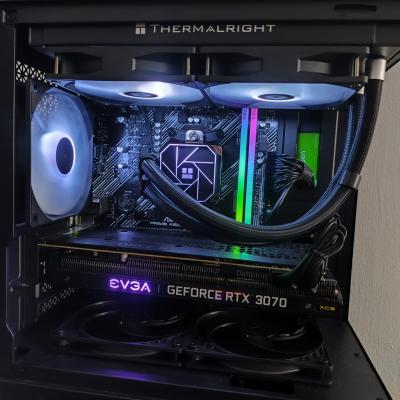
And if anyone wonder, this is my current pc look like:
» Click to show Spoiler - click again to hide... «
icon_rolleyes.gif


By the way, I would to thank all sifu/seniors for all the recommendations and suggestions provided. thumbup.gif

I really appreciate it. TQVM & you guys are awesome. thumbup.gif
AthrunIJ
post Feb 2 2024, 05:02 PM

Look at all my stars!!
*******
Senior Member
2,992 posts

Joined: Feb 2015

QUOTE(elmo666 @ Feb 2 2024, 04:59 PM)
Hi all. Finally, I managed to get these installed after 1 month+

+ Thermalright Aqua Elite 240 AIO
+ ARCTIC  P12 SlimPWM PST x 2 unit
+ ARCTIC MX-6T hermalpaste

Below is the comparison during playing Crysis3.

Temperature Before: 
» Click to show Spoiler - click again to hide... «


Temperature After:
» Click to show Spoiler - click again to hide... «


For the current setup, is that temperature range normal ?

And if anyone wonder, this is my current pc look like:
» Click to show Spoiler - click again to hide... «
  icon_rolleyes.gif
By the way, I would to thank all sifu/seniors for all the recommendations and suggestions provided.   thumbup.gif

I really appreciate it. TQVM & you guys are awesome.  thumbup.gif
*
Well, the min max doesn't tell the whole story.

If possible need to check the temp during gameplay. You can log it using the temp tool. Then open to check the temp in graph format.
Or just turn on the in display temperature using MSI afterburner.

However, it seems to be better now.

This post has been edited by AthrunIJ: Feb 2 2024, 05:03 PM
babylon52281
post Feb 2 2024, 05:37 PM

Look at all my stars!!
*******
Senior Member
2,681 posts

Joined: Apr 2017
QUOTE(elmo666 @ Feb 2 2024, 04:59 PM)
Hi all. Finally, I managed to get these installed after 1 month+

+ Thermalright Aqua Elite 240 AIO
+ ARCTIC  P12 SlimPWM PST x 2 unit
+ ARCTIC MX-6T hermalpaste

Below is the comparison during playing Crysis3.

For the current setup, is that temperature range normal ?

And if anyone wonder, this is my current pc look like:
» Click to show Spoiler - click again to hide... «
  icon_rolleyes.gif
By the way, I would to thank all sifu/seniors for all the recommendations and suggestions provided.  thumbup.gif

I really appreciate it. TQVM & you guys are awesome.  thumbup.gif
*
Temps looks ok. I see for the same max CPU load at ~7xW, now your doing 20oC below what you before so it looks like your not thermal throttling at the same settings anymore. Thats good.

If normal for your case, just run your most demanding apps (typically games) and monitor the max load wattage vs max temps.

If really want to be sure, run Cinebench/Prime95 for 10-20 min run and see how far you can go (CPU watt) b4 thermal limit (or if it even hit it).

But really if your happy now its all that matters.
TSelmo666
post Feb 3 2024, 10:38 AM

Casual
***
Junior Member
451 posts

Joined: Jul 2009
From: JB <> SG


QUOTE(AthrunIJ @ Feb 2 2024, 05:02 PM)
Well, the min max doesn't tell the whole story.

If possible need to check the temp during gameplay. You can log it using the temp tool. Then open to check the temp in graph format.
Or just turn on the in display temperature using MSI afterburner.

However, it seems to be better now.
*
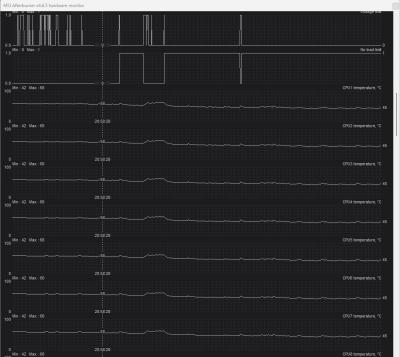
I did run MSI Afterburner when playing game. Here is the result:
CPU:
» Click to show Spoiler - click again to hide... «

GPU:
» Click to show Spoiler - click again to hide... «


Should be okay within that temperature range?

QUOTE(babylon52281 @ Feb 2 2024, 05:37 PM)
Temps looks ok. I see for the same max CPU load at ~7xW, now your doing 20oC below what you before so it looks like your not thermal throttling at the same settings anymore. Thats good.

If normal for your case, just run your most demanding apps (typically games) and monitor the max load wattage vs max temps.

If really want to be sure, run Cinebench/Prime95 for 10-20 min run and see how far you can go (CPU watt) b4 thermal limit (or if it even hit it).

But really if your happy now its all that matters.
*
I did run MSI Afterburner when playing game. Here is the result:
CPU:
» Click to show Spoiler - click again to hide... «

GPU:
» Click to show Spoiler - click again to hide... «

I can notice a significant drop in comparison to the previous setup. biggrin.gif
I guess I should not worry about the temperature now. rclxm9.gif

This post has been edited by elmo666: Feb 3 2024, 10:39 AM
AthrunIJ
post Feb 3 2024, 10:52 AM

Look at all my stars!!
*******
Senior Member
2,992 posts

Joined: Feb 2015

QUOTE(elmo666 @ Feb 3 2024, 10:38 AM)
I did run MSI Afterburner when playing game. Here is the result:
CPU:
» Click to show Spoiler - click again to hide... «

GPU:
» Click to show Spoiler - click again to hide... «


Should be okay within that temperature range?
I did run MSI Afterburner when playing game. Here is the result:
CPU:
» Click to show Spoiler - click again to hide... «

GPU:
» Click to show Spoiler - click again to hide... «

I can notice a significant drop in comparison to the previous setup.  biggrin.gif
I guess I should not worry about the temperature now.  rclxm9.gif
*
Cpu better.

Gpu however. Abit toasty but all good if can control it between 70 and 80

Enjoy your rig breh
zuozi
post Feb 3 2024, 10:57 AM

Regular
******
Senior Member
1,263 posts

Joined: Oct 2009
If you believe uncle a cooler master hyper 212 single fan variant is more than enough for your Ryzen 5 5600 if your casing have good airflow like Corsair 4000D airflow variant for example

Uncle use Ryzen 7 5700x the most lousy CPU variant hyper 212 can handle like a champ without problem at all

This post has been edited by zuozi: Feb 3 2024, 10:58 AM
babylon52281
post Feb 3 2024, 09:42 PM

Look at all my stars!!
*******
Senior Member
2,681 posts

Joined: Apr 2017
QUOTE(elmo666 @ Feb 3 2024, 10:38 AM)
I can notice a significant drop in comparison to the previous setup.  biggrin.gif
I guess I should not worry about the temperature now.  rclxm9.gif
*
CPU issue is settled just that GPU still remain bcuz your case bad airflow but at 80oC maxed I wouldnt be too worried about it unless your running it constantly for AI or mining or work.

The added benefit is now you got more ARGB bling in your case to show off too.


Change to:
| Lo-Fi Version
0.0287sec    0.56    6 queries    GZIP Disabled
Time is now: 7th December 2025 - 10:15 PM