Welcome Guest ( Log In | Register )

Bump Topic Topic Closed RSS Feed

Outline · [ Standard ] · Linear+

Unifi Official TM UniFi High Speed Broadband Thread V42, READ 1ST PAGE FOR RELEVANT WIFI INFO!

views
     
waja7968
post Sep 4 2024, 02:24 PM

Getting Started
**
Junior Member
56 posts

Joined: Nov 2006
QUOTE(jusbella @ Sep 4 2024, 02:19 PM)
Is the blocking start ad?

For me no block at all, still can surf some gov blocked site and some poxx site.

No use any vpn. Just cloudflare dns only.
*
Try --> https://www.olevod.tv/ (website to watch most recent movies)

Most mobile operators block it and Unifi fiber block it starting today

This post has been edited by waja7968: Sep 4 2024, 02:34 PM
waja7968
post Sep 4 2024, 03:04 PM

Getting Started
**
Junior Member
56 posts

Joined: Nov 2006
QUOTE(blacktubi @ Sep 4 2024, 02:58 PM)
For those with resources to setup their own DNS resolver or those sysadmin here.

Can anyone verify if ISP is hijacking private DNS resolver as well?

Cause it seems fine on my end. I am trying to avoid DoH and DoT due to performance impact.
*
Try --> https://www.olevod.tv/ (website to watch most recent movies) to verify.

If your browser just spining and timeout then 100% it is block. Use DoH also no help on some DNS resolvers
, need to find those resolvers not so well known and might have the chance to bypass the block.

Most mobile operators block it and Unifi fiber block it starting today

This post has been edited by waja7968: Sep 4 2024, 03:07 PM
waja7968
post Sep 4 2024, 03:09 PM

Getting Started
**
Junior Member
56 posts

Joined: Nov 2006
QUOTE(jusbella @ Sep 4 2024, 03:08 PM)
*
rclxms.gif rclxms.gif rclxms.gif no blocking, can continue watch recent movies

This post has been edited by waja7968: Sep 4 2024, 03:10 PM
waja7968
post Sep 4 2024, 03:14 PM

Getting Started
**
Junior Member
56 posts

Joined: Nov 2006
QUOTE(PJng @ Sep 4 2024, 03:10 PM)
Digi phone cannot load
*
If yours is Android phone, goto settings and key in "DNS" to search, chosse setup private/custom dns, then put in "dns.google".

waja7968
post Sep 4 2024, 03:18 PM

Getting Started
**
Junior Member
56 posts

Joined: Nov 2006
QUOTE(blacktubi @ Sep 4 2024, 03:11 PM)
You cannot access this site even via DoH with public resolver e.g. Google DNS now?
*
I know Adguard's DoH is 100% block. Not sure about other resolvers DoH.
waja7968
post Sep 4 2024, 04:40 PM

Getting Started
**
Junior Member
56 posts

Joined: Nov 2006
Anybody use this --> https://github.com/AdguardTeam/dnsproxy before ? Mind share the result and how to use it.

Commnad line base, no installation invloves.

This post has been edited by waja7968: Sep 4 2024, 04:43 PM
waja7968
post Sep 5 2024, 09:12 AM

Getting Started
**
Junior Member
56 posts

Joined: Nov 2006
QUOTE(BladeRider88 @ Sep 5 2024, 08:52 AM)
Bro...don't be so obvious..later you might end up with unwanted tags on you  doh.gif
Just sharing from my personal experience.

If you choose to buy TP Link routers

You can refer to the list that has DoH/DoT functions

https://community.tp-link.com/en/home/forum/topic/617138

If you choose to buy ASUS

You can refer to their FAQ before you pull the trigger

https://www.asus.com/support/faq/1051428/

But these routers (Both TP-Link & ASUS) offers basic DoT/DoH functions and now TM Nut seems to cripple the DoT/DoH, so if you are not in the hurry to change routers, wait for the current situation to settle down then only pull the trigger
*
Agreed. Btw, I own TpLink GE800 and do not offer Doh/Dot functions. mad.gif mad.gif mad.gif
waja7968
post Sep 7 2024, 09:27 AM

Getting Started
**
Junior Member
56 posts

Joined: Nov 2006
QUOTE(amirul hafizz @ Sep 7 2024, 09:12 AM)
i think gov never knew who use "cloudfare"🤣🤣

user posted image
*
U-Turn ? Our G standard newly implemented policy practice rclxm9.gif rclxm9.gif rclxm9.gif
Later either spur out a reason or "Penyakit Alzheimer" happen, all forget and become one part of history ranting.gif ranting.gif ranting.gif

This post has been edited by waja7968: Sep 7 2024, 09:50 AM
waja7968
post Dec 29 2024, 12:51 PM

Getting Started
**
Junior Member
56 posts

Joined: Nov 2006
QUOTE(Godhand73 @ Dec 29 2024, 12:19 PM)
So I went to the TM Point to ask about the SWU.
My current plan is 300Mbps for RM129.

Here are the plans offered.
300Mbps for RM119 + 6 months free + unifi mobile RM40 x 6 months
300Mbps for RM 129 + Sharp TV for 36 months contract

500 Mbps for RM 159 + 6 months free + unifi mobile RM40 x 6 months
(didn't ask about the TV option because I'm not interested in it)

1Gbps for RM259 + (I think it comes with 6 months free as well?)

I even pulled out my phone and showed the guy at the counter the Maxis 1Gbps for RM159 offer. He said it's way too cheap and they might possibly cap our data without us knowing. He even claimed a friend of his found out about his maxis fibre speed being throttled down a year later. There's no way to verify his story so that's that.
I don't know which one to pick.
Is Maxis as reliable as Unifi? 1Gbps for RM159 sounds very tempting. Do they increase the price after the contract ends? (Edit: Nvm. You need to be using Maxis postpaid plans to get this price)
Or should I go with (300Mbps for RM119 + 6 months free + unifi mobile RM40 x 6 months) hmm.gif
*
I just backed from TM Point Sungai Petani, TM Point offer me for RM159, 1Gbps + 6 months free. Thats all no free TV, laptop or whatso ever. Btw, modem need to change.

This post has been edited by waja7968: Dec 29 2024, 12:52 PM
waja7968
post Dec 29 2024, 01:51 PM

Getting Started
**
Junior Member
56 posts

Joined: Nov 2006
QUOTE(MGM @ Dec 29 2024, 01:26 PM)
Currently which plan n how much r u paying?
1GB with unifitv n free calls?
After contract speed remains at 1GB?
*
Current plan 500Mbps(contracted from 300Mbps to 500Mbps) at RM159 but contract expired since February 2024. After contract end, they just told me to come to look for any promotion at that time.

Details did not give me yet.

I just told TM Point, Maxis current promotion 1Gbps for RM159 (Maxis postpaid customer). Btw, TM Point cannot forced me to take unifi mobile as I already had 2 unifi mobile (prepaid) lines for my kids. Oh, I also told them since 500Mbps now was RM139, if nothing special been offered, I wanted to pay less for 500Mbps.

This post has been edited by waja7968: Dec 30 2024, 06:56 AM
waja7968
post Dec 29 2024, 08:30 PM

Getting Started
**
Junior Member
56 posts

Joined: Nov 2006
QUOTE(aniq8676 @ Dec 29 2024, 08:04 PM)
1Gbps speed for 24 months only.
» Click to show Spoiler - click again to hide... «

*
yup, TM Point staff told me that also. But she told me after contract end then come back to check for promotion to nego again.

This post has been edited by waja7968: Dec 30 2024, 06:55 AM
waja7968
post Jan 13 2025, 05:13 PM

Getting Started
**
Junior Member
56 posts

Joined: Nov 2006
QUOTE(Yluxion @ Jan 2 2025, 09:23 PM)
Reporting for my unifi free upgrade from 800Mbps to 1Gbps:

18 Dec - whatsapp (unifi) msg notifying for free upgrade. Submitted my application on that day.
20 Dec - call from unifi via +60379647000, for confirmation of application, T&C explanation & preferred appointment time.
24 Dec - SMS from 61000 informing of modification order successfully processed.
26 Dec - technicians come over, being given Skyworth GN630V 2.5G combo box by the technicians on that day.

Unfortunately, they tell me that they are not familiar with combo box thus unable help me set it as bridge mode.  sweat.gif

After trials and errors, takes me 90+ minutes to successfully set it as bridge mode while using my own router. (Asus RT-AX86U Pro)
So far so good for the past 7 days, smooth sailing.  thumbsup.gif

user posted image
*
Can you share what you set on TM ONU combo router?

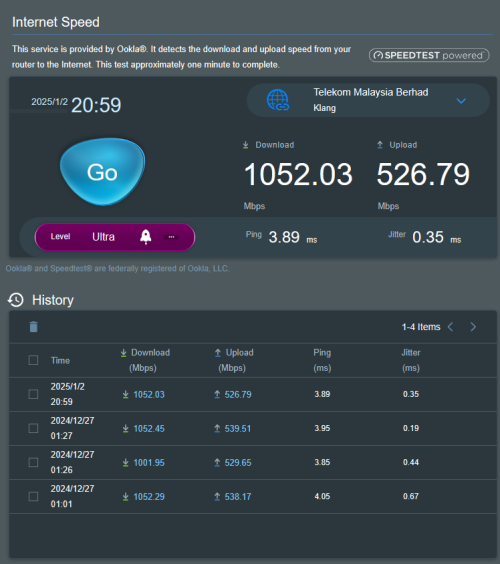
My a bit weird, use TM ONU combo router as default, speed test can reach 900mbps plus and landline telephone port is working. But using TM ONU combo as bridge then speed test can reach up to 600mps plus only and landline telephone port not working.
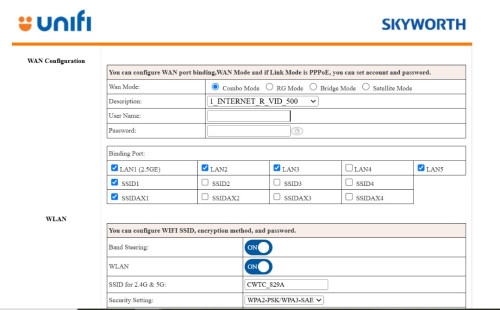
What I did is make a few changes below in ' INTERNET_R_VID_500
1) Mode change from route to bridge
2) Binding Port only for LAN1(2.5GE), the rest uncheck
3) VLAN TAG mode change to Transparent
4) Disable all WLAN(2.4GHz, 5 GHz and Mesh)

This post has been edited by waja7968: Jan 13 2025, 06:11 PM

waja7968
post Jan 14 2025, 08:18 AM

Getting Started
**
Junior Member
56 posts

Joined: Nov 2006
QUOTE(Yluxion @ Jan 13 2025, 10:28 PM)
I reset the Combo Box and then login into it, go straight to 'Bridge Mode' tab and setup from there. Didn't touch any VLAN TAG setting at all.
My VOIP and internet have been functioning well thus far. (No disconnection)

Information you must have in hand BEFORE you decided to reset the combo box:

1. Combo Box network UI login username & password

2. SSID & password

(these 2 can refer to the sticker at the bottom of combo box before you proceed to hard reset)

3. Your unifi WAN PPOE username & password

4. VOIP:
> SVC Number: 60312345678 (example)
> Account: +60312345678@ims.tm.com.my (example)
> SVC Password: (6 digits password)
*
Thanks a lot for the instructions. Land line telephone is working. But my speedtest still show me weird result, speed fluctuation very large, 400mbps ~ 900mbps. Need to debug further more. I do not think is my router problem, my router is TPLink GE800 gaming router.
Update: Found the problem, it is the RJ45 cable cannot support speed beyond 650mbps. I tested using phone support WIFI7 & WIFI7 dongle, both can easily hit 900mbps mark.

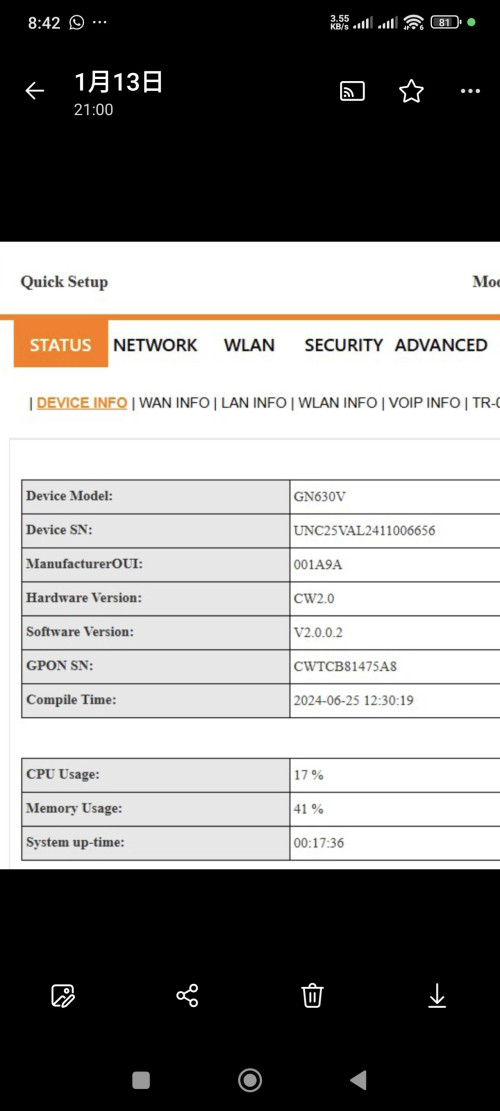
One interesthing finding here, though TM ONU Combo router already being set to bridge mode, you still can access the TM ONU Combo router configuration pages. What you do is just use LAN cable plug into any ethernet port of the ONU Combo router, and type 192.168.0.1 at the browser.

This post has been edited by waja7968: Jan 14 2025, 08:40 AM
waja7968
post Feb 2 2025, 04:20 PM

Getting Started
**
Junior Member
56 posts

Joined: Nov 2006
Hi, anybodu can confirm by using the latest black skyworth combo modem/router from TM, that means we can use xiaomi router(cannot set VLAN) without using any switch device any more?

waja7968
post Feb 24 2025, 06:35 PM

Getting Started
**
Junior Member
56 posts

Joined: Nov 2006
QUOTE(aspire2oo6 @ Feb 24 2025, 02:43 PM)
First time I follow your rule I didn't use special ISP it works but the unifi technician argue with me say must use special ISP requirements or else it won't work.
*
Unifi technician has no knowledge at least those that support my area. I let them tried setup and pair with TP link GE800 router. All attempt they tried fail and I told them made sure the black Skyworth worked as expected and gave me all login and passwords. Following Blacktubi instructions all work ok. I even play with VLAN passthrough mode by setting VLAN at TP Link GE800 router, and it work also.
waja7968
post Feb 26 2025, 08:51 AM

Getting Started
**
Junior Member
56 posts

Joined: Nov 2006
QUOTE(derict @ Feb 25 2025, 07:43 PM)
user posted image

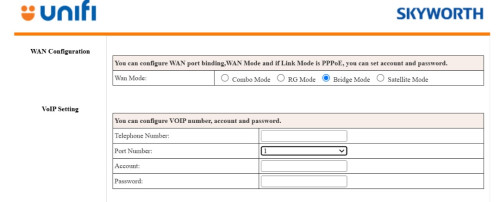
The new firmware sort of changed the interface (or because i am login using tmadmin and not actual admin)? No longer have the option to just choose bridge mode, instead now need to be selected under WAN mode (top level).

user posted image

After set to bridge mode, which port should i connect to? The 2.5 or the 1st WAN/LAN 1? I tried both, not working.

Also, anyone can advise if the fiber plugged in and its fine, is the PON light suppose to keep blinking or permanent?
*
The 1st pciture , if you choose 'Bridge Mode' the GUI should change, example username and password portion should be gone.

For the 2nd picture, it is for land line telephone, the port is 5060 (for my setting), Account is +604xxxxxxx@ims.tm.com and the password you need to get from TM. After ccorrect settings is set, your phone line will not work immediately, wait 30 minutes to 1 hours and verify.

This post has been edited by waja7968: Feb 26 2025, 08:59 AM
waja7968
post Feb 26 2025, 08:16 PM

Getting Started
**
Junior Member
56 posts

Joined: Nov 2006
QUOTE(derict @ Feb 26 2025, 07:58 PM)
Thank you. actually, the 2nd pic is after i choose 'bridge mode', then everything is gone other than the land line phone setting.

So, after i saved it and reboot, don't think i am able to access the unit anymore right?
*
Yes after reboot, you cannot access the unit anymore. But you can reset the unit by pressing the reset pin to force it back to default router mode.
After that you can configure the unit again.

If I recalled correctly, you still can access the unit, if you not reboot the unit after saving setting. During this stage you can configure and test your own router.

This post has been edited by waja7968: Feb 26 2025, 08:25 PM
waja7968
post Feb 26 2025, 08:31 PM

Getting Started
**
Junior Member
56 posts

Joined: Nov 2006
QUOTE(derict @ Feb 26 2025, 08:24 PM)
okie, thank you. Meaning i've set it correctly, but it didn't work.

My next Q is, which port my router need to be connected to in this device? WAN/LAN1?

Also, does the PON light on this device blinks if the fiber is OK? or should be steady light only?
*
I disabled all LAN ports except the 2.5 LAN1 port and your router need to connect to this LAN port. I also disabled all wifi. PON light must comsistent light up no blinking.

This post has been edited by waja7968: Feb 26 2025, 08:34 PM
waja7968
post Feb 26 2025, 08:43 PM

Getting Started
**
Junior Member
56 posts

Joined: Nov 2006
QUOTE(derict @ Feb 26 2025, 08:34 PM)
I think mine is of different firmware version as yours. As once i changed to bridge mode, nothing i can configure except the phone setting you see on my 2nd pic.

Will call technician as the PON light is blinking in green. unlike the power light.
*
user posted image

Topic ClosedOptions
 

Change to:
| Lo-Fi Version
0.0278sec    0.39    7 queries    GZIP Disabled
Time is now: 7th December 2025 - 07:25 PM