Welcome Guest ( Log In | Register )

Bump Topic Topic Closed RSS Feed
495 Pages « < 436 437 438 439 440 > » Bottom

Outline · [ Standard ] · Linear+

Unifi Official TM UniFi High Speed Broadband Thread V42, READ 1ST PAGE FOR RELEVANT WIFI INFO!

views
     
msrazi
post Jan 17 2025, 02:08 AM

Getting Started
**
Junior Member
112 posts

Joined: Sep 2009


QUOTE(MarcoFromTropoja @ Jan 17 2025, 12:43 AM)
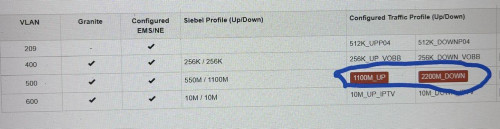
those team already check the reading at the port behind my house and it is -25 there
so they are suspecting the issue related with the reading & at the cabinet
because they already open max OLT 2200download 1100upload

user posted image
*
Seem like fiber bad join which also a factor of fiber quality issues
Adapters condition inside FDP also can give bad reading if FDP box/door not properly closed..No protection from heavy rain, dust or small insects


Moogle Stiltzkin
post Jan 17 2025, 10:16 AM

Look at all my stars!!
*******
Senior Member
4,466 posts

Joined: Jan 2003
QUOTE(tng55 @ Jan 15 2025, 11:17 AM)
yah expensive local
i saw amazon cheaper then local
EAP 660 HD also cheaper US then local hmm don't know
*
this eap 660 u linked seems to be wifi6, NOT wifi 6e. meaning it won't have 6ghz
https://www.tp-link.com/sg/business-network...oint/eap660-hd/

even if you don't want to pay for wifi 7, thats fine and understandable. but i would recommend wifi 6e over wifi6. simply due to the fact it can do 6ghz but the other can't.
https://www.netgear.com/sg/blog/home/whats-...-6e-and-wifi-6/


one very good advantage is, if your area has wifi congestion 2.4ghz and 5ghz, you can simply hop on 6ghz and have good wifi signal due to less congestion.


QUOTE
What are the benefits of the 6GHz Wireless band?

The 6GHz band, utilized by Wi-Fi 6E and Wi-Fi 7, offers significant benefits. It provides 1200 MHz of unlicensed spectrum, enabling faster speeds, lower latency, and less congestion. It supports advanced technologies like OFDMA and MU-MIMO, enhancing network capacity and efficiency. This results in a superior, more reliable wireless experience.

https://www.ruckusnetworks.com/insights/6.0...ou-need-to-know

argument against upgrade hmm.gif
https://www.hardwarezone.com.sg/feature-wif...guide-singapore


however it still comes down to, can your devices even support wifi 6e? sweat.gif

last i checked, devices are lately coming with wifi 6e


i short listed some smartphones here

https://www.gsmarena.com/compare.php3?idPho...&idPhone3=13478

the samsung budget model released early 2024, is wifi 6. but the google pixel 8a is wifi 6e. the upcoming mid range pixel 9a is listed as wifi 6e. Wifi 7 tend to be reserved for the higher end smartphone devices afaik even into 2025 so far. but this may change in 2026 (who knows).

But you can easily get a wifi 6e or wifi7 pcie card for desktop pc if you want to use it for that setup. Personally i used wired for desktop, and wireless for laptop/smartphone. these days if you want to use wifi to connect to desktop, is fine, especially with wifi 7 MLO which promises to achieve low latency when it comes to wifi.

This post has been edited by Moogle Stiltzkin: Jan 17 2025, 10:21 AM

MarcoFromTropoja
post Jan 17 2025, 06:11 PM

Getting Started
**
Junior Member
94 posts

Joined: Sep 2024
QUOTE(blacktubi @ Jan 17 2025, 12:38 AM)
Good luck, I already gave up as I know the fix will not persist unless they fix the root cause.

It's an integration issue between their billing system and provisioning system.

Do share if you manage to get it resolved.

FYI, it's not a fiber cable quality issue. They will try to blame it on that.
*
so as for today 17jan, the progress is around 80%
speed already back to normal getting around 1060-1080mbps
the main culprit is the cabinet (huawei infra) that handle this area
they change the network card or port im not sure the terms based on the tech
report not yet closed, since they are trying to lower down the fibre reading. current is -24
getting the new firmware for onu dlink dpn-fx3060v black : VERSION 2.0.6[U].. most user using 2.0.2 / 2.0.3
wireless speed at 5ghz improve drastically, getting more than 800mbps at distance around 10meter from onu ( previous 550-700mbps only)
will update again once they fixed the fibre reading and after report closed

user posted image

user posted image
msrazi
post Jan 17 2025, 07:21 PM

Getting Started
**
Junior Member
112 posts

Joined: Sep 2009


They will close the report later as -24dBm is in working ranges except ur power reading is in rx sensivity range -27 to -29.
outdoorxplorer
post Jan 17 2025, 07:25 PM

~Money Only Bring Pleasures When You Spent It WISELY!~
*******
Senior Member
2,028 posts

Joined: Jan 2003
From: Kuala Lumpur, MYS


Please share the latest VERSION 2.0.6 firmware. TIA

QUOTE(MarcoFromTropoja @ Jan 17 2025, 06:11 PM)
so as for today 17jan, the progress is around 80%
speed already back to normal getting around 1060-1080mbps
the main culprit is the cabinet (huawei infra) that handle this area
they change the network card or port im not sure the terms based on the tech
report not yet closed, since they are trying to lower down the fibre reading. current is -24
getting the new firmware for  onu dlink dpn-fx3060v black : VERSION 2.0.6[U].. most user using 2.0.2 / 2.0.3
wireless speed at 5ghz improve drastically, getting more than 800mbps at distance around 10meter from onu ( previous 550-700mbps only)
will update again once they fixed the fibre reading and after report closed

user posted image

user posted image
*
msrazi
post Jan 17 2025, 07:39 PM

Getting Started
**
Junior Member
112 posts

Joined: Sep 2009


QUOTE(MarcoFromTropoja @ Jan 17 2025, 06:11 PM)
so as for today 17jan, the progress is around 80%
speed already back to normal getting around 1060-1080mbps
the main culprit is the cabinet (huawei infra) that handle this area
they change the network card or port im not sure the terms based on the tech
report not yet closed, since they are trying to lower down the fibre reading. current is -24
getting the new firmware for  onu dlink dpn-fx3060v black : VERSION 2.0.6[U].. most user using 2.0.2 / 2.0.3
wireless speed at 5ghz improve drastically, getting more than 800mbps at distance around 10meter from onu ( previous 550-700mbps only)
will update again once they fixed the fibre reading and after report closed

user posted image

user posted image
*
Seem the firmware is the root cause. The speed back to normal u mention tested by lan or wifi?
MarcoFromTropoja
post Jan 17 2025, 08:04 PM

Getting Started
**
Junior Member
94 posts

Joined: Sep 2024
QUOTE(msrazi @ Jan 17 2025, 07:39 PM)
Seem the firmware is the root cause. The speed back to normal u mention tested by lan or wifi?
*
not the firmware, previously on 2.0.3, i still get 1050-1100mbps
after updating 2.0.6 still stuck at 960mbps
as i said, they change something at the cabinet referring to huawei infra
im not sure what it is either the port or network card, didnt understand what the technican said to me
yes its back to normal getting 1050-1080 via ONU lan 2.5 connected to my pc ethernet port 2.5
as for wifi, latest firmware giving fix to the slow speed previously on 5ghz ( v2.0.3). can get around 800+ at range 5-8mtr from ONU
msrazi
post Jan 17 2025, 09:02 PM

Getting Started
**
Junior Member
112 posts

Joined: Sep 2009


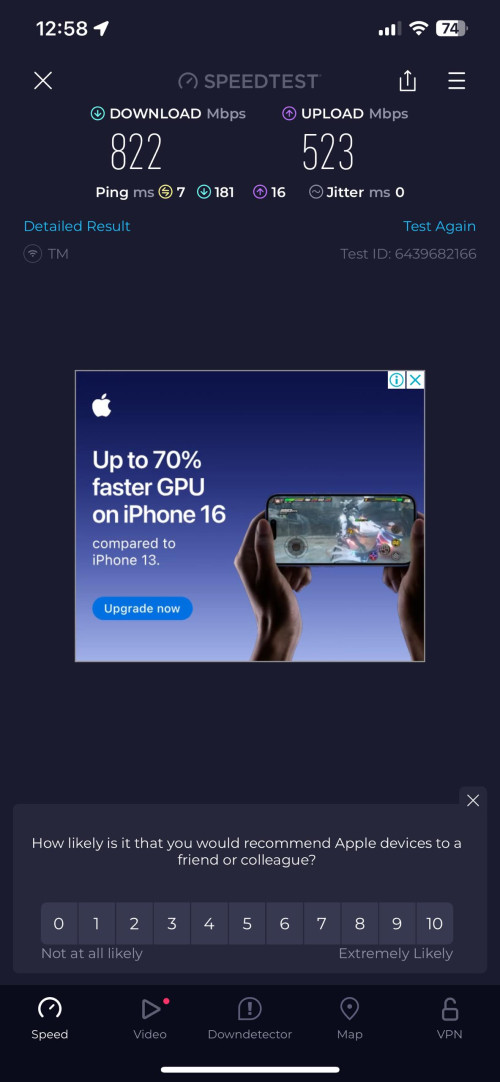
My laptop wifi AX210 speedtest result for 800mnps package.

user posted image
tng55
post Jan 17 2025, 09:21 PM

Regular
******
Senior Member
1,441 posts

Joined: Sep 2021


QUOTE(Moogle Stiltzkin @ Jan 17 2025, 10:16 AM)
this eap 660 u linked seems to be wifi6, NOT wifi 6e. meaning it won't have 6ghz
https://www.tp-link.com/sg/business-network...oint/eap660-hd/

even if you don't want to pay for wifi 7, thats fine and understandable. but i would recommend wifi 6e over wifi6. simply due to the fact it can do 6ghz but the other can't.
https://www.netgear.com/sg/blog/home/whats-...-6e-and-wifi-6/
one very good advantage is, if your area has wifi congestion 2.4ghz and 5ghz, you can simply hop on 6ghz and have good wifi signal due to less congestion.
https://www.ruckusnetworks.com/insights/6.0...ou-need-to-know

argument against upgrade  hmm.gif
https://www.hardwarezone.com.sg/feature-wif...guide-singapore
however it still comes down to, can your devices even support wifi 6e?  sweat.gif

last i checked, devices are lately coming with wifi 6e
i short listed some smartphones here

https://www.gsmarena.com/compare.php3?idPho...&idPhone3=13478

the samsung budget model released early 2024, is wifi 6. but the google pixel 8a is wifi 6e. the upcoming mid range pixel 9a is listed as wifi 6e. Wifi 7 tend to be reserved for the higher end smartphone devices afaik even into 2025 so far. but this may change in 2026 (who knows).

But you can easily get a wifi 6e or wifi7 pcie card for desktop pc if you want to use it for that setup. Personally i used wired for desktop, and wireless for laptop/smartphone. these days if you want to use wifi to connect to desktop, is fine, especially with wifi 7 MLO which promises to achieve low latency when it comes to wifi.
*
yah EAP 660 HD not wifi 6e and not wifi 7 i know

my pc desktop always use LAN Cable

phone always wifi

i waiting EAP 7XX HD = HD Version

because 660 HD = HD VERSION more cpu + ram strong

still not yet launch EAP 7XX HD
coolguy_0925
post Jan 18 2025, 01:11 AM

Look at all my stars!!
*******
Senior Member
4,538 posts

Joined: Jan 2003
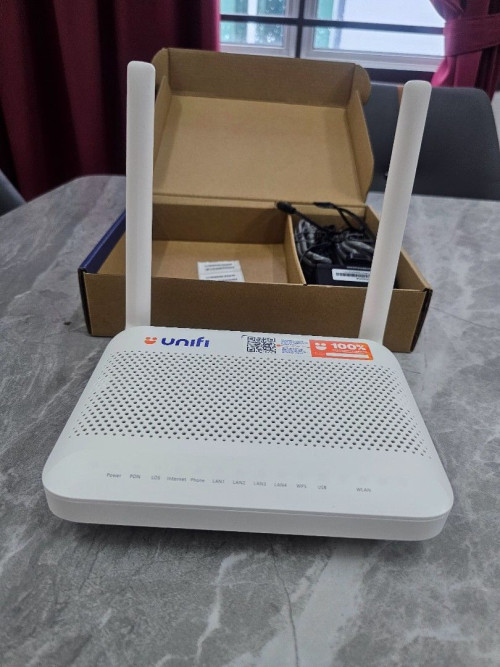
Anyone knows currently how many types (and what brand are they) routers being given / supplied by unifi?

P/S: 500Mbps, so should not be an AIO

This post has been edited by coolguy_0925: Jan 18 2025, 01:13 AM
aniq8676
post Jan 18 2025, 02:55 AM

Regular
******
Senior Member
1,524 posts

Joined: Dec 2020
From: Perak


QUOTE(coolguy_0925 @ Jan 18 2025, 01:11 AM)
Anyone knows currently how many types (and what brand are they) routers being given / supplied by unifi?

P/S: 500Mbps, so should not be an AIO
*
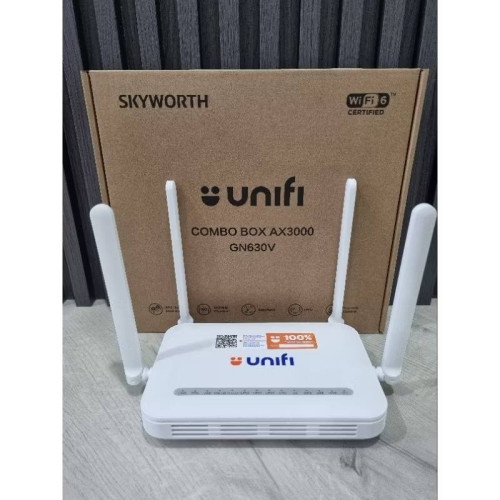
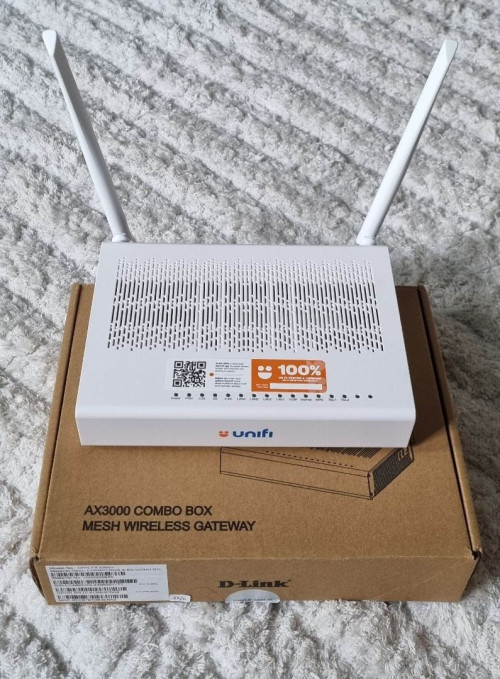
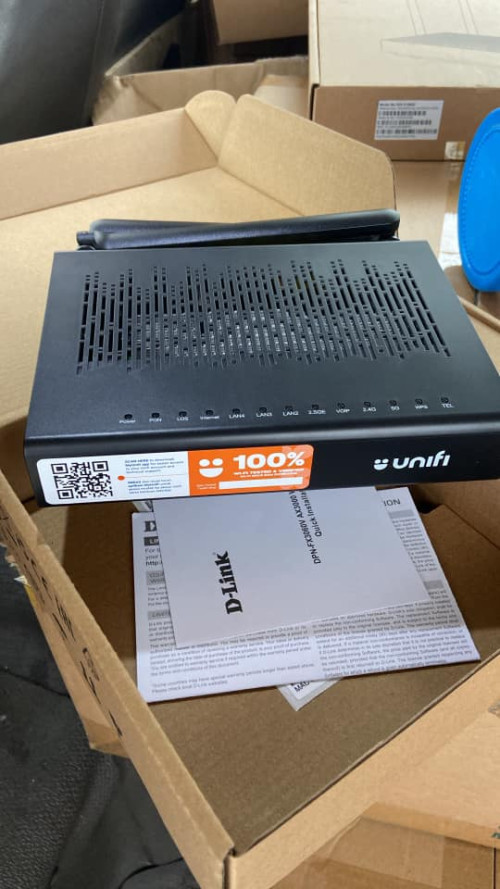
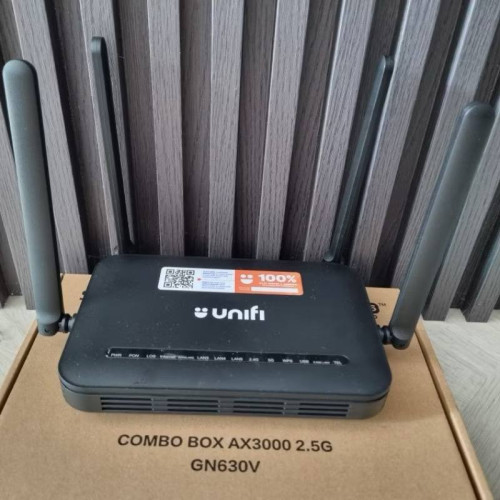
NON-ULTRA (100/300/500Mbps)

Fiberhome HG6145F3
user posted image

Skyworth GN630V
user posted image

ZTE ZXHN F6600P
user posted image


ULTRA (1/2Gbps)

D-Link DPN-FX3060V
user posted image

D-Link DPN-FX3060V (2.5G)
user posted image

Skyworth GN630V (2.5G)
user posted image

This post has been edited by aniq8676: Jan 18 2025, 03:11 AM
tientien
post Jan 18 2025, 09:30 AM

Getting Started
**
Junior Member
261 posts

Joined: Mar 2009
Damm..unifi really cancelled my 1gps upgrade. I am paying rm159 currently for 800mbps+ultimate tv+call currently. Anyone with the same plan as mine manage to get the free upgrade? I don't understand this unifi, if I am not eligible then don't offer me 😔.
Still thinking whether to escalate this to mcmc, that's how I got my previous plan ✌️
NagaK
post Jan 18 2025, 11:37 AM

Regular
******
Senior Member
1,194 posts

Joined: Sep 2018


QUOTE(aniq8676 @ Jan 18 2025, 02:55 AM)
NON-ULTRA (100/300/500Mbps)

Fiberhome HG6145F3
user posted image

Skyworth GN630V
user posted image

ZTE ZXHN F6600P
user posted image
ULTRA (1/2Gbps)

D-Link DPN-FX3060V
user posted image

D-Link DPN-FX3060V (2.5G)
user posted image

Skyworth GN630V (2.5G)
user posted image
*
Anyone using D Link or Skyworth 2.5G Combo? Is any issue encounter in bridge mode still now?

I'm still using fibre home modem which speed limit at 940mbps most of time
I'm also recently upgraded Asus router which supports 2.5G Wan support so I'm planning to contact unifi to demand replacement

This post has been edited by NagaK: Jan 18 2025, 11:38 AM
msrazi
post Jan 18 2025, 04:22 PM

Getting Started
**
Junior Member
112 posts

Joined: Sep 2009


QUOTE(tientien @ Jan 18 2025, 09:30 AM)
Damm..unifi really cancelled my 1gps upgrade. I am paying rm159 currently for 800mbps+ultimate tv+call currently. Anyone with the same plan as mine manage to get the free upgrade? I don't understand this unifi, if I am not eligible then don't offer me 😔.
Still thinking whether to escalate this to mcmc, that's how I got my previous plan ✌️
*
You can report to MCMC & request for actual reason why they cancel. Just say sorry not a real answer.
exsinner
post Jan 18 2025, 04:26 PM

New Member
*
Junior Member
36 posts

Joined: Nov 2010


QUOTE(NagaK @ Jan 18 2025, 11:37 AM)
Anyone using D Link or Skyworth 2.5G Combo? Is any issue encounter in bridge mode still now?

I'm still using fibre home modem which speed limit at 940mbps most of time
I'm also recently upgraded Asus router which supports 2.5G Wan support so I'm planning to contact unifi to demand replacement
*
What was the issue with bridge mode with skyworth? An acquaintance of mine tried to setup bridge mode but his router wont connect to the internet.
blacktubi
post Jan 18 2025, 04:29 PM

-
Group Icon
Elite
8,413 posts

Joined: Jul 2008

QUOTE(NagaK @ Jan 18 2025, 11:37 AM)
Anyone using D Link or Skyworth 2.5G Combo? Is any issue encounter in bridge mode still now?

I'm still using fibre home modem which speed limit at 940mbps most of time
I'm also recently upgraded Asus router which supports 2.5G Wan support so I'm planning to contact unifi to demand replacement
*
Might not be an issue with the modem, it could be an issue with their backend configuration

Yluxion
post Jan 18 2025, 05:16 PM

On my way
****
Junior Member
543 posts

Joined: Sep 2005
From: Sri Petaling, KL


QUOTE(exsinner @ Jan 18 2025, 04:26 PM)
What was the issue with bridge mode with skyworth? An acquaintance of mine tried to setup bridge mode but his router wont connect to the internet.
*
I've set both white & black Skyworth GN630V combo box in Bridge Mode. One in the office, another one at home.

Both have been running smoothly thus far. (white one since June 2024, black one since Dec 2024)

I hard reset the Skyworth combo box, then login to it & straight go to Bridge Mode tab and set up from there.

You can refer to post #8703. https://forum.lowyat.net/topic/5424552/+8700#

This post has been edited by Yluxion: Jan 18 2025, 05:19 PM
exsinner
post Jan 18 2025, 05:20 PM

New Member
*
Junior Member
36 posts

Joined: Nov 2010


QUOTE(Yluxion @ Jan 18 2025, 05:16 PM)
I've set both white & black Skyworth GN630V combo box in Bridge Mode. One in the office, another one at home.

Both have been running smoothly thus far. (white one since June 2024, black one since Dec 2024)

I hard reset the Skyworth combo box, then login to it & straight go to Bridge Mode tab and set up from there.

You can refer to post #8703. https://forum.lowyat.net/topic/5424552/+8700#
*
So just reset the combo box, run web gui setup and set to bridge mode. Thats all? What about GPON password? It it unnecessary
Yluxion
post Jan 18 2025, 05:55 PM

On my way
****
Junior Member
543 posts

Joined: Sep 2005
From: Sri Petaling, KL


QUOTE(exsinner @ Jan 18 2025, 05:20 PM)
So just reset the combo box, run web gui setup and set to bridge mode. Thats all?
Yeah. That's pretty much it, together with VOIP setup.

What about GPON password? It it unnecessary
Nope. I didn't touch any GPON setting. 
*
This post has been edited by Yluxion: Jan 18 2025, 05:55 PM
exsinner
post Jan 18 2025, 06:33 PM

New Member
*
Junior Member
36 posts

Joined: Nov 2010


QUOTE(Yluxion @ Jan 18 2025, 05:55 PM)

*
Sounds easy enough, luckily i remembered i had two of those combo box collecting dust. Might as well power them up and play around with it.

495 Pages « < 436 437 438 439 440 > » Top
Topic ClosedOptions
 

Change to:
| Lo-Fi Version
0.0231sec    0.34    6 queries    GZIP Disabled
Time is now: 9th December 2025 - 01:51 PM