Welcome Guest ( Log In | Register )

Outline · [ Standard ] · Linear+

 Problem with IPv6 vs cpu usage on Mikrotik hapAC2, Mikrotik sifus, pls come have a look

views
     
TSsquall0833
post Dec 2 2023, 05:59 AM, updated 3y ago

Regular
******
Senior Member
1,473 posts

Joined: Oct 2006
From: Jupiter


I recently notice this problem after I have 500Mbps package speed

before never happen cos my internet was only 300Mbps+


Im using mikrotik hap ac2

I realized when I do p2p or Steam download with ipv6 enabled, mikrotik cpu usage only 1 core at 100%

then im getting unstable connection via Ethernet ports

and the worst case is my ethernet port on mikrotik will stop working during heavy download on torrent client for few minutes, then I have to "disable" "re-enable" manually to fix my ethernet port

if disabled ipv6, then all works totally fine

is there any solution ?


Watch this video to reproduce the problem


is it just my hap ac2 ?

or does ur mikrotik device also like this?

I'm currently running the latest stable version routeros 7.12.1

This post has been edited by squall0833: Dec 2 2023, 06:18 AM
asellus
post Dec 2 2023, 07:44 AM

#gompusas
Group Icon
Elite
4,541 posts

Joined: Jan 2003
From: BSRPPG51 Access Concentrator


I believe the problem is caused by IPv6 not supporting FastTrack yet unlike IPv4. If you disable FastTrack IPv4 you will see the same problem too when IPv6 is disabled.

Solution? Here. For me, if you can't get full speed when FastTrack is disabled, your hardware is too slow. I always have FastTrack disabled in my setup.

This post has been edited by asellus: Dec 2 2023, 09:43 PM
TSsquall0833
post Dec 2 2023, 12:11 PM

Regular
******
Senior Member
1,473 posts

Joined: Oct 2006
From: Jupiter


QUOTE(asellus @ Dec 2 2023, 07:44 AM)
I believe the problem is caused by IPv6 not supporting FastTrack yet unlike IPv4. If you disable FastTrack IPv4 you will see the same problem too when IPv6 is disabled.

Solution? Here. For me, if you can't get full speed when FastTrack is enabled, your hardware is too slow. I always have FastTrack disabled in my setup.
*
So the workaround is I have to give up using ipv6 for now if I wanted to stay ipv4 + fasttrack for speed?

Unless I go for more powerful hardware?

This post has been edited by squall0833: Dec 2 2023, 12:12 PM
asellus
post Dec 2 2023, 12:18 PM

#gompusas
Group Icon
Elite
4,541 posts

Joined: Jan 2003
From: BSRPPG51 Access Concentrator


If you want IPv6 at higher speed with routeros, then need to change hardware. Else wait until FastTrack IPv6 support is being introduced, which is in the planning for several years but still not ETA. Or just stop using IPv6 with routeros; the support sucks anyway.
go626201
post Dec 2 2023, 12:31 PM

Regular
******
Senior Member
1,882 posts

Joined: Sep 2017
Hi,are u using the lower cpu freq for the hap ac2?
I saw the website wrote that CPU nominal frequency 716 MHz.
Maybe you can try to set higher cpu freq and tried again,might minimize the issue. (But the hardware is still not powerful enough)

My suggestion is just disable your PC ipv6.
Since unifi ipv6 is still not optimize enough.
I only enable ipv6 on my raspberrypi and torrent vm.
kwss
post Dec 2 2023, 12:34 PM

Regular
******
Senior Member
1,208 posts

Joined: Aug 2018
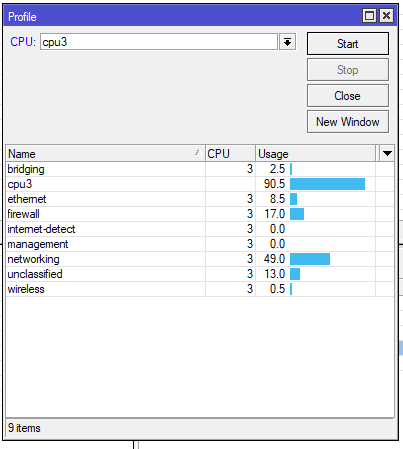
Go to Tools > Profile.
Hit Start.

Do the IPv6 download again and screenshot what is actually using CPU
TSsquall0833
post Dec 2 2023, 04:41 PM

Regular
******
Senior Member
1,473 posts

Joined: Oct 2006
From: Jupiter


QUOTE(kwss @ Dec 2 2023, 12:34 PM)
Go to Tools > Profile.
Hit Start.

Do the IPv6 download again and screenshot what is actually using CPU
*
user posted image

i got screenshot this, forgot to post lastnight biggrin.gif
hasmidzul_jojo
post Dec 2 2023, 04:41 PM

Getting Started
**
Junior Member
203 posts

Joined: Feb 2008
QUOTE(squall0833 @ Dec 2 2023, 05:59 AM)
I recently notice this problem after I have 500Mbps package speed

before never happen cos my internet was only 300Mbps+
Im using mikrotik hap ac2

I realized when I do p2p or Steam download with ipv6 enabled,  mikrotik cpu usage only 1 core at 100%

then im getting unstable connection via Ethernet ports

and the worst case is my ethernet port on mikrotik will stop working during heavy download on torrent client for few minutes, then I have to "disable" "re-enable" manually to fix my ethernet port

if disabled ipv6, then all works totally fine

is there any solution ?
Watch this video to reproduce the problem


is it just my hap ac2 ?

or does ur mikrotik device also like this?

I'm currently running the latest stable version routeros 7.12.1
*
It a bout right..hap ac2 max out approx 400Mbps with both ipv4/v6 enable.Did some RRUL Flent test some time ago.
TSsquall0833
post Dec 2 2023, 04:49 PM

Regular
******
Senior Member
1,473 posts

Joined: Oct 2006
From: Jupiter


QUOTE(go626201 @ Dec 2 2023, 12:31 PM)
Hi,are u using the lower cpu freq for the hap ac2?
I saw the website wrote that CPU nominal frequency 716 MHz.
Maybe you can try to set higher cpu freq and tried again,might minimize the issue. (But the hardware is still not powerful enough)

My suggestion is just disable your PC ipv6.
Since unifi ipv6 is still not optimize enough.
I only enable ipv6 on my raspberrypi and torrent vm.
*
it's default auto, I didnt touch the cpu freq setting

and it's running at 896Mhz during ipv6 Steam download


so, it's better just to disable ipv6 for now biggrin.gif

This post has been edited by squall0833: Dec 2 2023, 04:54 PM
kwss
post Dec 2 2023, 09:02 PM

Regular
******
Senior Member
1,208 posts

Joined: Aug 2018
What everyone said about RouterOS + IPv6 is true.

However, you can try disabling everything inside IPv6 > Firewall (Filter Rules, NAT, Mangle, Raw) and see how much performance you can gain, Maybe just enough to get by with IPv6 enabled.
Not sure if saving 17% off firewall will bring you double the speed though.

It's IPv6 > Firewall. Not IP > Firewall.
TSsquall0833
post Dec 2 2023, 11:13 PM

Regular
******
Senior Member
1,473 posts

Joined: Oct 2006
From: Jupiter


QUOTE(kwss @ Dec 2 2023, 09:02 PM)
What everyone said about RouterOS + IPv6 is true.

However, you can try disabling everything inside IPv6 > Firewall (Filter Rules, NAT, Mangle, Raw) and see how much performance you can gain, Maybe just enough to get by with IPv6 enabled.
Not sure if saving 17% off firewall will bring you double the speed though.

It's IPv6 > Firewall. Not IP > Firewall.
*
will try that for just testing biggrin.gif , thanks


Change to:
| Lo-Fi Version
0.0204sec    1.42    5 queries    GZIP Disabled
Time is now: 23rd December 2025 - 05:26 AM