

Hi my existing rig have gskill trident z royal ddr4 3600mhz 8gb x 2. Can I ask is it possible to add trident z neo ddr4 3600mhz 8gb x2 with the exact same speed to my existing trident z royal ?
Mixing trident z neo and trident z royal
Mixing trident z neo and trident z royal
|
|
 Nov 25 2023, 09:47 AM, updated 3y ago Nov 25 2023, 09:47 AM, updated 3y ago
Show posts by this member only | Post
#1
|
 
Junior Member
254 posts Joined: Jun 2011 
|
Hi my existing rig have gskill trident z royal ddr4 3600mhz 8gb x 2. Can I ask is it possible to add trident z neo ddr4 3600mhz 8gb x2 with the exact same speed to my existing trident z royal ?
|
|
|
|
|
|
Nov 25 2023, 11:03 AM
Show posts by this member only | Post
#2
|

Senior Member
1,006 posts Joined: Sep 2014 
|
Check the memory timings, not just the speed.
|
|
|
Nov 25 2023, 12:05 PM
Show posts by this member only | IPv6 | Post
#3
|
|
Junior Member
254 posts Joined: Jun 2011
|
QUOTE(Satori 14118a @ Nov 25 2023, 11:03 AM) Check the memory timings, not just the speed. Yes everything matches except the model  CL18-22-22-42 1.35V |
|
|
Nov 26 2023, 09:45 AM
Show posts by this member only | Post
#4
|

Senior Member
2,706 posts Joined: Apr 2017
|
QUOTE(AlphaOmega001 @ Nov 25 2023, 09:47 AM) Hi my existing rig have gskill trident z royal ddr4 3600mhz 8gb x 2. Can I ask is it possible to add trident z neo ddr4 3600mhz 8gb x2 with the exact same speed to my existing trident z royal ? For RAM matching the more important is RAM chips rather than the brand on the sticks. Lets say if its Samsung B die from Corsair you can still match pair with another B die kit from Kingston if they have nearly the same timings. Then XMP out of the box usually should have no issues. For ur case, Gskill is good that you can get a pretty good idea what memory chips are onboard based on the Serial Number. See here for guide https://www.reddit.com/r/overclocking/wiki/....skill_sn_table So once you find ur Z Royal RAM chip model, go find out if that Z Neo has the same chips or else you may need to search more for compatible RAMS. To note even match pairing the brand makers is no guaranteed success as many ie Micron has different die revision (ie A die, B die, E die, etc) which can also affect XMP stability. OTOH CL18 is a loose timing sticks so it might still play well with chips from other makers (ie if ur Z Royal is by Samsung, and the other is from Micron or something) but again no guarantees and even XMP at auto setup is more than likely to fail some stability tests. Good luck hunting! AlphaOmega001 liked this post
|
|
|
Nov 26 2023, 11:44 AM
Show posts by this member only | IPv6 | Post
#5
|
|
Junior Member
254 posts Joined: Jun 2011
|
QUOTE(babylon52281 @ Nov 26 2023, 09:45 AM) For RAM matching the more important is RAM chips rather than the brand on the sticks. Lets say if its Samsung B die from Corsair you can still match pair with another B die kit from Kingston if they have nearly the same timings. Then XMP out of the box usually should have no issues. Thank you very much for the info!For ur case, Gskill is good that you can get a pretty good idea what memory chips are onboard based on the Serial Number. See here for guide https://www.reddit.com/r/overclocking/wiki/....skill_sn_table So once you find ur Z Royal RAM chip model, go find out if that Z Neo has the same chips or else you may need to search more for compatible RAMS. To note even match pairing the brand makers is no guaranteed success as many ie Micron has different die revision (ie A die, B die, E die, etc) which can also affect XMP stability. OTOH CL18 is a loose timing sticks so it might still play well with chips from other makers (ie if ur Z Royal is by Samsung, and the other is from Micron or something) but again no guarantees and even XMP at auto setup is more than likely to fail some stability tests. Good luck hunting! |
|
|
Nov 29 2024, 10:43 PM
Show posts by this member only | IPv6 | Post
#6
|

Senior Member
1,972 posts Joined: Jan 2003 From: Klang Valley 
|
Hi there,
I just stumbled across this thread. I have actually successfully mixed existing G Skill Trident Z 2x8GB with a new kit of G Skill Trident Z Neo 2x16GB that has the same timing of 18-22-22-42 on both kits. XMP2.0 applied automatically from existing setting without any issue. The only tiny issue that I have is the RGB is not sync properly due to different models when using MSI Mystic Light. This issue has been resolved by replacing MSI Mystic Light with SignalRGB software. 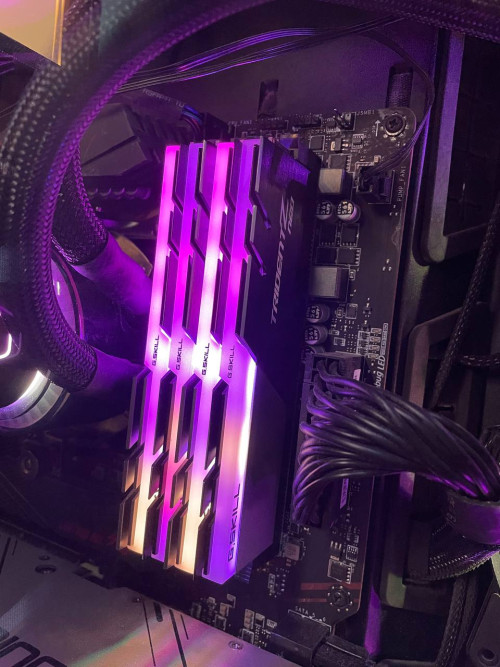 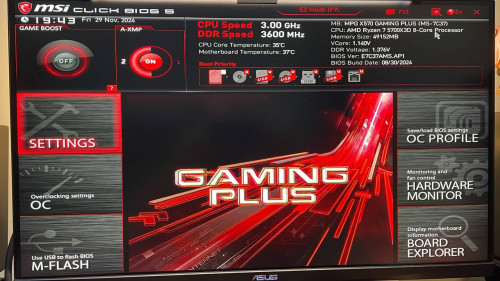 This post has been edited by tanghm: Nov 29 2024, 10:44 PM |
| Change to: |  0.0174sec 0.0174sec
 0.54 0.54
 5 queries 5 queries
 GZIP Disabled GZIP Disabled
Time is now: 21st December 2025 - 02:17 AM |
 Quote
Quote