Outline ·
[ Standard ] ·
Linear+
System goes to sleep when display turns off
|
TSRigerZ
|
 Nov 19 2023, 10:29 PM, updated 3y ago Nov 19 2023, 10:29 PM, updated 3y ago
|

|
On my old Windows 8 laptop I had the (.bat) script which turns off the display whenever I want to, instead of using the system timer. This then lets the system continue to run as normal but just with the screen off.
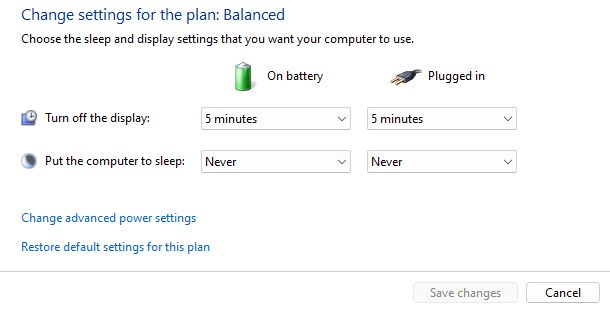
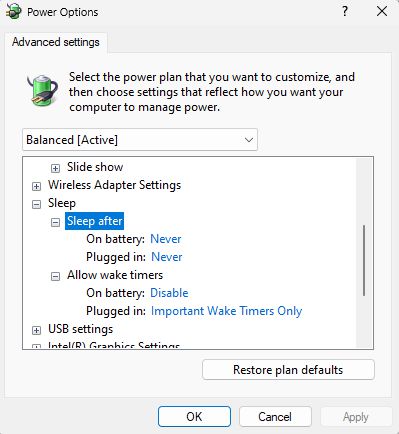
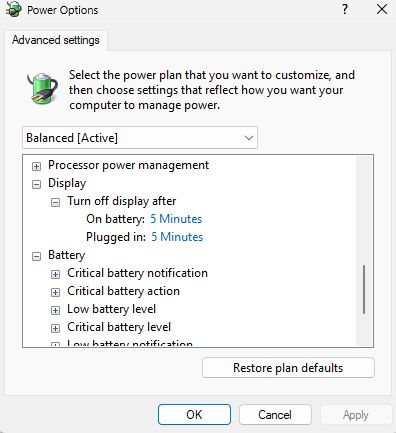
I've recently had the laptop replaced, but the same (.bat) script now also puts the whole laptop to sleep, which I do not want. All of my power settings for system sleep & screen off timers are set to "Never".
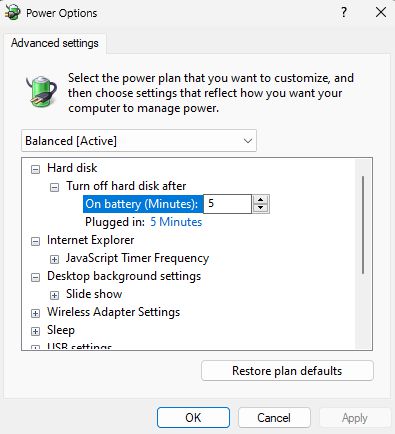
I did some reading and several articles/discussions suggested disabling the "Modern Standby" feature. A lot also mentioned of tweaking "additional power settings" but I cant find any such thing on my new laptop.
Is this suggestion correct or is there another fix for this? I have another big download ongoing, disabling Modern Standby will need a system restart which will disrupt my download, so I thought I'd post this question in the meantime.
My system:
Asus Vivobook 15 M3504Y
Win 11 Home
Version 22H2
OS build 22621.521
Experience Pack 1000.22634.1000.0
This post has been edited by RigerZ: Nov 19 2023, 10:31 PM
|
|
|
|
|
|
tvcat
|
Nov 20 2023, 11:43 AM
|
|
|
There are many other options available.
NitCMD, AutoHotkey, Twinkle.
Some laptops do have a dedicated key on the keyboard to turn display off, check the manual.
|
|
|
|
|
|
acbc
|
Nov 20 2023, 11:47 AM
|
|
|
Commands for previous version of Windows don't work properly on Windows 11. Need to relearn from scratch.
|
|
|
|
|
|
Xploit Machine
|
Nov 20 2023, 12:48 PM
|
|
|
|
|
|
|
|
|
TSRigerZ
|
Nov 20 2023, 12:53 PM
|
|
|
QUOTE(tvcat @ Nov 20 2023, 11:43 AM) There are many other options available. NitCMD, AutoHotkey, Twinkle. Some laptops do have a dedicated key on the keyboard to turn display off, check the manual. I did try one other program but it caused the same thing. Maybe I'll try these too QUOTE(acbc @ Nov 20 2023, 11:47 AM) Commands for previous version of Windows don't work properly on Windows 11. Need to relearn from scratch. Bummer.... QUOTE(Xploit Machine @ Nov 20 2023, 12:48 PM) why batch script when can be set via Control Panel manually on what to do?  my settings; Windows 11 got Control Panel? That interface doesnt look like Win11 either |
|
|
|
|
|
Xploit Machine
|
Nov 20 2023, 12:58 PM
|
|
|
QUOTE(RigerZ @ Nov 20 2023, 12:53 PM) I did try one other program but it caused the same thing. Maybe I'll try these too Bummer.... Windows 11 got Control Panel? That interface doesnt look like Win11 either Windows 11 even still got Internet Explorer  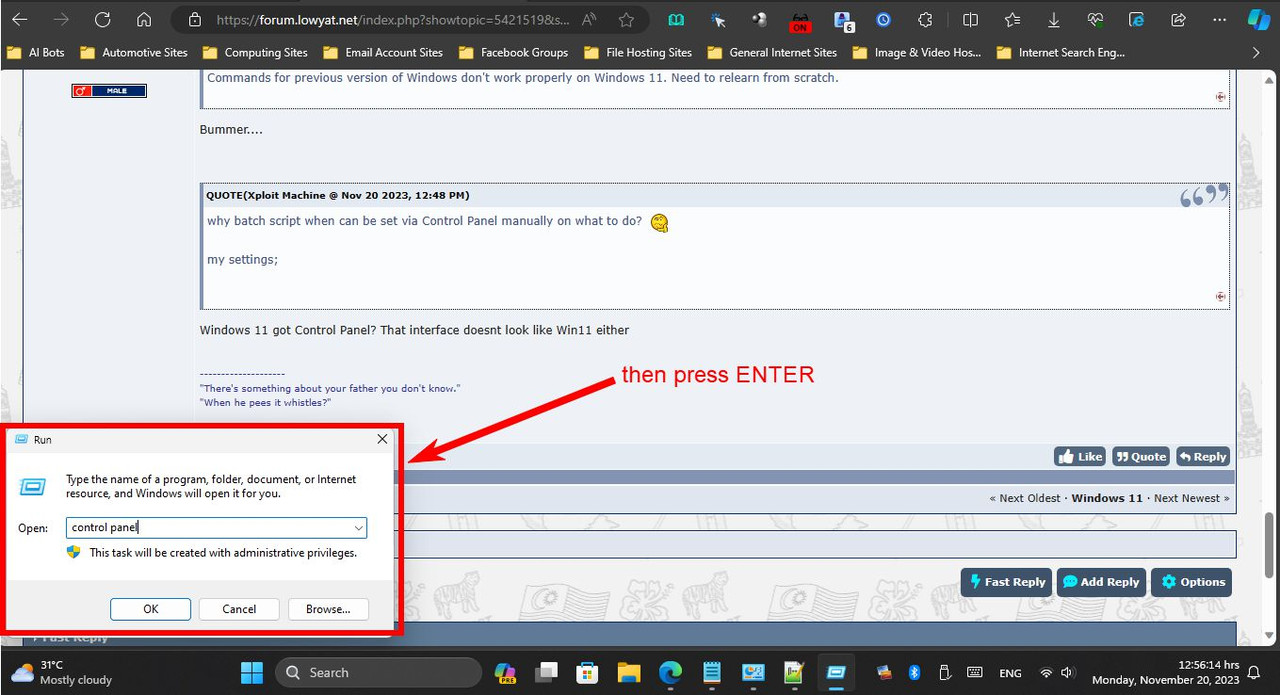 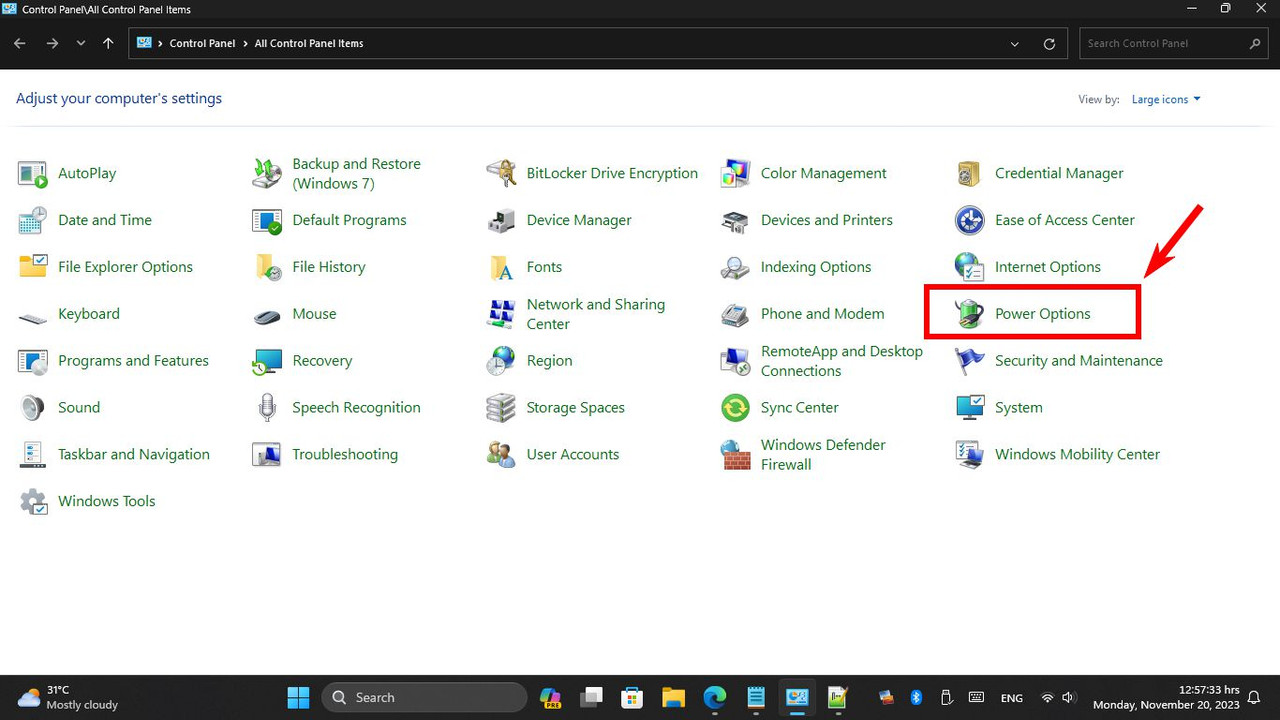 |
|
|
|
|
|
PJng
|
Nov 20 2023, 01:33 PM
|
|
|
QUOTE(Xploit Machine @ Nov 20 2023, 12:58 PM) Yeah, that is a way to open IE on win 11k, but clicking many item will direct to edge |
|
|
|
|
|
Xploit Machine
|
Nov 20 2023, 01:36 PM
|
|
|
QUOTE(PJng @ Nov 20 2023, 01:33 PM) Yeah, that is a way to open IE on win 11k, but clicking many item will direct to edge no, I was guiding him to manual Power Option settings in Control Panel .. rather than using batch scripts  |
|
|
|
|
|
PJng
|
Nov 20 2023, 07:16 PM
|
|
|
That weird, windows come with auto off screen ts disable it, but create script to manual off screen
|
|
|
|
|
|
TSRigerZ
|
Nov 20 2023, 08:13 PM
|
|
|
QUOTE(PJng @ Nov 20 2023, 07:16 PM) That weird, windows come with auto off screen ts disable it, but create script to manual off screen Its called personal preference lol |
|
|
|
|
|
PJng
|
Nov 20 2023, 08:18 PM
|
|
|
I think most laptop got FN + function button, no see thru those button?
|
|
|
|
|
|
coldwind21
|
Dec 22 2023, 03:19 PM
|
New Member

|
QUOTE(PJng @ Nov 20 2023, 08:18 PM) I think most laptop got FN + function button, no see thru those button? not most laptop but all laptop got FN button |
|
|
|
|
|
SUSNorman_kcs
|
Sep 6 2024, 05:58 PM
|
New Member
|
It sounds like your script might be acting up on Windows 11 compared to Windows 8. First, double-check that the script is only turning off the display and not triggering sleep. If that’s not the issue, try creating a new power plan in Control Panel > Power Options and set it to your preferred settings. You could also run the Power Troubleshooter by going to Settings > System > Troubleshoot > Other troubleshooters to see if it finds any problems. These steps might fix the issue without needing to disable Modern Standby and interrupt your download.
|
|
|
|
|



 Quote
Quote




 0.0211sec
 0.47
0.47
 5 queries
 GZIP Disabled