

QUOTE(Queryz @ Nov 6 2023, 10:36 PM)
Now interested with these two model.
Mr90x and ax73. Lol

should have flash sale...11.11 is around the corner...hope you able to get a good and right suitable one. good luckMr90x and ax73. Lol
Help to suggest which home router is good, In term of performance and economical
|
|
 Nov 6 2023, 10:37 PM Nov 6 2023, 10:37 PM
Show posts by this member only | IPv6 | Post
#41
|
 
Junior Member
835 posts Joined: Nov 2007 From: Land of Forgotten 
|
QUOTE(Queryz @ Nov 6 2023, 10:36 PM) Now interested with these two model. should have flash sale...11.11 is around the corner...hope you able to get a good and right suitable one. good luckMr90x and ax73. Lol |
|
|
|
|
|
Nov 6 2023, 10:46 PM
|

Senior Member
1,921 posts Joined: Apr 2013 From: Petaling Jaya 
|
IMO, after reading all the comments, suggestions and TS's posts about his wifi speed at 300Mbps, double storey house and still under construction, my opinion is to get every room with Ethernet Cable Dedicated directly from your main router. After that, get a decent router up to your allocated budget for your router, personally i will go for Asus. Been using Asus for years. Just got a refurbished AX88U for my room because i have a few devices I want to link up to LAN, 2 PCs, 1 NAS, 1 PS4 and in the future some additional electronics like TV with LAN support, hence why i went with Asus AX88U. It comes with 8 LAN slot and 1 WAN slot. Currently my house have free upgrade from 500Mbps to 800Mbps. I also have another AX56U for my work PC and that will connect to a printer. My room will have a printer also and I plan to connect it to the AX88U too.. lol. Basically better get 2 routers, same model also can, and run a LAN cable up to the first floor router. I have 1 main downstairs, AC86U, upstairs now 2, which is overkill I admit, AX56U and AX88U. Both serving different PCs. See which is your budget, AX56U is more than enough if you have not many people in the house. My house is cause my parents have a few devices each... LOL. so yeah, hence why i upgraded the routers. I just flashed my AX88U to default firmware, it was Merlin firmware. xD
|
|
|
Nov 6 2023, 10:58 PM
Show posts by this member only | IPv6 | Post
#43
|

Senior Member
2,615 posts Joined: Nov 2020
|
QUOTE(bobowyc @ Nov 6 2023, 10:46 PM) IMO, after reading all the comments, suggestions and TS's posts about his wifi speed at 300Mbps, double storey house and still under construction, my opinion is to get every room with Ethernet Cable Dedicated directly from your main router. After that, get a decent router up to your allocated budget for your router, personally i will go for Asus. Been using Asus for years. Just got a refurbished AX88U for my room because i have a few devices I want to link up to LAN, 2 PCs, 1 NAS, 1 PS4 and in the future some additional electronics like TV with LAN support, hence why i went with Asus AX88U. It comes with 8 LAN slot and 1 WAN slot. Currently my house have free upgrade from 500Mbps to 800Mbps. I also have another AX56U for my work PC and that will connect to a printer. My room will have a printer also and I plan to connect it to the AX88U too.. lol. Basically better get 2 routers, same model also can, and run a LAN cable up to the first floor router. I have 1 main downstairs, AC86U, upstairs now 2, which is overkill I admit, AX56U and AX88U. Both serving different PCs. See which is your budget, AX56U is more than enough if you have not many people in the house. My house is cause my parents have a few devices each... LOL. so yeah, hence why i upgraded the routers. I just flashed my AX88U to default firmware, it was Merlin firmware. xD yeah, absolutely run some cables aroundyou cant just place a few routers down and expect magic to happen cables, asus mesh with ethernet backhaul, should be a good choice also ax56u is eol already but yeah, this is not something cheap and dont cheap out on it get something powerful, reliable and with good long term support dont get the mercusys, friend of mine had a mr70x, the wan port died (lightning was not the cause) did get it replaced via warranty bobowyc liked this post
|
|
|
Nov 6 2023, 11:20 PM
|
|
Senior Member
1,921 posts Joined: Apr 2013 From: Petaling Jaya
|
QUOTE(PRSXFENG @ Nov 6 2023, 10:58 PM) yeah, absolutely run some cables around My first Asus router was the N56U i think. And i bought it 2nd hand too.. Lol. That time it was like RM100, way better than the default TM router, useless like anything. My mom keep nagging me saying the wifi so slow. lol. Ended up with that router for i think 2 years before it KO-ed. Bought another 2nd hand N56U. used for a year and it seems like it was gonna KO, so i bought AC86u that time, bought wrong time, because right after that price dropped drastically.. lol. Bought at RM800, i think a month later was like RM600.. I bought same time with my AX56U, just launched that time, RM600 AX56U. lols. Oh wells. haha. What's done is done. But I am very satisfied with Asus routers. The UI is very easy to navigate. Overall I would recommend Asus. xD you cant just place a few routers down and expect magic to happen cables, asus mesh with ethernet backhaul, should be a good choice also ax56u is eol already but yeah, this is not something cheap and dont cheap out on it get something powerful, reliable and with good long term support dont get the mercusys, friend of mine had a mr70x, the wan port died (lightning was not the cause) did get it replaced via warranty  |
|
|
Nov 7 2023, 10:02 AM
Show posts by this member only | IPv6 | Post
#45
|

Junior Member
258 posts Joined: Feb 2013 From: In your heart  
|
QUOTE(bobowyc @ Nov 6 2023, 11:20 PM) My first Asus router was the N56U i think. And i bought it 2nd hand too.. Lol. That time it was like RM100, way better than the default TM router, useless like anything. My mom keep nagging me saying the wifi so slow. lol. Ended up with that router for i think 2 years before it KO-ed. Bought another 2nd hand N56U. used for a year and it seems like it was gonna KO, so i bought AC86u that time, bought wrong time, because right after that price dropped drastically.. lol. Bought at RM800, i think a month later was like RM600.. I bought same time with my AX56U, just launched that time, RM600 AX56U. lols. Oh wells. haha. What's done is done. But I am very satisfied with Asus routers. The UI is very easy to navigate. Overall I would recommend Asus. xD Checking asus quite expensive but they provide good spec too. Need to keep more money. Harharhar bobowyc liked this post
|
|
|
Nov 7 2023, 10:18 AM
Show posts by this member only | IPv6 | Post
#46
|
|
Senior Member
5,296 posts Joined: Nov 2006
|
Try Mikrotik. Free Software upgrade untill it breakdown. After 10years you can set up as AP or LTE. Mikrotik stuff hardly breakdown.
This post has been edited by OlgaC4: Nov 7 2023, 10:20 AM |
|
|
|
|
|
Nov 7 2023, 10:23 AM
Show posts by this member only | IPv6 | Post
#47
|
|
Senior Member
5,296 posts Joined: Nov 2006
|
QUOTE(OlgaC4 @ Nov 7 2023, 10:18 AM) Try Mikrotik. Free Software upgrade untill it breakdown. After 10years you can set up as AP or LTE. Mikrotik stuff hardly breakdown. After 10years get 1more latest unit and you can setup auto roaming for your house network using new and old unit. |
|
|
Nov 7 2023, 12:05 PM
Show posts by this member only | IPv6 | Post
#48
|
|
Senior Member
2,615 posts Joined: Nov 2020
|
QUOTE(OlgaC4 @ Nov 7 2023, 10:18 AM) Try Mikrotik. Free Software upgrade untill it breakdown. After 10years you can set up as AP or LTE. Mikrotik stuff hardly breakdown. Yes Mikrotik stuff is powerful and reliableThe problem is it is quite advanced, being a SOHO/Business product Not sure if TS is willing to put in the effort to set that up compared to just a more plug and play solution of placing down a few consumer routers OlgaC4 liked this post
|
|
|
Nov 7 2023, 02:14 PM
Show posts by this member only | IPv6 | Post
#49
|
|
Junior Member
258 posts Joined: Feb 2013 From: In your heart
|
QUOTE(OlgaC4 @ Nov 7 2023, 10:18 AM) Try Mikrotik. Free Software upgrade untill it breakdown. After 10years you can set up as AP or LTE. Mikrotik stuff hardly breakdown. Yeap my previous job we are using mikrotik. Will consoder that too if its under my budget.  |
|
|
Nov 7 2023, 02:15 PM
Show posts by this member only | IPv6 | Post
#50
|
|
Junior Member
258 posts Joined: Feb 2013 From: In your heart
|
QUOTE(PRSXFENG @ Nov 7 2023, 12:05 PM) Yes Mikrotik stuff is powerful and reliable If got best price surely get this. But need consider my badget if not too high sky price. The problem is it is quite advanced, being a SOHO/Business product Not sure if TS is willing to put in the effort to set that up compared to just a more plug and play solution of placing down a few consumer routers  |
|
|
Nov 7 2023, 04:13 PM
Show posts by this member only | IPv6 | Post
#51
|
|
Junior Member
932 posts Joined: Dec 2019
|
QUOTE(Queryz @ Nov 7 2023, 02:15 PM) If got best price surely get this. But need consider my badget if not too high sky price. Nothings stopping you from using like a Hex(RB960PGS) with EAP613 then, I’d say separate it if you don’t mind a bit of tinkering, you’ll need more power plugs tho if you don’t want to use that Hex  Queryz liked this post
|
|
|
Nov 7 2023, 04:29 PM
Show posts by this member only | IPv6 | Post
#52
|
|
Junior Member
835 posts Joined: Nov 2007 From: Land of Forgotten
|
» Click to show Spoiler - click again to hide... « Cheapest AX3000 rated wifi router, but not sure does it works as intended for our ISP. and not much reviews. RM154. 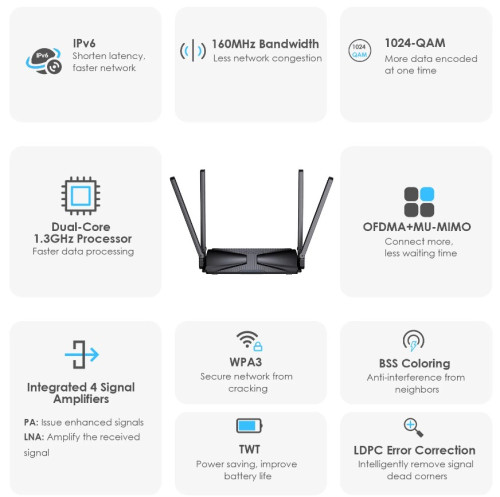 This post has been edited by Omochao: Nov 7 2023, 04:34 PM Queryz liked this post
|
|
|
Nov 7 2023, 04:33 PM
|

Senior Member
1,132 posts Joined: Jan 2003
|
Run cable to all room or area. Make sure it is 10Gbps proof
With the solid backbone then you can build solid wired or wireless network. PoE is nice and allow you to mount the AP certain location to maximize the coverage. Just another 2K opinion |
|
|
|
|
|
Nov 7 2023, 09:34 PM
|
|
Senior Member
1,921 posts Joined: Apr 2013 From: Petaling Jaya
|
QUOTE(Queryz @ Nov 7 2023, 10:02 AM) Checking asus quite expensive but they provide good spec too. Need to keep more money. Harharhar haha.. or wait for sale.. xD Queryz liked this post
|
|
|
Nov 7 2023, 09:40 PM
Show posts by this member only | IPv6 | Post
#55
|
|
Junior Member
258 posts Joined: Feb 2013 From: In your heart
|
QUOTE(yenchenje @ Nov 7 2023, 04:13 PM) Nothings stopping you from using like a Hex(RB960PGS) with EAP613 then, I’d say separate it if you don’t mind a bit of tinkering, you’ll need more power plugs tho if you don’t want to use that Hex Meaning to say from the ONU connect with Hex and go with EAP613? This Hex can support our ISP setup? Interesting if like that. |
|
|
Nov 7 2023, 09:42 PM
Show posts by this member only | IPv6 | Post
#56
|
|
Junior Member
258 posts Joined: Feb 2013 From: In your heart
|
QUOTE(cyberic @ Nov 7 2023, 04:33 PM) Run cable to all room or area. Make sure it is 10Gbps proof Yea got people ask to use POE with AP. Lay the cable surely all location covered with wifi. With the solid backbone then you can build solid wired or wireless network. PoE is nice and allow you to mount the AP certain location to maximize the coverage. Just another 2K opinion |
|
|
Nov 7 2023, 10:20 PM
Show posts by this member only | IPv6 | Post
#57
|
|
Junior Member
387 posts Joined: May 2019
|
QUOTE(Queryz @ Nov 7 2023, 09:42 PM) Yea got people ask to use POE with AP. Lay the cable surely all location covered with wifi. If you're going for that route, there is somebody selling 3 units of Ruckus R550 on Facebook marketplace. Price is RM1300, no idea if it's per unit or all 3. |
|
|
Nov 7 2023, 10:28 PM
Show posts by this member only | IPv6 | Post
#58
|
|
Junior Member
932 posts Joined: Dec 2019
|
QUOTE(Queryz @ Nov 7 2023, 09:40 PM) Meaning to say from the ONU connect with Hex and go with EAP613? Yes, put ONU in bridge and let Hex do PPPoE upstream, there's a big community of Mikrotik users in this forum This Hex can support our ISP setup? Interesting if like that.  Queryz liked this post
|
|
|
Nov 8 2023, 09:10 AM
Show posts by this member only | IPv6 | Post
#59
|
|
Junior Member
224 posts Joined: Apr 2019
|
unker also rekomen getting a grandfather clock besides cables...put router and cable together with the clock and it will run till end of time
in future when mesh tech become mature or fiber to the room tech appear then only replace the cat5e cable with cat9 by that time dlink and fiberhome router also can upgrade the firmware to support satellite broadband |
|
|
Nov 8 2023, 04:28 PM
Show posts by this member only | IPv6 | Post
#60
|
|
Junior Member
258 posts Joined: Feb 2013 From: In your heart
|
QUOTE(ChenKaiWen @ Nov 7 2023, 10:20 PM) If you're going for that route, there is somebody selling 3 units of Ruckus R550 on Facebook marketplace. Price is RM1300, no idea if it's per unit or all 3. Saw that just now. Rm1300 per unit. Got 3 units to sell. Used from their old office and now closed dy. ChenKaiWen liked this post
|
| Change to: |  0.0228sec 0.0228sec
 0.47 0.47
 5 queries 5 queries
 GZIP Disabled GZIP Disabled
Time is now: 22nd December 2025 - 12:15 AM |
 Quote
Quote