Welcome Guest ( Log In | Register )

Outline · [ Standard ] · Linear+

 DLink DIR-X3060Z Router Speedtests & Tips, Oh. So. Free.

views
     
TSsoonwai
post Oct 22 2023, 04:08 PM, updated 3y ago


********
All Stars
11,458 posts

Joined: Oct 2007
From: KL


DLink DIR-X3060Z
Oh. So. Free.

The X3060Z is one model of wifi routers that TM provides. Though lacking in features, it's not too shabby when it comes to wifi performace. It supports EasyMesh which allows APs from different manufacturers to mesh together.

If you're looking for speedtests, they're are in the 2nd post.

Closest model on DLink's website: DIR-X3000Z (https://www.dlink.com.my/product/ax3000-mesh-gigabit-wireless-router)
Manual: cannot find
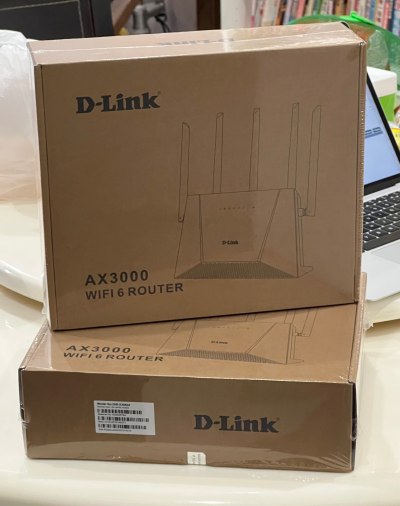
user posted image
TM's X3060Z brown box packaging.

App
DLink has a WiFi Connect app for the router but it's not working on IOS. I think Android is OK. (20231022)
IOS: https://apps.apple.com/my/app/d-link-wi-fi-...ct/id1613473017
Android: TBD

tl;dr Specs
SoC: ZTE ZX279128R (1Ghz Arm9 Dual Core)
Gigabit WAN Port x1
Gigabit LAN Ports x3
USB: None
RAM: 256MB
Flash: Unknown
WiFi6 802.11ax AX3000 (2x2 40Mhz & 160Mhz)
Antennas: 5 external
Antenna Gain: Unknown
Power: DC 12v 1.5A

CODE
tmadmin@zxic:/proc # cat cpuinfo
processor : 0
model name : ARMv7 Processor rev 1 (v7l)
BogoMIPS : 1987.37
Features : half thumb fastmult edsp tls
CPU implementer : 0x41
CPU architecture: 7
CPU variant : 0x4
CPU part : 0xc09
CPU revision : 1

processor : 1
model name : ARMv7 Processor rev 1 (v7l)
BogoMIPS : 1993.93
Features : half thumb fastmult edsp tls
CPU implementer : 0x41
CPU architecture: 7
CPU variant : 0x4
CPU part : 0xc09
CPU revision : 1

Hardware : ZTE ZX279128R (Device Tree)
Revision : 0000
Serial  : 0000000000000000


Open Ports
21/tcp ftp
22/tcp ssh
23/tcp telnet
80/tcp http
443/tcp https
3517/tcp802-11-iapp

Defaults
Refer to label on the bottom.
IP 192.168.0.1
username tmadmin
password Adm@XXXX (XXXX = last 4 digits of MAC address)
wifi password

Setup Guides
Normally TM's technician would have set it up for you but just in case, they didn't or if you had to reset.

I suggest that you start from default configuration. You can reset to defaults by using the reset button or from Administration/System Management - Factory Reset

How to Setup the DLink DIR-X3060Z as a Router
  1. Connect WAN port to your modem.
  2. Status/Quick Configuration - Working Mode: Routing patterns
  3. & WAN access mode: PPPoE
  4. Enter unifi credentials
  5. Enter WiFi SSID and password.
  6. The Internet Explorer LED (2nd from left) should become steady.
How to Setup the DLink DIR-X3060Z as an Access Point
  1. Status/Quick Configuration - Working Mode: The bridge model
  2. Connect WAN port to your network.
  3. Reboot.
  4. Check connectivity. The X3060Z should get an IP address from your main router.
  5. The Internet Explorer LED (2nd from left) should become steady.
How to Prepare the main DLink DIR-X3060Z for EasyMesh (Optional)
This is optional. You can leave both settings on Auto.
  1. /Network/WLAN/EasyMesh - Setting Device Roles: The main
  2. & Wireless Networking link: Only 5G
How to Setup EasyMesh on child DLink DIR-X3060Z (WPS)
I couldn't get this to work. They wouldn't connect. Recommend setup with cable.
  1. Press WPS button on main X3060Z.
  2. Press WPS button on secondary X3060Z
  3. 3rd from left LED on both X3060Zs should flash quickly.
  4. Wait until the LED is steady.
How to Setup EasyMesh on child DLink DIR-X3060Z (Cable)
  1. Connect WAN port to LAN. (doesn’t have to be the main DLink)
  2. Wait until the 69 LED (3rd from left) is steady. Takes a few mins for both DLinks to connect.
  3. Check status on EasyMesh page.
  4. Retain cable for Wired Mesh.
  5. Or remove cable for Wireless Mesh. Takes a few mins for both DLinks to reconnect.
  6. Remember not to place it too far away.


This post has been edited by soonwai: Oct 22 2023, 07:05 PM
TSsoonwai
post Oct 22 2023, 04:08 PM


********
All Stars
11,458 posts

Joined: Oct 2007
From: KL


Speedtests
Speedtests for the DLink DIR-X3060Z as a single Access Point (AP), Wireless Mesh and Wired Mesh.
  • I used my existing router, Mikrotik RB5009UG+S+IN as the main router.
  • The X3060Zs are configured as APs in Bridge mode.
  • I'm using the default 100% transmission power for both bands.
  • 2.4Ghz is set to 20Mhz and 5Ghz to 80Mhz.
  • Unifi is 800/200.
  • The Mikrotik router is located in my office room on the 1st floor towards the right & back of the house.
  • For all tests, the main X3060Z is in the same office room on the 1st floor.
  • For wireless mesh tests, the 2nd X3060Z is located downstairs in the living room at the foot of the stairs which is to the right of the house. This spot has a power point and good signal from the main X3060Z.
  • For wired mesh tests, the 2nd X3060Z is located downstairs in the living room to the front & left of the house. Because the network point & switch are here.
  • House is 24'x80' Bult-up not sure, 55"?. Maybe I draw a plan later.
|Location|Single AP (1st)|Wireless Mesh|Wired Mesh|
Office Room (1st)761/214--
Dining Room (G)478/210372/217807/213 (flaps)
Living Room (G)389/217353/216813/212 (flaps)
MacBook Air M1 Wifi6 2x2 80Mhz

LocationSingle AP (1st)Wireless MeshWired Mesh
Office (1st)739/242--
Dining Room (G)332/220377/232723/261
Living Room (G)340/228387/213747/257
Porch Door (G)51/52337/233638/232
Porch Gate (G)No signal279/232630/271
Master Room (1st)509/236280/214519/245
Master Toilet (1st)219/207240/187 (flaps)411/227 (flaps)
iPhone 13 Pro Wifi6 2x2 80Mhz

*(flaps) means the device cannot decide which mesh to connect to because it sees the same signal strength so it keeps changing and half the time, it connects to the slower one. It's probably because I left the transmission power at 100%.


This post has been edited by soonwai: Oct 25 2023, 09:45 PM
PRSXFENG
post Oct 22 2023, 05:48 PM

Look at all my stars!!
*******
Senior Member
2,608 posts

Joined: Nov 2020


This should help you fill out the specs
https://www.netcore.cn/en/product-center/fa...outer/2576.html

Or, possibly
https://www.netcore.cn/en/product-center/fa...outer/2600.html

Also, you wrote AC3000 instead of AX3000

This post has been edited by PRSXFENG: Oct 22 2023, 05:51 PM
pokchik
post Oct 22 2023, 05:52 PM

I'm getting too old for this sh*t
******
Senior Member
1,304 posts

Joined: Mar 2010


I find that the performance drops within 1 week of using.. devices disconnected, my online conference keeps disconnecting.. etc..

It doesn't happen overnight - I feel like the performance degraded after 3-4 days of usage.

Changed back to my ASUS RT-AC86U which has been solid for my usage.
TSsoonwai
post Oct 22 2023, 06:16 PM


********
All Stars
11,458 posts

Joined: Oct 2007
From: KL


QUOTE(PRSXFENG @ Oct 22 2023, 05:48 PM)
This should help you fill out the specs
https://www.netcore.cn/en/product-center/fa...outer/2576.html

Or, possibly
https://www.netcore.cn/en/product-center/fa...outer/2600.html

Also, you wrote AC3000 instead of AX3000
*
Thanks, corrected to AX3000. That's a wealth of info there.
TSsoonwai
post Oct 22 2023, 06:20 PM


********
All Stars
11,458 posts

Joined: Oct 2007
From: KL


QUOTE(pokchik @ Oct 22 2023, 05:52 PM)
I find that the performance drops within 1 week of using.. devices disconnected, my online conference keeps disconnecting.. etc..

It doesn't happen overnight - I feel like the performance degraded after 3-4 days of usage.

Changed back to my ASUS RT-AC86U which has been solid for my usage.
*
Memory leaks probably. Was afraid of things like that. Will keep an eye out for it. Doubt we're gonna get too many updates for this router. I wonder if can use official firmware from DLink but even then they don't have any new firmware yet for X3000Z.
wanttobuylaptop
post Oct 22 2023, 06:25 PM

.......
******
Senior Member
1,693 posts

Joined: Sep 2009


QUOTE(pokchik @ Oct 22 2023, 05:52 PM)
I find that the performance drops within 1 week of using.. devices disconnected, my online conference keeps disconnecting.. etc..

It doesn't happen overnight - I feel like the performance degraded after 3-4 days of usage.

Changed back to my ASUS RT-AC86U which has been solid for my usage.
*
There isnt a lot of router can match ac86u in the price range or ~300.
Well, 2nd hand ac86u still fetch quite a lot of money...
SUSMyProLife
post Oct 22 2023, 07:12 PM

I bully wumao & MPKL
*******
Senior Member
2,075 posts

Joined: Sep 2021
From: nowhere

Well TS you can add below links from google play store (android only) for apps that can control "d-link" special router (x1860z or x3060z only)
https://play.google.com/store/apps/details?...ink.quickconfig

Alternatively, unifi themselves also provide another app for their wifi 6 routers (maybe for FiberHome routers)
https://play.google.com/store/apps/details?...i.cloudcheck.tm
SUSMyProLife
post Oct 22 2023, 07:18 PM

I bully wumao & MPKL
*******
Senior Member
2,075 posts

Joined: Sep 2021
From: nowhere

Additionally, there's some correction:

The ZTE ZX279128R has ARM Cortex-A9 dual-core, 1GHz 32-bit SoC

But the wifi radio part is from Mediatek, MT7916AN combined with MT7976DN RF

more spicy info right here: https://device.report/netis-systems/nx30r

This post has been edited by MyProLife: Oct 22 2023, 07:38 PM
Aspick
post Oct 22 2023, 11:02 PM

Getting Started
**
Junior Member
189 posts

Joined: Jul 2018


soonwai how come the download speed for wireless mesh is about half of the download speed from single AP or Wired Mesh? However upload speed seems consistent for all 3 configuration types.

And when you test using MacBook, I am curious why the download speed when connected to Wired Mesh is even better than when it is connected to the Single AP.


SUSMyProLife
post Oct 22 2023, 11:35 PM

I bully wumao & MPKL
*******
Senior Member
2,075 posts

Joined: Sep 2021
From: nowhere

QUOTE(Aspick @ Oct 22 2023, 11:02 PM)
[email=soonwai]soonwai[/email] how come the download speed for wireless mesh is about half of the download speed from single AP or Wired Mesh? However upload speed seems consistent for all 3 configuration types.

And when you test using MacBook, I am curious why the download speed when connected to Wired Mesh is even better than when it is connected to the Single AP.
*
this is just coz of how wifi works. wifi works in half duplex mode, either tx or rx can be done one moment. so when the wifi 5ghz radio is also used as wireless backhaul at the same time, speed will be about half. for upload speed, it's just unifi thing because unifi implement asymmetrical speed which upload is much lower than download usually
TSsoonwai
post Oct 22 2023, 11:47 PM


********
All Stars
11,458 posts

Joined: Oct 2007
From: KL


QUOTE(Aspick @ Oct 22 2023, 11:02 PM)
[email=soonwai]soonwai[/email] how come the download speed for wireless mesh is about half of the download speed from single AP or Wired Mesh? However upload speed seems consistent for all 3 configuration types.

And when you test using MacBook, I am curious why the download speed when connected to Wired Mesh is even better than when it is connected to the Single AP.
*
Wireless mesh throughput is halved because the mesh node only has one 5Ghz transceiver (radio.) It uses that single radio to alternate sending/receiving from the main mesh and sending/receiving to the device. Wifi is half-duplex, it can't send/receive simultaneously. So double duty for it and therefore about 50% effective throughput.

I think the mesh can handle about 800Mbps so 400+400 for sending and receiving. Unifi upload is only 200Mbps so no problem there.

This is why the more expensive tri-band mesh systems have 2 x 5Ghz radios. One dedicated to the main mesh and one to the devices.

As for the MacBook, I think that's because the office room is a much smaller space with walls on all sides and the radio waves are bouncing off the walls and interfering with themselves. Also because the MacBook was much closer, about 3ft away from the x3060z. Too close also no good. Another thing is that I left the power of the x3060z in the office room at 100%. Probably a bit too much for that room.

The living and dining room are much bigger spaces and I'm about 8ft away during the tests.

This post has been edited by soonwai: Oct 23 2023, 12:37 AM
Aspick
post Oct 23 2023, 12:31 AM

Getting Started
**
Junior Member
189 posts

Joined: Jul 2018


Soonwai & MyProLife, thanks very much for the explanation.

Now I know if I need the download speed on my future mesh unit to be same as the main unit, I need to either pull a lan cable to the mesh unit or upgrade both units to a triband model.
PJng
post Oct 23 2023, 12:43 AM

10k Club
********
All Stars
12,039 posts

Joined: Oct 2017


QUOTE(Aspick @ Oct 23 2023, 12:31 AM)
Soonwai & MyProLife, thanks very much for the explanation.

Now I know if I need the download speed on my future mesh unit to be same as the main unit, I need to either pull a lan cable to the mesh unit or upgrade both units to a triband model.
*
i no pening2 setup mesh la what
buy cheap wifi 6 router as AP, pull long cable, set wifi name is same just add 1 number behide, same wifi password
both also can get full speed
TSsoonwai
post Oct 23 2023, 12:59 AM


********
All Stars
11,458 posts

Joined: Oct 2007
From: KL


QUOTE(PJng @ Oct 23 2023, 12:43 AM)
i no pening2 setup mesh la what
buy cheap wifi 6 router as AP, pull long cable, set wifi name is same just add 1 number behide, same wifi password
both also can get full speed
*
Yes can also. I was using like that except with just one SSID for all APs. Mikrotik hAP ac2 + hAP ac. Got centralized management (Mikrotik calls it Capsman) but no fast roaming. Of course, cable.

The newer hAP ax3 which I've been testing for a few months now supports both management & fast roaming. Once happy, I'll probably get another hAP ax3 or a cheaper ax2.

Mesh main benefits:
1. Centralized Management but not so important if just 2 units.
2. Fast Roaming when going from AP to another.
3. Controller can give the device a list of recommended APs to connect to. Again not so important for 2 units.

This post has been edited by soonwai: Oct 23 2023, 12:59 AM
PJng
post Oct 23 2023, 01:03 AM

10k Club
********
All Stars
12,039 posts

Joined: Oct 2017


QUOTE(soonwai @ Oct 23 2023, 12:59 AM)
Yes can also. I was using like that except with just one SSID for all APs. Mikrotik hAP ac2 + hAP ac. Got centralized management (Mikrotik calls it Capsman) but no fast roaming. Of course, cable.

The newer hAP ax3 which I've been testing for a few months now supports both management & fast roaming. Once happy, I'll probably get another hAP ax3 or a cheaper ax2.

Mesh main benefits:
1. Centralized Management but not so important if just 2 units.
2. Fast Roaming when going from AP to another.
3. Controller can give the device a list of good APs to connect to. Again not so important for 2 units.
*
i got try set same SSID, but seem sometime phone does not auto switch, and i cannot know which router is connected to, so i just add extra 1 number on SSID, easy to see connected to which router.

and some more AP also got LAN port for PC use
hasmidzul_jojo
post Oct 23 2023, 06:40 AM

Getting Started
**
Junior Member
203 posts

Joined: Feb 2008
Roaming is interesting but mesh...for me not important for my usage.Only roaming.
Aspick
post Oct 23 2023, 08:34 AM

Getting Started
**
Junior Member
189 posts

Joined: Jul 2018


QUOTE(PJng @ Oct 23 2023, 12:43 AM)
i no pening2 setup mesh la what
buy cheap wifi 6 router as AP, pull long cable, set wifi name is same just add 1 number behide, same wifi password
both also can get full speed
*
If I pull cable from ground floor to 1st floor, it will be messy and I don't like to see exposed cable running along the walls. That is why I using repeater for now. But repeater also give half the speed of my main unit.

Was hoping getting another similar X3060z and set up as wireless mesh will give full speed. Guess will have to reconsider other options.
wc_how
post Oct 23 2023, 11:28 AM

Regular
******
Senior Member
1,187 posts

Joined: Oct 2009
QUOTE(PJng @ Oct 23 2023, 12:43 AM)
i no pening2 setup mesh la what
buy cheap wifi 6 router as AP, pull long cable, set wifi name is same just add 1 number behide, same wifi password
both also can get full speed
*
This just because Dlink/Easymesh suck.

I used to use this method, but once going mesh(tplink deco), that is no turning back.
If you have the condition to pull lan for 2 AP, make backbone mesh. My whole house (2storeys) are 450-600m with AC1200. Most importantly, the roaming doesn't lag or spike.

2 ssid or 1 same ssid with same name are shit. It won't switch to the best signal automatically, unless you tune the signal lower, but it cause another issue that it reduces your performance.

Side note: used to be wireless mesh which was about 250m for the satelite unit.
I can imagine if i choose to use deco X60 series, i can use up to 600m even with wireless mesh.

This post has been edited by wc_how: Oct 23 2023, 11:35 AM
Maknusia
post Oct 23 2023, 11:33 AM

Enthusiast
*****
Junior Member
997 posts

Joined: Apr 2009


QUOTE(wc_how @ Oct 23 2023, 11:28 AM)
This just because Dlink/Easymesh suck.

I used to use this method, but once going mesh(tplink deco), that is no turning back.
If you have the condition to pull lan for 2 AP, make backbone mesh. My whole house (2storeys) are 450-600m with AC1200. Most importantly, the roaming doesn't lag or spike.

2 ssid or 1 same ssid with same name are shit. It won't switch to the best signal automatically, unless you tune the signal lower, but it cause another issue that it reduces your performance.
*
I dont have problem at my home switching for my Deco M4 when I walk from ground floor to 1st floor room, it automatically switches and yes both has the same SSID.
wc_how
post Oct 23 2023, 11:36 AM

Regular
******
Senior Member
1,187 posts

Joined: Oct 2009
QUOTE(Maknusia @ Oct 23 2023, 11:33 AM)
I dont have problem at my home switching for my Deco M4 when I walk from ground floor to 1st floor room, it automatically switches and yes both has the same SSID.
*
I mean 2 diff range of routers, not mesh unit with same ssid. Or what i mean is, 2 individual APs.
Maknusia
post Oct 23 2023, 11:47 AM

Enthusiast
*****
Junior Member
997 posts

Joined: Apr 2009


QUOTE(wc_how @ Oct 23 2023, 11:36 AM)
I mean 2 diff range of routers, not mesh unit with same ssid. Or what i mean is, 2 individual APs.
*
I see...got it! yeah those are leceh. Sorry misunderstood earlier.
wc_how
post Oct 23 2023, 11:48 AM

Regular
******
Senior Member
1,187 posts

Joined: Oct 2009
QUOTE(Maknusia @ Oct 23 2023, 11:47 AM)
I see...got it! yeah those are leceh. Sorry misunderstood earlier.
*
Ya that was my meaning i never go back after using tplink deco series.
TSsoonwai
post Oct 23 2023, 02:56 PM


********
All Stars
11,458 posts

Joined: Oct 2007
From: KL


QUOTE(PJng @ Oct 23 2023, 01:03 AM)
i got try set same SSID, but seem sometime phone does not auto switch, and i cannot know which router is connected to, so i just add extra 1 number on SSID, easy to see connected to which router.

and some more AP also got LAN port for PC use
*
True also. Even with mesh systems, - more accurately 802.11[r,k,v]. WiFi Mesh nowadays is more a marketing term - ultimately it's still up to the device whether it wants to switch or not.

For sure your house will have spots where the signal is the same but one AP is faster than the other. And dunno why the phone always connects to the one that is slower. bangwall.gif

My master toilet is one such place. No matter what I'm using, Deco M4, M9 Plus, X20, Mikrotik hAP ac, ac2, ax3 and now DLink X3060Z, the same thing happens.

Another one is the camera in my front door, for some strange reason, it always connect to the AP at the back of the house instead of the one 10ft away from it. confused.gif This can be solved by using separate SSIDs like what you do. Since I prefer a single SSID, I solve this by blocking that camera from the back AP but I can only do this when using Mikrotik APs.

Another thing is power, I never use 100%. Too much overlap in the signal. TPLink Deco team knows this so their products all have conservative power settings. Buy more Decos instead of increasing power. smile.gif
This post has been edited by soonwai: Oct 23 2023, 03:11 PM
TSsoonwai
post Oct 23 2023, 03:32 PM


********
All Stars
11,458 posts

Joined: Oct 2007
From: KL


QUOTE(Aspick @ Oct 23 2023, 08:34 AM)
If I pull cable from ground floor to 1st floor, it will be messy and I don't like to see exposed cable running along the walls. That is why I using repeater for now. But repeater also give half the speed of my main unit.

Was hoping getting another similar X3060z and set up as wireless mesh will give full speed. Guess will have to reconsider other options.
*
Looks like it has be tri-band then. M9 Plus is really cheap now but Wifi5 only. The current Wifi6 Deco tribands are too expensive.

You'll also need to see if you have a good place to put the unit where it's family approved, has a power point and good signal from the main unit. Harder than it sounds.

Or hack the walls and conceal a cable. smile.gif

This post has been edited by soonwai: Oct 23 2023, 03:33 PM
pokchik
post Oct 23 2023, 09:31 PM

I'm getting too old for this sh*t
******
Senior Member
1,304 posts

Joined: Mar 2010


QUOTE(soonwai @ Oct 23 2023, 03:32 PM)
Or hack the walls and conceal a cable. smile.gif
*
I wonder if we can do our own FTTR using Huawei solution..
fuadfadz
post Oct 23 2023, 09:51 PM

Enthusiast
*****
Senior Member
795 posts

Joined: Jun 2009

i sold my dlink dir-x3060z. i like fiberhome sr1041f more
BOTAK_WAI
post Oct 23 2023, 09:53 PM

Blow Water First Class
*******
Senior Member
4,153 posts

Joined: Jan 2003
From: Cheras, KL


QUOTE(pokchik @ Oct 23 2023, 09:31 PM)
I wonder if we can do our own FTTR using Huawei solution..
*
why not use tplink cheaper solution
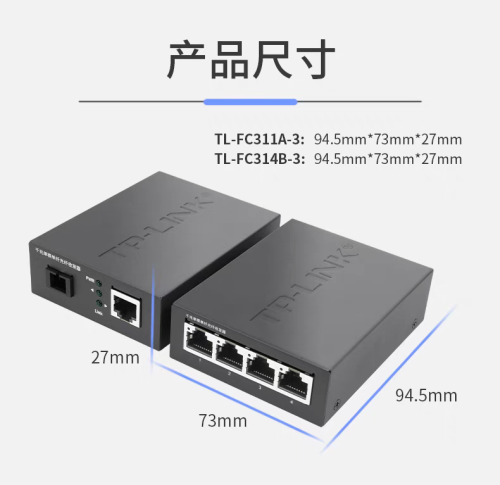
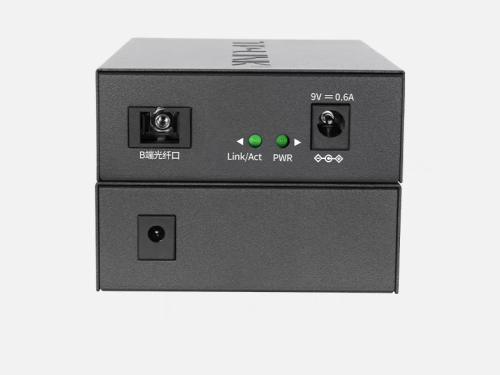
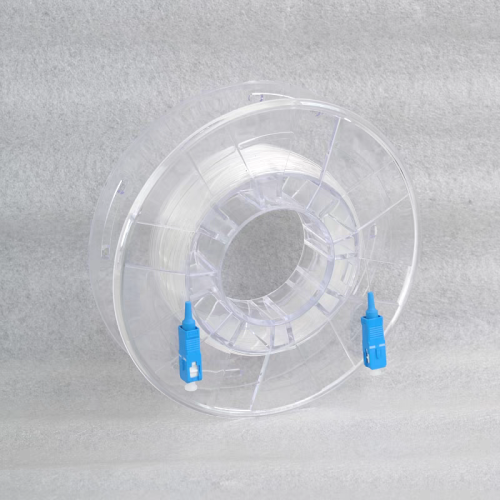
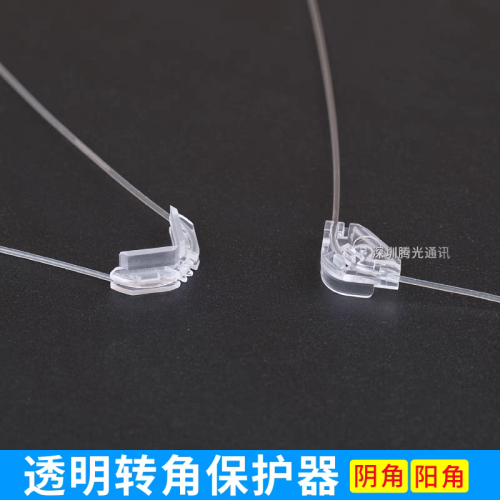
user posted image

user posted image

user posted image

user posted image

user posted image

This post has been edited by BOTAK_WAI: Oct 23 2023, 10:07 PM
TSsoonwai
post Oct 24 2023, 05:05 AM


********
All Stars
11,458 posts

Joined: Oct 2007
From: KL


QUOTE(fuadfadz @ Oct 23 2023, 09:51 PM)
i sold my dlink dir-x3060z. i like fiberhome sr1041f more
*
Any reasons why? Colour? Design?
SUSMyProLife
post Oct 24 2023, 10:16 AM

I bully wumao & MPKL
*******
Senior Member
2,075 posts

Joined: Sep 2021
From: nowhere

QUOTE(soonwai @ Oct 24 2023, 05:05 AM)
Any reasons why? Colour? Design?
*
I feel like fiberhome wifi 6 stability is better from my brief experience with sr1041y model. Just than features wise its lacking only. Almost close to tp link archer level
TSsoonwai
post Oct 24 2023, 10:36 AM


********
All Stars
11,458 posts

Joined: Oct 2007
From: KL


QUOTE(MyProLife @ Oct 24 2023, 10:16 AM)
I feel like fiberhome wifi 6 stability is better from my brief experience with sr1041y model. Just than features wise its lacking only. Almost close to tp link archer level
*
Stability compared to X3060Z? Stability in what way?
SUSMyProLife
post Oct 24 2023, 11:02 AM

I bully wumao & MPKL
*******
Senior Member
2,075 posts

Joined: Sep 2021
From: nowhere

QUOTE(soonwai @ Oct 24 2023, 10:36 AM)
Stability compared to X3060Z? Stability in what way?
*
No experience yet with x3060z. Actually at that time because got upgraded from dir842 to sr1041y maybe as part of recontract. Feels like sr1041y is better than dir842 in terms of ping, packet lose and range as well as the speed that can more easily to reach 300mbps
apalexar
post Oct 25 2023, 07:59 PM

apalexar
******
Senior Member
1,383 posts

Joined: Sep 2012


Since TS provide good test result for the router, anyone interested to get one unit? Got 1 unit for sell here brows.gif
fuadfadz
post Oct 25 2023, 09:12 PM

Enthusiast
*****
Senior Member
795 posts

Joined: Jun 2009

QUOTE(soonwai @ Oct 24 2023, 05:05 AM)
Any reasons why? Colour? Design?
*
Fiberhome sr1041f give better speed when connected to mesh via wifi.

I can easily get 200mbps+ when i’m in room upstairs. Dlink struggle to give 100-150mbps.

Coverage wise both dlink dir x3060z and fiberhome sr1041f works really well.
Sky.Live
post Oct 27 2023, 04:26 PM

Proctected Species
*******
Senior Member
4,390 posts

Joined: Oct 2004
From: Cheras, Malaysia


when use the mesh as bridge mode, after disable dhcp.. the router die die cant connect.. what setting did i set wrongly?
TSsoonwai
post Oct 27 2023, 06:08 PM


********
All Stars
11,458 posts

Joined: Oct 2007
From: KL


QUOTE(Sky.Live @ Oct 27 2023, 04:26 PM)
when use the mesh as bridge mode, after disable dhcp.. the router die die cant connect.. what setting did i set wrongly?
*
No idea what you did but just set Bridge mode. No need to disable DHCP, it should be done automatically.
Sky.Live
post Oct 27 2023, 10:30 PM

Proctected Species
*******
Senior Member
4,390 posts

Joined: Oct 2004
From: Cheras, Malaysia


QUOTE(soonwai @ Oct 27 2023, 06:08 PM)
No idea what you did but just set Bridge mode. No need to disable DHCP, it should be done automatically.
*
Set to bridge mode ok, but i want my main router to assign ip to rest of my devices
TSsoonwai
post Oct 27 2023, 11:30 PM


********
All Stars
11,458 posts

Joined: Oct 2007
From: KL


QUOTE(Sky.Live @ Oct 27 2023, 10:30 PM)
Set to bridge mode ok, but i want my main router to assign ip to rest of my devices
*
That's what I do on mine.

Main router is Mikrotik RB5009.

X3060Z-#1
• Set bridge mode
• Connect WAN port to Mikrotik
• DLink will get IP address from Mikrotik
• No need to disable DHCP or set IP address
• Configure EasyMesh

X3060Z-#2
• No need to set anything
• Just connect WAN port to LAN switch
• DLink will get IP address from Mikrotik
• EasyMesh will auto configure

Device connected to DLink #1 or #2 wifi will get IP address from Mikrotik.
Sky.Live
post Oct 29 2023, 04:53 PM

Proctected Species
*******
Senior Member
4,390 posts

Joined: Oct 2004
From: Cheras, Malaysia


QUOTE(soonwai @ Oct 27 2023, 11:30 PM)
That's what I do on mine.

Main router is Mikrotik RB5009.

X3060Z-#1
• Set bridge mode
• Connect WAN port to Mikrotik
• DLink will get IP address from Mikrotik
• No need to disable DHCP or set IP address
• Configure EasyMesh

X3060Z-#2
• No need to set anything
• Just connect WAN port to LAN switch
• DLink will get IP address from Mikrotik
• EasyMesh will auto configure

Device connected to DLink #1 or #2 wifi will get IP address from Mikrotik.
*
Device 2 wan port connect to lan port of device 1 or your Mikrotik?
TSsoonwai
post Oct 30 2023, 12:22 AM


********
All Stars
11,458 posts

Joined: Oct 2007
From: KL


QUOTE(Sky.Live @ Oct 29 2023, 04:53 PM)
Device 2  wan port connect to lan port of device 1 or your Mikrotik?
*
Device 2 connects to a switch which is connected to my Mikrotik RB5009.
Khan92
post Oct 30 2023, 12:41 AM

To live is to die
****
Junior Member
553 posts

Joined: Aug 2017


QUOTE(soonwai @ Oct 22 2023, 11:47 PM)
Wireless mesh throughput is halved because the mesh node only has one 5Ghz transceiver (radio.) It uses that single radio to alternate sending/receiving from the main mesh and sending/receiving to the device. Wifi is half-duplex, it can't send/receive simultaneously. So double duty for it and therefore about 50% effective throughput.

I think the mesh can handle about 800Mbps so 400+400 for sending and receiving. Unifi upload is only 200Mbps so no problem there.

This is why the more expensive tri-band mesh systems have 2 x 5Ghz radios. One dedicated to the main mesh and one to the devices.

As for the MacBook, I think that's because the office room is a much smaller space with walls on all sides and the radio waves are bouncing off the walls and interfering with themselves. Also because the MacBook was much closer, about 3ft away from the x3060z. Too close also no good. Another thing is that I left the power of the x3060z in the office room at 100%. Probably a bit too much for that room.

The living and dining room are much bigger spaces and I'm about 8ft away during the tests.
*
Sifu question.

i do an easymesh for ax3000z and ax3060z. Ax3000z as main unit while 3060z as satellite/mesh unit.

channel set as 5ghz, by right when i close by on satellite unit i should get full speed as well right? the distance like 5-6 feet with 2 wall
Epic_winner091
post Oct 31 2023, 03:27 PM

Casual
***
Junior Member
337 posts

Joined: Mar 2010
From: Shah Alam


We were given a pair of this router as part of their WiFi 6 upgrade exercise.

For a TM-provided router, I have to say it's rock solid. Haven't had any problems with it. At least 3 heavy users in our household and it has no issues trudging through that.
jkfoong
post Oct 31 2023, 04:36 PM

Long time member
****
Junior Member
518 posts

Joined: May 2008
How does this compare to AX50?
Queryz
post Nov 5 2023, 10:56 AM

Getting Started
**
Junior Member
258 posts

Joined: Feb 2013
From: In your heart


QUOTE(apalexar @ Oct 25 2023, 07:59 PM)
Since TS provide good test result for the router, anyone interested to get one unit? Got 1 unit for sell here brows.gif
*
how much wanted to sell master?
cheap cheap plss brows.gif brows.gif brows.gif
apalexar
post Nov 5 2023, 11:23 AM

apalexar
******
Senior Member
1,383 posts

Joined: Sep 2012


QUOTE(Queryz @ Nov 5 2023, 10:56 AM)
how much wanted to sell master?
cheap cheap plss brows.gif  brows.gif  brows.gif
*
How about 110 brows.gif
Queryz
post Nov 5 2023, 11:25 AM

Getting Started
**
Junior Member
258 posts

Joined: Feb 2013
From: In your heart


QUOTE(apalexar @ Nov 5 2023, 11:23 AM)
How about 110 brows.gif
*
wowwww sealed unit or used icon_idea.gif icon_idea.gif
apalexar
post Nov 5 2023, 11:31 AM

apalexar
******
Senior Member
1,383 posts

Joined: Sep 2012


QUOTE(Queryz @ Nov 5 2023, 11:25 AM)
wowwww sealed unit or used  icon_idea.gif  icon_idea.gif
*
Not virgin anymore, the technician direct open it even I say I will connect it later myself sweat.gif
Queryz
post Nov 5 2023, 11:32 AM

Getting Started
**
Junior Member
258 posts

Joined: Feb 2013
From: In your heart


QUOTE(apalexar @ Nov 5 2023, 11:31 AM)
Not virgin anymore, the technician direct open it even I say I will connect it later myself sweat.gif
*
let me ping you for more details drool.gif drool.gif
SUSoverlimit
post Nov 8 2023, 04:37 PM

Getting Started
**
Junior Member
141 posts

Joined: Mar 2022
Is mesh function available under Access Point mode?
Sky.Live
post Nov 16 2023, 08:31 PM

Proctected Species
*******
Senior Member
4,390 posts

Joined: Oct 2004
From: Cheras, Malaysia


I thought this wifi ap is rock solid, able to max out my 500Mbps without sweat over wifi. Just realised my ethernet backhaul is only able to handshake at 100Mbps, upstairs mesh is only able to output 100Mbps.. i think need to redo my ethernet plug connectors
kopitiam
post Nov 16 2023, 09:57 PM

cookie monster
*******
Senior Member
4,480 posts

Joined: Jan 2003
From: The capital of Soviet Sarawak - Pusak City


QUOTE(apalexar @ Nov 5 2023, 11:23 AM)
How about 110 brows.gif
*
wished i read earlier bangwall.gif bought used unit for rm160 from shopee

so total i have 3 units rclxms.gif

QUOTE(Sky.Live @ Nov 16 2023, 08:31 PM)
I thought this wifi ap is rock solid, able to max out my 500Mbps without sweat over wifi. Just realised my ethernet backhaul is only able to handshake at 100Mbps, upstairs mesh is only able to output 100Mbps.. i think need to redo my ethernet plug connectors
*
yup can max out 500mbps from all 3 of my units. all connected through cable
apalexar
post Nov 16 2023, 10:01 PM

apalexar
******
Senior Member
1,383 posts

Joined: Sep 2012


QUOTE(kopitiam @ Nov 16 2023, 09:57 PM)
wished i read earlier  bangwall.gif bought used unit for rm160 from shopee

so total i have 3 units  rclxms.gif
yup can max out 500mbps from all 3 of my units. all connected through cable
*
Bet you can get it below 130 at lowyat easily, or carousell
SUSnonamer
post Nov 17 2023, 05:06 PM

Getting Started
**
Junior Member
224 posts

Joined: Apr 2019
QUOTE(kopitiam @ Nov 16 2023, 09:57 PM)
yup can max out 500mbps from all 3 of my units. all connected through cable
*
is the mesh node resilient to wan disconnection? means no need for manual intervention or re-setup when main router rebooted or wan changed ip
kopitiam
post Nov 18 2023, 06:17 PM

cookie monster
*******
Senior Member
4,480 posts

Joined: Jan 2003
From: The capital of Soviet Sarawak - Pusak City


I gave up on this 3060z as a router. suddenly this morning 2 of my android tv no IP address assigned and a few hours ago one of the 3060z mesh client also no ip address.

i took out my old tplink router set as router, and set all of the 3060z as AP.

work perfectly doh.gif
simmarjit
post Nov 19 2023, 06:09 PM

Enthusiast
*****
Junior Member
980 posts

Joined: Dec 2011


I wonder, is this any better than a FiberHome PON ONU if using it as a ONU not router.
simmarjit
post Nov 19 2023, 06:38 PM

Enthusiast
*****
Junior Member
980 posts

Joined: Dec 2011


QUOTE(BOTAK_WAI @ Oct 23 2023, 09:53 PM)
why not use tplink cheaper solution
user posted image

user posted image

user posted image

user posted image

user posted image
*
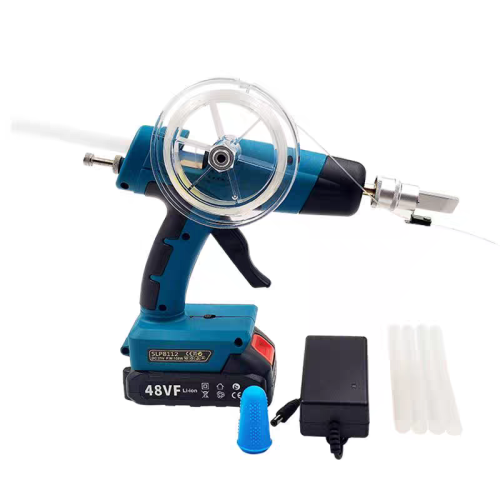
Do you know what are the tools for the last 3 pictures? Basically a hot glue gun for fiber? Cant seem to find it on shopee/taobao idk if i am typing for the correct item
BOTAK_WAI
post Nov 19 2023, 07:27 PM

Blow Water First Class
*******
Senior Member
4,153 posts

Joined: Jan 2003
From: Cheras, KL


QUOTE(simmarjit @ Nov 19 2023, 06:38 PM)
Do you know what are the tools for the last 3 pictures? Basically a hot glue gun for fiber? Cant seem to find it on shopee/taobao idk if i am typing for the correct item
*
the watermark got shop name if u zoom in.

yes. just a hot glue gun, cordless.
SUSMyProLife
post Nov 29 2023, 03:14 AM

I bully wumao & MPKL
*******
Senior Member
2,075 posts

Joined: Sep 2021
From: nowhere

Conclusion: dlink (well it's netis actually) still lose to fiber home (at least on paper)

Because:

1. SR1041F with Econet (MTK subsidiary) has 64 bit dual core A53 @ 1ghz. Almost on par with Qualcomm IPQ5000 series (aka IPQ0518/5018) on some tp link archers
2. SR1041F comes with 512m of ram

The wireless solutions from mediatek are almost the same nonetheless on both dlink/netis and fiber home so the range should be similar great for single level homes. But fiber home should be able to provide much more stable connection if with many devices connected

But the con on zte/Econet on either model, no openWRT support at all to bypass ISP firmware. So no much value after all.
Better to get mediatek filogic models for that, lol

Source: https://www.acwifi.net/24040.html
alip_11
post Nov 30 2023, 01:56 AM

Getting Started
**
Junior Member
232 posts

Joined: Nov 2006
From: Brissy


Hi guys. Need some opinion here. I have 5g cpe but its wireless coverage is limited. So I bought this ax3000 unifi unit to make it as AP.

Reading the first page, i managed to set it to bridge model. But the speed is way too low compared to wireless directly from my 5g cpe. If near the 5g cpe, i got around 500mbps. After connecting it to dlink and set it to bridge mode, the speed i got from dlink router is only around 100mbps altho just 5cm from it.

Anything i did wrong?

Oh ya, if in bridge mode, cannot access the dlink router setting page anymore? Type the ip, nothing comes up…
kopitiam
post Nov 30 2023, 01:34 PM

cookie monster
*******
Senior Member
4,480 posts

Joined: Jan 2003
From: The capital of Soviet Sarawak - Pusak City


QUOTE(alip_11 @ Nov 30 2023, 01:56 AM)
Hi guys. Need some opinion here. I have 5g cpe but its wireless coverage is limited. So I bought this ax3000 unifi unit to make it as AP.

Reading the first page, i managed to set it to bridge model. But the speed is way too low compared to wireless directly from my 5g cpe. If near the 5g cpe, i got around 500mbps. After connecting it to dlink and set it to bridge mode, the speed i got from dlink router is only around 100mbps altho just 5cm from it.

Anything i did wrong?

Oh ya, if in bridge mode, cannot access the dlink router setting page anymore? Type the ip, nothing comes up…
*
most likely the ethernet cable. please try another cable
Epic_winner091
post Nov 30 2023, 05:00 PM

Casual
***
Junior Member
337 posts

Joined: Mar 2010
From: Shah Alam


QUOTE(MyProLife @ Nov 29 2023, 03:14 AM)
Conclusion: dlink (well it's netis actually) still lose to fiber home (at least on paper)

Because:

1. SR1041F with Econet (MTK subsidiary) has 64 bit dual core A53 @ 1ghz. Almost on par with Qualcomm IPQ5000 series (aka IPQ0518/5018) on some tp link archers
2. SR1041F comes with 512m of ram

The wireless solutions from mediatek are almost the same nonetheless on both dlink/netis and fiber home so the range should be similar great for single level homes. But fiber home should be able to provide much more stable connection if with many devices connected

But the con on zte/Econet on either model, no openWRT support at all to bypass ISP firmware. So no much value after all.
Better to get mediatek filogic models for that, lol

Source: https://www.acwifi.net/24040.html
*
Can the FiberHome be used with wired backhaul?
SUSMyProLife
post Nov 30 2023, 05:17 PM

I bully wumao & MPKL
*******
Senior Member
2,075 posts

Joined: Sep 2021
From: nowhere

QUOTE(Epic_winner091 @ Nov 30 2023, 05:00 PM)
Can the FiberHome be used with wired backhaul?
*
Not tried yet. Easymesh function is meant for wireless backhaul mainly.

I got 2 of sr1041f want to let go btw
sitescope
post Nov 30 2023, 06:04 PM

Look at all my stars!!
*******
Senior Member
4,493 posts

Joined: Oct 2013
QUOTE(Epic_winner091 @ Nov 30 2023, 05:00 PM)
Can the FiberHome be used with wired backhaul?
*
Should be yes. Chg mode to bridge/ap on 2nd router n disable dhcp
sitescope
post Nov 30 2023, 06:05 PM

Look at all my stars!!
*******
Senior Member
4,493 posts

Joined: Oct 2013
QUOTE(MyProLife @ Nov 30 2023, 05:17 PM)
I got 2 of sr1041f want to let go btw
*
I sold mine for rm100 both within 1hr in fb
alip_11
post Dec 1 2023, 08:09 AM

Getting Started
**
Junior Member
232 posts

Joined: Nov 2006
From: Brissy


QUOTE(kopitiam @ Nov 30 2023, 01:34 PM)
most likely the ethernet cable. please try another cable
*
I see. Ok2, need to get new one for shopee to try 1st then. Thanks for suggestion.
shirogane
post Dec 2 2023, 09:34 PM

New Member
*
Junior Member
35 posts

Joined: Jun 2007


Hi Sifus, i just got a new DLink DIR-X3060Z from Unifi today and setup by contractor.
However, I noticed that the my handphone will not auto connect to WiFi and need to manually connect everytime. Any idea why this happen?
Also the WiFi connection will disconnected from time to time.
Any advise for the above? Thank you
Sky.Live
post Dec 3 2023, 01:52 PM

Proctected Species
*******
Senior Member
4,390 posts

Joined: Oct 2004
From: Cheras, Malaysia


Once i use this as router, its quite buggy at times.. still prefer it as pure wireless ap
tvcat
post Dec 5 2023, 01:22 PM

Mr. Dumb Dumb
*******
Senior Member
2,904 posts

Joined: Nov 2004


QUOTE(shirogane @ Dec 2 2023, 09:34 PM)
Hi Sifus, i just got a new DLink DIR-X3060Z from Unifi today and setup by contractor.
However, I noticed that the my handphone will not auto connect to WiFi and need to manually connect everytime. Any idea why this happen?
Also the WiFi connection will disconnected from time to time.
Any advise for the above? Thank you
*
Forget the WIFi on your phone and connect again. Try another WiFi channel.
tvcat
post Dec 5 2023, 01:25 PM

Mr. Dumb Dumb
*******
Senior Member
2,904 posts

Joined: Nov 2004


My client unit has a weird problem. The port forwarding rule will stop working after the WAN reconnected. You will need to re-enable all the rules one by one which is too much hassle.
Epic_winner091
post Jan 19 2024, 03:29 PM

Casual
***
Junior Member
337 posts

Joined: Mar 2010
From: Shah Alam


Just noticed the main router has set itself as the "agent". But the mesh seems to work fine. I'm using wired backhaul for the secondary router.

user posted image

Role selection is set to "automatic".

This post has been edited by Epic_winner091: Jan 19 2024, 03:29 PM
lowmh
post Jan 22 2024, 10:35 AM

New Member
*
Junior Member
24 posts

Joined: May 2019
QUOTE(soonwai @ Oct 22 2023, 04:08 PM)
Speedtests
Speedtests for the DLink DIR-X3060Z as a single Access Point (AP), Wireless Mesh and Wired Mesh.

  • I used my existing router, Mikrotik RB5009UG+S+IN as the main router.
  • The X3060Zs are configured as APs in Bridge mode.
  • I'm using the default 100% transmission power for both bands.
  • 2.4Ghz is set to 20Mhz and 5Ghz to 80Mhz.
  • Unifi is 800/200.
  • The Mikrotik router is located in my office room on the 1st floor towards the right & back of the house.
  • For all tests, the main X3060Z is in the same office room on the 1st floor.
  • For wireless mesh tests, the 2nd X3060Z is located downstairs in the living room at the foot of the stairs which is to the right of the house. This spot has a power point and good signal from the main X3060Z.
  • For wired mesh tests, the 2nd X3060Z is located downstairs in the living room to the front & left of the house. Because the network point & switch are here.
  • House is 24'x80' Bult-up not sure, 55"?. Maybe I draw a plan later.
|Location|Single AP (1st)|Wireless Mesh|Wired Mesh|
Office Room (1st)761/214--
Dining Room (G)478/210372/217807/213 (flaps)
Living Room (G)389/217353/216813/212 (flaps)
MacBook Air M1 Wifi6 2x2 80Mhz

LocationSingle AP (1st)Wireless MeshWired Mesh
Office (1st)739/242--
Dining Room (G)332/220377/232723/261
Living Room (G)340/228387/213747/257
Porch Door (G)51/52337/233638/232
Porch Gate (G)No signal279/232630/271
Master Room (1st)509/236280/214519/245
Master Toilet (1st)219/207240/187 (flaps)411/227 (flaps)
iPhone 13 Pro Wifi6 2x2 80Mhz

*(flaps) means the device cannot decide which mesh to connect to because it sees the same signal strength so it keeps changing and half the time, it connects to the slower one. It's probably because I left the transmission power at 100%.
*
Hi, can I know how do you setup the x3060z ? I tried to connect the WAN port of the x3060z to my LAN port of existing TP link router, the internet LED light stable. Then I unplug it and place it downstairs to my living room. But the wifi from the x3060z downstairs keep disconnecting and connecting after few minutes. Am I missing something here ? Do I need to configure anything besides connecting both routers?
mikeeeee
post Jan 29 2024, 04:33 PM

*~Tien9Chi~*
*******
Senior Member
3,026 posts

Joined: Oct 2004
From: KL, Penang & JB


Anyone configured ddns from router ? I'm using no-ip ddns, for some reason the router is not updating the IP to no-ip. Same credentials use on previous fiberhome router no issue .
red.mosquitos
post Feb 9 2024, 05:31 PM

New Member
*
Junior Member
46 posts

Joined: Nov 2009
Create easy mesh…wonder how combine both 2.4GHz and 5GHz together? Auto. Used mesh TPlink at my other home easy just 1 wifi to connect and auto
kramuse
post Feb 15 2024, 10:38 PM

Getting Started
**
Junior Member
200 posts

Joined: Dec 2004
From: OUG


QUOTE(alip_11 @ Nov 30 2023, 01:56 AM)
Hi guys. Need some opinion here. I have 5g cpe but its wireless coverage is limited. So I bought this ax3000 unifi unit to make it as AP.

Reading the first page, i managed to set it to bridge model. But the speed is way too low compared to wireless directly from my 5g cpe. If near the 5g cpe, i got around 500mbps. After connecting it to dlink and set it to bridge mode, the speed i got from dlink router is only around 100mbps altho just 5cm from it.

Anything i did wrong?

Oh ya, if in bridge mode, cannot access the dlink router setting page anymore? Type the ip, nothing comes up…
*
once you set to bridge mode, your main router will assign a dynamic IP to this router. i also initially thought i had lost connectivity but noticed it appeared in my host dhcp
kramuse
post Feb 16 2024, 08:03 PM

Getting Started
**
Junior Member
200 posts

Joined: Dec 2004
From: OUG


QUOTE(lowmh @ Jan 22 2024, 10:35 AM)
Hi, can I know how do you setup the x3060z ? I tried to connect the WAN port of the x3060z to my LAN port of existing TP link router, the internet LED light stable. Then I unplug it and place it downstairs to my living room. But the wifi from the x3060z downstairs keep disconnecting and connecting after few minutes. Am I missing something here ? Do I need to configure anything besides connecting both routers?
*
I also had this problem. But it stabilised after a while. What I noticed was for 5GHz, even tho my router was right next to the computer, wireless only got 17-200Mbps up/down even though it sat on a free channel. When I changed the band to 80Mhz, it will randomly select a channel (eventho its a congested channel and outside 80Mhz from my desired channel) BUT I will get 1201Mbps up/down. I left this configuration on and its working great. I attribute this to a buggy OS? But after first configuration, it does drop connections a bit before stabilizing. I really want to see if I can flash OpenWRT or something else on this or not.
kunimi
post Mar 3 2024, 10:03 PM

Casual
***
Junior Member
334 posts

Joined: Oct 2006


Hello anyone try to conenct the router to dlink app? for some reason i cant have my router connect to the application
nick.remember.u
post Mar 8 2024, 08:56 PM

Getting Started
**
Junior Member
98 posts

Joined: Mar 2010
Hi, i cant remote access Dlink 3000z router

https://play.google.com/store/apps/details?...ink.quickconfig

Using Dlink wifi connect apps

user posted image

This post has been edited by nick.remember.u: Mar 8 2024, 08:57 PM
issac99289928
post Mar 17 2024, 05:55 PM

Getting Started
**
Junior Member
291 posts

Joined: Sep 2016
From: muar, johor


X3060Z and X1086Z use the same ZTE ZX279128R . the main complaint about the cpu is lack of hardware acceleration .the cpu spikes on speedtests .some complain unstable speed even at 300 mbps. Sr1041f does not have this issue.

Other routers that use the same cpu

https://www.youtube.com/watch?v=_bUPIt9kVDA...index=29&t=160s


https://www.youtube.com/watch?v=TmqR6ykJkC4&t=60s


This post has been edited by issac99289928: Mar 18 2024, 01:47 AM
ahrasis
post Mar 27 2024, 06:12 PM

New Member
*
Newbie
47 posts

Joined: Aug 2017
Can we access this router remotely via browser?
PJng
post Mar 27 2024, 07:01 PM

10k Club
********
All Stars
12,039 posts

Joined: Oct 2017


QUOTE(issac99289928 @ Mar 17 2024, 05:55 PM)
X3060Z and X1086Z use the same ZTE ZX279128R . the main complaint about the cpu is lack of hardware acceleration .the cpu spikes on speedtests .some complain unstable speed even at 300 mbps. Sr1041f does not have this issue.

Other routers that use the same cpu

https://www.youtube.com/watch?v=_bUPIt9kVDA...index=29&t=160s
https://www.youtube.com/watch?v=TmqR6ykJkC4&t=60s
*
Yes, my relative apply SWU 3.0, try many time speed test, a few second reCh 400mbps, then stuck below 350, and 300mbps

X1860z if not wrong
JimbeamofNRT
post Apr 1 2024, 02:36 PM

the Original Lanji@_ Chicken Rice Shop Since 2002
******
Senior Member
1,902 posts

Joined: Sep 2012

QUOTE(soonwai @ Oct 22 2023, 04:08 PM)

*
great review bro. Thanks!
k58pk
post Apr 30 2024, 05:07 PM

New Member
*
Newbie
5 posts

Joined: Oct 2012
Seems like the ZTE ZX279128R shares its SDK with Broadcom BCM53xx

https://www.chinadsl.net/thread-166731-1-1.html

QUOTE
ZX279128架构与bcm53xx的相同,借用它的SDK


xFr3sHx
post May 7 2024, 07:06 PM

New Member
*
Junior Member
23 posts

Joined: Aug 2012
Sifu sifu
I got x5460, dra ac1300 and this x3060z
3060 as primary, 5460 as extend mode (wired), both WiFi ssid is same.
But I got issue with 5460 WiFi, and the WiFi range, low speed and no stable.
Any solution for this?

This post has been edited by xFr3sHx: May 8 2024, 12:02 AM
kunimi
post May 8 2024, 02:28 PM

Casual
***
Junior Member
334 posts

Joined: Oct 2006


QUOTE(nick.remember.u @ Mar 8 2024, 08:56 PM)
Hi, i cant remote access Dlink 3000z router

https://play.google.com/store/apps/details?...ink.quickconfig

Using Dlink wifi connect apps

user posted image
*
Anyone can share how to connect to the DLink App with this stupid Unifi Dlink? haha
rarahim
post Jul 4 2024, 12:16 PM

New Member
*
Junior Member
25 posts

Joined: Jan 2003
Need help with setting MAC filtering..

How can i set MAC filering such that all unrecognized devices will be blocked by default, and i need to explicitly allow access for it to be connected? I found the page in the Router setting where I can chose Deny or Allow and key in MAC address but i don't quite understand how it's supposed to work.. is it Deny all or Allow all by default?

Thank you.
Sky.Live
post Sep 15 2024, 08:52 AM

Proctected Species
*******
Senior Member
4,390 posts

Joined: Oct 2004
From: Cheras, Malaysia


something funny with my DIR3060Z, lately when I try to speedtest, i only get less than 100 Mbps, i tried to change LAN cable thinking a bad handshake speed, but it's still the same.

If i direct connect to my main router (EdgerouterX) i can get the full 500Mbps I am supposed to get.

I even tried to use the 3060z to be the main router but I am still getting 80Mbps with lan or wireless connection. Anyone faced such issue?

OK, i found out the router is simply faulty, not sure why, i swap with my upstairs mesh unit and were able to get 500Mbps again

This post has been edited by Sky.Live: Sep 15 2024, 09:12 AM
xiiaoz
post Dec 12 2024, 10:19 PM

New Member
*
Junior Member
12 posts

Joined: Mar 2022
Can i use DIR3060Z as a modem only and use asus as my primary router?
quikstep
post Feb 1 2025, 11:42 AM

Casual
***
Junior Member
422 posts

Joined: Apr 2010
I have my own wifi6 setup already. Got a pair of these last year when we renewed Unifi contract.

I was wondering if anyone knows how to put this into emergency mode to upload openwrt firmware instead? Wanted to check some parental control feature in openwrt.
PRSXFENG
post Feb 1 2025, 04:19 PM

Look at all my stars!!
*******
Senior Member
2,608 posts

Joined: Nov 2020


QUOTE(quikstep @ Feb 1 2025, 11:42 AM)
I have my own wifi6 setup already. Got a pair of these last year when we renewed Unifi contract.

I was wondering if anyone knows how to put this into emergency mode to upload openwrt firmware instead? Wanted to check some parental control feature in openwrt.
*
Don't think it's supported by OpenWRT?
quikstep
post Feb 3 2025, 10:56 AM

Casual
***
Junior Member
422 posts

Joined: Apr 2010
QUOTE(PRSXFENG @ Feb 1 2025, 04:19 PM)
Don't think it's supported by OpenWRT?
*
Basically it supports DIR-3060. Should be similar.

Hopefully someone knows how to put this router into recovery mode.
quikstep
post Feb 3 2025, 11:38 AM

Casual
***
Junior Member
422 posts

Joined: Apr 2010
or maybe someone knows the ssh root password?
PRSXFENG
post Feb 3 2025, 02:14 PM

Look at all my stars!!
*******
Senior Member
2,608 posts

Joined: Nov 2020


QUOTE(quikstep @ Feb 3 2025, 10:56 AM)
Basically it supports DIR-3060. Should be similar.

Hopefully someone knows how to put this router into recovery mode.
*
DIR-3060 is a AC Wireless router
using Mediatek CPU

DIR X3060Z, or it's non TM Branded, X3000Z
uses a ZTE CPU and has completely different specs

So no, it's not even close, and will not work
quikstep
post Feb 3 2025, 03:50 PM

Casual
***
Junior Member
422 posts

Joined: Apr 2010
QUOTE(PRSXFENG @ Feb 3 2025, 02:14 PM)
DIR-3060 is a AC Wireless router
using Mediatek CPU

DIR X3060Z, or it's non TM Branded, X3000Z
uses a ZTE CPU and has completely different specs

So no, it's not even close, and will not work
*
Thanks for the kind explanation notworthy.gif

Dropped the idea now.
ericmaxman
post Feb 4 2025, 03:55 PM

-
*******
Senior Member
7,951 posts

Joined: Sep 2005
QUOTE(quikstep @ Feb 1 2025, 11:42 AM)
I have my own wifi6 setup already. Got a pair of these last year when we renewed Unifi contract.

I was wondering if anyone knows how to put this into emergency mode to upload openwrt firmware instead? Wanted to check some parental control feature in openwrt.
*
Unless you want to develop openwrt yourself, the SoC has zero support with openwrt. ZXIC never released their source code, never mind D-Link.

A few posts above got mentioned about the ZXIC SoC using the BCM53xx SDK, but that's just the beginning.

You'll need to hack job the wifi drivers, figure out what bootloader it uses, how to access the bootlader, flash and memory modules, modding the dts, etc etc.

You're better off buying an openwrt-ready router.

Xange
post Feb 4 2025, 09:42 PM

Getting Started
**
Junior Member
76 posts

Joined: Sep 2010
From: Kuala Lumpur
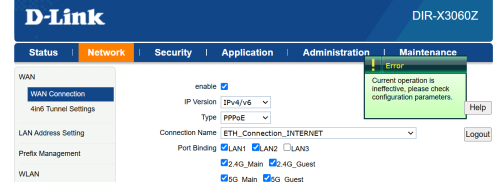
hi everyone, may i ask, does anyone knows a way to set this router ipv6 dns address to local cidr (fe80:: range) as i setup docker and runs pihole so i want to point router dhcp dns ip to this pihole instead, there is no issue for me to set ipv4 to local ip (192.168.xxx.xxx) but I cant set the ipv6's one to local cidr.

whenever i try to set the ipv6 dns to static local ip i get this error
user posted image
JimbeamofNRT
post Apr 27 2025, 09:46 PM

the Original Lanji@_ Chicken Rice Shop Since 2002
******
Senior Member
1,902 posts

Joined: Sep 2012

QUOTE(quikstep @ Feb 1 2025, 11:42 AM)
I have my own wifi6 setup already. Got a pair of these last year when we renewed Unifi contract.

I was wondering if anyone knows how to put this into emergency mode to upload openwrt firmware instead? Wanted to check some parental control feature in openwrt.
*
QUOTE(Sky.Live @ Sep 15 2024, 08:52 AM)
something funny with my DIR3060Z, lately when I try to speedtest, i only get less than 100 Mbps, i tried to change LAN cable thinking a bad handshake speed, but it's still the same.

If i direct connect to my main router (EdgerouterX) i can get the full 500Mbps I am supposed to get.

I even tried to use the 3060z to be the main router but I am still getting 80Mbps with lan or wireless connection. Anyone faced such issue?

OK, i found out the router is simply faulty, not sure why, i swap with my upstairs mesh unit and were able to get 500Mbps again
*
I must say that this stock d-link DIR3060Z router degrade quite fast. was helping my neighbor last week, the router is only 1 year plus, got frequent wifi disconnect especially at night. I kasi borrow him my old asus AC68u, which apparently works well ( even though the router is almost 10 years already ) for 2 days, after that I suggest him to get a better asus router.

for those who think can save money by using this free stock router, forget it, save your sanity, ditch the router cheap cheap in carousell or fb, get a better router instead.

This post has been edited by JimbeamofNRT: Apr 27 2025, 09:51 PM
Sky.Live
post May 1 2025, 02:12 PM

Proctected Species
*******
Senior Member
4,390 posts

Joined: Oct 2004
From: Cheras, Malaysia


QUOTE(JimbeamofNRT @ Apr 27 2025, 09:46 PM)
I must say that this stock d-link DIR3060Z router degrade quite fast. was helping my neighbor last week, the router is only 1 year plus, got frequent wifi disconnect especially at night. I kasi borrow him my old asus AC68u, which apparently works well ( even though the router is almost 10 years already ) for 2 days, after that I suggest him to get a better asus router.

for those who think can save money by using this free stock router, forget it, save your sanity, ditch the router cheap cheap in carousell or fb, get a better router instead.
*
at least tahan 1 year, i been using 1 unit 2 years without mesh now.. still ok..
JimbeamofNRT
post May 1 2025, 03:39 PM

the Original Lanji@_ Chicken Rice Shop Since 2002
******
Senior Member
1,902 posts

Joined: Sep 2012

QUOTE(Sky.Live @ May 1 2025, 02:12 PM)
at least tahan 1 year, i been using 1 unit 2 years without mesh now.. still ok..
*
it is like you pay for ron100 but using kancil 660

should have fully utilise it
Sky.Live
post May 4 2025, 01:51 PM

Proctected Species
*******
Senior Member
4,390 posts

Joined: Oct 2004
From: Cheras, Malaysia


QUOTE(JimbeamofNRT @ May 1 2025, 03:39 PM)
it is like you pay for ron100 but using kancil 660

should have fully utilise it
*
my lan backhaul has some problem.. lazy to fix it..
tvcat
post May 26 2025, 01:10 PM

Mr. Dumb Dumb
*******
Senior Member
2,904 posts

Joined: Nov 2004


Hey guys, this router does not have firewall for IPv6 right? I cannot find it anywhere in the router settings.
Jjuggler
post May 28 2025, 08:25 AM

Narcissistic Genius
******
Senior Member
1,341 posts

Joined: Dec 2016
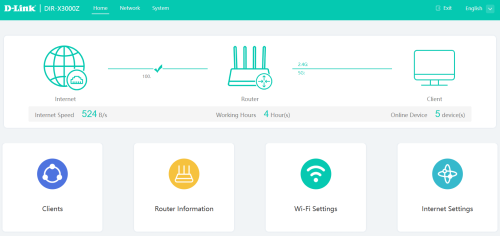
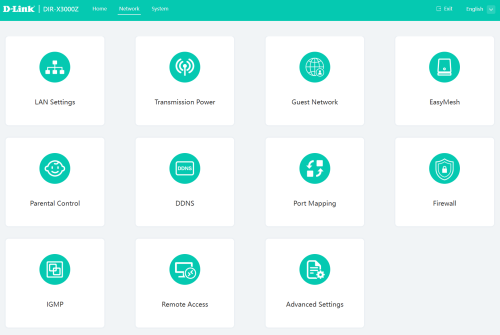
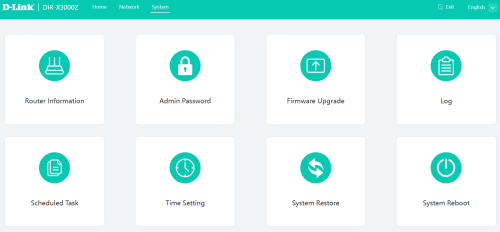
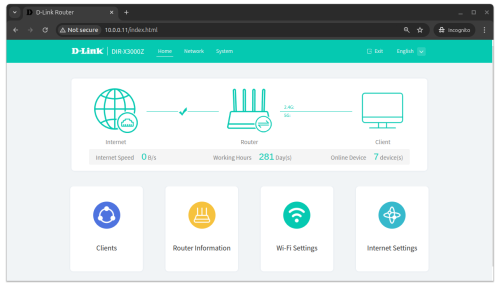
I am currently using retail version of D-LINK DIR-X3000Z. The functionality is extremely limited, but worth for the price you paid. The retail version has new UI, which I consider amateurish, and its like a FYP UI/UX project.

Dashboard
user posted image

Network options
user posted image

System options
user posted image

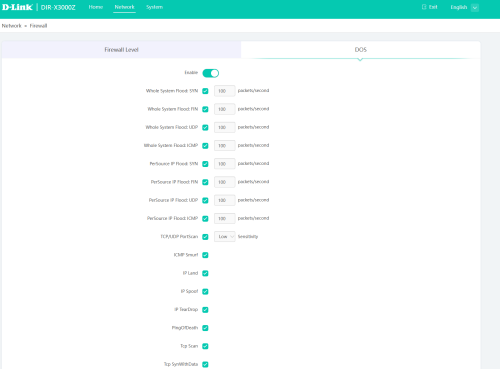
Firewall
user posted image

Currently, I am utilizing almost 70% features that comes with this router, except for DDNS since I am behind NAT44, and some other features such as UPNP, and DMZ. The downside of this router is, after solid 14 days, you need to reboot the router, memory leaks probably or suffered kernel panic. Hence I set the router to be rebooted on daily basis.


songokujames
post Jun 17 2025, 11:19 PM

Casual
***
Junior Member
414 posts

Joined: Oct 2008
recently buying the DIR-X3000Z from D-Link official store at Lazada for mesh with my Unifi dir-x3060z via cable. Speedtest is ok and can up to 800mbps, but when I downloading heavily with lot of connection , it will randomly disconnect and reboot. Tot it was individual faulty product and request return/refund. After refund, buying back the same product from the same store again and the same problem occur. Is this product cannot use for downloading? Previously I using tenda to link with unifi dir-3060z at downstairs, I have no problem with downloading ,just it can't mesh so have 2 different ssid which is not so convenient and tenda is ax1200 only which has lower speed. I try also downloading with the original tm dir-x3060z, it has no problem with downloading heavily also and can achieve 800mbps with wifi. So, only the retail version of D-Link dir-x3000z has problem of disconnecting and reboot when downloading heavily that is really suck.

This post has been edited by songokujames: Jun 17 2025, 11:20 PM
hsbb
post Jun 18 2025, 01:40 AM

Casual
***
Junior Member
447 posts

Joined: Aug 2009


QUOTE(songokujames @ Jun 17 2025, 11:19 PM)
recently buying the DIR-X3000Z from D-Link official store at Lazada for mesh with my Unifi dir-x3060z via cable. Speedtest is ok and can up to 800mbps, but when I downloading heavily with lot of connection , it will randomly disconnect and reboot. Tot it was individual faulty product and request return/refund. After refund, buying back the same product from the same store again and the same problem occur. Is this product cannot use for downloading? Previously I using tenda to link with unifi dir-3060z at downstairs, I have no problem with downloading ,just it can't mesh so have 2 different ssid which is not so convenient and tenda is ax1200 only which has lower speed. I try also downloading with the original tm dir-x3060z, it has no problem with downloading heavily also and can achieve 800mbps with wifi. So, only the retail version of D-Link dir-x3000z has problem of disconnecting and reboot when downloading heavily that is really suck.
*
Did try the retail version as controller & tm version as client?
songokujames
post Jun 18 2025, 09:14 AM

Casual
***
Junior Member
414 posts

Joined: Oct 2008
QUOTE(hsbb @ Jun 18 2025, 01:40 AM)
Did try the retail version as controller & tm version as client?
*
no, cause I forgot my tm unifi password
wahedenator
post Jul 5 2025, 09:31 AM

New Member
*
Newbie
5 posts

Joined: Sep 2010


QUOTE(JimbeamofNRT @ Apr 27 2025, 09:46 PM)
I must say that this stock d-link DIR3060Z router degrade quite fast. was helping my neighbor last week, the router is only 1 year plus, got frequent wifi disconnect especially at night. I kasi borrow him my old asus AC68u, which apparently works well ( even though the router is almost 10 years already ) for 2 days, after that I suggest him to get a better asus router.

for those who think can save money by using this free stock router, forget it, save your sanity, ditch the router cheap cheap in carousell or fb, get a better router instead.
*
What would you suggest for a better router? Asus RT AX57?

I’m having drop issue with Dlink DIR3060Z in non-mesh mode. Wifi frequently drop and need to power cycle for no reason. Upon checking with TM, since the warranty already lapse, they asked to review contract then only can get new router.


JimbeamofNRT
post Jul 5 2025, 11:50 AM

the Original Lanji@_ Chicken Rice Shop Since 2002
******
Senior Member
1,902 posts

Joined: Sep 2012

QUOTE(wahedenator @ Jul 5 2025, 09:31 AM)
What would you suggest for a better router? Asus RT AX57?

I’m having drop issue with Dlink DIR3060Z in non-mesh mode. Wifi frequently drop and need to power cycle for no reason. Upon checking with TM, since the warranty already lapse, they asked to review contract then only can get new router.
*


Asus RT AX57 is a good replacement

ASUS Router Wi-Fi 6 Wireless Dual Band AiMesh Router RT-AX57


2.4GHz 2x2 antenna
5GHz 2x2 antenna
1.7GHz quad-core processor
128 MB Flash
256 MB RAM

OFDMA
Beamforming
1024-QAM high data rate
20/40/80/160 MHz bandwidth
AiMesh

-----------

that darn 3060z always have that kind of problem, the internet logo button will gone on and off for no reason
quality of the board gone the drain, we do know that these electronic stuff are being used daily and it deteriorate over time but seriously? only after a year????

This post has been edited by JimbeamofNRT: Jul 5 2025, 11:52 AM
JimbeamofNRT
post Jul 5 2025, 11:53 AM

the Original Lanji@_ Chicken Rice Shop Since 2002
******
Senior Member
1,902 posts

Joined: Sep 2012

QUOTE(songokujames @ Jun 18 2025, 09:14 AM)
no, cause I forgot my tm unifi password
*
which u can obtain easily via tm helpline
JON97
post Aug 19 2025, 02:47 PM

Casual
***
Junior Member
341 posts

Joined: Nov 2016
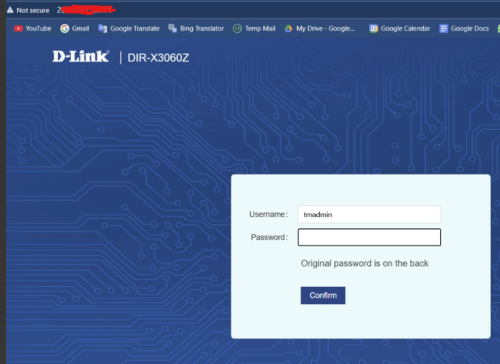
Randomly decided to check my DIR-X3060Z (AX3000) logs and came across my public IP is open on 80 and 443.

Remote management - disabled
Port Forwarding - None
Remote ManageMent Status
- Onu Inform to ITMS - Unreported(Terminal is starting)
- ITMS Access to Onu - CPE Connection Uninitialized
Firmware - DIR-X3060Z_220522_1.0.2

user posted image

Here is the error log:
QUOTE
accept errno=[24:Too many open files]
open file error Too many open files
ProcAcceptEvent ... newfd[-1] ...
msgq-0 is full!


QUOTE
check user info failed! ret = -842


Does anyone know how to fix this? Or the only way is to get a better router since this is TM locked?
kwss
post Aug 19 2025, 09:03 PM

Regular
******
Senior Member
1,207 posts

Joined: Aug 2018
QUOTE(JON97 @ Aug 19 2025, 02:47 PM)
Randomly decided to check my DIR-X3060Z (AX3000) logs and came across my public IP is open on 80 and 443.

Remote management - disabled
Port Forwarding - None
Remote ManageMent Status
- Onu Inform to ITMS - Unreported(Terminal is starting)
- ITMS Access to Onu - CPE Connection Uninitialized
Firmware - DIR-X3060Z_220522_1.0.2

user posted image

Here is the error log:
Does anyone know how to fix this? Or the only way is to get a better router since this is TM locked?
*
Telltale sign your router is now part of a botnet:
Management interface still accessible from internet when remote management is disabled.
You ran out of file descriptor. Either too many open file or socket. I suspect it's the latter since that's what botnet mostly do.

Unless you have the firmware, which you don't because no ISP publish firmware for their rubbish...

Scrap this device and buy a new one.

EDIT:
You test and open the web UI from another telco like mobile data right?

This post has been edited by kwss: Aug 19 2025, 09:08 PM
JON97
post Aug 19 2025, 11:10 PM

Casual
***
Junior Member
341 posts

Joined: Nov 2016
QUOTE(kwss @ Aug 19 2025, 09:03 PM)
Telltale sign your router is now part of a botnet:
Management interface still accessible from internet when remote management is disabled.
You ran out of file descriptor. Either too many open file or socket. I suspect it's the latter since that's what botnet mostly do.

Unless you have the firmware, which you don't because no ISP publish firmware for their rubbish...

Scrap this device and buy a new one.

EDIT:
You test and open the web UI from another telco like mobile data right?
*
You test and open the web UI from another telco like mobile data right?
- Yes correct.

Yea that's the thing. I doubt they will even want to give me the firmware to update it. Will try with a second router in the mean time.

kwss
post Aug 19 2025, 11:21 PM

Regular
******
Senior Member
1,207 posts

Joined: Aug 2018
QUOTE(JON97 @ Aug 19 2025, 11:10 PM)
You test and open the web UI from another telco like mobile data right?
- Yes correct.

Yea that's the thing. I doubt they will even want to give me the firmware to update it. Will try with a second router in the mean time.
*
Then I can say with certainty your router is a bot.
You need to keep your router firmware updated.
Disable all remote management.
Change all default password.

The thing with TM router is that even if you disable TR069, VLAN 209 is still terminated in both the ONU and the router. So technically your device is still discoverable remotely.

To make matter worst, the TM firmware will allow ACS unrestricted access, meaning it's possible for VLAN 209 to jump into your LAN.
JON97
post Aug 20 2025, 12:46 AM

Casual
***
Junior Member
341 posts

Joined: Nov 2016
QUOTE(kwss @ Aug 19 2025, 11:21 PM)
Then I can say with certainty your router is a bot.
You need to keep your router firmware updated.
Disable all remote management.
Change all default password.

The thing with TM router is that even if you disable TR069, VLAN 209 is still terminated in both the ONU and the router. So technically your device is still discoverable remotely.

To make matter worst, the TM firmware will allow ACS unrestricted access, meaning it's possible for VLAN 209 to jump into your LAN.
*
The thing with TM router is that even if you disable TR069, VLAN 209 is still terminated in both the ONU and the router. So technically your device is still discoverable remotely.

To make matter worst, the TM firmware will allow ACS unrestricted access, meaning it's possible for VLAN 209 to jump into your LAN.


- Looks like I missed out on this. It seems so, this is the case. I tired with my other mesh router (Which I didn't use) and its the same issue. Public IP exposed.

Unifi won't give the firmware, and dont see anyone share any recent firmware. So looks like a new router it is.

Update: Not sure if DIR-X3060 supports OpenWrt

This post has been edited by JON97: Aug 20 2025, 12:51 AM
kwss
post Aug 20 2025, 12:56 AM

Regular
******
Senior Member
1,207 posts

Joined: Aug 2018
QUOTE(JON97 @ Aug 20 2025, 12:46 AM)
The thing with TM router is that even if you disable TR069, VLAN 209 is still terminated in both the ONU and the router. So technically your device is still discoverable remotely.

To make matter worst, the TM firmware will allow ACS unrestricted access, meaning it's possible for VLAN 209 to jump into your LAN.


- Looks like I missed out on this. It seems so, this is the case. I tired with my other mesh router (Which I didn't use) and its the same issue. Public IP exposed.

Unifi won't give the firmware, and dont see anyone share any recent firmware. So looks like a new router it is.

Update: Not sure if DIR-X3060 supports OpenWrt
*
I want to be very clear: No amount of firmware update will help if you are using TM hardware.

The boa web server is forever vulnerable. The ACS and VLAN209 is forever there.

Most importantly, their new firmware don't fix security issue or what not. They only fix compatibility issue.

If security is a concern, do not plug in anything from TM into your network.
tumira
post Aug 23 2025, 09:15 AM

Getting Started
**
Junior Member
75 posts

Joined: Jan 2007
Can we update the DIR-X3060Z firmware's with DIR-X3000Z firmware from the Dlink website ?

https://www.dlink.com.my/dir-x3000z/#firmware
PRSXFENG
post Aug 23 2025, 10:27 AM

Look at all my stars!!
*******
Senior Member
2,608 posts

Joined: Nov 2020


QUOTE(JON97 @ Aug 20 2025, 12:46 AM)
Update: Not sure if DIR-X3060 supports OpenWrt
*
Unlikely to ever be supported due to ZTE SoC
JON97
post Aug 23 2025, 08:40 PM

Casual
***
Junior Member
341 posts

Joined: Nov 2016
QUOTE(tumira @ Aug 23 2025, 09:15 AM)
Can we update the DIR-X3060Z firmware's with DIR-X3000Z firmware from the Dlink website ?

https://www.dlink.com.my/dir-x3000z/#firmware
*
I checked with D-Link they mention it is not supported. Also if you flash it and it doesn't work the Roter will be a siting stock unless someone has the TM firmware

Marcus95
post Aug 26 2025, 01:13 AM

ᴄᴏɴɴᴏɪꜱꜱᴇᴜr
****
Junior Member
631 posts

Joined: Nov 2006


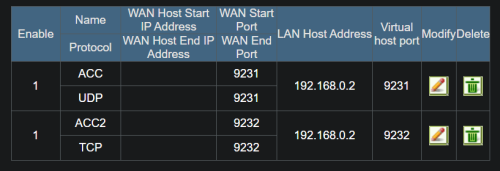
Anyone have tried port forwarding with the 3060? i think i set it up right but when i tested the port https://www.canyouseeme.org/ there is no reponse

Need help

user posted image
user posted image


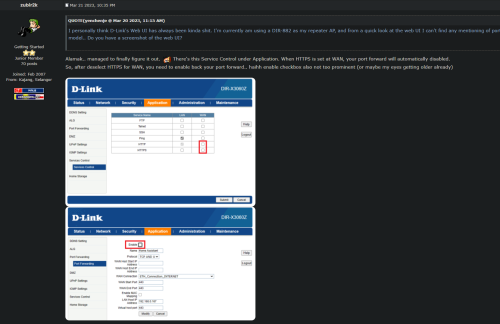
I have also tried this guys step but still didnt manage to make it to work

user posted image

This post has been edited by Marcus95: Aug 26 2025, 01:18 AM
marshpertt P
post Oct 8 2025, 05:28 PM

New Member
*
Probation
10 posts

Joined: Feb 2023
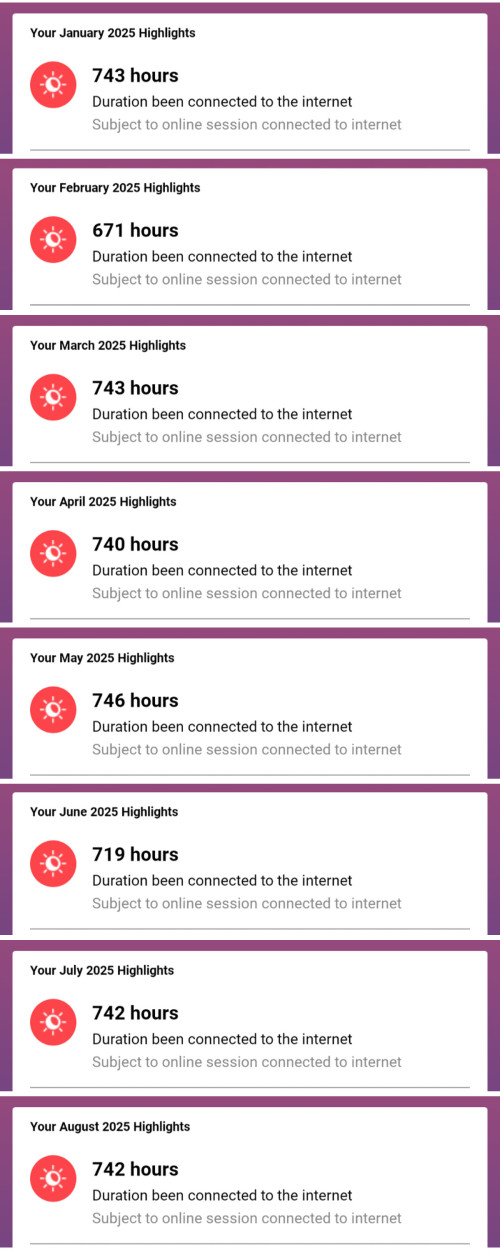
Been using the DIR-X3000Z as access point for the past 10 months, haven't rebooted since 31 Dec 2024. I access local network heavily over Wi-Fi, never had disconnection issue or any speed drop. Housemates play mobile games a lot and I don't get any complaints either.

My home network is essentially set and forget, just found time today to clean off the dust and checked the uptime before shutting everything off.

For this price, it's totally worth it. I found it cheap on Lazada (RM140+) and bought a few units.

user posted image

Also, my Unifi connection has been really good this year with zero issues. biggrin.gif

user posted image

P/S: YMMV - this is just my personal review. My house has near zero Wi-Fi interference, all the neighbors' Wi-Fi are quite far to reach. House is fairly small, around 1500+ sq ft, so the Wi-Fi covers everywhere. Cheap router is good if your environment is ideal.


Change to:
| Lo-Fi Version
0.0605sec    0.29    5 queries    GZIP Disabled
Time is now: 8th December 2025 - 02:02 AM