Item(s):- Intel Xeon E5 2670 V3
- 12-core, 24-thread
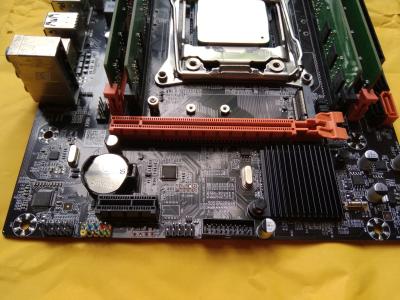
- 2.3GHz Base clock, 3.1GHz Turbo - Oubasikii socket 2011-3 x99 Motherboard
- bios modded to enable Full-turbo boost unlock + ReBAR (Resizable BAR) support (see spoiler below) - SK Hynix 32GB (8x4) RAM
- runs in Quad-channel mode
- DDR4 2400 Registered ECC
BIOS mods applied :» Click to show Spoiler - click again to hide... «
- microcode 06F06F2 removed
- this is a pre-requisite for enabling Full-turbo unlock - S3Turbohack PEI driver injected
- allows Full-turbo unlock for OS-independent usage
- only applicable for V3 series of Xeon E5 (see note 1) - undervolt for processor pre-applied (-30 core/-50 cache)
- can be manually modified in BIOS - C-states fix pre-applied
- can be manually modified in BIOS - ReBAR (Resizable BAR) DXE driver injected (see note 2)
- can be manually turned on/off in BIOS
Notes:
1. Turbo Boost Unlock MOD
» Click to show Spoiler - click again to hide... «
- Similar to their desktop counterpart, Xeon CPUs will boost to their max advertised turbo when only 1-4 cores are in use, but will operate at a lower turbo frequency when more/all cores are being used simultaneously. For example, a Xeon E5 2670 V3 (by default) will boost to 3.1 GHz when few cores are being needed, but will only tops at 2.6 GHz when all cores are being utilized instead. So this is where the MOD comes in.
The MOD allows the limit to be bypassed, enabling all cores to run at their max frequency simultaneously, in other words, the aforementioned Xeon E5 2670 V3 will now runs at 3.1 GHz all-cores, and will sustain that clock as long as the TDP limit isn't reached. (and this is where 'undervolting' inserts itself into the picture) - 'Undervolting' lowers overall power consumption / temperatures of the CPU, allowing it to sustains its turbo clock for longer period. In Xeon E5 2670 V3's case, it was able to sustain the full 3.1 GHz frequency during an entire gaming session (few hours)
- Only Xeon E5 26xx V3 CPUs are compatible with this MOD
2. Resizeable BAR (aka Smart Access Memory)
» Click to show Spoiler - click again to hide... «
- first and foremost, not all GPU can be used with ReBAR, hence the settings is set to OFF by default in the BIOS. Only turn it on if you have any of these cards;
- all RX and Vega series card from AMD
- RTX 3050 and above from NVIDIA
- Intel ARCs - Secondly, the OS needs to be booted in UEFI mode. You can easily check this using GPU-z
- Not all games will gain extra fps with ReBAR enabled, some more than others, while there are also reports of games losing fps instead (CoD:WZ), though few
- follow the steps in THIS LINK to enable ReBAR in Windows (after you've enable the settings in BIOS) you can also PM me if you have difficulties to understand the guide
I/O shield + Socket 2011-3 universal cpu cooler bracket
Price: SOLD to xtremecooler Warranty: 2-weeks personal warranty for all included hardwares, void with physical damage/burn marks due to mishandling/misintallation/overclocking by buyer.
Dealing method: COD / postage @ RM8 Semenanjung, RM14 Sarawak/Sabah
Location: Alor Setar
Contact method/details: PM
---
Item(s) conditions: Working.
CLICK HERE for CPU-z validationPictures:CPU
» Click to show Spoiler - click again to hide... «
MOTHERBOARD
» Click to show Spoiler - click again to hide... «
RAM
» Click to show Spoiler - click again to hide... «
Extra screenshots
» Click to show Spoiler - click again to hide... «
ReBAR status (GPU-z)
» Click to show Spoiler - click again to hide... «
vs. i7 2600K (CPU-z bench)
» Click to show Spoiler - click again to hide... «
vs. i7 7700K (CPU-z bench)
» Click to show Spoiler - click again to hide... «
vs Ryzen 7 1700 (CPU-z bench)
» Click to show Spoiler - click again to hide... «
all 24 threads @ 3.1GHz in Baldur's Gate 3
» Click to show Spoiler - click again to hide... «


 Oct 17 2023, 02:45 PM, updated 3y ago





 Quote
Quote
 0.0178sec
 0.17
0.17
 6 queries
 GZIP Disabled