Welcome Guest ( Log In | Register )

Outline · [ Standard ] · Linear+

Tech Support DLINK AX3000, Need Help regarding LAN PORTs, Disable IPTV and Enable Internet

views
     
TSidoloveyou
post Oct 7 2023, 10:51 PM, updated 3y ago

Getting Started
**
Junior Member
146 posts

Joined: Feb 2016
Hello Sifus,

Just received 2x DLINK MESH AX3000 routers as part of a Unifi upgrade to SWU3.0 with 500mbps.

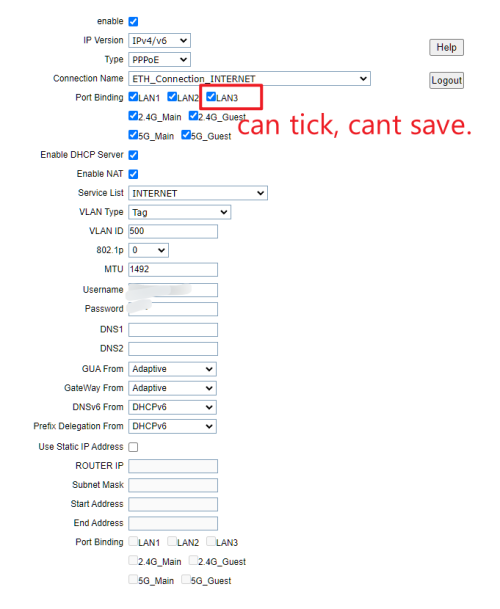
I need help on how to disable the IPTV LAN 3 port and enable the INTERNET.

So far, I have tried:

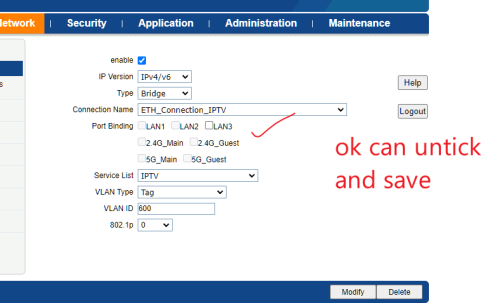
1) Disabling IPTV: I unchecked LAN3 in the IPTV settings page, but I can't save the checked LAN3 box in the Internet profile.

2) Deleting the IPTV profile: I encountered the same issue; I can't save the checked LAN3 box in the Internet profile.

During the installation, the technician informed me that this router has only 2 LAN ports. If I need additional LAN ports for more devices, I would need to set up another router. I'm not sure if TM can hard-lock the LAN 3 port making it solely reserve for IPTV ?

anyone with same router facing same issue?

orsame router, but can try to disable iptv and enable internet see if it works?

Thanks.


user posted image
user posted image

This post has been edited by idoloveyou: Oct 7 2023, 11:43 PM
BOTAK_WAI
post Oct 7 2023, 11:15 PM

Blow Water First Class
*******
Senior Member
4,160 posts

Joined: Jan 2003
From: Cheras, KL


buy a switch and plug it in and save your time to figure it out.
no configuration needed.
if not enough then buy 8 ports

https://shp.ee/jwbzeu8

This post has been edited by BOTAK_WAI: Oct 7 2023, 11:18 PM
TSidoloveyou
post Oct 7 2023, 11:21 PM

Getting Started
**
Junior Member
146 posts

Joined: Feb 2016
QUOTE(BOTAK_WAI @ Oct 7 2023, 11:15 PM)
buy a switch and plug it in and save your time to figure it out.
no configuration needed.
if not enough then buy 8 ports

https://shp.ee/jwbzeu8
*
very straight forward haaaaa tongue.gif tongue.gif tongue.gif


TSidoloveyou
post Oct 15 2023, 09:34 PM

Getting Started
**
Junior Member
146 posts

Joined: Feb 2016
anyone fixed this issue? pls share
dineshmike
post Oct 16 2023, 02:21 AM

Casual
***
Junior Member
344 posts

Joined: Oct 2006
From: Kulaijaya, Johor


I think you need to delete the IPTV connection profile and then tick the LAN 3 checkbox under Internet connection profile. Backup your settings and try it.
TSidoloveyou
post Oct 17 2023, 05:06 PM

Getting Started
**
Junior Member
146 posts

Joined: Feb 2016
thanks dinesh but not working, unable to save the configuration
papyrous
post Oct 17 2023, 05:44 PM

Getting Started
**
Junior Member
214 posts

Joined: May 2017
if you reset everything and start new, is there a Unifi biz profile to select?
prdkancil
post Oct 17 2023, 07:11 PM

Getting Started
**
Junior Member
219 posts

Joined: Nov 2021


Tis guy say follow his steps and save , even at the end it not reflect on the web page but it is working .

user posted image
TSidoloveyou
post Oct 17 2023, 07:14 PM

Getting Started
**
Junior Member
146 posts

Joined: Feb 2016
thank you for sharing, will try
sailou
post Oct 17 2023, 08:01 PM

On my way
****
Senior Member
617 posts

Joined: Mar 2005
From: Mars


Weird this router. I tried to change the dns but it doesn't save too.


Change to:
| Lo-Fi Version
0.0177sec    0.49    5 queries    GZIP Disabled
Time is now: 15th December 2025 - 06:22 AM