QUOTE(soonwai @ Oct 16 2023, 10:45 AM)
Been thinking the same,obtaining one more ax device of mikrotik for extending coverage.Waiting for audience ax is like forever......
Unifi Official TM UniFi High Speed Broadband Thread V41, READ 1ST PAGE FOR RELEVANT WIFI INFO
|
|
Oct 16 2023, 10:54 AM
Return to original view | IPv6 | Post
#1
|
![]() ![]()
Junior Member
203 posts Joined: Feb 2008 |
|
|
|
|
|
|
Oct 16 2023, 11:15 AM
Return to original view | IPv6 | Post
#2
|
![]() ![]()
Junior Member
203 posts Joined: Feb 2008 |
QUOTE(soonwai @ Oct 16 2023, 11:03 AM) Another one I'm looking forward to is cAP ax. Not sure if it's already in MY yet. Maybe get that instead of hAP ax2. I don't like the antennas on the hAP ax3 but no choice, had to get because got USB slot for external storage for containers. Have you tried containers yet? Adguard Home, for example, runs pretty well. Cap ax is a good choice.I maybe will wait for abit for the audiance or get another hap ax3.Not yet, maybe will try it too. |
|
|
Oct 17 2023, 09:23 AM
Return to original view | Post
#3
|
![]() ![]()
Junior Member
203 posts Joined: Feb 2008 |
QUOTE(Marcion @ Oct 17 2023, 08:51 AM) Hello guys, I have problem with the unifi speed, I got SMS from TM unifi saying free upgrade completed from 300 to 500mbps but stock router give only same speed 200mbps. So I bought new router Asus rt-ax53u, after setup up, firmware update, set 2.4ghz bandwidth to max 40 and 5ghz to 80, tested TM speed at early morning get Disable IPV6 and test again.[attachmentid=11482352] I also did set IPv6 to native. So why I still not able to get at 400+ Mbps or 500mbps speed? The cpu might not able to handle ipv6 greater than 400Mbps. |
|
|
Oct 17 2023, 09:47 AM
Return to original view | IPv6 | Post
#4
|
![]() ![]()
Junior Member
203 posts Joined: Feb 2008 |
QUOTE(AVFAN @ Oct 17 2023, 09:32 AM) so many questions on speed after upgrades, new router, new eqpt, etc.. n i m a little confused or maybe out of date on wifi tech...? Short answer.will be good if u or other gurus can u help clarify: assuming proper modem, premium router, correct cables, latest premium mobile phone used to test: 1. is it normal to expect full wifi speed using wifi 6, 5ghz? Or typically 70, 80% of max? 2. does it make a big difference using ookla, fast.com, netflix apps for testing? 3. if using wifi 5, 5ghz, close to router, what may be the max speed one shud expect... 30, 50, 60% of max? 1. 50-60% 2. nope,all having Malaysia hosted server. 3. 50-60% I believe this WIFI speed was covered on Soonwai pinned thread. |
|
|
Oct 17 2023, 10:12 AM
Return to original view | IPv6 | Post
#5
|
![]() ![]()
Junior Member
203 posts Joined: Feb 2008 |
QUOTE(AVFAN @ Oct 17 2023, 09:56 AM) that means... Not like that..what im refering was on the wifi side.ethernet : wifi 800 : 400-500 500 : 250-300 300 : 150-200 i m puzzled why still 1 of every 2 posts in this or related threads are about "not getting full speed with wifi"! If you subsribed to 500Mbps internet package,you should have 500Mbps speed. On the wifi side of things, if you have wifi6 AX 5GHz at 1200Mbps,you should have approx 60% of the rated speed due to the nature of wifi. Example, you have AC wifi 5 ( 2 stream) of 80MHz wide channel ( 867Mbps ) router accesspoint, expect 50-60% speed of the wifi if you have the matching client. when you have wifi 6 AX ( 2 stream ) of 80MHz wide (1200Mbps)....the same as above if you have matching client. when you have router AP with wifi 6 with 160MHz wide ( 2400Mbps ), you could eventually hit max speed of your subscribed internet package of 800Mbps with client matching wifi hardware spec of your wifi accesspoint. "not getting the full speed " was due to those(wifi) hardware.Same goes to the router capabilities (CPU) of routing and other overhead. |

|
|
Oct 17 2023, 10:45 AM
Return to original view | IPv6 | Post
#6
|
![]() ![]()
Junior Member
203 posts Joined: Feb 2008 |
QUOTE(AVFAN @ Oct 17 2023, 10:30 AM) Glad it help you.For me..for my type of usage,I dont care of raw speed on downloading etc. I can live with 30Mbps of internet. My upmost priority was network latency.I do alot of wifi calling and video call which does not consume bulk traffic. |
|
|
|
|
|
Oct 17 2023, 03:51 PM
Return to original view | Post
#7
|
![]() ![]()
Junior Member
203 posts Joined: Feb 2008 |
|
|
|
Oct 17 2023, 04:00 PM
Return to original view | Post
#8
|
![]() ![]()
Junior Member
203 posts Joined: Feb 2008 |
QUOTE(hurricane21 @ Oct 17 2023, 03:53 PM) I dont really like downtime, so i proactively ask for replacement.They say if got connectivity problem, then technician came and do troubleshoot. I said also, where can i buy one ( new unit )..she didnt answer my question. |
|
|
Oct 17 2023, 04:12 PM
Return to original view | Post
#9
|
![]() ![]()
Junior Member
203 posts Joined: Feb 2008 |
QUOTE(hurricane21 @ Oct 17 2023, 04:05 PM) No sure will get replacement or not even if technician come, if they say no problem then buta2 kena service charge, so I just use as it now since connection no problem. They will squeeze the life of that ONT before make the replacement.That the way i see it. hurricane21 liked this post
|
|
|
Oct 17 2023, 06:37 PM
Return to original view | IPv6 | Post
#10
|
![]() ![]()
Junior Member
203 posts Joined: Feb 2008 |
|
|
|
Oct 17 2023, 06:42 PM
Return to original view | IPv6 | Post
#11
|
![]() ![]()
Junior Member
203 posts Joined: Feb 2008 |
QUOTE(soonwai @ Oct 17 2023, 04:48 PM) nvm, next time if internet problem. See how they are going to troubleshoot with you over phone or live chat with all dead leds.. I really hate downtime..they should do some sort of preventive maintenance before something goes wrong IMHO.Haaa.... i will answer what they ask one by one...no led...no led..no led. |
|
|
Oct 17 2023, 06:51 PM
Return to original view | IPv6 | Post
#12
|
![]() ![]()
Junior Member
203 posts Joined: Feb 2008 |
QUOTE(NimalKumar @ Oct 17 2023, 04:20 PM) Why wanna change ONT ? I received my Huawei ONT during my first install and would never let them change to the FiberHome one. No hate to FiberHome but I feel Huawei is superior. I do actually save my huawei ont config(PLOAM.OMCI.HW MAC etc) to my computer if something happen. |
|
|
Oct 18 2023, 11:48 AM
Return to original view | IPv6 | Post
#13
|
![]() ![]()
Junior Member
203 posts Joined: Feb 2008 |
|
|
|
|
|
|
Oct 18 2023, 03:11 PM
Return to original view | IPv6 | Post
#14
|
![]() ![]()
Junior Member
203 posts Joined: Feb 2008 |
|
|
|
Oct 18 2023, 04:19 PM
Return to original view | IPv6 | Post
#15
|
![]() ![]()
Junior Member
203 posts Joined: Feb 2008 |
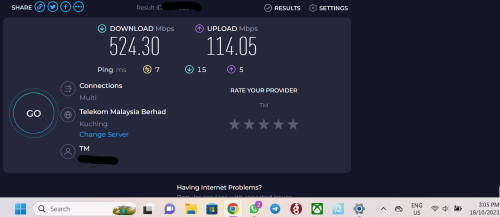
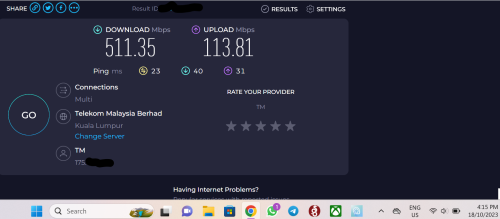
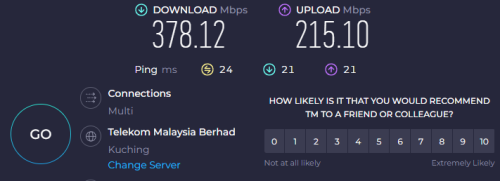
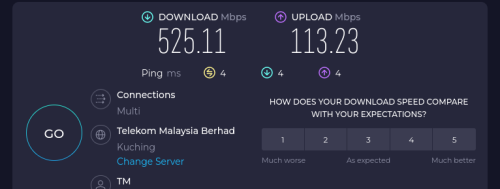
QUOTE(beverlykho @ Oct 18 2023, 03:46 PM) TM's routing seems shittier today, particularly in Kuching. I'm only getting 350-380M when I Speedtest via Wifi to Singtel server. 60.xx.xx.xx, 175.xx.xx.xx, 124.xx.xx.xx range all shitty. Speedtest to TM KL server also shitty. Simanggang to TM KLI only see 500M, or close to it, if I Speedtest to TM server in Kuching. Also, for packages above 100M, TM now promises to 75% of advertised speed. ![]() |
|
|
Oct 20 2023, 06:50 AM
Return to original view | IPv6 | Post
#16
|
![]() ![]()
Junior Member
203 posts Joined: Feb 2008 |
|
|
|
Oct 20 2023, 09:07 AM
Return to original view | IPv6 | Post
#17
|
![]() ![]()
Junior Member
203 posts Joined: Feb 2008 |
|
|
|
Nov 23 2023, 09:06 AM
Return to original view | IPv6 | Post
#18
|
![]() ![]()
Junior Member
203 posts Joined: Feb 2008 |
|
|
|
Nov 23 2023, 09:18 AM
Return to original view | IPv6 | Post
#19
|
![]() ![]()
Junior Member
203 posts Joined: Feb 2008 |
|
|
Topic ClosedOptions
|
| Change to: | 0.2036sec
0.12
7 queries
GZIP Disabled
Time is now: 7th December 2025 - 02:37 AM |