


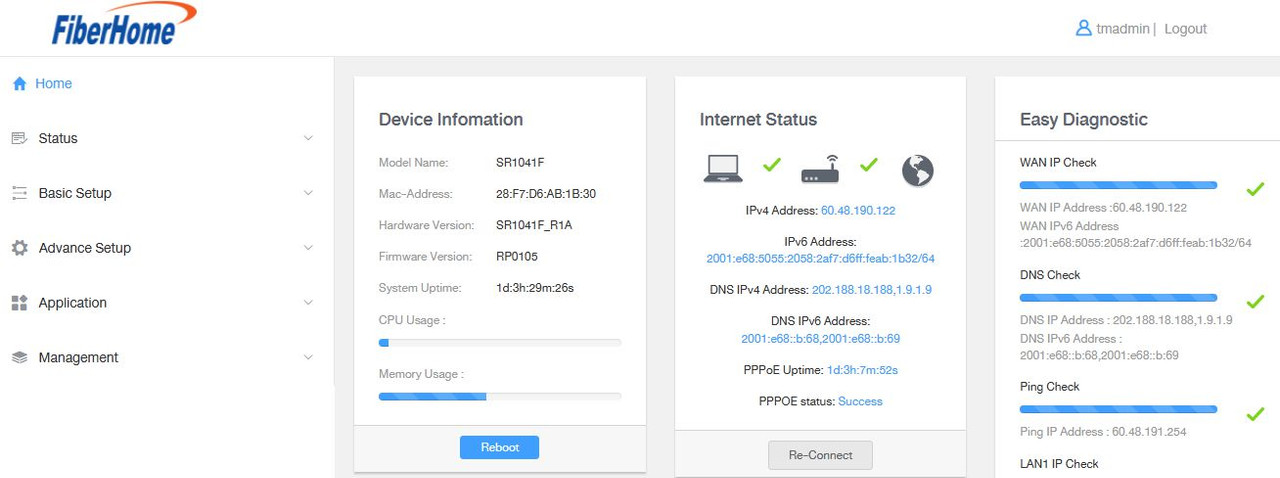
i tried change the DNS but not updating in Home screen ..

Unifi Official TM UniFi High Speed Broadband Thread V41, READ 1ST PAGE FOR RELEVANT WIFI INFO
|
|
 Nov 24 2023, 02:17 AM Nov 24 2023, 02:17 AM
Return to original view | IPv6 | Post
#1
|
 
Senior Member
7,255 posts Joined: Nov 2008 From: SINGAPORE💃 
|
anyone knows SR1041F supervisor password?
i tried change the DNS but not updating in Home screen .. |
|
|
|
|
|
Nov 24 2023, 10:56 AM
Return to original view | IPv6 | Post
#2
|
|
Senior Member
7,255 posts Joined: Nov 2008 From: SINGAPORE💃
|
QUOTE(BenYeeHua @ Nov 24 2023, 05:50 AM) Home page showing PPPoE DNS, while you changed is for SLAAC/DHCPv6 and DHCPv4 DNS.  issit? .. but I dont find any other section for DNS settings, only this screen |
|
|
Nov 24 2023, 11:17 AM
Return to original view | IPv6 | Post
#3
|
|
Senior Member
7,255 posts Joined: Nov 2008 From: SINGAPORE💃
|
QUOTE(jhleo1 @ Nov 24 2023, 11:15 AM) Make sure you use correct ID. tmadmin credential i know .. im asking supervisor bro ..Enter User Name: tmadmin and Password: Adm@xxxx (xxxx is the last 4 digits of MAC address) |
|
|
Nov 24 2023, 11:32 AM
Return to original view | IPv6 | Post
#4
|
|
Senior Member
7,255 posts Joined: Nov 2008 From: SINGAPORE💃
|
QUOTE(ycs @ Nov 24 2023, 11:22 AM) it seems the new fiberhome only have tmadmin user, no superadmin user when I see the technician doing he used supervisor credentials same as the one for SR1041Y .. but I forgot to ask him since I was attending some other work .. SR1041Y Username : superadmin Password : f1ber@dm!n but for SR1041Y cannot use it btw, u know how to change the DNS part?  |
|
|
Nov 24 2023, 08:55 PM
Return to original view | IPv6 | Post
#5
|
|
Senior Member
7,255 posts Joined: Nov 2008 From: SINGAPORE💃
|
QUOTE(xngjn @ Nov 24 2023, 08:25 PM) can try fiberhome and password fiberhome are u blind? refer my replies before anwering .. dont act smart  |
|
|
Nov 25 2023, 08:05 AM
Return to original view | IPv6 | Post
#6
|
|
Senior Member
7,255 posts Joined: Nov 2008 From: SINGAPORE💃
|
QUOTE(BenYeeHua @ Nov 24 2023, 10:02 PM) Just wonder, did ur DHCPv6/SLAAC or DHCPv4 DNS don't get changed? meand i have to change DHCPv6/SLAAC or DHCPv4 Unless you wanna setup NAS/ftp etc via USB on your own router's firmware, it should not affected too much? I also prefer letting device connect to the DNS directly, so it allow to enabled secure DNS(TLS or https whatever)instead of router's DNS. Unless you also want DNS caching by router? And to change default DNS of your PPPoE, it might also be on the PPPoE setup, try check that one.  where to change this? FYI im using direct modem / router .. no mesh or AP TQ for guiding .. hope u can guide me more |
|
|
Nov 25 2023, 09:00 AM
Return to original view | IPv6 | Post
#7
|
|
Senior Member
7,255 posts Joined: Nov 2008 From: SINGAPORE💃
|
QUOTE(BenYeeHua @ Nov 25 2023, 08:11 AM) After you applied your screenshot, check your phone's wifi and your PC's IP address and DNS, it should be the one you setup. wic part of the menu? So it will be bypassing your router DNS relay, and connect directly to the DNS server. Also remember, setup for IPv6 as well, because, by default all device will try IPv6 DNS to obtain both IPv6 and IPv4 address, only if IPv6 is down, then it will be IPv4 DNS.  |
|
Topic ClosedOptions
|
| Change to: |  0.3068sec 0.3068sec
 0.32 0.32
 7 queries 7 queries
 GZIP Disabled GZIP Disabled
Time is now: 6th December 2025 - 06:17 PM |
 Quote
Quote