Welcome Guest ( Log In | Register )

Bump Topic Topic Closed RSS Feed

Outline · [ Standard ] · Linear+

Unifi Official TM UniFi High Speed Broadband Thread V41, READ 1ST PAGE FOR RELEVANT WIFI INFO

views
     
CAL V
post Oct 6 2023, 11:48 AM

Getting Started
**
Junior Member
277 posts

Joined: Dec 2011


QUOTE(BenYeeHua @ Oct 6 2023, 10:56 AM)
TIME user: ?
Still, I will be interesting on Time, if nothing big, it means TM is bigger than before now.
*
I have both subscriptions, also waiting to see what TIME will announce.

Tbh I don't need the speed upgrade, not a heavy downloader pun. Give me better price and I put that savings to a better wifi system brows.gif
CAL V
post Oct 6 2023, 03:36 PM

Getting Started
**
Junior Member
277 posts

Joined: Dec 2011


If for say want to change to SWU3.0, can do at which type of store?

From their website got Unifi Store, TMPoint and Authorised dealer (TAD). Weekend only some Unifi Store and TAD open. hmm.gif
CAL V
post Oct 6 2023, 04:24 PM

Getting Started
**
Junior Member
277 posts

Joined: Dec 2011


QUOTE(ben3003 @ Oct 6 2023, 01:04 PM)
call TM 100, they say they cannot do via online, only TMPoint lol. She say can do on behalf, ask me give my IC and letter of authorization to my friend or relatives then walk in TMPoint can do. my friend will help me do this afternoon, hopefully all good.
*
Photocopy IC is acceptable? hmm.gif
CAL V
post Oct 6 2023, 05:46 PM

Getting Started
**
Junior Member
277 posts

Joined: Dec 2011


QUOTE(tzxsean @ Oct 6 2023, 05:31 PM)
why not? pls enlighten me what I'm missing out?
*
QUOTE(Max2006 @ Oct 6 2023, 05:37 PM)
You miss nothing. It's just that usually unifi router is crappy in term of performance and stability. So most people prefer to buy their own router rather than using those free unifi routers.
*
Can second this. If it works fine for you then there’s no issue really.

My luck with bundled routers were always poor, the last router I got from TM was the trash can Dlink, spoilt once and they replaced FOC. Disconnects a lot. In the end changed to RT-AC68u since before covid, been rock solid for ~95% of the time I’d say.

Now the ONU also giving me some problems, just in time to renew contract I guess laugh.gif
CAL V
post Oct 6 2023, 05:56 PM

Getting Started
**
Junior Member
277 posts

Joined: Dec 2011


QUOTE(raynman @ Oct 6 2023, 05:49 PM)
I first started with Unifi in 2014 with the VIP5 (5Mbps) package.

Then CS called with a lot of price reductions and speed upgrades.

The biggest speed upgrade was the 10x Turbo Upgrade in 2018.
*
Sure your name is very Ong in TM’s customer list.

Best I got was the 10x Turbo speed to 800Mbps. Aside from that no discounts nothing, my account has been their customer for 3 decades ago lol. Maybe that time switch from copper to fibre reset already cry.gif
CAL V
post Oct 7 2023, 12:34 PM

Getting Started
**
Junior Member
277 posts

Joined: Dec 2011


QUOTE(night1218 @ Oct 7 2023, 10:28 AM)
Update:10mins all done. 500mbps 12months only.the rest is the same.
*
Got mine done in 20mins at KLCC just now too. RM119 500Mbps 12mths…

Just that CS did not tell me which free router. Forgot to ask. Other details same.
CAL V
post Oct 8 2023, 06:09 PM

Getting Started
**
Junior Member
277 posts

Joined: Dec 2011


QUOTE(xjoshualaw29 @ Oct 8 2023, 06:06 PM)
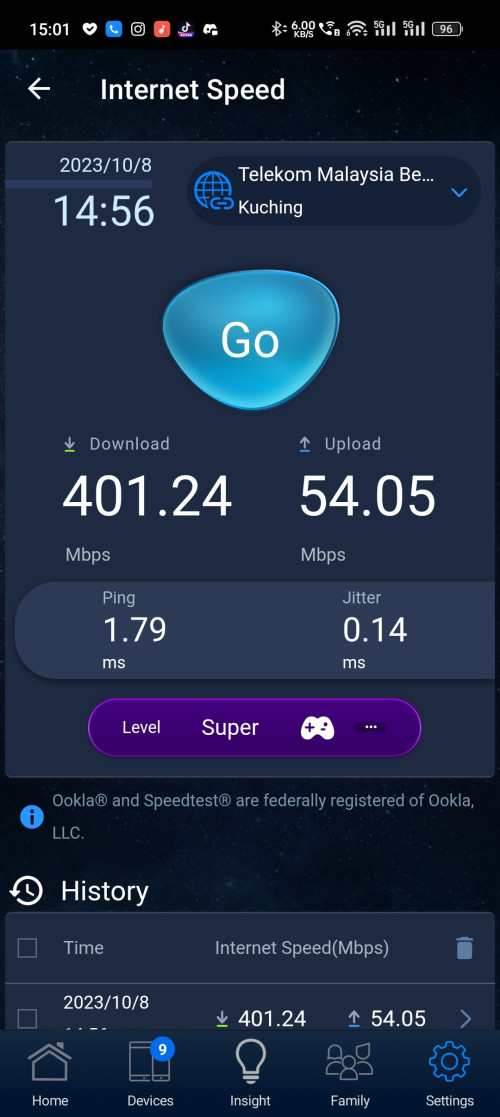
Ah, after heavy testing definitely Unifi side having issues as the modem speed capped or something speed capped. I was alone using yet confused. TM technical team coming in tomorrow morning and hoping assumption is correct.

The speedtest is done from ASUS built in speed test tool

user posted image
*
Wow, download 500Mbps and upload is 1/10th of that blink.gif
CAL V
post Oct 12 2023, 03:36 PM

Getting Started
**
Junior Member
277 posts

Joined: Dec 2011


QUOTE(NimalKumar @ Oct 12 2023, 02:34 PM)
Just an update on my SWU3 switch.

1. Technician came today and gave us FibreHome routers, Unfortunately (Damn Seremban).

2. I'm not sure if its congestion or server issue, but I'm getting very wobbly speed test results ... 320 .. 430 .. 190 .. 220 .. 390

3. Technician stated I need to wait at least until evening to ensure I get the smooth transition.

4. Technician himself admitted that TPLink router is way superior ... Second Dlink .. So he said I can continue using my AX20 if the Fibrehome routers are unsatisfactory.

5. Need to monitor why wobbly speed.
*
The technician is also installing at my place now. Also FiberHome router. (Seremban too)

Sadly I’m not at home, will test tomorrow and see how it is. Most likely I will swap back to my Asus router.

CAL V
post Oct 13 2023, 02:54 PM

Getting Started
**
Junior Member
277 posts

Joined: Dec 2011


QUOTE(bsvanan @ Oct 13 2023, 12:34 PM)
Currently using TUF AX3000 but not able to cover whole 2storey hse especially kitchen area and part of ground floor (router is at 1st floor).

Will it be better if I go for a TUF AX4200 alone?
*
I'm using one AX4200 (assume you're referring to Asus), after 2 walls (likely not reinforced concrete) the wifi signal already reduced one bar. (iPhone).

Useable for double storey, yes. Good coverage, likely no. Just my 2 cents.

QUOTE(wailing81 @ Oct 13 2023, 01:56 PM)
problem in using TM stock router is you can't have your preferred SSID cause it will need to end with "@unifi"
*
My mom screenshot for me yesterday, my new SSID does not have @unifi. TM FiberHome router, just installed yesterday when they performed the SWU installation. hmm.gif

The old Dlink trashcan did have the @unifi added to the SSID back in the day. From my experience.

CAL V
post Oct 14 2023, 02:53 AM

Getting Started
**
Junior Member
277 posts

Joined: Dec 2011


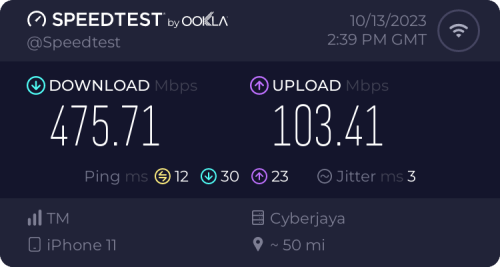
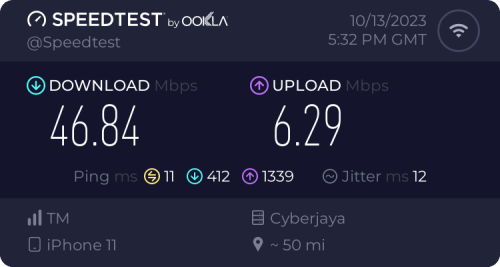
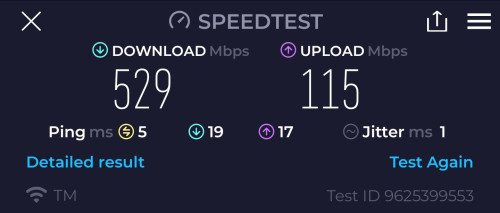
Just sharing my swu upgrade results. Upgraded from 100Mbps 2019 Turbo plan to SWU 300Mbps plan.

Technician came to install on Thursday, gave us FiberHome SR1041F router (1unit).

So far my speedtest looks good, and the FiberHome router also works better than I thought so far.

5m away from router, 5Ghz channel. No direct line of sight, no door.
Device: iPhone 11
user posted image

2nd floor, back bathroom. 2.4Ghz channel. Furthest point from the router within the house. About 4-5 walls in between.
Device: iPhone 11
user posted image

Nothing to complain about I guess, the Wifi6 itself is already outperforming my AC68u in all aspects for speed and range.
If I have to upgrade from here, means burn more money la doh.gif

This post has been edited by CAL V: Oct 14 2023, 03:27 AM
CAL V
post Oct 14 2023, 01:07 PM

Getting Started
**
Junior Member
277 posts

Joined: Dec 2011


QUOTE(coolguy_0925 @ Oct 14 2023, 03:42 AM)
sounds like fiberhome is not that bad afterall
*
QUOTE(issac99289928 @ Oct 14 2023, 03:55 AM)
SR1041F is good enough if the router is placed centrally in single storey house.
*
Not straight up garbage I guess, unlike the infamous Dlink trashcan that was truly embracing as one.

For normal user like me, will just keep using it until hand itchy. No urge to upgrade it urgently.
CAL V
post Oct 14 2023, 01:32 PM

Getting Started
**
Junior Member
277 posts

Joined: Dec 2011


QUOTE(cyberic @ Oct 14 2023, 11:49 AM)
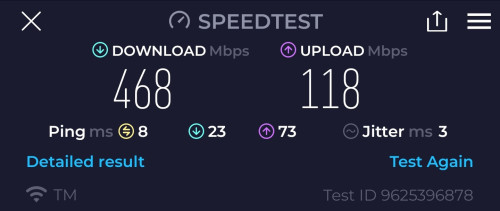
Just realised my upper floor AP connected at 100Mb speed. Problem solved with another cable. 😅

user posted image

3x3 mimo AP

user posted image

4x4 mimo AP

Just comparing for fun. Tested with Samsung s23 ultra. Is.s23 support 2x2?
*
If I recall correctly, Samsung S series already had higher spec Wifi performance compared to iPhones for quite a few years.

Latest iPhone 15pro stated 2x2 MIMO, oddly Samsung didn't list it out clearly.


Topic ClosedOptions
 

Change to:
| Lo-Fi Version
1.4865sec    0.43    7 queries    GZIP Disabled
Time is now: 8th December 2025 - 01:17 AM