ppl is trying to help you. don't be angry. just paste the screenshot so we can see what's culprit.
Unifi Official TM UniFi High Speed Broadband Thread V41, READ 1ST PAGE FOR RELEVANT WIFI INFO
Unifi Official TM UniFi High Speed Broadband Thread V41, READ 1ST PAGE FOR RELEVANT WIFI INFO
|
|
 Nov 27 2023, 03:13 PM Nov 27 2023, 03:13 PM
|
 
Senior Member
1,425 posts Joined: Jan 2003 From: Pearl 14000 + Kayangan 01000  
|
ppl is trying to help you. don't be angry. just paste the screenshot so we can see what's culprit.
|
|
|
|
|
|
Nov 27 2023, 05:07 PM
Show posts by this member only | IPv6 | Post
#8942
|

Junior Member
835 posts Joined: Nov 2007 From: Land of Forgotten
|
QUOTE(sitescope @ Nov 27 2023, 01:00 PM) Can u open parental ctrl What option it has there ?  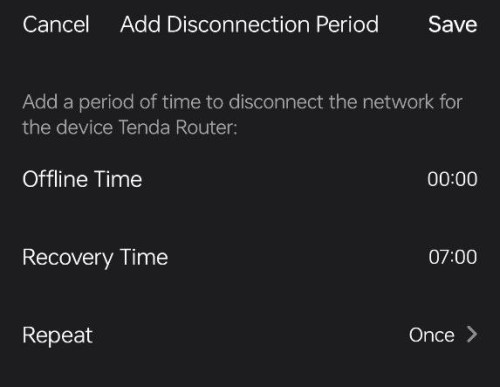 |
|
|
Nov 27 2023, 05:44 PM
Show posts by this member only | IPv6 | Post
#8943
|

Senior Member
4,493 posts Joined: Oct 2013
|
QUOTE(Omochao @ Nov 27 2023, 05:07 PM) Cant separated by individual hp |
|
|
Nov 27 2023, 05:54 PM
|

All Stars
14,245 posts Joined: Jan 2011
|
QUOTE(OlgaC4 @ Nov 27 2023, 03:09 PM) I am telling you there is a different. I already told you also i game better with LTE then fiber line. To believe or not is up to you. Sure bo?I play mobile game on 5G but the latency is terrible. |
|
|
Nov 27 2023, 07:06 PM
Show posts by this member only | IPv6 | Post
#8945
|
|
Senior Member
5,292 posts Joined: Nov 2006
|
QUOTE(westlife @ Nov 27 2023, 05:54 PM) Sure bo? Maxis tower to my house 100meter +- my ping about 23.I play mobile game on 5G but the latency is terrible. 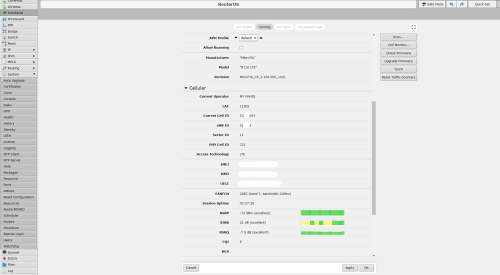 This post has been edited by OlgaC4: Nov 27 2023, 07:14 PM |
|
|
Nov 27 2023, 08:40 PM
|

Junior Member
980 posts Joined: Dec 2011
|
QUOTE(OlgaC4 @ Nov 27 2023, 03:09 PM) I am telling you there is a different. I already told you also i game better with LTE then fiber line. To believe or not is up to you. LOL ok bruv ...in your settings got asset streaming? |
|
|
|
|
|
Nov 27 2023, 08:48 PM
Show posts by this member only | IPv6 | Post
#8947
|
|
Junior Member
835 posts Joined: Nov 2007 From: Land of Forgotten
|
QUOTE(sitescope @ Nov 27 2023, 05:44 PM) Not good can..before this page ,you will have to select device..i didnt screen shot is because i have a lot devices that I named individuallyCant separated by individual hp 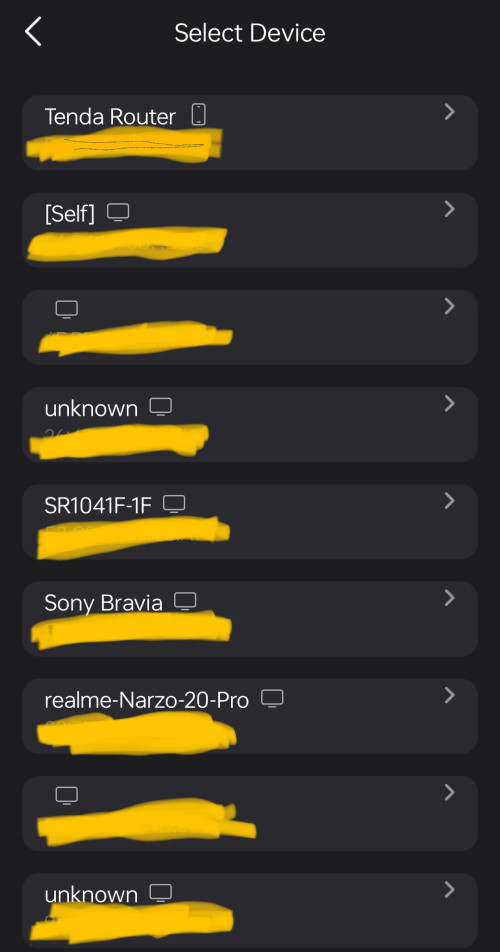 This post has been edited by Omochao: Nov 27 2023, 08:50 PM |
|
|
Nov 27 2023, 09:08 PM
|
|
Senior Member
5,292 posts Joined: Nov 2006
|
QUOTE(simmarjit @ Nov 27 2023, 08:40 PM) LOL ok bruv ...in your settings got asset streaming? No |
|
|
Nov 27 2023, 09:33 PM
Show posts by this member only | IPv6 | Post
#8949
|
|
Senior Member
1,873 posts Joined: Nov 2010
|
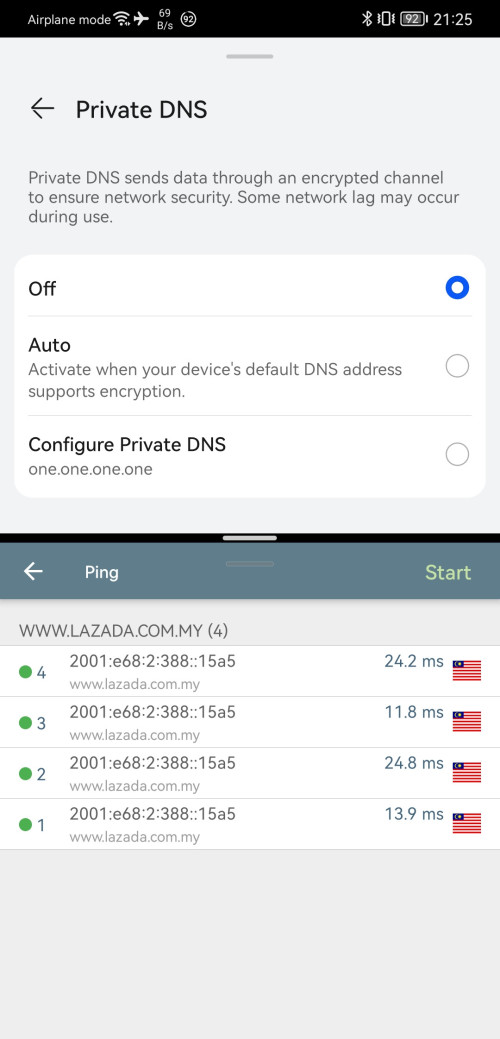
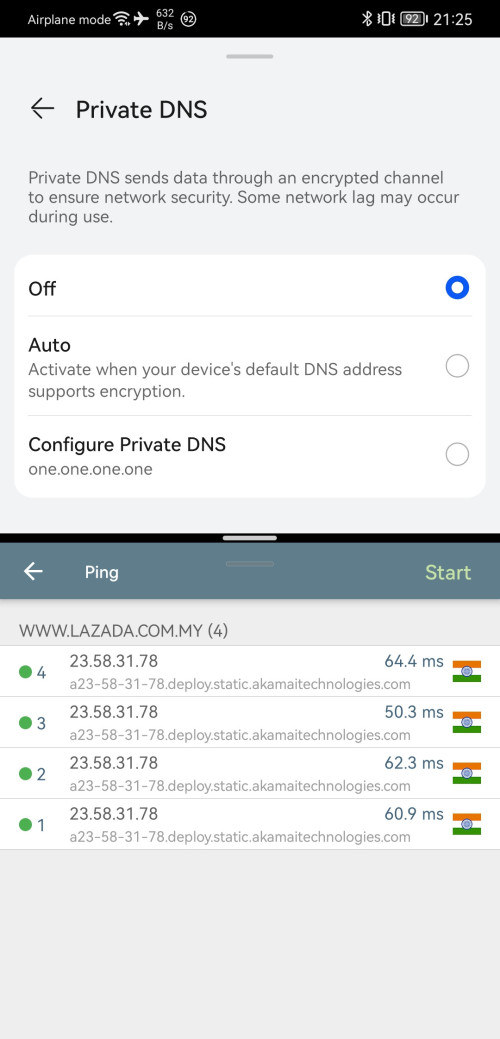
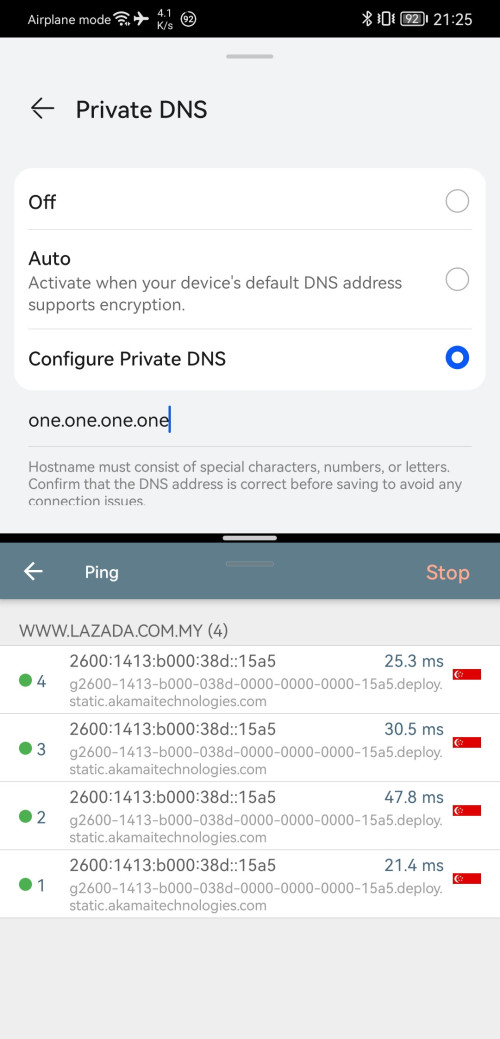
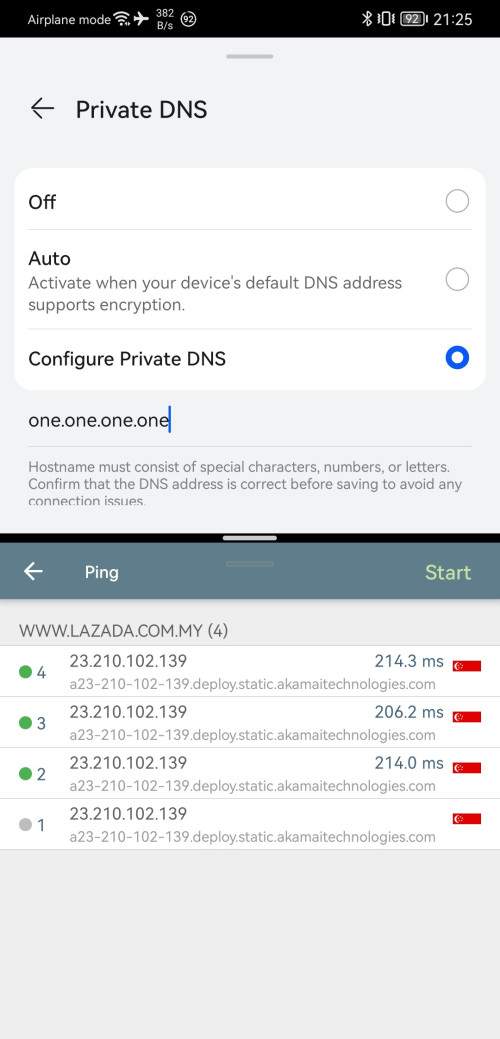
QUOTE(kwss @ Nov 27 2023, 04:08 AM) You are misdiagnosing the issue. It has nothing to do with DNS or IPv6. You are saying me wrong, but supporting me with your proof lol.And thanks for proofing me it is pbe's DNS server issues.  ----- Yes, it is TM issues to redirect customer wrongly to the server, or I should said, load-balancing or best-cost. And nope, you are using wrong address. I test on www.lazada.com.my la... In browser, or any DNS eyes, lazada.com.my ≠ www.lazada.com.my, that's why you get your result wrong. Same to lowyat.net ≠ forum.lowyat.net Else, it is a big security that can harm for good, and yes I know a few gov website don't support jumping from lazada.com.my to www.lazada.com.my(as example), as browser just showing DNS not result error, lol.  So here u go~ Skip lowyat as same server, talk later. PS: Somehow the A also need @, else it go to my router which is Google dns for A result, lol. www.lazada.com.my: CODE dig +short www.lazada.com.my a @2001:4860:4860::8888 www.lazada.com.my aaaa @2001:4860:4860::8888 www.lazada-lazpay.edgekey.net. e5541.dsca.akamaiedge.net. 23.47.103.216 www.lazada-lazpay.edgekey.net. e5541.dsca.akamaiedge.net. 2001:e68:2:390::15a5 2001:e68:2:388::15a5 dig +short www.lazada.com.my a @8.8.8.8 www.lazada.com.my aaaa @8.8.8.8 www.lazada-lazpay.edgekey.net. e5541.dsca.akamaiedge.net. 23.14.199.55 www.lazada-lazpay.edgekey.net. e5541.dsca.akamaiedge.net. 2001:e68:2:388::15a5 2001:e68:2:390::15a5 CODE dig +short www.lazada.com.my a @2606:4700:4700::1111 www.lazada.com.my aaaa @2606:4700:4700::1111 www.lazada-lazpay.edgekey.net. e5541.dsca.akamaiedge.net. 23.210.102.139 www.lazada-lazpay.edgekey.net. e5541.dsca.akamaiedge.net. 2600:1413:b000:38d::15a5 2600:1413:b000:382::15a5 dig +short www.lazada.com.my a @1.1.1.1 www.lazada.com.my aaaa @1.1.1.1 www.lazada-lazpay.edgekey.net. e5541.dsca.akamaiedge.net. 23.210.102.139 www.lazada-lazpay.edgekey.net. e5541.dsca.akamaiedge.net. 2600:1413:b000:38d::15a5 2600:1413:b000:382::15a5 And yes, during the testing, I found out IPv6 1.1.1.1 get return Malaysia Akamai, while IPv4 1.1.1.1 return SG Akamai. But more strange, only dig still showing SG Akamai, the "Best Track" is returning MY Akamai already...  So yes, even using different query tools get different result, lol. If I set my Secure DNS on my phone as one.one.one.one, the result is SG Akamai, same as dig. » Click to show Spoiler - click again to hide... « Hei! 23.58.31.78??? lol, it is at India!!! Much more fun to be play in the future!!!   --- Back to lowyat. CODE dig +short forum.lowyat.net a forum.lowyat.net aaaa @2001:4860:4860::8888 172.67.74.89 104.26.6.73 104.26.7.73 2606:4700:20::ac43:4a59 2606:4700:20::681a:749 2606:4700:20::681a:649 http://[2606:4700:20::ac43:4a59]/cdn-cgi/trace CODE fl=35f716 h=[2606:4700:20::ac43:4a59] ip=(hidden) ts=1701088906.577 visit_scheme=http uag=(hidden) colo=SIN sliver=010-sin02 http=http/1.1 loc=MY tls=off sni=off warp=off gateway=off rbi=off kex=none Other 681a also SG, IPv4 for HK yes. So you ask me, why you said it is Johor? Well, I locked it based on lowyat IPv6 address that provided 1 years ago. Sorry, hide it as I still using it for JHB lol, later UniFi found out they forget this IPv6 address, it will get kicked to SG or HK lol.  http://[2606:4700:Hidden:Hidden]/cdn-cgi/trace CODE fl=242f15 h=[2606:4700:Hidden:Hidden] ip=(hidden) ts=1701089177.025 visit_scheme=http uag=(hidden) colo=JHB sliver=010-jhb01 http=http/1.1 loc=MY tls=off sni=off warp=off gateway=off rbi=off kex=none So after admin team look at it, found out the performance not good, then kicked it to new IP address? This is a unknown answer for me... ---- For pbe, you half-half agreed with me, but using wrong address, still works la, lol. I means the return result time, not the routing issues la... As Dig failed to showing the slowness part, and also different AAAA + A result, which means DIG don't = real-world performance. PS: I reopen browser for each test, else it is default to DNS cache lol. With browser, it is following the result from Best Trace, slowing 10s. 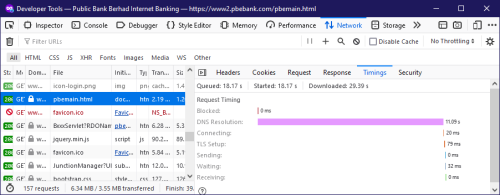 But if you enabled DNS over HTTPS, result changed. 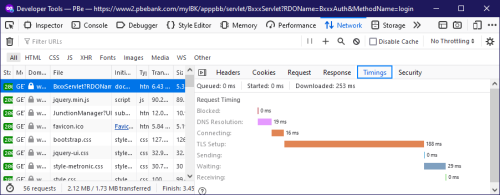 For interesting part? Yes, it need a reopen of browser to trigger it, flush DNS or flush idle connection on Chrome don't happen. Second Strange part? on Chrome showing stall, not DNS. It can be the DNSSEC issues, which I then perform testing, yes, it is. https://dnssec-analyzer.verisignlabs.com/www2.pbebank.com CODE All Queries to ns1.a1.impervasecuredns.net for www2.pbebank.com/DNSKEY timed out or failed So the slowness is caused by not DNS, or DNS caching, but the pbe failed to host DNSKEY? This, I need to use fiddler to capture Firefox, see did it query for DNSKEY, but I am hungry now, lol!!! ---- In the end, well, new stuff on the surface now. 1. DIG is not the real-world 2. Google DNS really can go crazy, giving India IPv4 as result, lol 3. Public bank lacking DNSKEY? Now your turn, I wonder did DNS give different result based on requester's IP address. For me, I am at Melaka, which is nearby SG, more easier to be taken as SG customer.  Later post the CF's IP address that is public for KUL lol. This post has been edited by BenYeeHua: Nov 27 2023, 09:53 PM PRSXFENG liked this post
|
|
|
Nov 27 2023, 09:51 PM
Show posts by this member only | IPv6 | Post
#8950
|
|
Senior Member
1,873 posts Joined: Nov 2010
|
Many will be asking, HEI GIVE ME THE CF's JOHOR IP ADRESS!!! Edit: removed, I found out my clue might too easy to abuse, I am not bad guys lol. --- The real action is to kick TM and CloudFlare, not changing the IP address of server. So.... Hmm... --- I search again, there is 2 Johor, 0 KUL. Should be more on IPv6 side, I think most are smart people if they know me? This post has been edited by BenYeeHua: Nov 27 2023, 10:10 PM simmarjit liked this post
|
|
|
Nov 27 2023, 11:03 PM
|
|
Senior Member
1,437 posts Joined: Sep 2021
|
QUOTE(OlgaC4 @ Nov 27 2023, 08:37 AM) Counter offer from unfi when i jump to maxis. RM110 500mbps 6months free. that is RM119 but not RM110 impossible RM110RM110 500mbps 6months free. downgrade to maxis RM129 + RM10(public ip) 6+2months free. 300mbps Will switch maxis tommorow after my finger print verification . |
|
|
Nov 28 2023, 05:01 AM
|
|
Senior Member
1,207 posts Joined: Aug 2018
|
QUOTE(BenYeeHua @ Nov 27 2023, 09:33 PM) You are saying me wrong, but supporting me with your proof lol. I will still say your statement on IPv6 and DNS were wrong. Specifically:And thanks for proofing me it is pbe's DNS server issues. ----- Yes, it is TM issues to redirect customer wrongly to the server, or I should said, load-balancing or best-cost. And nope, you are using wrong address. I test on www.lazada.com.my la... In browser, or any DNS eyes, lazada.com.my ≠ www.lazada.com.my, that's why you get your result wrong. Same to lowyat.net ≠ forum.lowyat.net Else, it is a big security that can harm for good, and yes I know a few gov website don't support jumping from lazada.com.my to www.lazada.com.my(as example), as browser just showing DNS not result error, lol. So here u go~ Skip lowyat as same server, talk later. PS: Somehow the A also need @, else it go to my router which is Google dns for A result, lol. www.lazada.com.my: CODE dig +short www.lazada.com.my a @2001:4860:4860::8888 www.lazada.com.my aaaa @2001:4860:4860::8888 www.lazada-lazpay.edgekey.net. e5541.dsca.akamaiedge.net. 23.47.103.216 www.lazada-lazpay.edgekey.net. e5541.dsca.akamaiedge.net. 2001:e68:2:390::15a5 2001:e68:2:388::15a5 dig +short www.lazada.com.my a @8.8.8.8 www.lazada.com.my aaaa @8.8.8.8 www.lazada-lazpay.edgekey.net. e5541.dsca.akamaiedge.net. 23.14.199.55 www.lazada-lazpay.edgekey.net. e5541.dsca.akamaiedge.net. 2001:e68:2:388::15a5 2001:e68:2:390::15a5 CODE dig +short www.lazada.com.my a @2606:4700:4700::1111 www.lazada.com.my aaaa @2606:4700:4700::1111 www.lazada-lazpay.edgekey.net. e5541.dsca.akamaiedge.net. 23.210.102.139 www.lazada-lazpay.edgekey.net. e5541.dsca.akamaiedge.net. 2600:1413:b000:38d::15a5 2600:1413:b000:382::15a5 dig +short www.lazada.com.my a @1.1.1.1 www.lazada.com.my aaaa @1.1.1.1 www.lazada-lazpay.edgekey.net. e5541.dsca.akamaiedge.net. 23.210.102.139 www.lazada-lazpay.edgekey.net. e5541.dsca.akamaiedge.net. 2600:1413:b000:38d::15a5 2600:1413:b000:382::15a5 And yes, during the testing, I found out IPv6 1.1.1.1 get return Malaysia Akamai, while IPv4 1.1.1.1 return SG Akamai. But more strange, only dig still showing SG Akamai, the "Best Track" is returning MY Akamai already... So yes, even using different query tools get different result, lol. If I set my Secure DNS on my phone as one.one.one.one, the result is SG Akamai, same as dig. » Click to show Spoiler - click again to hide... « Hei! 23.58.31.78??? lol, it is at India!!! Much more fun to be play in the future!!! --- Back to lowyat. CODE dig +short forum.lowyat.net a forum.lowyat.net aaaa @2001:4860:4860::8888 172.67.74.89 104.26.6.73 104.26.7.73 2606:4700:20::ac43:4a59 2606:4700:20::681a:749 2606:4700:20::681a:649 http://[2606:4700:20::ac43:4a59]/cdn-cgi/trace CODE fl=35f716 h=[2606:4700:20::ac43:4a59] ip=(hidden) ts=1701088906.577 visit_scheme=http uag=(hidden) colo=SIN sliver=010-sin02 http=http/1.1 loc=MY tls=off sni=off warp=off gateway=off rbi=off kex=none Other 681a also SG, IPv4 for HK yes. So you ask me, why you said it is Johor? Well, I locked it based on lowyat IPv6 address that provided 1 years ago. Sorry, hide it as I still using it for JHB lol, later UniFi found out they forget this IPv6 address, it will get kicked to SG or HK lol. http://[2606:4700:Hidden:Hidden]/cdn-cgi/trace CODE fl=242f15 h=[2606:4700:Hidden:Hidden] ip=(hidden) ts=1701089177.025 visit_scheme=http uag=(hidden) colo=JHB sliver=010-jhb01 http=http/1.1 loc=MY tls=off sni=off warp=off gateway=off rbi=off kex=none So after admin team look at it, found out the performance not good, then kicked it to new IP address? This is a unknown answer for me... ---- For pbe, you half-half agreed with me, but using wrong address, still works la, lol. I means the return result time, not the routing issues la... As Dig failed to showing the slowness part, and also different AAAA + A result, which means DIG don't = real-world performance. PS: I reopen browser for each test, else it is default to DNS cache lol. With browser, it is following the result from Best Trace, slowing 10s. But if you enabled DNS over HTTPS, result changed. For interesting part? Yes, it need a reopen of browser to trigger it, flush DNS or flush idle connection on Chrome don't happen. Second Strange part? on Chrome showing stall, not DNS. It can be the DNSSEC issues, which I then perform testing, yes, it is. https://dnssec-analyzer.verisignlabs.com/www2.pbebank.com CODE All Queries to ns1.a1.impervasecuredns.net for www2.pbebank.com/DNSKEY timed out or failed So the slowness is caused by not DNS, or DNS caching, but the pbe failed to host DNSKEY? This, I need to use fiddler to capture Firefox, see did it query for DNSKEY, but I am hungry now, lol!!! ---- In the end, well, new stuff on the surface now. 1. DIG is not the real-world 2. Google DNS really can go crazy, giving India IPv4 as result, lol 3. Public bank lacking DNSKEY? Now your turn, I wonder did DNS give different result based on requester's IP address. For me, I am at Melaka, which is nearby SG, more easier to be taken as SG customer. Later post the CF's IP address that is public for KUL lol. 1. Telling user to change to ABC DNS server because it is better than XYZ DNS server. What happen in pbebank.com is strictly limited to pbebank.com authoritative DNS server (which is Imperva configured by Public Bank). There is no best DNS server for everyone. 2. Telling user to disable IPv6. There will always be some site that works better on IPv6 or IPv4. In the perfect world they should both work equally well but... We are not a perfect world. It is not TM that redirect customer to different Cloudflare server. Cloudflare did it themself and even wrote about it: https://blog.cloudflare.com/meet-traffic-manager/ Inside the blog post they specifically mention Free customer will be moved to the slowest free region first, followed by Pro, and Business plan. Enterprise plan will get top priority. It might also happen when the data center is having problem. All hyperscaler do this, including Akamai. There is no secret in network routing. It is how routers around the world know where to send your packet. JHB POP: 2606:4700:3108::ac42:2b02 2606:4700:3108::ac42:28fe 172.66.40.254 172.66.43.2 DO NOT HARDCODE THE ABOVE TO YOUR HOST FILE. IT IS JUST FOR YOUR INFORMATION. If Cloudflare change their JHB addresses, everyone in this forum that do what you suggested will have broken sites. NOT GOOD! OK, I used lazada.com.my instead of www.lazada.com.my. I am going to make it up for you in this post. I will address ns1.a1.impervasecuredns.net first. Whenever you see message like that, it can mean a lot of things. CODE $ dig +short tm.com.my @ns1.a1.impervasecuredns.net 45.60.243.95 45.60.245.95 This works because TM also uses Imperva for as their authoritative DNS provider. What does this means? It means the resolver is working from my connection. It could very well just a transient network issue between: AS30060 VeriSign Infrastructure & Operations -and- AS19551 Incapsula Inc The best action from now on would be to find a Looking Glass in one of those AS and check where things break. But everything is up now. A simple clarification for dig. It is not only real world. It is real time. It is reliable. It is battle tested. It is THE tool for DNS diagnostic. What you are facing is not the tool's fault. You are just misunderstanding how CDN works, and also DNSoTLS / DNSoHTTPS which is a separate layer. So I would like to address traffic steering for CDN I assume you have read and understand the Cloudflare post first. You have an existing understanding on Cloudflare with their long list of IP addresses when you do your query (300 seconds TTL). Akamai only return one or two IP address with a very short TTL of 20 seconds. The strategy both CDN uses are different. Cloudflare mostly depend on BGP prefix announcement to manipulate where user get served. They will use region specific data center IP address depending on the subscription plan, latency and traffic pattern. Cloudflare has specified 50ms latency worldwide. As far as I can tell they are still delivering their promise. Akamai predominantly depends on publishing and withdrawing IP addresses using DNS to manipulate where user get served. The advantage is that Akamai do not need to wait for BGP announcement to propagate around the world. There is also zero chance of killing the Internet in the case of misconfiguration causing BGP Route Leak or BGP Poisoning. However, it does come with downside too and they documented it here: https://techdocs.akamai.com/edge-ip-binding/docs https://techdocs.akamai.com/client-access-control/docs Again I would like to emphasize there is no single best way to do things in this world. When you use a tool, you first must understand the architecture behind it. In this case Cloudflare and Akamai. If you really understand the above, then it should answer your question why it gone to India or why different DNS return different IP address but I will elaborate further for you. Google has contract with TM to host their CDN right inside TM core network. Cloudflare does not. Coincidentally Akamai also has contract with TM to host their CDN inside TM core network. With Anycast routing, packet will go to the closest server, in this case, packet just traverse inside TM core network. Obviously Cloudflare DNS do not have this privilege. Again this doesn't make one better than the other. It is case by case basis. If you predominantly use Akamai, then having TM as your provider and using Google DNS will be the best choice for you. But not for others. Regarding why it goes to India, it is just a transient network condition. It happen all the time. That's why people use monitoring tools if network performance and uptime is important. Dig didn't show it and your app show it doesn't means one is wrong and the other is right. 20 seconds has passed (remember the TTL) and Akamai can return a different IP. You can try again every 20 seconds and see if it end up in India all the time and tell me about it. Last I will address your "browser issue". I will start by saying I do not have a metric how long it takes for first DNSoHTTPS connection is normal. It is like asking people what is the normal boot time for a computer. A laptop and a 2 socket x 128 core server have very different boot time. What happen is this: 1. Browser query your OS resolver to resolve whatever DNSoHTTPS that's configured. 2. Browser will setup DNSoHTTPS (handshake, verify certificate, key exchange, final encrypted connection) 3. All DNS queries in browser will now be done using DNSoHTTPS What I suspect is you have adblocker extension like uBO, Tracking Protection or others. They will block all connection before they finish starting up to prevent content from being leaked. So they too block DNSoHTTPS. The question you must ask is how do you further diagnose this issue? I will start by repeatedly do the following when I start the browser and the page loads: CODE $ ss -tanp; ss -uanp It gives you a high level overview of what is being done network wise. If you are still not sure why it is taking so long, do a Wireshark capture and see if it is really network stalling. If yes, where does it stall. If not, then it is isolated in the browser code and nothing to do with network. in Firefox about:networking, you can capture application log. That could be done to gather more information. Conclusion: First understand the architecture, understand the process. Use the tool, understand the tool, understand the limitation. Come out with hypothesis and further action plan. Like I said, there is no secret in networking. There is no best way to do something. Cheers |
|
|
Nov 28 2023, 08:26 AM
Show posts by this member only | IPv6 | Post
#8953
|
|
Senior Member
5,292 posts Joined: Nov 2006
|
QUOTE(tng55 @ Nov 27 2023, 11:03 PM) RM110 500mbps 6months free. that is RM119 but not RM110 impossible RM110 Is a counter offer. |
|
|
|
|
|
Nov 28 2023, 08:30 AM
Show posts by this member only | IPv6 | Post
#8954
|

Senior Member
4,034 posts Joined: Dec 2019
|
don't mind me.
growing with both popcorn and counter-arguments.  |
|
|
Nov 28 2023, 08:33 AM
Show posts by this member only | IPv6 | Post
#8955
|
|
Junior Member
224 posts Joined: Apr 2019
|
QUOTE(BenYeeHua @ Nov 26 2023, 05:17 PM) I guess some ISP is special? i do not understand what the problem is with pbebank but i think u should not be using both ipv6 and ipv4 dns...should be using one type only...so far using ipv6 dns only i not encounter any problem do not know what is the point in using ipv4Unsure, can be their tech setup it wrongly?  Based on this thread, UniFi https://forum.lowyat.net/topic/5073652/+100 I think If you feel slow down, then try disable IPv6 la, but the issues is mostly caused by the throttling of UniFi on SG, like the rerouting of HK to SG CloudFlare now....  --- For your info, I performed testing on www.lazada.com.my with IPv4 and IPv6 of Google DNS and CloudFlare DNS. Here is the result. 2606:4700:4700::1111, MY 2606:4700:4700::1001, MY 1.1.1.1, SG Akamai for IPv4/IPv6 1.0.0.1, SG Akamai for IPv4/IPv6 2001:4860:4860::8888, MY 2001:4860:4860::8844, MY 8.8.8.8, MY for both 8.8.4.4, MY for both This is why I prefer Google DNS, lol. For the extra, both IPv6 DNS got reaching issues for Public Bank's DNS server, lol. https://www2.pbebank.com/ Yes, there is 10s timeout for public bank.(old is 30s) This might be caused by the caching time TTL is 30s, but strange that if I check via Android network tools, it is fine.... --- More testing on PBe, it works well also on DNS over HTTPS, both IPv4/IPv6, so... Seem like only happen on DNS over UDP for IPv6 la. |
|
|
Nov 28 2023, 08:37 AM
Show posts by this member only | IPv6 | Post
#8956
|
|
Senior Member
4,034 posts Joined: Dec 2019
|
QUOTE(nonamer @ Nov 28 2023, 08:33 AM) i do not understand what the problem is with pbebank but i think u should not be using both ipv6 and ipv4 dns...should be using one type only...so far using ipv6 dns only i not encounter any problem do not know what is the point in using ipv4 some servers are ipv4-only.some servers are ipv6-only. some servers are hybrid. you'll need both. |
|
|
Nov 28 2023, 08:39 AM
Show posts by this member only | IPv6 | Post
#8957
|
|
Junior Member
224 posts Joined: Apr 2019
|
QUOTE(Oltromen Ripot @ Nov 28 2023, 08:37 AM) some servers are ipv4-only. nope im using cloudflare ipv6 dns only at the router and no problem at allsome servers are ipv6-only. some servers are hybrid. you'll need both. |
|
|
Nov 28 2023, 09:31 AM
Show posts by this member only | IPv6 | Post
#8958
|
|
Senior Member
4,034 posts Joined: Dec 2019
|
QUOTE(nonamer @ Nov 28 2023, 08:39 AM) nope im using cloudflare ipv6 dns only at the router and no problem at all DNS by right should be able to resolve either IPv4 (A records) and IPv6 (AAAA records).What i wrote is, your destination servers that a DNS is pointing towards can either be IPv4-only, IPv6-only, or hybrid. While there is translation layer available - without which IPv4 and IPv6 will not be able to interconnect to each other -, that is not the point i am trying to deliver. On my part, I do not enable IPv6 at all on all the servers I am taking care of. Strictly IPv4-only. I don't want the pain of having to administer and decipher the long long IPv6 addresses whenever there is hosting trouble. The world should have just elongated the IPv4 addresses and otherwise stick to how IPv4 works instead of introducing a whole new worm called IPv6. Don't have to stunble upon new firewall quirks, don't have to use translator, don't have to come out with mathwiz calculations, .... This post has been edited by Oltromen Ripot: Nov 28 2023, 09:32 AM BenYeeHua and hasmidzul_jojo liked this post
|
|
|
Nov 28 2023, 09:55 AM
|

Senior Member
2,281 posts Joined: Feb 2012
|
QUOTE(OlgaC4 @ Nov 27 2023, 03:09 PM) I am telling you there is a different. I already told you also i game better with LTE then fiber line. To believe or not is up to you. fiber > cellular |
|
|
Nov 28 2023, 10:06 AM
Show posts by this member only | IPv6 | Post
#8960
|
|
Senior Member
1,873 posts Joined: Nov 2010
|
QUOTE(kwss @ Nov 28 2023, 05:01 AM) Conclusion: Thanks for sharing me extra IP address, I get different CloudFlare Johor than yours, lol.First understand the architecture, understand the process. Use the tool, understand the tool, understand the limitation. Come out with hypothesis and further action plan. Like I said, there is no secret in networking. There is no best way to do something. Cheers Also thanks not sharing the abuse IP address, as it is really abuse. I give up, I telling you 99% of times, google DNS give better result, which is Malaysia CDN, and yes, in case it is laggy because MY CDN(Any, Tencent or Akamai or Alibaba) back to SG/HK server caused by crappy TM backbone, then I will switch to one.one.one.one QUOTE 1. Telling user to change to ABC DNS server because it is better than XYZ DNS server. What happen in pbebank.com is strictly limited to pbebank.com authoritative DNS server (which is Imperva configured by Public Bank). There is no best DNS server for everyone. 2. Telling user to disable IPv6. There will always be some site that works better on IPv6 or IPv4. In the perfect world they should both work equally well but... We are not a perfect world. 1. I am not doing that, I just tell everyone, switch to DNS over HTTPS to solve this slowness issues. Somehow browser need to obtain DNSKEY from the PBE website server, but DNS over HTTPS might already provide DNSKEY, so there is no 10s delay on opening PBE website for the first time. 5 years ago with that old Chrome it is much worse result, the DNSKEY don't cached and expired during browsing of PBE, I think Firefox and Chrome solved this issues, based on me need to relaunch browser to reproduce this issues. Also yes, 5 years ago there is no DNS over HTTPS yet. PS: Might not be the DNSKEY, but I lazy to discover, because the solution is switch to DNS over HTTPS. 2. I told them to use IPv6 instead of IPv4, all my result pointing to IPv6 provide better routing(cloudflare going to SG for lowyat)and better DNS result because the IPv6 is more precise on where are you(lazada going to MY or SG for any DNS). I think you have been messed up with someone, I am fine with it lol. Because I am same line with you, disable IPv6 and thinking it will solve everything? Hei, how about Steam gamer? Now Steam all using steamwork that depend on P2P!!! IPv4 = Steam P2P Relays server IPv6 = Steam Friend shared IPv6 and directly connected Also CGNAT. So, nope, I reject on disabling IPv6, because bad network is better than dead network. It is just like telling everyone use 5GHz WiFi on IoT, but not thinking it is possible 100 meter passing multiple wall, which 2.4GHz perform better. How about those get interference at 2.4GHz? Go 5GHz with router put outdoor, problem solved! Sadly, most people don't hand-craft like me, written the IP Address into host file as need, not saying Android phone need ROOT or VPN DNS apps to do that, and local VPN burn a lot battery life. So yes, most of my method don't works well for regular user, which easy to be solved by burn money, going VPN, get new router and IoT supported 5GHz, lol. QUOTE If Cloudflare change their JHB addresses, everyone in this forum that do what you suggested will have broken sites. NOT GOOD! Yup, like I said, I share it out, everyone did it, then the traffic to JHB too large, it will still get load-balanced to SG in the end, lol. And same to the abuse, I think you might have idea about it now. QUOTE A simple clarification for dig. It is not only real world. It is real time. It is reliable. It is battle tested. It is THE tool for DNS diagnostic. What you are facing is not the tool's fault. You are just misunderstanding how CDN works, and also DNSoTLS / DNSoHTTPS which is a separate layer. If, DIG works as real world, how did I get different result from ping??? The screenshot on phone just for simple record, the real world is, I use ping on my computer, the result is same as the screenshot. I use browser on my PC, result same. Only DIG is different. See? DIG is good, but not when server treat differently to tools and real-world application. Then you will be like, DIG IS FINE, customer FAULT!!! So is my fault that DIG get different result from PING that request over DNS UDP, or BEST TRACE, or DNS over HTTPS, or DNS over TLS??? DIG fighting 4 different method to obtain the AAAA and A result, only DIG came out wrong result. Your conclusion, this guys is fault, DIG is the only ANSWER because it is It is real time. It is reliable. It is battle tested!!! Your Bowser is doing it wrong, as it get the different result than DIG!!! Just like Google did to other browser, not chromium based? Ban this feature!!! Then you gonna tell all of them, change to Chrome, your own fault using Firefox and Safari!!! Why use Safari on iOS! go to Chrome! The fault is at DNS side, because same time I run all 4 tools, only DIG get different result, even after ttl, and others 4 changed/updated the result, that's what I observer. QUOTE Cloudflare mostly depend on BGP prefix announcement to manipulate where user get served. They will use region specific data center IP address depending on the subscription plan, latency and traffic pattern. Cloudflare has specified 50ms latency worldwide. As far as I can tell they are still delivering their promise. Hmm, thanks for new knowledge, yes, it is trouble for keeping low latency, but not target high bandwidth lol.So yes, promise is done, 50ms, but crappy because throttling by TM. Sound funny it is 50ms, but getting throttling to like 1-10 MBPS, and it is enough for CloudFlare, lol. QUOTE Google has contract with TM to host their CDN right inside TM core network. Cloudflare does not. Coincidentally Akamai also has contract with TM to host their CDN inside TM core network. Fun fact, you know why Google did this? During the switching on IPv4 to IPv6 few years ago, TM has silently enabled IPv6 support for Streamyx customer, then for the first month, no throttling from Streamyx to Google own server. Then after they was like DUDE, no more high QoS for normal Streamyx customer!!! The speed is getting throttling sharp, again(why again? they already throttling to Streamyx user on IPv4), 480 KBPS. Only method, is just what I did now. Enforcing Johor CloudFlare server, let the CloudFlare bring the data from SG Server to Johor Server, so I can enjoy my internet. But I guess you need sharp answer, so here it is. During that time, IPv6 99% of time it is providing Google server instead of TM peer server, which you can fell the slowdown on Google, 480 KBPS. Solution? Hope your IPv4 DNS give you IPv4 result that end up as TM peer server, else, feel the pain of 480 KBPS watching YouTube.(Yes, throttling because YouTube mostly, but it also hurt Google as there are same to TM ISP, lol) For YouTube that is real pain, because Google choose which very_long_hostname_that_choose_which_IP_you_should_connected.video.youtube.com, so I had to face 3-5 times of wrong result(Google server), then hoping it finally give me TM peer server. That, forced me to start writing own host files until now, including Bilibili which was using Sina and other server as their free video server hoster during that time, and now, still crappy at HK server back to China Mainland, lol. QUOTE Regarding why it goes to India, it is just a transient network condition. It happen all the time. That's why people use monitoring tools if network performance and uptime is important. Dig didn't show it and your app show it doesn't means one is wrong and the other is right. 20 seconds has passed (remember the TTL) and Akamai can return a different IP. You can try again every 20 seconds and see if it end up in India all the time and tell me about it. Yes, as above, I will switch as I need, if slowness detected, then jump in between one.one.one.one and google dns la.Easy. India is not the problem, because it is still 50ms without random jumping to 200ms and feel the slowness and jitter. It works fine! As long as no one notify the slowness! The problem is too heavy throttling on TM side!!! QUOTE What I suspect is you have adblocker extension like uBO, Tracking Protection or others. They will block all connection before they finish starting up to prevent content from being leaked. So they too block DNSoHTTPS. Wrong, you are not point the error on DNSKEY, which might be the possible, but pointing it is USER PROBLEM again.You are looking me too down, I am not that stupid, if this is caused by extension, why all website is fine, except PBE? Remember? I am firefox user, I know the regular method. 1. Hold shift, safe mode 2. if safe mode fine, then extension error 3. If safe mode failed, then browser or website issues 4. 2=True? Time to perform half-half solution, disable half of your extension, until problem solved, then seek those small range extension. Anyways, if it end out to be extension, it, will be interesting bug, lol. ---- Tested, nope, not extension, safe mode same issues.  QUOTE The question you must ask is how do you further diagnose this issue? Not a Public Bank customer, fine to me. Let the Public Bank solve it, not me. I am other bank's regular customer, lol. But yes, I might try observe and learn how this happen, so to prevent it happen when I deploy my own la, lol. QUOTE Conclusion: First understand the architecture, understand the process. Use the tool, understand the tool, understand the limitation. Come out with hypothesis and further action plan. Still Conclusion, based on real world result, not DIG tools. You don't try open Public Bank website on your own side, using Private/Incognito, first-time, uncached, with DNS UDP(not over HTTPS). You don't try switching one.one.one.one which solved laggy issues during Guess It 2.0 Lazada live event, which solved laggy on livestream video.(by jumping to SG server instead of MY server) you don't try switching to dot-jp.blahdns.com as private DNS on your Android, which enforce UC Webview engine to happy connect to far server that avoid laggy and deploy(yes, Taobao always forgot to deploy and causing event load failed issues on HK server, lol) issues on Taobao. (And also using HK DNS server sometimes, or Ali DNS, because Ali DNS IPv4 on Malaysia, but IPv6 on China, lol.) You, point it out, it is my fault, to doing all those step, to "workaround" TM bad routing issues, workaround Public Bank 10s timeout issues, workaround lazada SG and MY server issues, using host file to using Johor server for CloudFlare issues. In the end, Yes, it is my fault la, lol.  |
|
Topic ClosedOptions
|
| Change to: |  0.0256sec 0.0256sec
 0.28 0.28
 6 queries 6 queries
 GZIP Disabled GZIP Disabled
Time is now: 3rd December 2025 - 01:35 AM |
 Quote
Quote