

QUOTE(westlife @ Oct 10 2023, 09:35 PM)
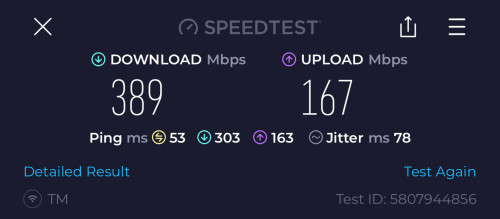
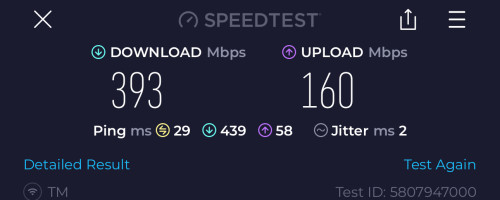
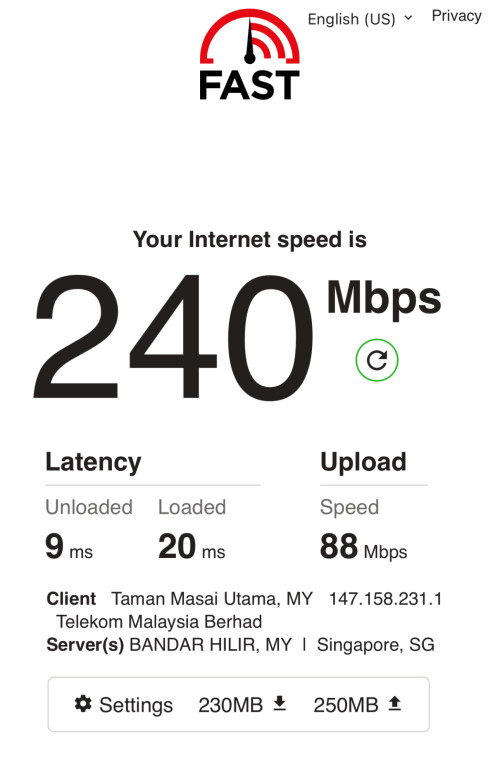
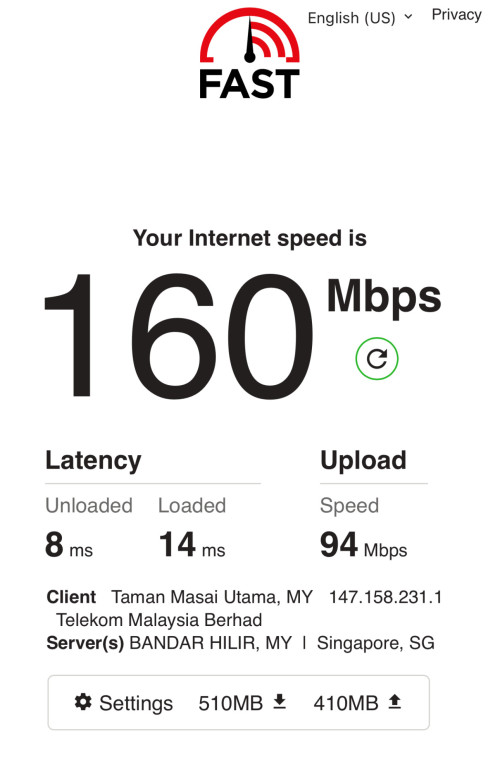
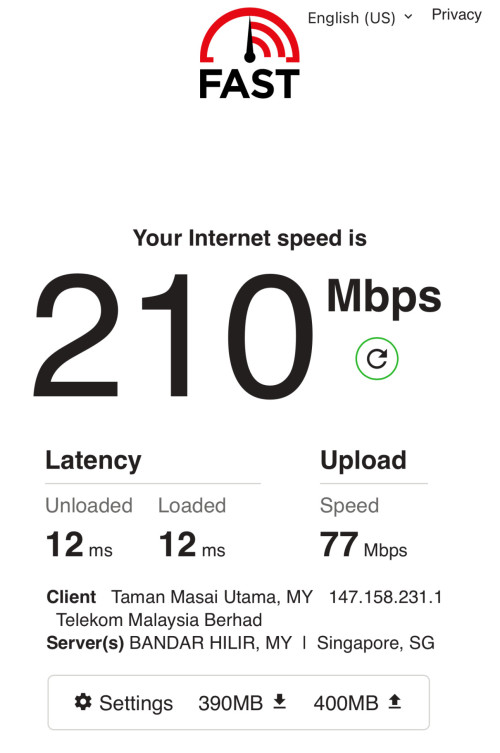
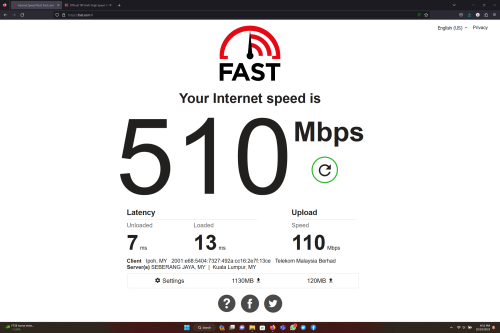
Ever since upgraded to 500Mbps, fast app I can only get this low speed.

Unifi Official TM UniFi High Speed Broadband Thread V41, READ 1ST PAGE FOR RELEVANT WIFI INFO
|
|
 Oct 10 2023, 09:52 PM Oct 10 2023, 09:52 PM
Return to original view | IPv6 | Post
#41
|
 
Senior Member
1,524 posts Joined: Dec 2020 From: Perak  
|
QUOTE(westlife @ Oct 10 2023, 09:35 PM) Ever since upgraded to 500Mbps, fast app I can only get this low speed. |
|
|
|
|
|
Oct 12 2023, 03:08 PM
Return to original view | IPv6 | Post
#42
|
|
Senior Member
1,524 posts Joined: Dec 2020 From: Perak
|
QUOTE(william4835 @ Oct 12 2023, 02:57 PM) because they will get a Free Speed Upgrade (If eligible) to 100Mbps RM69. |
|
|
Oct 12 2023, 09:51 PM
Return to original view | IPv6 | Post
#43
|
|
Senior Member
1,524 posts Joined: Dec 2020 From: Perak
|
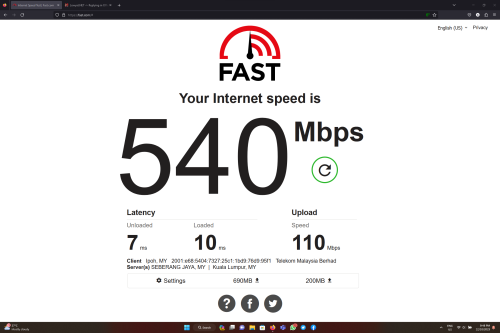 So far there is no problem using a stock router from TM, D-LINK X3060Z |
|
|
Oct 13 2023, 01:15 AM
Return to original view | IPv6 | Post
#44
|
|
Senior Member
1,524 posts Joined: Dec 2020 From: Perak
|
D-LINK DIR X3060Z (Unifi)
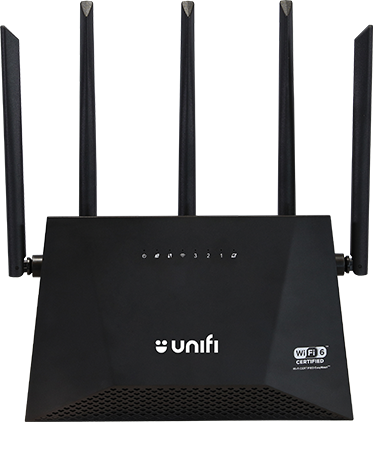 D-LINK DIR X3000Z  NETIS NX30  It looks the same but it's not. x3060z and x3000z routers support easymesh |
|
|
Oct 13 2023, 10:52 PM
Return to original view | IPv6 | Post
#45
|
|
Senior Member
1,524 posts Joined: Dec 2020 From: Perak
|
Pelan Perpaduan users who have been upgraded to 100Mbps. Unifi will downgrade back to 30Mbps 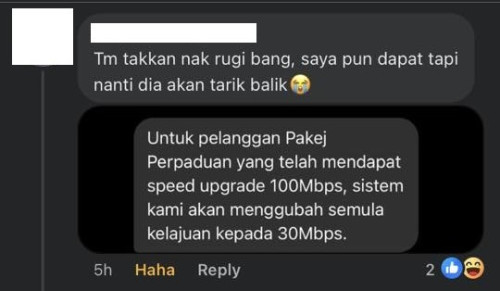 sg8989 and NimalKumar liked this post
|
|
|
Oct 18 2023, 09:21 PM
Return to original view | IPv6 | Post
#46
|
|
Senior Member
1,524 posts Joined: Dec 2020 From: Perak
|
QUOTE(Theeban @ Oct 18 2023, 08:26 PM) Hi everyone, anyone using the fiberhome router + mesh It's best if you set up the mesh next to the main router firstdo the mesh router have to be close to the main router because when i set up in a room,the indicator lights show red,is there any correct way to setup mesh for this router,thanks |
|
|
|
|
|
Oct 22 2023, 11:07 PM
Return to original view | IPv6 | Post
#47
|
|
Senior Member
1,524 posts Joined: Dec 2020 From: Perak
|
QUOTE(contestchris @ Oct 22 2023, 11:05 PM) My parents Unifi is RM239 for 800mbps, out of contract. No Unifi TV pack or any add on. For your parents, 100Mbps is enoughWhat's the best way to pay less? I recommend them to pick 300mbps or 500mbps to be safe, 800mbps is overkill for their use. |
|
|
Oct 24 2023, 01:02 AM
Return to original view | Post
#48
|
|
Senior Member
1,524 posts Joined: Dec 2020 From: Perak
|
QUOTE(mikey8811 @ Oct 24 2023, 12:12 AM) Hi Cant, Unifi VDSL limit up to 30Mbps (50Mbps for some highrise)I am still on VDSL 50 Mbps with no contract. Is the best deal I can get SWU 3.0 300 Mbps at RM 99 a month with 6 months free and 2 free Mesh routers? Thanks |
|
|
Oct 24 2023, 12:59 PM
Return to original view | IPv6 | Post
#49
|
|
Senior Member
1,524 posts Joined: Dec 2020 From: Perak
|
QUOTE(scpy19 @ Oct 24 2023, 12:55 PM) I thought the speed will be automatically upgraded for existing customers. Why is everyone applying to switch to SWU 3.0? Is it because of the 6 months waived fees? Can apply through live chat or not? Free speed upgrade is automatically given to all Unifi users.Those who subscribe to SWU want to get a cheaper price than the original price. only available at TMPoint and Unifi Store |
|
|
Oct 24 2023, 01:01 PM
Return to original view | IPv6 | Post
#50
|
|
Senior Member
1,524 posts Joined: Dec 2020 From: Perak
|
Unifi still gives users the option to subscribe to Ultimate Pack or Family Pack. Since both packs cost RM60.
I thought they no longer offer the Ultimate Pack.  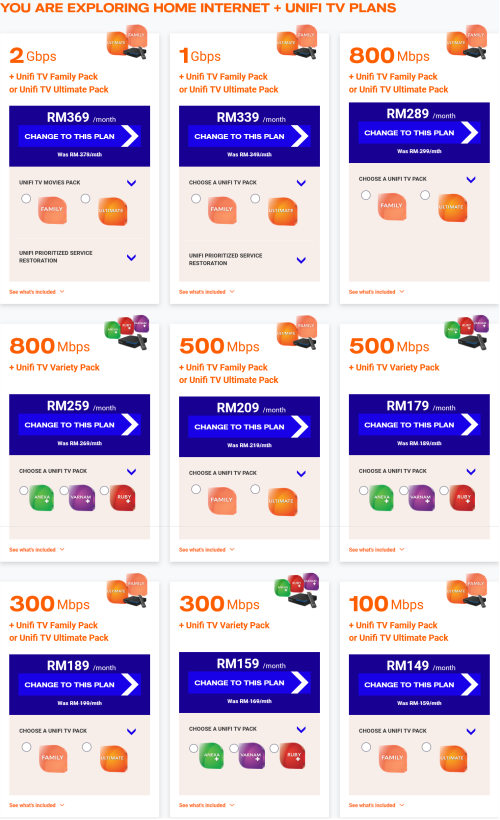 |
|
|
Oct 24 2023, 04:24 PM
Return to original view | IPv6 | Post
#51
|
|
Senior Member
1,524 posts Joined: Dec 2020 From: Perak
|
QUOTE(jutamind @ Oct 24 2023, 04:15 PM) Can the fiber cable on the right side of the box be bought from Shopee/LZD? This cable connects the box and the wifi modem. Fiber optics from outside the house is connected to the left side of the box? can lah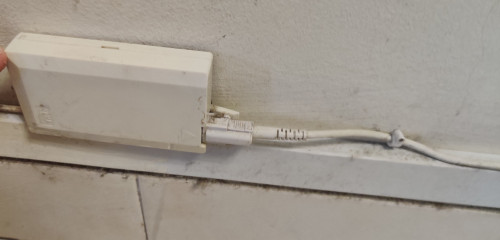 |
|
|
Oct 25 2023, 10:37 AM
Return to original view | IPv6 | Post
#52
|
|
Senior Member
1,524 posts Joined: Dec 2020 From: Perak
|
QUOTE(Wind82 @ Oct 25 2023, 10:07 AM) Can the Fiberhome router run as wired backhaul mesh? supports wired backhaul, from the main router (LAN) to the satellite (WAN).I tried to plug cable into one of the LAN port but it didn't work. Or should I plug into the Wan port instead? I have tried on SR1041Y yamin07 liked this post
|
|
|
Oct 25 2023, 09:35 PM
Return to original view | Post
#53
|
|
Senior Member
1,524 posts Joined: Dec 2020 From: Perak
|
QUOTE(blacktubi @ Oct 25 2023, 09:15 PM) I just checked, couldn't find anything that match this specification in MCMC database If TM uses a fibre modem from TP-Link, 3 speculations - The TM technician got the right info but it's not finalized yet - TM will be using TP-Link fiber modem with 2.5G port rather than AIO wireless product hence MCMC not required - The TM technician received wrong info 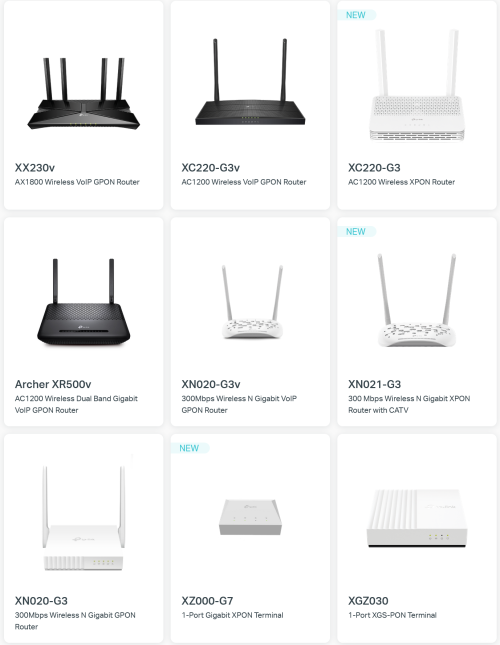 |
|
|
|
|
|
Oct 26 2023, 05:04 PM
Return to original view | IPv6 | Post
#54
|
|
Senior Member
1,524 posts Joined: Dec 2020 From: Perak
|
QUOTE(totally_skint @ Oct 26 2023, 03:46 PM) No discount shown in current bill Looks like Unifi has changed the speed plan name.Just straight RM99 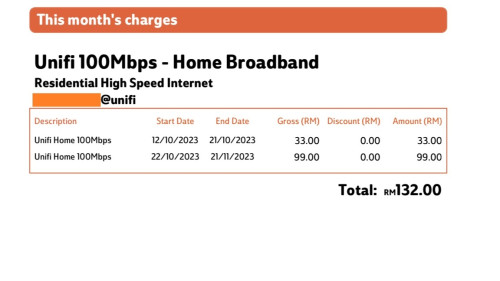 So, I pay amount as stated in bill (overpay RM10 now) and will be adjusted in next bill? I just want to know it isn't an error that becomes permanent. Thanks for your feedback. Before this it was called "Unifi Lite 100Mbps", the latest one is "Unifi Home 100Mbps" 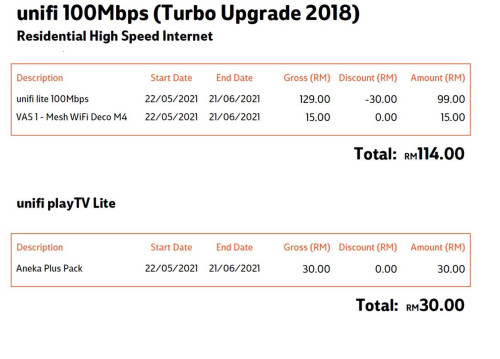 |
|
|
Oct 27 2023, 04:09 PM
Return to original view | IPv6 | Post
#55
|
|
Senior Member
1,524 posts Joined: Dec 2020 From: Perak
|
 Maxis CS told that their 2Gbps plan is also offered on TM infra. Does this mean that TM will provide a fiber modem with a 2.5G port soon |
|
|
Oct 27 2023, 08:42 PM
Return to original view | IPv6 | Post
#56
|
|
Senior Member
1,524 posts Joined: Dec 2020 From: Perak
|
QUOTE(machoez @ Oct 27 2023, 08:36 PM) how can i know that my ip have been change to public ip? If IP on the router is the same as the IP on the website.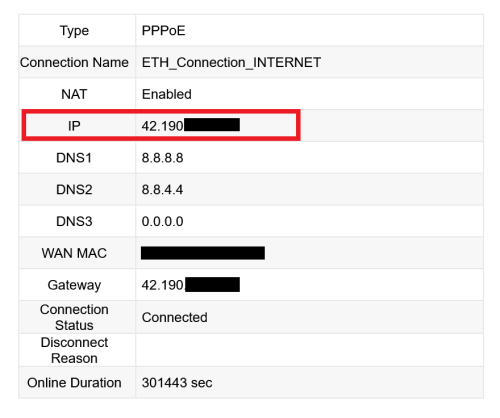 Mine is Public IP alfiejr liked this post
|
|
|
Oct 27 2023, 10:29 PM
Return to original view | IPv6 | Post
#57
|
|
Senior Member
1,524 posts Joined: Dec 2020 From: Perak
|
QUOTE(asellus @ Oct 27 2023, 10:23 PM) If Maxis gives you true 2Gb speed instead of the 1+1Gb crap that TM does, it is already a win. Soon, TM will provide a fiber modem with a 2.5Gigabit port |
|
|
Oct 29 2023, 06:17 PM
Return to original view | IPv6 | Post
#58
|
|
Senior Member
1,524 posts Joined: Dec 2020 From: Perak
|
QUOTE(Icehart @ Oct 29 2023, 06:00 PM) Does anyone here knows if TM offers price matching? My condo has TIME but I would prefer UniFi. TIME100Mbps - RM 99 - 100 Mbps DL - 100 Mbps UL UNIFI 100Mbps - RM 89 (Normal Price RM99) - 100 Mbps DL - 50 Mbps UL |
|
|
Nov 2 2023, 09:09 PM
Return to original view | IPv6 | Post
#59
|
|
Senior Member
1,524 posts Joined: Dec 2020 From: Perak
|
QUOTE(beverlykho @ Nov 2 2023, 08:41 PM) Talking about firmware upgrades, both my Fiberhome routers got its firmware upgraded from RP0104 to RP0106. I didn't even initiate a check for firmware upgrades. Routers from ISP have TR069So, upgrades are going on behind the scenes. beverlykho liked this post
|
|
|
Nov 2 2023, 11:17 PM
Return to original view | IPv6 | Post
#60
|
|
Senior Member
1,524 posts Joined: Dec 2020 From: Perak
|
QUOTE(Oltromen Ripot @ Nov 2 2023, 10:46 PM) i enabled TR-069. I tried request a firmware update for the TP-Link Archer C1200 router via Unifi livechat in 2021i even enabled VLAN209 (TR-069). my ONR still v1.0.6, not upgraded to what v1.x.y like what others had posted. The next day, my router firmware has been upgraded to the latest version (build2021) |
|
Topic ClosedOptions
|
| Change to: |  0.3761sec 0.3761sec
 0.45 0.45
 7 queries 7 queries
 GZIP Disabled GZIP Disabled
Time is now: 13th December 2025 - 03:51 PM |
 Quote
Quote