Welcome Guest ( Log In | Register )

Bump Topic Topic Closed RSS Feed
20 Pages « < 10 11 12 13 14 > » Bottom

Outline · [ Standard ] · Linear+

Unifi Official TM UniFi High Speed Broadband Thread V41, READ 1ST PAGE FOR RELEVANT WIFI INFO

views
     
Oltromen Ripot
post Oct 13 2023, 11:09 AM

👍 999999 person Likes this member
*******
Senior Member
4,034 posts

Joined: Dec 2019
QUOTE(jutamind @ Oct 13 2023, 11:06 AM)
For those getting new wifi and MESH routers under SWU 3.0, are we able to get the admin username and password for those routers from TM technician so that we can amend the settings as we need?
*
i thought TM have it printed underneath on label. no?

unlike Maxis, which have several level of secretive usernames inside its customised routers, "richer" than the one printed on label.
Oltromen Ripot
post Oct 13 2023, 12:14 PM

👍 999999 person Likes this member
*******
Senior Member
4,034 posts

Joined: Dec 2019
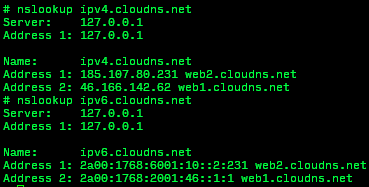
i SSH-ed into ultra ONR, delighted to see there is option to get Linux shell, so i fooled around.

It's possible for me to custom set-up dynamic update to my own DNS 👍

now I chuck No-IP aside.

user posted image

user posted image


edit:

rejoiced to soon.
cronjon removed after reboot.

This post has been edited by Oltromen Ripot: Oct 13 2023, 05:15 PM
Oltromen Ripot
post Oct 13 2023, 12:16 PM

👍 999999 person Likes this member
*******
Senior Member
4,034 posts

Joined: Dec 2019
QUOTE(Boldnut @ Oct 13 2023, 11:39 AM)
oh well Fahmi finally ""delivers" I guess? Not what I want, I wanted lower price, better than nothing lol
*
the promise was cheaper internet.
the promise was MSAP took effect since March 2023.
that means we have been overpaying since April 2023 onwards.

do you NOW feel you are paying cheaper than what you previously paid since April 2023?

just by upgrading the speed, now TM have the upper hands to say there is no need to refund for the excess payments since April 2023; "unless you change pack, you are now paying the same" maaaa....

This post has been edited by Oltromen Ripot: Oct 13 2023, 12:17 PM
Oltromen Ripot
post Oct 13 2023, 01:05 PM

👍 999999 person Likes this member
*******
Senior Member
4,034 posts

Joined: Dec 2019
QUOTE(Jjuggler @ Oct 13 2023, 12:58 PM)
I don't think the fiberhome router sucks. It does have bundled features compared to other stock router by TM except for the crappy UI. Know how to configure the router, it will serve you life-long. I got the router for my 800Mbps package. I didn't experience any downtime and ping reading was fine, averaging between 3-5ms. The unit provided to me comes pair, and the specific model is Fiberhome SR1041Y (AX1800).

*
yes. the bundled ultra ONR is actually a good router if your speed is <=1Gbps.

The only complain is for us over >1Gbps, because the 4 LAN ports are only 1Gbps each.
That means unless you have ways to capitalise 2 ports as a round-robin load balancing or aggregation, your whatever downstream preferred mesh devices or downstream (PPPoE dialer) router is gonna maxed at 1Gbps only, not yet discounting transport overhead.
Oltromen Ripot
post Oct 13 2023, 02:43 PM

👍 999999 person Likes this member
*******
Senior Member
4,034 posts

Joined: Dec 2019
QUOTE(AmeiN @ Oct 13 2023, 02:39 PM)
CS from technical called me this morning informed that new installed 89/100mbps wont get that 6m 300mbps and also excluded from speed upgrade

user posted image
*
because FSU2023 only applicable for existing and new applicants as at 4th October.

100Mbps/RM99 and 100Mbps/RM89 is newly introduced on 5th.

Those making plan change on 5th onward is gambling that TM will exercise budibicara to still apply FSU2023 onto their new plans.
Oltromen Ripot
post Oct 13 2023, 03:16 PM

👍 999999 person Likes this member
*******
Senior Member
4,034 posts

Joined: Dec 2019
QUOTE(stormaker @ Oct 13 2023, 02:45 PM)
The question is, existing user that switch/change plan = new user ?

The 5/10 free upgrade cut off date is for new user.
*
reading the intent behind T&C carefully,

• FSU2023 campaign is to upgrade to next speed from subscribed speed for the same subscribed price as-it-is on 4th October

• Those who disagree with next speed increase for price as-it-is, but instead wants different price or wants to go different speed than what FSU2023 offers, they are allowed to change plan with new contract to their exact intended speed and price.

reading together, that means those who changed plan since 5th already forfeited their entitled FSU2023, as they already have an intended target speed, price, and/or purpose, and they have opted to supersede what FSU2023 is offering by signing a new contract for such-and-such speed at such-and-such price.

to otherwise demand that they should still be included for FSU2023 entitlement is pure gambling under budibicara leniency. and greed.

This post has been edited by Oltromen Ripot: Oct 13 2023, 03:17 PM
Oltromen Ripot
post Oct 13 2023, 03:23 PM

👍 999999 person Likes this member
*******
Senior Member
4,034 posts

Joined: Dec 2019
QUOTE(noob9293 @ Oct 13 2023, 03:12 PM)
user posted image
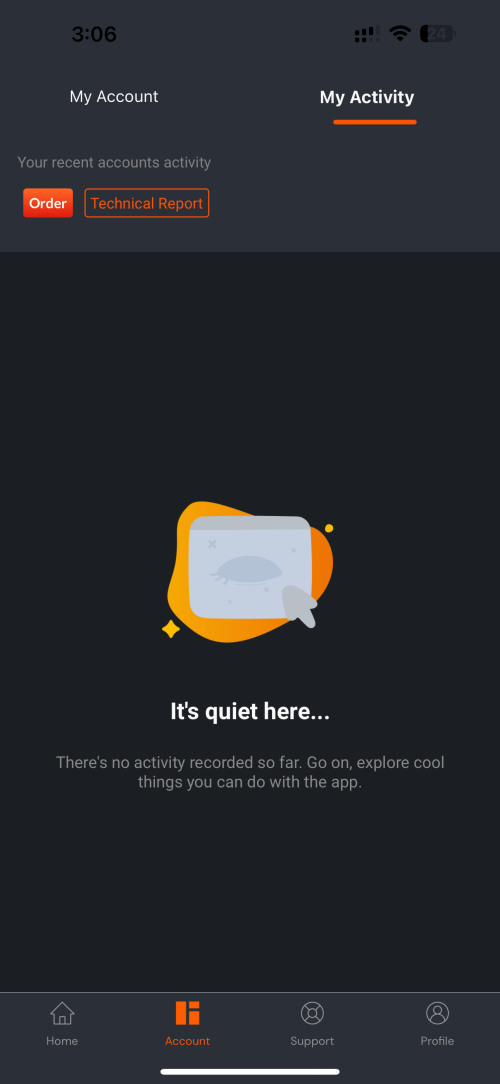
Dont have any activity. unifi told me 5 working days. already 10days system dont have any order in proceed.
TM already play me two times. Last 2 weeks i already walk in tmpoint thumbprint request to maxis. After 3days maxis said i dint walk in to tmpoint do request.
i request second transfer to maxis again then they called offer me this SWU3.0 i agreed.untill now dont have any update.
*
few pages back, somebody went to TMpoint and staff mentioned TM had system issue the week before(?) and that some submissions could be in limbo.

i am just stating this for your own convenience; don't ask me what explicitly happened to your forms, as i am just reminding of this.
Oltromen Ripot
post Oct 13 2023, 05:59 PM

👍 999999 person Likes this member
*******
Senior Member
4,034 posts

Joined: Dec 2019
huhu... no wonder tered suddenly silent.
everyone listening to Bajet.

Oltromen Ripot
post Oct 13 2023, 06:21 PM

👍 999999 person Likes this member
*******
Senior Member
4,034 posts

Joined: Dec 2019
QUOTE(Max2006 @ Oct 13 2023, 05:37 PM)
Budget 2024 is out.

SST up to 8%

Telecommunication is excempted.

Is broadband service under category of telecommunication?
*
QUOTE(NightFelix @ Oct 13 2023, 06:10 PM)
Congrats gaise! Harga Internet sekarang start dari:
RM69+8%
RM89+8%
RM119+8%
RM159+8%
RM189+8%
and soooooooooooo on!
*
will gift "a token of appreciation", they said.

Oltromen Ripot
post Oct 13 2023, 07:16 PM

👍 999999 person Likes this member
*******
Senior Member
4,034 posts

Joined: Dec 2019
I downloaded speedtest cli into the ultra ONR.

Things inside manual:
• ultra speedtest is only available through D-Link Air app.
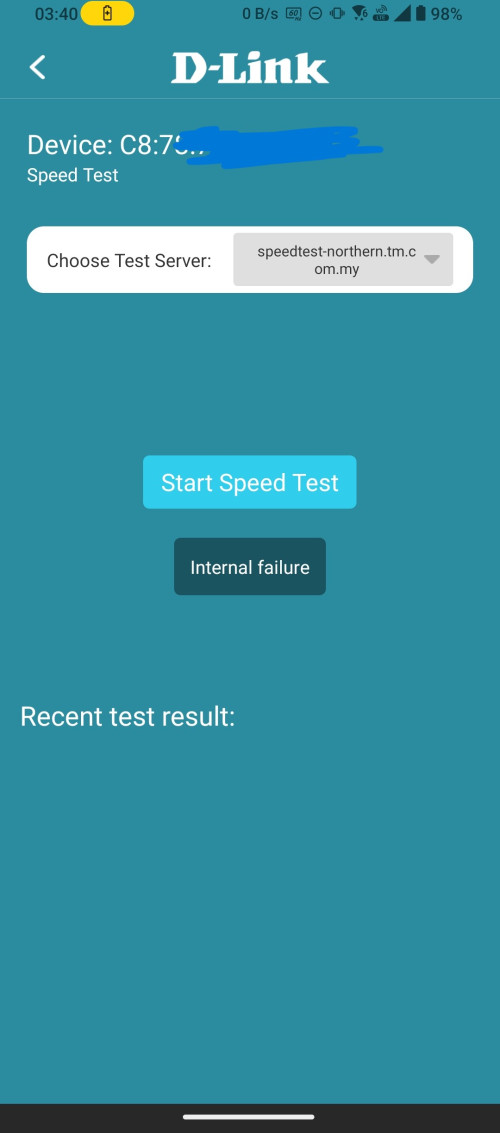
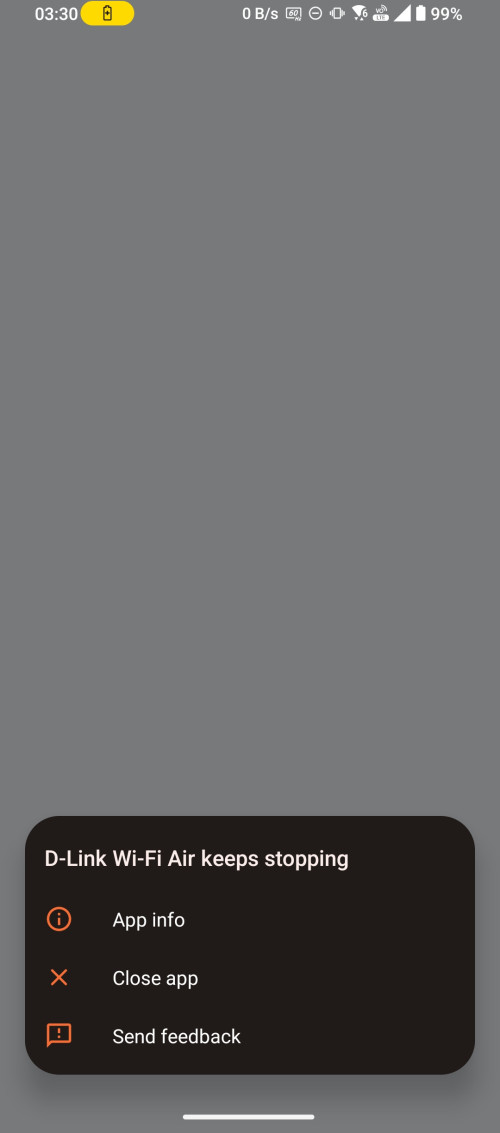
trust me, that app is crap. I can only perform test once and only once using app downloaded Android Play store only (Apple Appstore no need to download, it simply won't work). After that I will need to totally remove the app and reinstall fresh, go through the whole cycle again. To D-Link; THAT app developer should kena buang kerja, never to be hired ever again in IT industry.

Things I expected:
• TM Seberang Jaya is at least capable of testing 1Gbps/1Gbps (else how those subscribing 800Mbps can test?)
• The ppp0 is the dial-up interface representing the fibre itself, so it should at least have the 2Gbps/1Gbps that I subscribed to (right?)
• TM is keeping the ultra speedtest server ID secret and only available for the rigged Air app.

Things I never expected:
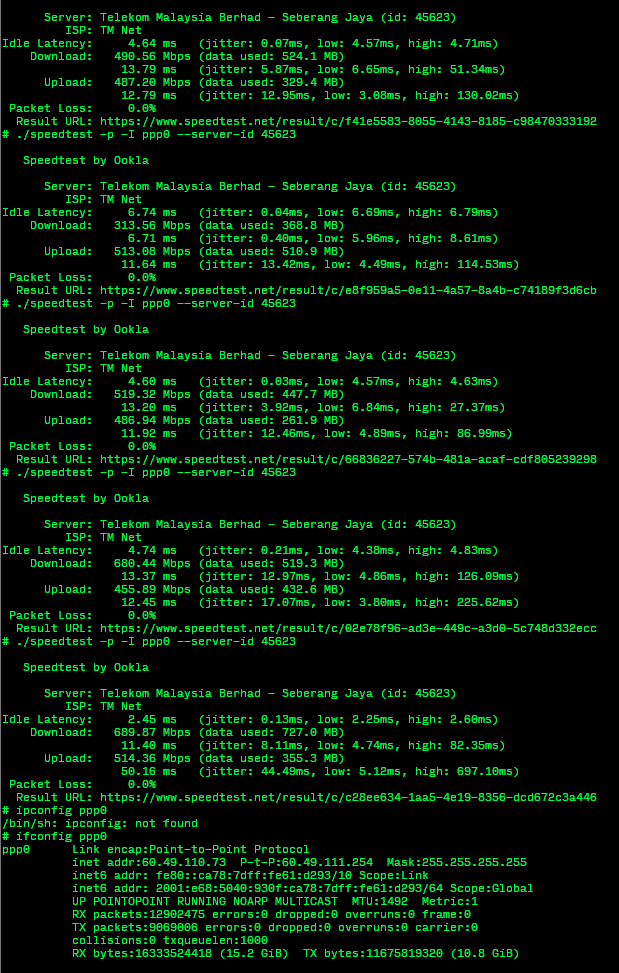
• My 2Gbps/1Gbps subscription can barely get over 600Mbps/500Mbps testing against TM Seberang Jaya. What!? A 2Gbps/1Gbps cannot even get a decent 800Mbps download that an 800Mbps subscription could have reached!?

• I thought, maybe, I will need to multi-thread run 2 speedtest side-by-side to simulate 2 laptops speedtesting at same time, just like what TM suggested as alternative to D-Link Wifi Air app. Laptops won't have access to the ultra speed test servers that TM is hiding behind the app, right? But what I get instead is the same speed earlier earned through single speedtest client now divided in 2 speedtests running simultaneously.

• okay, .... maybe TM prepared TWO different server ID for ultra speedtest; so I tested against Celcom Axiata Penang to simulate testing simultaneously against 2 different server ID. Guess what?:- the same sum of speed regardless I am simultaneously testing 2x TM Seberang Jaya or mix with Celcom Pulau Pinang.

...

TM, what magic did you hide behind the badly-written D-Link Wifi Air app?
Why is performing speedtest from inside the router itself does not yield expected result?

Is the CPU limiting?
Is the RAM limiting?
But the Air app also just a front-end that actually runs inside the router, right?

--

1 client against TM Seberang Jaya
user posted image

2 clients against TM Seberang Jaya.
The upload result is skewed as 1 of them finished faster, so the one finishing later got chance to bolot the feed.
user posted image

2 clients against TM Seberang Jaya and against Celcom Axiata Penang.
user posted image


Oltromen Ripot
post Oct 13 2023, 07:20 PM

👍 999999 person Likes this member
*******
Senior Member
4,034 posts

Joined: Dec 2019
QUOTE(ahlong @ Oct 13 2023, 06:00 PM)
i think so.. coz under the same Minister also right..
*
Isn't TNB also under same ministry? Or now already shifted?
Oltromen Ripot
post Oct 13 2023, 07:30 PM

👍 999999 person Likes this member
*******
Senior Member
4,034 posts

Joined: Dec 2019
QUOTE(cyberic @ Oct 13 2023, 07:23 PM)
Time to ping anime4000 for onu with 2.5G port? 😄
*
I tested from within the router itself maaa. So not even passing through the hardware of 1Gbps RJ45 port. That ppp0 represent the PPPoE, the fibre itself.
It shouldn't be limited except if the speedtest server itself is limited.
I expected using 2 different speedtest servers would be possible to go over the limit of a single speedtest server, but it still seemed that it cannot get over the limit of 800Mbps/500Mbps.

What gives, TM?

(did I fell to marketing gimic, proprietary Air app false-ception, ....)
Oltromen Ripot
post Oct 13 2023, 07:55 PM

👍 999999 person Likes this member
*******
Senior Member
4,034 posts

Joined: Dec 2019
haih... instead of broadening the tax base, he chose to tax the same people at higher rate.
Oltromen Ripot
post Oct 13 2023, 08:01 PM

👍 999999 person Likes this member
*******
Senior Member
4,034 posts

Joined: Dec 2019
QUOTE(ahlong @ Oct 13 2023, 07:57 PM)
maybe TNB under Kementerian Tenaga? Dont know weh sweat.gif
*
last time under Komunikasi Temaga Multimedia.

i seriously didn't give attention after the recent election.
nak sangat kat Anwar until blinded.
Oltromen Ripot
post Oct 13 2023, 08:19 PM

👍 999999 person Likes this member
*******
Senior Member
4,034 posts

Joined: Dec 2019
QUOTE(soonwai @ Oct 13 2023, 08:05 PM)
Thanks, I jumped at the good news too fast.
*
does not matter. M40 screwed by bottom and top.
B40 got "pressure relief valve" by gomen.
Oltromen Ripot
post Oct 13 2023, 08:43 PM

👍 999999 person Likes this member
*******
Senior Member
4,034 posts

Joined: Dec 2019
QUOTE(yulee @ Oct 13 2023, 08:39 PM)
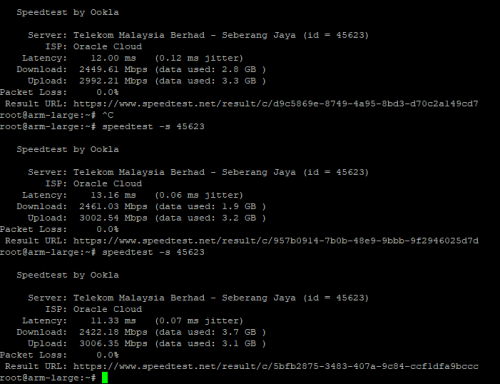
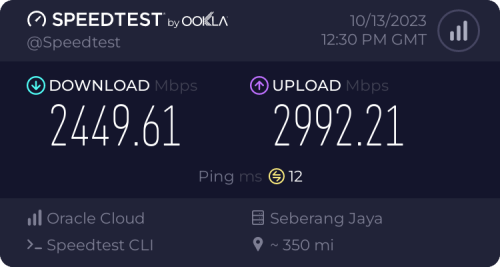
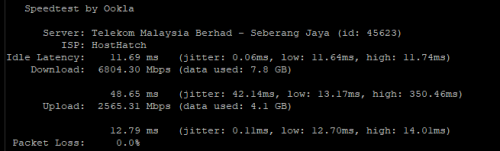
seems like TM Seberang Jaya have enough port speed to handle 2Gbps+ connection,here is some test results using my oracle sg server(3Gbps network)

user posted image

user posted image

I tested 3 times,seems like tm is limiting download speed for 2.5Gbps? idk maybe its my server prob
*
then more the reason i'm supposed to at least get up to 2Gbps/1Gbps from TM Seberang Jaya, even on single speedtest client. testing from inside ONR itself, ffs...

but now it looks fitting for a 800Mbps/500Mbps instead.

This post has been edited by Oltromen Ripot: Oct 13 2023, 08:44 PM
Oltromen Ripot
post Oct 13 2023, 11:10 PM

👍 999999 person Likes this member
*******
Senior Member
4,034 posts

Joined: Dec 2019
QUOTE(aniq8676 @ Oct 13 2023, 10:52 PM)
Pelan Perpaduan users who have been upgraded to 100Mbps.
Unifi will downgrade back to 30Mbps

user posted image
*
LOL... pedih.
Oltromen Ripot
post Oct 13 2023, 11:14 PM

👍 999999 person Likes this member
*******
Senior Member
4,034 posts

Joined: Dec 2019
QUOTE(NimalKumar @ Oct 13 2023, 10:56 PM)
Damn. Why they do that?
*
T&C already explicitly mentioned Perpaduan does not get speed upgrade.
So rolling back is also within TM's prerogative, the same like those SWU sign ups after 4th also up to TM's prerogative to get FSU2023.

Same like 2Gbps also excluded. If there is a 2Gbps out there suddenly get a speed upgrade, I will flip table mengamuk wehh....
Oltromen Ripot
post Oct 13 2023, 11:17 PM

👍 999999 person Likes this member
*******
Senior Member
4,034 posts

Joined: Dec 2019
QUOTE(go626201 @ Oct 13 2023, 09:54 PM)
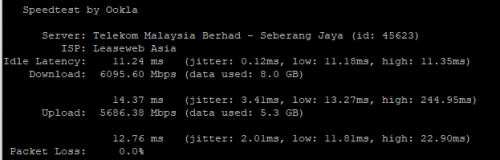
Speed could be higher, I use my 10G Singapore VPS to speedtest with it.

user posted image

Edited:
Speedtest with another 10G Singapore VPS:

user posted image
*
Aiyoyo, gasing atas kepala...

Now I am curious, dubious, furious, serious, ...
Oltromen Ripot
post Oct 14 2023, 05:11 AM

👍 999999 person Likes this member
*******
Senior Member
4,034 posts

Joined: Dec 2019
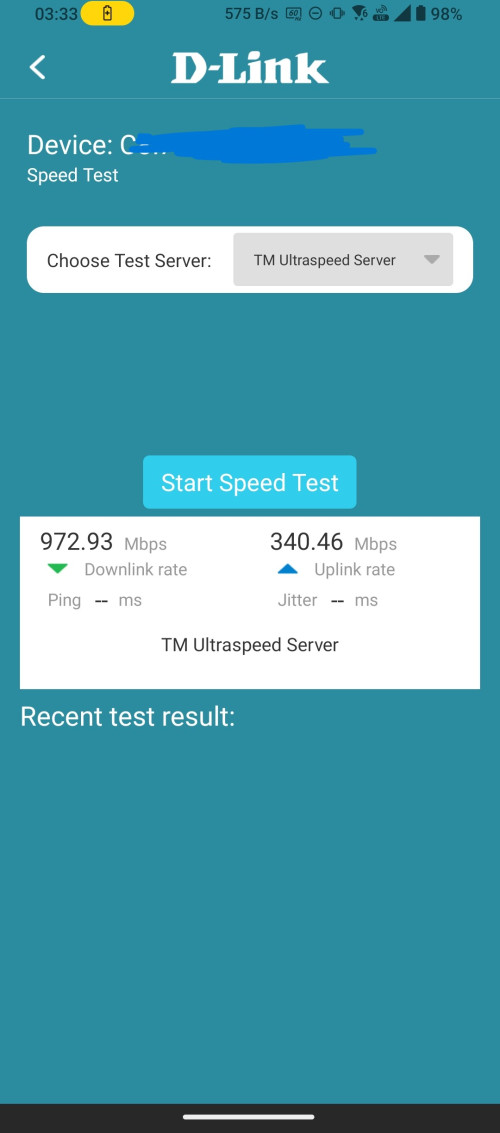
The D-Link WiFi Air app... in action with ultra ONR.

--

The list of servers.
» Click to show Spoiler - click again to hide... «


Don't bother selecting other than "TM Ultraspeed Server". The rest of them is just there for appearance, will not yield result.
» Click to show Spoiler - click again to hide... «


After fresh Android app install, add the ONR router, and execute 1st speed test.
TAKE NOTE OF THAT MEAGRE SPEED TEST RESULT, WILL BE REFERRED TO IN FOLLOWING POST.
» Click to show Spoiler - click again to hide... «


2nd attempt to execute speed test. You will now need to uninstall the app, and start (re)install and reconfigure again from scratch, just to execute another speed test using the app.
» Click to show Spoiler - click again to hide... «


--

The secret behind the D-Link Wifi Air app ... revealed through SSH access.

CODE
# /bin/axel -Z -n 4 -t 10 -q -o /tmp -i ppp0 http://speedtest-klg.tm.com.my/acs/2gb.test
Parsing interface ppp0
Parsed result: ppp0
start host speedup
[get_special_fastfwd_irq_by_cpu_port@131] l2tp_cpu#0x14 irq = 35
[get_special_fastfwd_irq_by_cpu_port@131] l2tp_cpu#0x15 irq = 36
[get_special_fastfwd_irq_by_cpu_port@131] l2tp_cpu#0x16 irq = 37
[get_special_fastfwd_irq_by_cpu_port@131] l2tp_cpu#0x17 irq = 38
pass url:http://speedtest-klg.tm.com.my:80/acs/2gb.test
echo add sip 218.111.111.51 sport 58515 dip 58.26.239.30 dport 80 > /proc/HostSpeedUP-STREAM
echo add sip 218.111.111.51 sport 52691 dip 58.26.239.30 dport 80 > /proc/HostSpeedUP-STREAM
echo add sip 218.111.111.51 sport 58373 dip 58.26.239.30 dport 80 > /proc/HostSpeedUP-STREAM
echo add sip 218.111.111.51 sport 34249 dip 58.26.239.30 dport 80 > /proc/HostSpeedUP-STREAM
[get_special_fastfwd_irq_by_cpu_port@131] l2tp_cpu#0x14 irq = 35
[get_special_fastfwd_irq_by_cpu_port@131] l2tp_cpu#0x15 irq = 36
[get_special_fastfwd_irq_by_cpu_port@131] l2tp_cpu#0x16 irq = 37
[get_special_fastfwd_irq_by_cpu_port@131] l2tp_cpu#0x17 irq = 38
optmize_test_result_2 avg_value=114526167
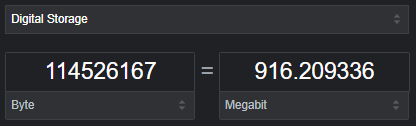
user posted image

CODE
# /bin/uploadTest -u 0 -n 15 -t 15 -i ppp0 -o /tmp/uploadDiagnostics.tmp http://speedtest-klg.tm.com.my/acs/upload.php
g_usersend = 0
sh: /etc/script/speed_test.sh: not found
<uploadTest> add rip 58.26.239.30 rport 0 lip 0.0.0.0 lport 0
<uploadTest> add sip 218.111.111.51 sport 38433 dip 58.26.239.30 dport 80 upload 1 snd_wscale 1024
<uploadTest> add sip 218.111.111.51 sport 43687 dip 58.26.239.30 dport 80 upload 1 snd_wscale 1024
<uploadTest> add sip 218.111.111.51 sport 34993 dip 58.26.239.30 dport 80 upload 1 snd_wscale 1024
<uploadTest> add sip 218.111.111.51 sport 43049 dip 58.26.239.30 dport 80 upload 1 snd_wscale 1024
<uploadTest> add sip 218.111.111.51 sport 39929 dip 58.26.239.30 dport 80 upload 1 snd_wscale 1024
<uploadTest> add sip 218.111.111.51 sport 43083 dip 58.26.239.30 dport 80 upload 1 snd_wscale 1024
<uploadTest> add sip 218.111.111.51 sport 57409 dip 58.26.239.30 dport 80 upload 1 snd_wscale 1024
<uploadTest> add sip 218.111.111.51 sport 48719 dip 58.26.239.30 dport 80 upload 1 snd_wscale 1024
<uploadTest> add sip 218.111.111.51 sport 35723 dip 58.26.239.30 dport 80 upload 1 snd_wscale 1024
<uploadTest> add sip 218.111.111.51 sport 53201 dip 58.26.239.30 dport 80 upload 1 snd_wscale 1024
<uploadTest> add sip 218.111.111.51 sport 57615 dip 58.26.239.30 dport 80 upload 1 snd_wscale 1024
<uploadTest> add sip 218.111.111.51 sport 38257 dip 58.26.239.30 dport 80 upload 1 snd_wscale 1024
<uploadTest> add sip 218.111.111.51 sport 38005 dip 58.26.239.30 dport 80 upload 1 snd_wscale 1024
<uploadTest> add sip 218.111.111.51 sport 58509 dip 58.26.239.30 dport 80 upload 1 snd_wscale 1024
<uploadTest> add sip 218.111.111.51 sport 51539 dip 58.26.239.30 dport 80 upload 1 snd_wscale 1024

# cat /tmp/uploadDiagnostics.tmp
bom_sec=1697228507
bom_usec=441725
eom_sec=1697228522
eom_usec=436822
TestBytesSent=599656503
TotalBytesSend=628704549
TestUploadRate=312320
TotalUploadRate=327448
URL=http://speedtest-klg.tm.com.my/acs/upload.php

# ls -l /etc/script/speed_test.sh /etc/scripts/speed_test.sh
ls: /etc/script/speed_test.sh: No such file or directory
-rwxr-xr-x    1 root     0              561 Mar  8  2023 /etc/scripts/speed_test.sh
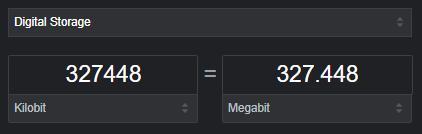
user posted image

--

I have shown you what the Air app returned as result, and I have shown you how it came to those result.

My observations
  • existing /etc/scripts/speed_test.sh being referred to as non-existent /etc/script/speed_test.sh by the upload test
  • default 4 threads for speedtesting download isn't enough to saturate the download link, returning result that is short from maximum possible and earlier had caused me anxiety.
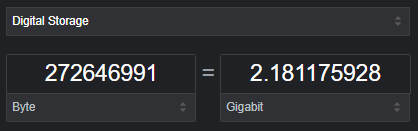
  • I toyed with the /bin/axel, and found that it needs at least 16 threads to saturate the download link.
  • I toyed with the /bin/uploadTest, and found while maxing the threads to 20 slightly increases the upload rate, adding more time (timeout?) for it didn't dramatically change the rate. This one definitely line problem.
  • Don't know why TM/D-Link want to write down the download 2gb.test file into /tmp and probably cause the flash storage stress and wear-and-tear, when they can write it out to /dev/null.
CODE
# /bin/axel -Z -n 1 -t 10 -q -o /tmp -i ppp0 http://speedtest-klg.tm.com.my/acs/2gb.test
optmize_test_result_2 avg_value=32275873

# /bin/axel -Z -n 4 -t 10 -q -o /tmp -i ppp0 http://speedtest-klg.tm.com.my/acs/2gb.test
optmize_test_result_2 avg_value=115830973

# /bin/axel -Z -n 8 -t 10 -q -o /tmp -i ppp0 http://speedtest-klg.tm.com.my/acs/2gb.test
optmize_test_result_2 avg_value=189779456

# /bin/axel -Z -n 12 -t 10 -q -o /tmp -i ppp0 http://speedtest-klg.tm.com.my/acs/2gb.test
optmize_test_result_2 avg_value=265327488
optmize_test_result_2 avg_value=244885837

# /bin/axel -Z -n 16 -t 10 -q -o /tmp -i ppp0 http://speedtest-klg.tm.com.my/acs/2gb.test
optmize_test_result_2 avg_value=272646991
optmize_test_result_2 avg_value=272328474
user posted image

CODE
# uploadTest -u 0 -n 20 -t 15 -i ppp0 -o /tmp/uploadDiagnostics.tmp http://speedtest-klg.tm.com.my/acs/upload.php
# cat /tmp/uploadDiagnostics.tmp
TotalUploadRate=440264

# uploadTest -u 0 -n 20 -t 30 -i ppp0 -o /tmp/uploadDiagnostics.tmp http://speedtest-klg.tm.com.my/acs/upload.php
# cat /tmp/uploadDiagnostics.tmp
TotalUploadRate=445536


The mess left behind
CODE

# ls -l /tmp/
-rw-r--r--    1 root     0                0 Oct 14 03:28 2gb.test
-rw-r--r--    1 root     0              297 Oct 14 04:52 axel_tr143_result
-rw-r--r--    1 root     0              216 Oct 14 04:58 uploadDiagnostics.tmp

# cat /tmp/axel_tr143_result
result=2
bom_sec=1697230363
bom_usec=172784
bytes_recv=2147483648
eom_sec=1697230371
eom_usec=58421
total_bytes=2147483648
sampled_cnt=8
285626368
285626368
272325632
278976000
278132736
278694912
274745344
277707520
273586176
276883251
271564800
275996842
249782272
272251903
272864470
272328473

# cat /tmp/uploadDiagnostics.tmp
bom_sec=1697230654
bom_usec=757414
eom_sec=1697230684
eom_usec=753802
TestBytesSent=1631625616
TotalBytesSend=1710872290
TestUploadRate=424896
TotalUploadRate=445536
URL=http://speedtest-klg.tm.com.my/acs/upload.php


--

UPDATE 1.
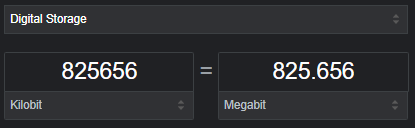
Looks like testing upload against nearer server can gauge better maximum capability.
Closer to the expected subscribed upload rate of 1Gbps.
CODE

# uploadTest -u 0 -n 20 -t 15 -i ppp0 -o /tmp/uploadDiagnostics.tmp http://speedtest-northern.tm.com.my/acs/upload.php
# cat /tmp/uploadDiagnostics.tmp
TotalUploadRate=825656
URL=http://speedtest-northern.tm.com.my/acs/upload.php

user posted image

This post has been edited by Oltromen Ripot: Oct 14 2023, 05:20 AM

20 Pages « < 10 11 12 13 14 > » Top
Topic ClosedOptions
 

Change to:
| Lo-Fi Version
0.2186sec    0.71    7 queries    GZIP Disabled
Time is now: 12th December 2025 - 09:20 PM