Welcome Guest ( Log In | Register )

Bump Topic Topic Closed RSS Feed
20 Pages « < 7 8 9 10 11 > » Bottom

Outline · [ Standard ] · Linear+

Unifi Official TM UniFi High Speed Broadband Thread V41, READ 1ST PAGE FOR RELEVANT WIFI INFO

views
     
Oltromen Ripot
post Oct 8 2023, 04:01 PM

👍 999999 person Likes this member
*******
Senior Member
4,034 posts

Joined: Dec 2019
QUOTE(Max2006 @ Oct 8 2023, 03:16 PM)
From these 2 days I noticed more and more people reporting free upgrade only 12 months, except those branches in Klang Valley? Too many posts I already lost track... rclxub.gif
*
free speed upgrade 2023 applicable to new install and existing subscribers until 4th October.

Change account from 5th October AND still hoping to get permanent upgrade is a gamble.
Oltromen Ripot
post Oct 8 2023, 04:05 PM

👍 999999 person Likes this member
*******
Senior Member
4,034 posts

Joined: Dec 2019
QUOTE(westlife @ Oct 8 2023, 11:27 AM)
maybe the installer 'accidentally' brought the extra unit back home?  tongue.gif
*
can check post-install summary pdf in email afterward.
Oltromen Ripot
post Oct 8 2023, 06:47 PM

👍 999999 person Likes this member
*******
Senior Member
4,034 posts

Joined: Dec 2019
QUOTE(lamusiqa @ Oct 8 2023, 03:48 PM)
Unifi's 2gbps service uses a modem that split the connection into 2 separate 1 gigabit ethernet ports. If I were to replace it with another modem that has a 2.5 gigabit or 10 gigabit ethernet, can I use only 1 Cat7 cable to get the 2gbps connection?
*
your modem got WAN fibre interface?
Oltromen Ripot
post Oct 9 2023, 10:57 AM

👍 999999 person Likes this member
*******
Senior Member
4,034 posts

Joined: Dec 2019
QUOTE(Cavino @ Oct 9 2023, 10:44 AM)
You mean the new Ultra ONR can be switched to Bridge Mode and still work as modem? I read a post on March 2023 that mentioned the switching to bridge mode hang thus has to switch back to router mode (or maybe just happen to the post author but other users can switch to bridge mode).

*
probably you are referring to me.
and no, the ONR does not hang in bridge mode.
I dislike the bridge mode because i have no way to access the user interface after it is switched to. i don't like to "lose control" of a device when it was "previously" accessible.

plus for a 2Gbps set up, it's a lose situation when using it as bridge-only. all the RJ45 ports are 1Gbps, that means your downstream PPPoE will only be able to push sub-optimal payload below 1Gbps when you consider IP transport headers.
Oltromen Ripot
post Oct 9 2023, 11:03 AM

👍 999999 person Likes this member
*******
Senior Member
4,034 posts

Joined: Dec 2019
@9:57am, Penang Bridge 1 island-bound.

Saw a Unifi contractor on motorcyle stopped by the emergency stop area to check his phone.
On his back is a black rucksack - not backpack - taller than the helmet on his head.

I hazard a guess - He is probably performing "J&T" to at least 10 subscribers 😅 maybe more.

Hardworking for us! Show some appreciation by offering them cold (packet) drink when they visit our premise.
Oltromen Ripot
post Oct 9 2023, 12:24 PM

👍 999999 person Likes this member
*******
Senior Member
4,034 posts

Joined: Dec 2019
QUOTE(yenchenje @ Oct 9 2023, 11:42 AM)
Changing the connection to bridge, not the whole ONR.

....

Technically speaking your old Huawei ONU can probably be used back without much issues, since PLOAM and all those are the same, and my technician didn’t change any of the ONU mode in the DPN-FX3060V and left it at default, but you can try and let us know, ...

....
*
already experimented twice - out of curiosity - to use back old ZTE ONU when I upgrade 500Mbps to 1Gbps, and when i upgrade to 2Gbps.
the old ZTE ONU can still work when used pre-Ultra set up with ASUS router, but for 2Gbps it will be a waste since the ONU port is 1Gbps.

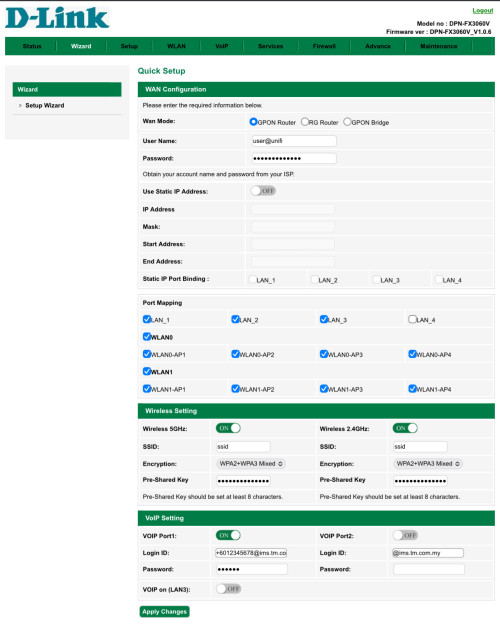
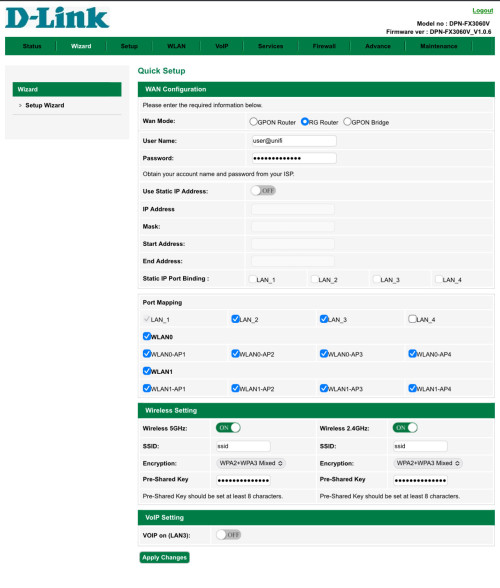
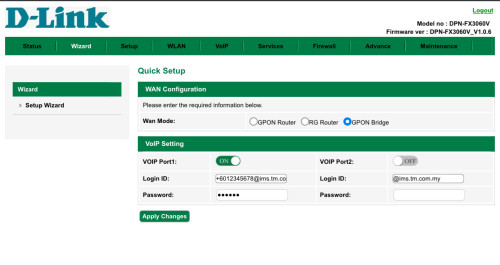
the ultra ONR, when i tested it, can have 3 modes
• GPON router (PPPoE dialer, WiFi, VoIP port)
• RG router (PPPoE dialer, WiFi)
• GPON bridge (the usual BTU/ONT/ONU/so-called-modem, with VoIP port)

Your set-up, instead of turning the ONR into a dumb BTU/ONT/ONU/so-called-modem,
is using bridge mode instead of PPPoE dialler, correct?

» Click to show Spoiler - click again to hide... «


» Click to show Spoiler - click again to hide... «


Oltromen Ripot
post Oct 9 2023, 12:35 PM

👍 999999 person Likes this member
*******
Senior Member
4,034 posts

Joined: Dec 2019
QUOTE(squall0833 @ Oct 9 2023, 12:29 PM)
This morning upgraded,
I need upgrade my home mesh liao...
Deco m4 cannot handle 500Mbps (both connect with cable)

Or maybe m4 degraded, no matter what it only struggling around 340-400

Use my pc which is ethernet cable instantly 540+
*
Deco M9 Plus spec is 2*Gigabit RJ45.
Using it as pure mesh access point, so confirm no fancy filter or anti malware or childcare nursery whatever.

When I upgraded to 1Gbps, I executed the built-in speed test. It barely surpasses 500Mbps. Further research on net found complains from users all over the world.
M9 Plus confirm crippled. Intentional or not from factory is not the point.

So M4 might also be crippled.
Oltromen Ripot
post Oct 9 2023, 12:40 PM

👍 999999 person Likes this member
*******
Senior Member
4,034 posts

Joined: Dec 2019
QUOTE(yenchenje @ Oct 9 2023, 12:31 PM)
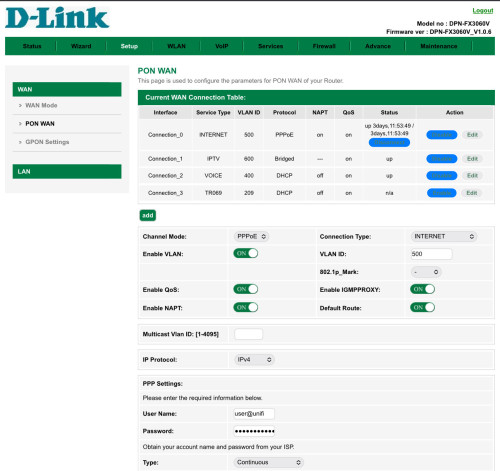
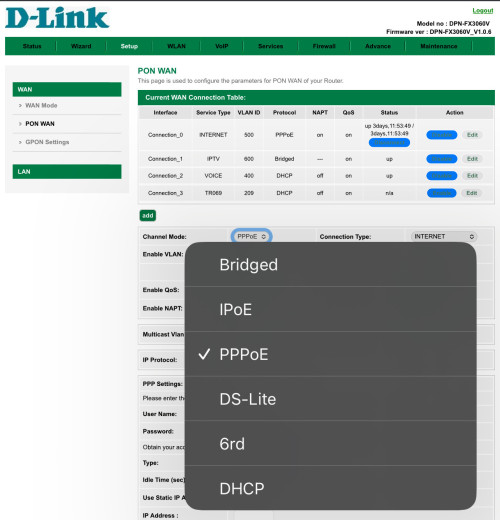
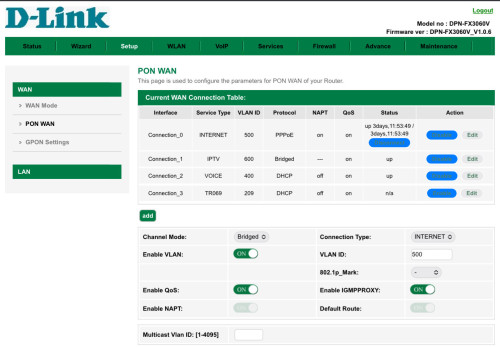
Yep, PPPoE change to Bridge, everything else leave as default. Don’t change mode and whatever

WAN mode leave as GPON router, and you can still access webUI if you leave the AP on, just DHCP will not work so you will have to set static IP to be able to access FX3060V web UI
*
i was using ASUS Dual-WAN 1:1 round-robin. Manage to get up to 1.75Gbps/750Mbps, give or take. I think limited due to local exchange and congestion, so i am not gussy to milk every drop.

Anyway, already sold off my ASUS RT-AX86U to a ktard. I found the ultra ONR is stable enough to deal with ~2Gbps without much fuss. I got a 3rd unit of the ONR when I upgrade to 2Gbps, so I have 3 units altogether which I can later deploy in wider mesh mode if need to; hopefully will still be reliable. For now I disable the EasyMesh function.
Oltromen Ripot
post Oct 9 2023, 12:44 PM

👍 999999 person Likes this member
*******
Senior Member
4,034 posts

Joined: Dec 2019
QUOTE(MyProLife @ Oct 9 2023, 12:40 PM)
M4 is definitely crippled as well cause it using much weaker single core processor that reliant on proprietary nat boost

Latest firmware 1.5.8 seems like has worse stability. Because sometimes speed can drop down to around 50-60mbps down/up
Or maybe just tm problems
*
I moved all M9 Plus to my other house with Maxis 500Mbps sub.

For Unifi 2Gbps, I found the ultra ONR single unit to be reliable enough. Keeping additional 2 ONR units as cold spare or to deploy wider mesh if need to in future.
Oltromen Ripot
post Oct 9 2023, 01:15 PM

👍 999999 person Likes this member
*******
Senior Member
4,034 posts

Joined: Dec 2019
QUOTE(dexeric @ Oct 9 2023, 01:07 PM)
I have been upgraded from (RM159)300mbps to 500mbps...
although the download speed in speedtest is 522mbps but the download speed in FAST.com is 210mbps...
the steam download also max 21MByte/s.
Is this normal?
*
stop using fast.com for speed testing.

fast.com is netflix.
it's optimised for testing netflix experience.
Oltromen Ripot
post Oct 9 2023, 01:22 PM

👍 999999 person Likes this member
*******
Senior Member
4,034 posts

Joined: Dec 2019
QUOTE(dexeric @ Oct 9 2023, 01:07 PM)
I have been upgraded from (RM159)300mbps to 500mbps...
although the download speed in speedtest is 522mbps but the download speed in FAST.com is 210mbps...
the steam download also max 21MByte/s.
Is this normal?
*
what you should look forward to when doing speed test is the speed between you and local ISP itself.
since we're on unifi, test against unifi speed test server.

logically, if you CAN'T get your subscribed speed even within your own ISP network, then that is something to complain about.

testing outside of your own ISP will introduce a lot more variables and less reliable to pinpoint where your issue is. let say you test against server of another local ISP and cannot get your subscribed speed; so where do you want to point finger at? your ISP? the other ISP? local IX?

if you test against fast.com by netflix, which itself is not an ISP to begin with, don't know how far and how many networks hops you had to jump over lorrr....
Oltromen Ripot
post Oct 9 2023, 01:23 PM

👍 999999 person Likes this member
*******
Senior Member
4,034 posts

Joined: Dec 2019
QUOTE(beverlykho @ Oct 9 2023, 01:16 PM)
You gave them come???
*
QUOTE(JimmyChan77 @ Oct 9 2023, 01:19 PM)
Think coke...
*
QUOTE(beverlykho @ Oct 9 2023, 01:22 PM)
That's a relief. I have coke.
*
inb4 cocain

Oltromen Ripot
post Oct 9 2023, 01:37 PM

👍 999999 person Likes this member
*******
Senior Member
4,034 posts

Joined: Dec 2019
QUOTE(WaNaWe900 @ Oct 9 2023, 01:33 PM)
Best way  thumbup.gif  thumbup.gif  thumbup.gif  possible with Asus router app (under Setting > QOS > Internet Speed) also possible
*
👍
both Asus and Deco (selected models) have built-in Ookla speed testers.
Oltromen Ripot
post Oct 9 2023, 02:28 PM

👍 999999 person Likes this member
*******
Senior Member
4,034 posts

Joined: Dec 2019
QUOTE(VeeJay @ Oct 9 2023, 01:46 PM)
I have no problem hitting 460-480Mbps on M4. Have you tried repositioning?

On Ax3060Z, yes I reach around 500Mbps. To me 300-400Mbps on wifi is good enough for my needs.
*
He said Built-in speedtest. that will be from the Deco node that is direct-attach to router. Not a wireless issue with having to reposition.

This post has been edited by Oltromen Ripot: Oct 9 2023, 02:29 PM
Oltromen Ripot
post Oct 9 2023, 02:34 PM

👍 999999 person Likes this member
*******
Senior Member
4,034 posts

Joined: Dec 2019
QUOTE(soonwai @ Oct 9 2023, 02:30 PM)
Same as my neighbour. https://forum.lowyat.net/index.php?showtopi...#entry108266542
RM119 so cheap for 500Mbps or even 300Mbps already good enough for her.

One thing I felt - I told a few ppl about SWU3 - many of them don't believe me when I told them got free 6 months. Probably think I'm a scammer. sweat.gif
*
they don't think you are a scammer.

rather, you are the one being scammed!
this is TM that we speak of after all; who will believe TM can be so generous? nobody!
Oltromen Ripot
post Oct 9 2023, 02:46 PM

👍 999999 person Likes this member
*******
Senior Member
4,034 posts

Joined: Dec 2019
QUOTE(redic @ Oct 9 2023, 02:40 PM)
exactly, even if TM call customers regarding this package

everyone will think they scammers doing scam calls
*
QUOTE(BenYeeHua @ Oct 9 2023, 02:41 PM)
Also 2 free mesh router wow! tongue.gif
No need buy extra router for 500M. brows.gif
*
yeah. until today i cannot believe TM is gonna gift "a token of appreciation". ...

at least those 800Mbps-ers can sigh in relief that the scam is already out in open for them: free speed upgrade 2023 not gonna happen to them!
Oltromen Ripot
post Oct 9 2023, 03:00 PM

👍 999999 person Likes this member
*******
Senior Member
4,034 posts

Joined: Dec 2019
QUOTE(failed.hashcheck @ Oct 9 2023, 02:44 PM)
If you are using Digi fast would better.
They rigged connection to speedtest.net server that lets you go as far as your LTE allows, but not the other real usage that is bound to artificial package limit. While other ISP/telco display the speed faithfully according to their plan limit.
After some time they paid soyacincau to publish story about how they have the best stats in speedtest.net (apparently the sponsored article is now deleted. can't find it anymore)

Since fast.com is just part of open connect server in ISP, they can't tamper it without causing collateral damage to the rest of Netflix service.

Not sure if they are still doing this shit post-merger though. But I still wouldn't trust them to not fucking with speedtest.net.
*
it's about testing what your line is capable of.
so what if it is rigged to prioritise traffic?
the important thing is to test the maximum limit of what you line can carry.
even if the test server rigged as alleged to send 10Gbps exclusive just to your device, if your physical line and equipment itself degraded can support only 85Mbps, it won't be able to get further than that.

if fast.com says my line can only support 81Mbps - really, not joke.
is it really that is the limit of my 2Gbps?
so what if TM rigged (or not) Seberang Jaya speed test server to boost speed tests?
The upper limit of my 2Gbps is still 1.75Gbps/750Mbps.

again, we need to change our mindset on why we use speed test.
• we need to understand that it is to test the maximum limit of what our lines can carry. it is not an indicator that each and every connection we make will be minimum such and such speed as per speed test.
• even if ISP prioritise (or your lingo, "rig"), it can never go above the limit of what your line can carry.

--

again i iterate.
stop using fast.com to cry that your individual line sucks or great.

Oltromen Ripot
post Oct 9 2023, 03:02 PM

👍 999999 person Likes this member
*******
Senior Member
4,034 posts

Joined: Dec 2019
QUOTE(PRSXFENG @ Oct 9 2023, 02:51 PM)
No, use fast.com exactly

speedtest.net servers are in their control, they can boost it however they want
fast.com is netflix, if its fast, netflix is fast

there are also other alternatives like nperf, cloudflare speedtest, mlab

honestly, dont rely on just 1, try multiple speedtest websites
with that said, the isp usually only wants to look at speedtest.net
*
post #4798
Oltromen Ripot
post Oct 9 2023, 03:17 PM

👍 999999 person Likes this member
*******
Senior Member
4,034 posts

Joined: Dec 2019
QUOTE(failed.hashcheck @ Oct 9 2023, 02:44 PM)

*
QUOTE(PRSXFENG @ Oct 9 2023, 02:51 PM)

*
it's like this.

3 of us buy same proton model of vehicle.
all of us get same speedometer maxed at 200km/h for example.

we go to "approved" race course, and found out that individually,
each of our engines and vehicles will max out at different speed, due to a variation of factors affecting it. maybe race track itself. even if manufacturer give a boost rigging the racetrack, however that is, all of us will be affected the same. we still can't get over the physical limitation of our individual engines and vehicles. if you are so badly affected, at least can raise a complain and work on remedy.

now suddenly you want to use result from different racetrack... how do we even begin to compare? his car hit this limit. her car hit this limit. that car hit a different limit. and it is so wildly different, reduced or increased from the norm. should you complain. should you keep quiet.

i mean, when i see people brag or complain about their fast.com result saying this ISP is too great or that ISP suck big time, ... really frustrating because your understanding of why you do speed test is different from why i do speed test.
Oltromen Ripot
post Oct 9 2023, 03:27 PM

👍 999999 person Likes this member
*******
Senior Member
4,034 posts

Joined: Dec 2019
QUOTE(Cavino @ Oct 9 2023, 03:22 PM)
Sure or not coz the reason I ask about my Asus router can be use for 1GB plan is becoz when I login to check my account (800Mbps), it says I'm eligible for free speed upgrade.
If only upgrade to 1GB, I'll keep using the Huawei modem and my Asus router with the parental features if they still worked. Even if bandwidth cannot max, near to max ok liao, upload speed doubled.

If upgrade to 2GB, no choice liao, just so used to Asus excellent GUI and features and excellent reach. Using TM router is like a high downgrade (except for the bandwidth) for a layman like us.
*
you ... didn't get the joke.

abang, the "free speed upgrade 2023" is a scam for you 800Mbps-ers.

... because you are getting upgraded in 2024. read that not-so-eligible notice again.

20 Pages « < 7 8 9 10 11 > » Top
Topic ClosedOptions
 

Change to:
| Lo-Fi Version
0.0280sec    0.80    7 queries    GZIP Disabled
Time is now: 11th December 2025 - 09:34 AM