Outline ·
[ Standard ] ·
Linear+
Unifi Official TM UniFi High Speed Broadband Thread V41, READ 1ST PAGE FOR RELEVANT WIFI INFO
|
cyberic
|
 Oct 10 2023, 06:39 PM Oct 10 2023, 06:39 PM
|

|
QUOTE(tzxsean @ Oct 10 2023, 06:20 PM) back at home now still cant find LAN cable with my iPhone, 500 mbps in front of router and 300 mbps at room ... for my laptop, 400 mbps at room (door open), 300 mbps when door is closed so what can we do?  With speed upgrade, it comes with wifi speed headache for some 😬 Hardware upgrade is inevitable for some. |
|
|
|
|
|
cyberic
|
Oct 10 2023, 06:53 PM
|
|
|
QUOTE(tzxsean @ Oct 10 2023, 06:42 PM) Today is 10/10 huh I didn’t set up mesh anyway only using 1 (main) router Any recommendations and the price range for me to consider? Can check out TPLink ax53, about 2xx. Some mentioned ok-ish Asus tuf4200 price 5xx. I never use use those but I reckon it's are OK for 500Mbps This post has been edited by cyberic: Oct 10 2023, 06:54 PM |
|
|
|
|
|
cyberic
|
Oct 10 2023, 07:21 PM
|
|
|
QUOTE(tzxsean @ Oct 10 2023, 07:00 PM) if I'm inside my room (door locked) and about within 5m from the router (with a wall in between), I think FiberHome or TP Link or Mercusys also not much difference? Max speed of about 300 mbps as well. Cheap things not great, good things not cheap. Expect to pay more for wifi router with better processor and specs. Spend based on budget then. This post has been edited by cyberic: Oct 10 2023, 07:22 PM |
|
|
|
|
|
cyberic
|
Oct 10 2023, 08:10 PM
|
|
|
QUOTE(westlife @ Oct 10 2023, 08:03 PM) Ax53 can buy two units to mesh them together? Or it can only use the range extender? Can with easymesh. https://www.blacktubi.com/review/archer-ax53/Ax53 in easy mesh list This post has been edited by cyberic: Oct 10 2023, 08:22 PM |
|
|
|
|
|
cyberic
|
Oct 10 2023, 08:13 PM
|
|
|
QUOTE(BenYeeHua @ Oct 10 2023, 08:02 PM) What? It don't works like that. But yes, should try changing channel, because some phone's antenna hate certain frequency. Like my mate 20 drop heavy on ch 149, but works fine at ch 36 lol. But redmi note 9s full power on both. The best will be try on auto DFS, get kicked into center one, but unsure how to trigger it... I tried DFS channels before. Wifi offline few times probably due to some military radar? I don't know. Never use DFS after that. |
|
|
|
|
|
cyberic
|
Oct 10 2023, 08:15 PM
|
|
|
QUOTE(wanttobuylaptop @ Oct 10 2023, 08:05 PM) Aiyo, those who need new router and unfortunately does not get dlink ax3000, but lo from others. Ppl are selling two routers for ~200. Frankly speaking, if u are using devices that does not support up to 800Mbps, or even 500 mbps, i believe dlink ax3000 is more than enough for your usage. Better yet, @ ~200 for two units, can grab four for ~400, and dlink can support up to 5 mesh. Hook four mesh and use only 5gz for entire home, should be kuat enough already. Is the Dlink 3060z stable enough for daily use? |
|
|
|
|
|
cyberic
|
Oct 10 2023, 08:36 PM
|
|
|
QUOTE(xkaizoku @ Oct 10 2023, 08:25 PM) I have the dlink 1860z, quite stable but after every 1-2 months, need reboot because ping increase Good to know. I replaced my in law's 30M plan Aztech wifi with Dlink 1860z, can see improvement. Cctv loading almost instantly compared to Aztech. Not sure how stable though. I notice weird problem with the account or router. It won't connect when I replace it. It just work after few hours. |
|
|
|
|
|
cyberic
|
Oct 10 2023, 10:11 PM
|
|
|
QUOTE(PJng @ Oct 10 2023, 10:02 PM) that between 2 wall, mine ax20, between 3 wall, really unstable, can good as 60mbps, then down to 5mbps, that why i buy another cheap2 wifi 6 router as AP If you want feel good connection. Deploy wifi ap at each room and strategic location around the house. You will smile every time you do speed test or look at full wifi bar. 😁 |
|
|
|
|
|
cyberic
|
Oct 10 2023, 10:46 PM
|
|
|
QUOTE(abidshown @ Oct 10 2023, 10:20 PM) my house is 2 storey. i used to do this mesh thingy using deco m5+deco m3w and 2pcs asus ax55 using aimesh, there must be some kind of problem... for deco, when i go upstairs the phone still connects to the main deco below rather than the slave node upstairs. then whats the point using deco  for the asus aimesh, when i am connected to the slave node, i cannot SSH to RPi that connects via lan at main node downstairs. also no use  so now i just buy tplink ax73 and put the router and every single lan-connected device at the stairs. now i happy, speedtest dalam jamban pun boleh dapat 500mbps no hal  Too many different brands. I know Mikrotik and Ubiquiti have those mini AP. My current setup have 2 AP only, both 2.4 and 5 GHz using the same ssid. System will decide, 5GHz set to preferred. I'm not expect in wifi deployment, I think not fully utilised the potential yet. |
|
|
|
|
|
cyberic
|
Oct 11 2023, 11:24 AM
|
|
|
Counting 11 days to get new bill. Anyone upgraded and expecting new bill soon?
|
|
|
|
|
|
cyberic
|
Oct 11 2023, 11:49 AM
|
|
|
QUOTE(abcdef123456 @ Oct 11 2023, 11:27 AM) I only can get 450 and above after i changed the width to 20/40/80. With 20/40 which was my original setting, it at most reached 330+ only. Just that even i changed to the newest setting, i cannot everytime get 400+ speedtest even im close to the router. Need a few try. What i meant for not getting back previous max speed 300, was due to before the free upgrade, i have no issue to achieve that. However, once the upgrade was done (need to off and on the modem and router, thats what said in the msg), it started to get low speedtest like average 180+ for 5ghz even im near to the router and i didnt change anything in the settings at the time. More channels give you more bandwidth. 5GHz wifi with 80Mhz, give your higher connection speed but if your area is congested, it affects the stability. That explain why sometimes you get lower speed. For congested area, maybe choose 40Mhz for stability, sacrificing top speed. |
|
|
|
|
|
cyberic
|
Oct 11 2023, 11:50 AM
|
|
|
QUOTE(soonwai @ Oct 11 2023, 11:47 AM) My neighbour's bill coming soon on the 13th. Good. They can find out what is the new name for the plan. |
|
|
|
|
|
cyberic
|
Oct 11 2023, 11:58 AM
|
|
|
QUOTE(soonwai @ Oct 11 2023, 11:55 AM) Hers already updated from YEP 2019 to SWU3.0 as per ss before install. 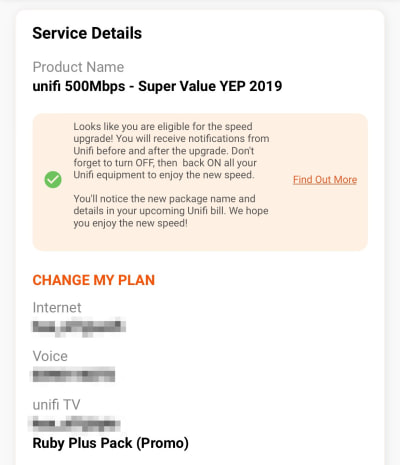 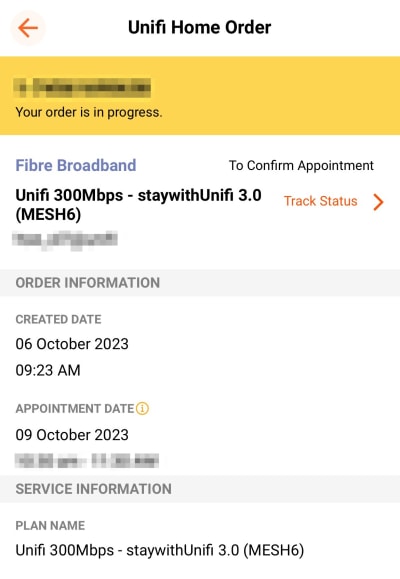 Just curious that message mentioned about package name and detail will be in new bill. My current bill state advance plus 500. |
|
|
|
|
|
cyberic
|
Oct 12 2023, 12:35 PM
|
|
|
QUOTE(speeder_man @ Oct 12 2023, 12:14 PM) New bill has come out today. Have received free speed upgrade on 7th Oct (300Mbps >> 500Mbps). Bill details still not change. Same like last month (Unifi Advance 300Mbps). Unifi apps notification also still not updated (still eligible for fsu) I will check my bill on 22nd. Currently it is advance plus 500, before free upgrade. |
|
|
|
|
|
cyberic
|
Oct 12 2023, 07:07 PM
|
|
|
Why not get BE router for wifi 7 ready? 😛
|
|
|
|
|
|
cyberic
|
Oct 12 2023, 07:28 PM
|
|
|
QUOTE(shinjite @ Oct 12 2023, 07:11 PM) Here in MY, don't bother for the next few years. Wifi 6E also hardly la..... 😂 WiFi 7 built on top of 6E, 6GHz and can use all 2.4 and 5GHz together. I see review said blazing fast. Price might scare most away though at the moment 😁 |
|
|
|
|
|
cyberic
|
Oct 12 2023, 08:05 PM
|
|
|
QUOTE(anip94 @ Oct 12 2023, 07:41 PM) i dont get it, whats the different between having a strong mesh network and FTTR? do they connect each of the child node wired from the main router? This is like my ideal setup where each room have a AP for near perfect wireless connection. Only difference is backhaul is fiber instead of copper ethernet cable. |
|
|
|
|
|
cyberic
|
Oct 12 2023, 11:28 PM
|
|
|
QUOTE(yenchenje @ Oct 12 2023, 10:48 PM) Using any POE AP? |
|
|
|
|
|
cyberic
|
Oct 12 2023, 11:31 PM
|
|
|
QUOTE(NimalKumar @ Oct 12 2023, 11:21 PM) Is there even any way for us to return the Fibrehome and ask for at least one decent DLink router? I feel scammed 🥹🥹🥹 You are free to do anything with the mesh router except return 🙄 |
|
|
|
|
|
cyberic
|
Oct 12 2023, 11:39 PM
|
|
|
QUOTE(BenYeeHua @ Oct 12 2023, 11:33 PM) lol at my 11 years old laptop, after upgraded 100M, my 480Mbps USB 2.0 unable to handle it, randomly stop transmit. Going back to cable, keep loosen. Spray WD40 and mop the port pin, solved, but 1Gbps still will disconnect randomly. Setting it back 100Mbps then, lol. The price of upgrading, lol.  I can imagine laptop very slow for today's usage. What are you using it for? Build raspberry pi 5 computer 👍🏼 |
|
|
|
|



 Quote
Quote




 0.3276sec
 0.39
0.39
 7 queries
 GZIP Disabled