
Welcome Guest ( Log In | Register )

Outline · [ Standard ] · Linear+

 [2023] Apple Watch Series 9 Discussion Thread

views
     
Justin.Loong
post Sep 14 2023, 02:53 PM

Look at all my stars!!
*******
Senior Member
8,363 posts

Joined: Feb 2014


Picture this: I’m making the arduous journey back from Trader Joes to my apartment with a heavy tote of groceries when my mom calls out of the blue. You always have to answer the phone when mom calls, right? But with my right hand holding my bag firmly and my iPhone stowed in my purse, I’m torn between letting the call buzz out (possibly sending my mom into a panic) or attempting to awkwardly tap the answer button with my nose.

Except now, with either the new Apple Watch Series 9 or Apple Watch Ultra 2, I can simply tap my free index finger and thumb on my watch hand twice to answer the call, hang up the call, or execute a slew of additional controls.
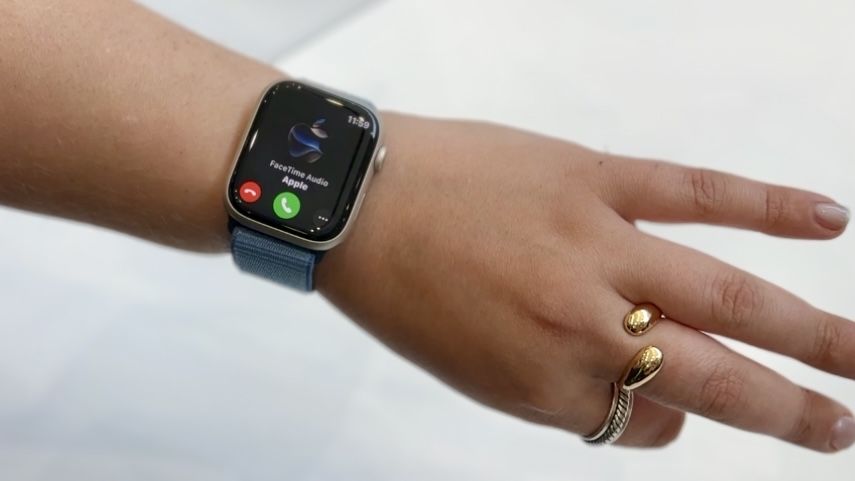
user posted image
I had the chance to try double tap for Apple Watch myself after the Apple event on September 12. Though the feature won’t roll out to devices until October, there were some units with double tap available to try. And while I wasn’t in a situation such as I described above, I got a taste of what the most convenient Apple Watch experience yet feels like.

Double tap works with your wrist raised and your Apple Watch Series 9 or Apple Watch Ultra 2 awaiting the gesture in the background. Yes, although the next-gen Apple Watch devices don’t have a new optical heart sensor reading the minor wrist movements and changes in blood flow, only the upgraded S9 SiP supports the gesture’s algorithm.

There are too many applications of double tap to name, but I’ll walk you through the ones I tried for myself beyond answering phone calls. First and foremost, double tap opens the Smart Stack, the standout watchOS 10 update that curates a dynamic tile carousel on your wrist. When I continued the double tap gesture, the demo watch cycled through a collection of calendar, timer and music tiles.

When I opened the timer app and started a 10-second countdown, I could use double tap to pause, restart, and dismiss the timer. I imagine this will be helpful when I’m cooking and managing multiple timers while running a chicken dredge station.

Finally, I saw how double tap totally improves the Camera Remote app. I use Camera Remote to remotely facilitate iPhone capture content quite often, though it can be cumbersome depending on the type of photos or videos I’d like to take. Sometimes I’m intentionally holding an object in my non-Apple Watch hand, making it tricky to tap the capture button. Double tap solves this problem.

Double tap can also pause and play music, trigger talk-to-type for text messages, snooze alarms and more. I didn’t try these functions myself, but all in all, this suggests that double tap will permeate many parts of the Apple Watch user experience. I imagine it’ll take some getting used to, but as second-nature as it is to raise my wrist to wake the wrist, I expect double tap will become integral to navigating the watch.

That said, the large-scale double tap adoption will take time. Since earlier-generation Apple Watch devices don’t support double tap, it’ll probably be a few upgrade cycles until a majority of users are able to access the feature. I don’t think double tap is enough to encourage an update from the Apple Watch Series 8, but we’ll have to wait to see how it's received once it's working next month.

Source: I just tried the Apple Watch 9 double tap feature — and I'm convinced it's the future.
Justin.Loong
post Sep 14 2023, 02:56 PM

Look at all my stars!!
*******
Senior Member
8,363 posts

Joined: Feb 2014


During its recent Wonderlust event, Apple unveiled the upcoming Apple Watch Series 9, and with it an ingenious new way to control the wearable called Double Tap.
user posted image
With this feature, users can perform the “most common actions on [their] Apple Watch Series 9” just by quickly tapping their index finger and thumb twice on one hand. You don’t even have to touch the display. As seen in the official announcement trailer, the gesture can be used to turn off alarms, set timers, answer calls (or end them if you’re being too loud), and even take photographs via the Camera Remote function. Apple goes on to state in its post that using Double Tap on the watch face opens the Smart Stack and tapping again lets you scroll through individual widgets.

This just scratches the surface of what Double Tap can do. No one knows the full potential of the tech at the moment. What we do know is it’s pretty fun to use. TechRadar’s US Editor-in-Chief Lance Ulanoff managed to try out Double Tap at the event, and you can see his initial reaction below.


Apple explains Double Tap “is enabled by the [wearable’s] faster Neural Engine.” It sports an upgraded “machine learning algorithm” which can detect “tiny wrist movements [plus] changes in blood flow” caused by a person’s index finger and thumb performing the tapping action. From there, the engine collects that information and processes it with additional data obtained from the internal “accelerometer, gyroscope, and optical heart sensor”.

Unknown mechanics
Apart from the mechanics, it’s unknown exactly how the Apple Watch 9’s Double Tap feature will operate. Obviously, you touch your digits together, but there’s more to it than that. Double tapping the watch face launches Smart Stack but can that input be changed to something else, like opening a certain app? Do the gestures only work for certain functions or can they affect everything on the device?

Fortunately, we won’t have to wait very long to get our questions answered. The Apple Watch Series 9 is currently on sale with prices starting at $399 / £399 / AU$649. However, Double Tap isn’t available right now. It’ll come out “in a software update next month.”

The other major star of Wonderlust 2023 was the iPhone 15. We got our first-hand look at the titanium-clad iPhone 15 Pro as well as the powerful 5x periscope zoom camera on the Pro Max model. Be sure to catch up on our coverage of the event.

Source: Double Tap lets you operate the Apple Watch 9 without touching the screen


Change to:
| Lo-Fi Version
0.0142sec    0.78    7 queries    GZIP Disabled
Time is now: 12th December 2025 - 10:15 PM