
Welcome Guest ( Log In | Register )

Outline · [ Standard ] · Linear+

 Asus Vivobook S15, Help Needed

views
     
TSspookie
post Jul 30 2023, 09:37 PM, updated 3y ago

Getting Started
**
Junior Member
87 posts

Joined: Jan 2003


HI! Its been years since I last posted but this is my fav trusted source for folks to give real feedback.
Hence, apologies if I miss some rule on postings but trying my best here.

Basically, I have an :
Asus Vivobook S15 S533EQ, with specs below (Umm...I am not techie so I had to read the system info to get this):
Processor: i7-1165G7
Graphics: Nvidia GeForce MX350 and Intel iris XE Graphics
Storage: 500GB
Memory: 16GB

I bought it in 2020 i think and after a year plus, I started having issues with the screen. cry.gif It would like be all fuzzy and then the whole thing freezes. I thought its coz its hot, and it would happen middle of a zoom call. So i bought a cooler fan thing to place at the bottom. However, from time to time, it would freeze up again. I also hv issues trying to play games sad.gif
The screen will freeze up again and nothing can be done about it. I had to press the start button longer and when it restarts, its all ok again.

And recently, my USB ports on the right side have stopped working. I've tried to google suggested solutions but uninstalling the USB root hub thing and controller stuff didn't work.

So being super frustrated, I have unscrewed the back and open it up, my laptop looks super clean. Of course, I hv no idea how to see what's wrong with the USB but at least i know the heating isn't due to dust etc. sweat.gif

SO....I would like to know, should i bring my laptop for repair? If yes, would it be worthwhile and would you have any shops to recommend in the SS2/PJ vicinity?
Or, is there a route to trade in and get a new laptop? If I'm on a budget but I really would love to play some games like genshin impact etc, what should I get? Is there even a shop that would allow trade ins?

Thanks in advance and looking forward to your kind expertise and help plssss
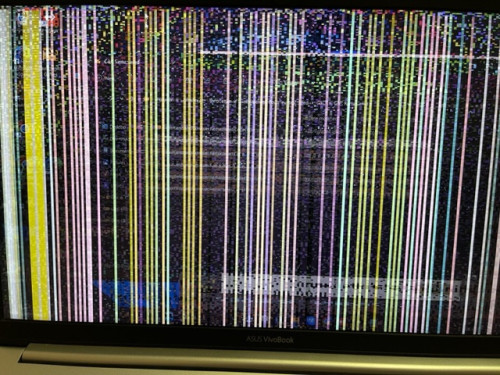


user posted image


Attached thumbnail(s)
Attached Image
boyz
post Jul 30 2023, 09:58 PM

Your Humble Vaudevillian
******
Senior Member
1,523 posts

Joined: Oct 2004
From: Penrissen Camp


-deleted

This post has been edited by boyz: Jul 30 2023, 09:58 PM
tvcat
post Jul 30 2023, 10:10 PM

Mr. Dumb Dumb
*******
Senior Member
2,923 posts

Joined: Nov 2004


This is really hard to tell what exactly is the problem without checking in person.

However you can run system diagnosis. Just follow the instruction on this Asus website.

https://www.asus.com/support/FAQ/1045716/
Uncle Toby
post Jul 30 2023, 10:19 PM

Getting Started
**
Junior Member
76 posts

Joined: Jan 2018


MY relative had the same problem, but it was cheaper low amd spec asus, thankfully claimed warranty, they changed the screen and also the motherboard.
TSspookie
post Jul 30 2023, 10:50 PM

Getting Started
**
Junior Member
87 posts

Joined: Jan 2003


QUOTE(tvcat @ Jul 30 2023, 10:10 PM)
This is really hard to tell what exactly is the problem without checking in person.

However you can run system diagnosis. Just follow the instruction on this Asus website.

https://www.asus.com/support/FAQ/1045716/
*
Thanks so much! I've ran it. Only issue detected was weak wifi. rclxub.gif
They did say if I have issues, do a reset, which I actually did two days ago but the problems still persist.

TSspookie
post Jul 30 2023, 10:51 PM

Getting Started
**
Junior Member
87 posts

Joined: Jan 2003


QUOTE(Uncle Toby @ Jul 30 2023, 10:19 PM)
MY relative had the same problem, but it was cheaper low amd spec asus, thankfully claimed warranty, they changed the screen and also the motherboard.
*
Thanks. I guess my warranty is over but I will check if they have some outlet to fix.
tvcat
post Jul 30 2023, 11:09 PM

Mr. Dumb Dumb
*******
Senior Member
2,923 posts

Joined: Nov 2004


QUOTE(spookie @ Jul 30 2023, 10:50 PM)
Thanks so much! I've ran it. Only issue detected was weak wifi. rclxub.gif
They did say if I have issues, do a reset, which I actually did two days ago but the problems still persist.
*
I see. Could be hardware issue.

Try running check disc on c drive

If still not fix then better send to repair shop.

You can also try to ask this forum user for repair.

https://forum.lowyat.net/index.php?showtopic=718059&hl=


Change to:
| Lo-Fi Version
0.0171sec    0.59    6 queries    GZIP Disabled
Time is now: 16th December 2025 - 11:22 PM
