This post has been edited by davychoo: Jul 27 2023, 10:27 PM
Attached thumbnail(s)


Huawei Optixstar HG8145X6-10 (Time Fiber) Newest!, Time Fiber latest router revealed
|
|
 Jul 27 2023, 10:23 PM, updated 3y ago Jul 27 2023, 10:23 PM, updated 3y ago
Show posts by this member only | Post
#1
|
 
Newbie
6 posts Joined: Dec 2014  
|
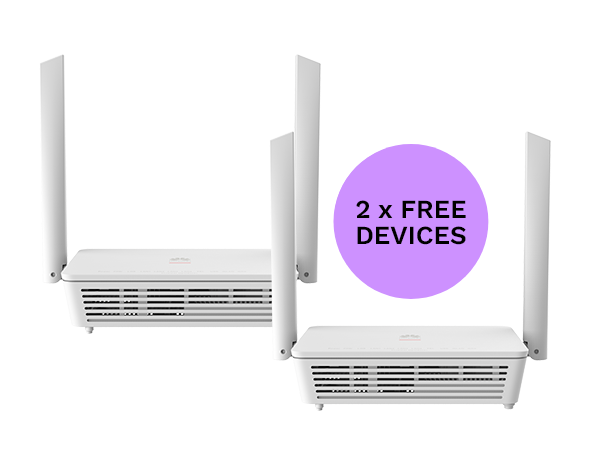
Just got today the latest model of Huawei Optixstar HG8145X6-10 from Time Fiber. Check online, and found no one using this. I guess I'm the first person who received this from Time Fiber. The outlook design and antenna is newer look.
This post has been edited by davychoo: Jul 27 2023, 10:27 PM Attached thumbnail(s)
|
|
|
|
|
|
Jul 27 2023, 11:03 PM
Show posts by this member only | IPv6 | Post
#2
|
|
Senior Member
5,650 posts Joined: Mar 2012
|
How's the speed and coverage
old » Click to show Spoiler - click again to hide... « This post has been edited by fireballs: Jul 27 2023, 11:15 PM |
|
|
Jul 28 2023, 12:40 PM
Show posts by this member only | IPv6 | Post
#3
|
|
Newbie
6 posts Joined: Dec 2014
|
So far so good.
QUOTE(fireballs @ Jul 27 2023, 11:03 PM) How's the speed and coverage old » Click to show Spoiler - click again to hide... «   Attached thumbnail(s) 
|
|
|
Jul 28 2023, 12:44 PM
Show posts by this member only | IPv6 | Post
#4
|
|
Newbie
6 posts Joined: Dec 2014
|
QUOTE(fireballs @ Jul 27 2023, 11:03 PM) How's the speed and coverage This is the result for next room, behind the wall.old » Click to show Spoiler - click again to hide... « 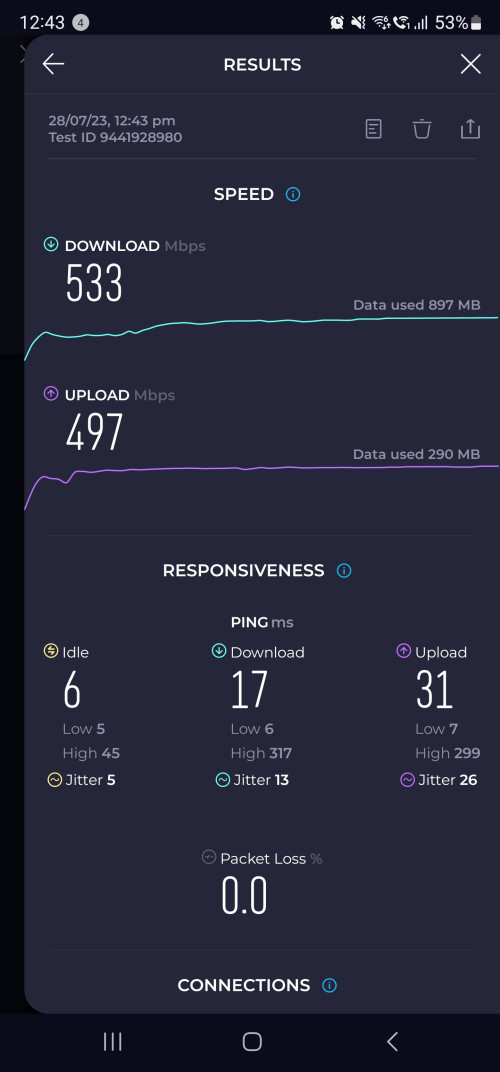 fireballs liked this post
|
|
|
Jul 28 2023, 02:05 PM
Show posts by this member only | Post
#5
|
|
Newbie
6 posts Joined: Dec 2014
|
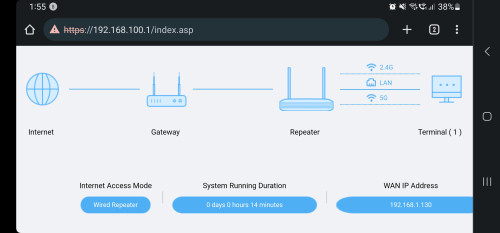 Wired backhaul supported, connected from my Tplink AX73 |
|
|
Aug 18 2023, 10:23 PM
Show posts by this member only | Post
#6
|

Senior Member
614 posts Joined: Sep 2009
|
did time offer it as a free replacement?
|
|
|
|
|
|
Aug 18 2023, 11:36 PM
Show posts by this member only | IPv6 | Post
#7
|
|
Junior Member
387 posts Joined: May 2019
|
QUOTE(I<3LYN @ Aug 18 2023, 10:23 PM) did time offer it as a free replacement? Not sure but it's given to all new install |
|
|
Aug 20 2023, 07:20 AM
Show posts by this member only | IPv6 | Post
#8
|

All Stars
14,313 posts Joined: Jan 2011
|
Looks nice. Always like Huawei mobile broadband devices.
Never use their wifi product yet though. |
|
|
Aug 20 2023, 07:25 AM
Show posts by this member only | IPv6 | Post
#9
|

Junior Member
661 posts Joined: Jan 2010
|
Somehow there's hardly any in depth reviews on units like this?
|
|
|
Sep 18 2023, 07:30 PM
Show posts by this member only | IPv6 | Post
#10
|

Senior Member
562 posts Joined: Dec 2008 From: WonderLand :D
|
Anyone knows how to disable the WPS?
The wps setting doesn't shows up in the wlan configuration page at 192.168.100.1/ |
|
|
Sep 23 2023, 10:21 PM
Show posts by this member only | IPv6 | Post
#11
|
|
Junior Member
407 posts Joined: Dec 2008
|
I just installed Time broadband 500mbps today.
Can Original Huawei HG8145X6-10 use ethernet backhaul to connect 2nd mesh unit? Anyone tried before ?  This post has been edited by slackinux: Sep 23 2023, 10:22 PM |
|
|
Sep 24 2023, 01:38 PM
Show posts by this member only | IPv6 | Post
#12
|
|
Probation
7 posts Joined: Oct 2020
|
QUOTE(slackinux @ Sep 23 2023, 10:21 PM) I just installed Time broadband 500mbps today. Yes you can, I am running this setup.Can Original Huawei HG8145X6-10 use ethernet backhaul to connect 2nd mesh unit? Anyone tried before ? Attached thumbnail(s) 
|
|
|
Sep 25 2023, 11:33 AM
Show posts by this member only | IPv6 | Post
#13
|
|
Junior Member
407 posts Joined: Dec 2008
|
QUOTE(superavenger @ Sep 24 2023, 01:38 PM) Yes you can, I am running this setup. The installer pair the 2nd router using wireless signal.Do I need to make any changes on the main router if I connect 2nd mesh unit via ethernet backhaul? |
|
|
|
|
|
Sep 26 2023, 10:58 AM
|

Senior Member
1,561 posts Joined: Feb 2006 From: Penang island
|
i got this pair of mesh/router but i plan to buy my own router and use 2 of them as mesh, just wondering how can i set them up?
|
|
|
Sep 26 2023, 12:04 PM
Show posts by this member only | IPv6 | Post
#15
|
|
Junior Member
407 posts Joined: Dec 2008
|
QUOTE(intothefantasy @ Sep 26 2023, 10:58 AM) i got this pair of mesh/router but i plan to buy my own router and use 2 of them as mesh, just wondering how can i set them up? I tested the 2nd unit so called mesh enabled router is actually not implementing wireless mesh protocol 802.11k/v/r.It is just a wireless AP or wired AP, i.e., if connected to main router via ethernet cable. I placed the main router at level 2 and placed the 2nd unit at level one. Both having same WiFi SSID. I connect to the level 1 SSID and go up to the level 2. My device forever attach to the level 1 SSID. It will never switch to level 2 SSID seamlessly like other mesh router. Unless you choose to connect level 2 SSID manually then only it connects to level 2 SSID. Therefore, the 2nd unit router given definitely not a mesh unit. It is actually acting as a wireless AP. TIME marketing team is misleading the subscriber with the term "mesh". In networking term, wireless mesh means a network element that implements 802.11k/v/r protocol. This post has been edited by slackinux: Sep 26 2023, 12:06 PM |
|
|
Sep 26 2023, 02:31 PM
|
|
Senior Member
1,561 posts Joined: Feb 2006 From: Penang island
|
QUOTE(slackinux @ Sep 26 2023, 12:04 PM) I tested the 2nd unit so called mesh enabled router is actually not implementing wireless mesh protocol 802.11k/v/r. thanks for the test, now i know how it wors lol but since got it why not use it, i am just now sure how to set them up only as wireless AP if i get new router. i guess just connect LAN cable to the fake "mesh" and access 192.168.100.1 to the page and setup as wireless ap then?It is just a wireless AP or wired AP, i.e., if connected to main router via ethernet cable. I placed the main router at level 2 and placed the 2nd unit at level one. Both having same WiFi SSID. I connect to the level 1 SSID and go up to the level 2. My device forever attach to the level 1 SSID. It will never switch to level 2 SSID seamlessly like other mesh router. Unless you choose to connect level 2 SSID manually then only it connects to level 2 SSID. Therefore, the 2nd unit router given definitely not a mesh unit. It is actually acting as a wireless AP. TIME marketing team is misleading the subscriber with the term "mesh". In networking term, wireless mesh means a network element that implements 802.11k/v/r protocol. |
|
|
Sep 28 2023, 11:11 AM
Show posts by this member only | IPv6 | Post
#17
|
|
Junior Member
407 posts Joined: Dec 2008
|
QUOTE(slackinux @ Sep 26 2023, 12:04 PM) I tested the 2nd unit so called mesh enabled router is actually not implementing wireless mesh protocol 802.11k/v/r. Hi, I would like to retreat my statement that Huawei Optixstar HG8145X6-10 not implementing 802.11k/v/r protocol.It is just a wireless AP or wired AP, i.e., if connected to main router via ethernet cable. I placed the main router at level 2 and placed the 2nd unit at level one. Both having same WiFi SSID. I connect to the level 1 SSID and go up to the level 2. My device forever attach to the level 1 SSID. It will never switch to level 2 SSID seamlessly like other mesh router. Unless you choose to connect level 2 SSID manually then only it connects to level 2 SSID. Therefore, the 2nd unit router given definitely not a mesh unit. It is actually acting as a wireless AP. TIME marketing team is misleading the subscriber with the term "mesh". In networking term, wireless mesh means a network element that implements 802.11k/v/r protocol. My previous test showed that my device didn't switch between SSID from main router and 2nd router due to default setting of the Cascade Link Threshold value is too low, i.e., 200kbps. Meaning that if the device's data transfer rate lower than 200kbps then it will switch to another SSID that is stronger. After I increased the cascade link threshold from 200kbps to 40000kbps, my device able to switch between main router and 2nd mesh unit's SSID seamlessly. Conclusion is Huawei Optixstar HG8145X6-10 is compliant to Easymesh and able to switch between SSID seamlessly.  |
|
|
Sep 30 2023, 12:58 PM
Show posts by this member only | IPv6 | Post
#18
|

Senior Member
2,260 posts Joined: Jan 2003 From: Centre of KL
|
QUOTE(slackinux @ Sep 28 2023, 11:11 AM) Hi, I would like to retreat my statement that Huawei Optixstar HG8145X6-10 not implementing 802.11k/v/r protocol. how do u access this advance page? My previous test showed that my device didn't switch between SSID from main router and 2nd router due to default setting of the Cascade Link Threshold value is too low, i.e., 200kbps. Meaning that if the device's data transfer rate lower than 200kbps then it will switch to another SSID that is stronger. After I increased the cascade link threshold from 200kbps to 40000kbps, my device able to switch between main router and 2nd mesh unit's SSID seamlessly. Conclusion is Huawei Optixstar HG8145X6-10 is compliant to Easymesh and able to switch between SSID seamlessly. i couldnt see this in my menu |
|
|
Sep 30 2023, 01:05 PM
Show posts by this member only | IPv6 | Post
#19
|
|
Junior Member
387 posts Joined: May 2019
|
QUOTE(lkm51 @ Sep 30 2023, 12:58 PM) how do u access this advance page? Same here. Could it be he has the password for superadmin?i couldnt see this in my menu |
|
|
Sep 30 2023, 07:42 PM
Show posts by this member only | IPv6 | Post
#20
|
|
Senior Member
2,614 posts Joined: Nov 2020
|
QUOTE(lkm51 @ Sep 30 2023, 12:58 PM) how do u access this advance page? For me on HG8145X6i couldnt see this in my menu Advanced -> WLAN -> Wi-Fi Coverage -> Wi-Fi Network Management button on the page under the first checkmark checked with normal admin password |
|
|
Oct 1 2023, 03:46 PM
Show posts by this member only | IPv6 | Post
#21
|
|
Probation
7 posts Joined: Oct 2020
|
QUOTE(slackinux @ Sep 25 2023, 11:33 AM) The installer pair the 2nd router using wireless signal. I recall seeing a settings sub page where you can set the repeater mode to wired or wirelesss. I tried finding it but can't seem to find the page though.Do I need to make any changes on the main router if I connect 2nd mesh unit via ethernet backhaul? |
|
|
Oct 3 2023, 05:52 PM
Show posts by this member only | IPv6 | Post
#22
|
|
Junior Member
407 posts Joined: Dec 2008
|
QUOTE(lkm51 @ Sep 30 2023, 12:58 PM) how do u access this advance page? I access using username telecomadmin. i couldnt see this in my menu The normal username admin has no authority to access this advance page. |
|
|
Oct 3 2023, 06:16 PM
Show posts by this member only | IPv6 | Post
#23
|
|
Junior Member
387 posts Joined: May 2019
|
QUOTE(slackinux @ Oct 3 2023, 05:52 PM) I access using username telecomadmin. Password admintelecom?The normal username admin has no authority to access this advance page. This user is not available on mine based on the config I exported. Weird yours have it and mine doesn't. |
|
|
Oct 9 2023, 09:27 PM
Show posts by this member only | IPv6 | Post
#24
|
|
Junior Member
25 posts Joined: Jan 2003
|
I'm using this new TIME broadband router.. but i have not been able to enable port forwarding. I'm sure i've done it right as far as configuring the port forewrding in the router is concerned, because i had done many times before with other routers but this one does not want to work..
I configure my web server on machine 192.168.100.2 and use a dynamic IP service.. i am able to ping and connect to that web server using the public ip address when i'm connected to the wifi network, but as soon as i change to a different network, i cannot ping or telnet or ssh or do anything with my web server.. Is there a special setting i have to enable? - |
|
|
Oct 27 2023, 05:01 PM
|

Senior Member
713 posts Joined: Sep 2004 From: Kuala Lumpur
|
QUOTE(superavenger @ Sep 24 2023, 01:38 PM) Yes you can, I am running this setup. How ya ? elaborate a little. I want to try. |
|
|
Nov 16 2023, 08:54 PM
|
|
Junior Member
205 posts Joined: Sep 2014
|
QUOTE(slackinux @ Sep 28 2023, 11:11 AM) Hi, I would like to retreat my statement that Huawei Optixstar HG8145X6-10 not implementing 802.11k/v/r protocol. Are you setting up the same SSID or a different one?My previous test showed that my device didn't switch between SSID from main router and 2nd router due to default setting of the Cascade Link Threshold value is too low, i.e., 200kbps. Meaning that if the device's data transfer rate lower than 200kbps then it will switch to another SSID that is stronger. After I increased the cascade link threshold from 200kbps to 40000kbps, my device able to switch between main router and 2nd mesh unit's SSID seamlessly. Conclusion is Huawei Optixstar HG8145X6-10 is compliant to Easymesh and able to switch between SSID seamlessly. |
|
|
Nov 24 2023, 11:37 AM
Show posts by this member only | IPv6 | Post
#27
|
|
Junior Member
407 posts Joined: Dec 2008
|
QUOTE(RagingCandy @ Nov 16 2023, 08:54 PM) Are you setting up the same SSID or a different one? Same SSID in both Huawei Optixstar HG8145X6-10 |
|
|
Dec 8 2023, 03:14 PM
Show posts by this member only | IPv6 | Post
#28
|
|
Junior Member
167 posts Joined: Nov 2005
|
May I know does it have a gigabyte lah port for SSD hard disk plug and play?
|
|
|
Dec 8 2023, 10:06 PM
Show posts by this member only | IPv6 | Post
#29
|
|
Junior Member
328 posts Joined: Dec 2007
|
QUOTE(slackinux @ Oct 3 2023, 05:52 PM) I access using username telecomadmin. May I know where do you get the telecomadmin password?The normal username admin has no authority to access this advance page. |
|
|
Dec 15 2023, 05:03 PM
|
|
Junior Member
407 posts Joined: Dec 2008
|
QUOTE(1234_4321 @ Dec 8 2023, 10:06 PM) May I know where do you get the telecomadmin password? I figured it out myself PRSXFENG liked this post
|
|
|
Dec 15 2023, 11:08 PM
Show posts by this member only | IPv6 | Post
#31
|
|
All Stars
14,313 posts Joined: Jan 2011
|
Just had my time broadband installed. I can only say it is totally disappointed. The ONU Huawei wifi router + modem and mesh are simply trash.
Even the room next to living room that has the ONU connected also could not get more than 200Mbps of speed. Anyway I can change the stoopig ONU to bridge mode so I can use my own wifi mesh? 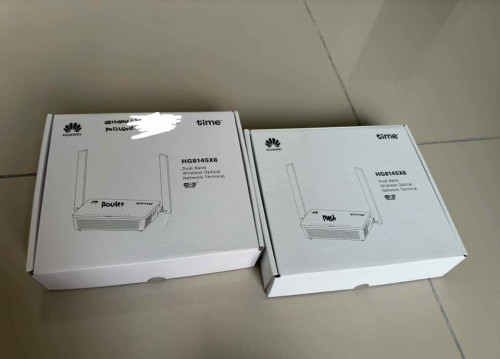 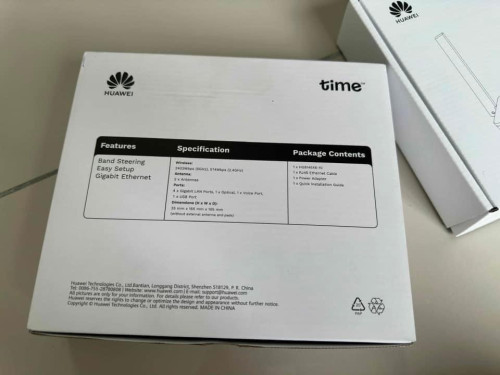 |
|
|
Dec 15 2023, 11:10 PM
Show posts by this member only | IPv6 | Post
#32
|
|
Senior Member
2,614 posts Joined: Nov 2020
|
QUOTE(westlife @ Dec 15 2023, 11:08 PM) Just had my time broadband installed. I can only say it is totally disappointed. The ONU Huawei wifi router + modem and mesh are simply trash. yes, ask time cs to do so for youEven the room next to living room that has the ONU connected also could not get more than 200Mbps of speed. Anyway I can change the stoopig ONU to bridge mode so I can use my own wifi mesh? |
|
|
Dec 16 2023, 12:07 AM
Show posts by this member only | IPv6 | Post
#33
|
|
All Stars
14,313 posts Joined: Jan 2011
|
QUOTE(PRSXFENG @ Dec 15 2023, 11:10 PM) yes, ask time cs to do so for you They can do it remotely? Is it free also?I seriously need to use back my own wifi mesh routers. |
|
|
Dec 16 2023, 06:36 AM
|
|
Junior Member
387 posts Joined: May 2019
|
QUOTE(westlife @ Dec 16 2023, 12:07 AM) They can do it remotely? Is it free also? Yes it is free. For normal user, guess the Huawei is fine. The old TIME would give Asus router.I seriously need to use back my own wifi mesh routers. |
|
|
Dec 16 2023, 07:10 AM
|

Junior Member
350 posts Joined: Dec 2022 From: ChynaBuildKingdom InsteadOfBS aboutFreedom WarDoom
|
Huawei still the best
|
|
|
Dec 16 2023, 07:16 AM
Show posts by this member only | IPv6 | Post
#36
|
|
All Stars
14,313 posts Joined: Jan 2011
|
QUOTE(Kopistall @ Dec 16 2023, 07:10 AM) Huawei still the best Not really. The coverage is poor…Speed is also not consistent. This post has been edited by westlife: Dec 16 2023, 07:16 AM |
|
|
Dec 16 2023, 07:18 AM
|
|
Junior Member
350 posts Joined: Dec 2022 From: ChynaBuildKingdom InsteadOfBS aboutFreedom WarDoom
|
QUOTE(westlife @ Dec 16 2023, 07:16 AM) Not really. The coverage is poor… But but but mine okaySpeed is also not consistent. |
|
|
Jan 6 2024, 07:43 AM
Show posts by this member only | IPv6 | Post
#38
|
|
Senior Member
2,260 posts Joined: Jan 2003 From: Centre of KL
|
QUOTE(slackinux @ Dec 15 2023, 05:03 PM) I figured it out myself mind sharing? |
|
|
Jan 7 2024, 12:26 PM
Show posts by this member only | IPv6 | Post
#39
|

Senior Member
1,602 posts Joined: Jan 2016
|
QUOTE(lkm51 @ Jan 6 2024, 07:43 AM) mind sharing? username: telecomadminpassword: TIMExxxx where xxxx is last 4 digit of main router's MAC address in capital letter |
|
|
Jan 9 2024, 01:31 PM
Show posts by this member only | IPv6 | Post
#40
|

Junior Member
436 posts Joined: Mar 2005
|
QUOTE(westlife @ Dec 15 2023, 11:08 PM) Just had my time broadband installed. I can only say it is totally disappointed. The ONU Huawei wifi router + modem and mesh are simply trash. I just use this router todeyEven the room next to living room that has the ONU connected also could not get more than 200Mbps of speed. Anyway I can change the stoopig ONU to bridge mode so I can use my own wifi mesh? But technical said that router to mesh using 2.4G only Unless using direct cable |
|
|
Jan 9 2024, 03:41 PM
|
|
Junior Member
387 posts Joined: May 2019
|
QUOTE(akecema @ Jan 9 2024, 01:31 PM) I just use this router todey No, it can mesh using 2.4 or 5But technical said that router to mesh using 2.4G only Unless using direct cable |
|
|
Jan 9 2024, 04:00 PM
Show posts by this member only | IPv6 | Post
#42
|
|
Junior Member
436 posts Joined: Mar 2005
|
QUOTE(ChenKaiWen @ Jan 9 2024, 03:41 PM) No, it can mesh using 2.4 or 5 After technician balik, i check the routerChang ssid. This router nub kenot dual band mode. Sohai. Reconnect mesh then setting shows connect router-mesh using 5Ghz Mcm mau change back to old router because dual band mode Can use old btu? Because this new router using built in btu |
|
|
Jan 9 2024, 05:39 PM
|
|
Junior Member
362 posts Joined: Jul 2013
|
sorry, a super newbie here.
i just gotten keys for my new condo, its supported by times but when i see my unit, the fibre optic cable port is at the living room,at the place of the TV ports area. i asked times customer service, they say they will install huawei HG8145X6 at the port and all devices need to connect wirelessly. so if i have a PC inside another Room how a? normally what do ppl do? during renovation extend the fibre optic cable or something? i currently staying in another apartment which is still using unifi , the traditional copper cable i suppose, so my desktop is connected via Lan to the router. many years ago during reno, we have extended the phone line from the living room into my room, so my unifi router and devices all at room This post has been edited by prozfromhell: Jan 9 2024, 05:41 PM |
|
|
Jan 9 2024, 06:31 PM
|
|
Senior Member
2,614 posts Joined: Nov 2020
|
QUOTE(akecema @ Jan 9 2024, 04:00 PM) After technician balik, i check the router Can't reuse old BTU, but you can ask time cs to convert the new 2 in 1 router btu into just btu mode, and connect up your own router as usualChang ssid. This router nub kenot dual band mode. Sohai. Reconnect mesh then setting shows connect router-mesh using 5Ghz Mcm mau change back to old router because dual band mode Can use old btu? Because this new router using built in btu |
|
|
Jan 9 2024, 06:53 PM
Show posts by this member only | IPv6 | Post
#45
|
|
Senior Member
2,614 posts Joined: Nov 2020
|
QUOTE(prozfromhell @ Jan 9 2024, 05:39 PM) sorry, a super newbie here. There might be a few ways you could go about thisi just gotten keys for my new condo, its supported by times but when i see my unit, the fibre optic cable port is at the living room,at the place of the TV ports area. i asked times customer service, they say they will install huawei HG8145X6 at the port and all devices need to connect wirelessly. so if i have a PC inside another Room how a? normally what do ppl do? during renovation extend the fibre optic cable or something? i currently staying in another apartment which is still using unifi , the traditional copper cable i suppose, so my desktop is connected via Lan to the router. many years ago during reno, we have extended the phone line from the living room into my room, so my unifi router and devices all at room 1. Purchase a fiber cable with the correct plugs and move the router to your room later 2. Purchase a Lan cable and connect the pc to the router in the living room with it 3. Subscribe to time fiber to the room and get a node at every room connected via fiber |
|
|
Jan 9 2024, 10:29 PM
Show posts by this member only | IPv6 | Post
#46
|
|
Senior Member
699 posts Joined: Oct 2004
|
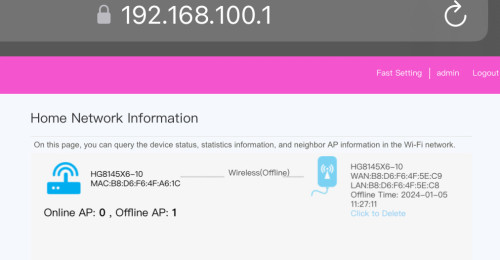
Hi, may i know how to reconnect the second mesh (AP)? This few days i feel that wifi abit weak in my room. So i try checked on admin page. Seems like AP are disconnected. How to manually reconnect again? As i already turn off and off few times but it still appear as offline.
 This post has been edited by hakim_radzuan: Jan 9 2024, 10:29 PM |
|
|
Jan 9 2024, 10:44 PM
Show posts by this member only | IPv6 | Post
#47
|
|
All Stars
14,313 posts Joined: Jan 2011
|
QUOTE(akecema @ Jan 9 2024, 01:31 PM) I just use this router todey I doubt it is using 2.4ghz only. If yes, it can never hardly even hit above 100Mbps…But technical said that router to mesh using 2.4G only Unless using direct cable |
|
|
Jan 10 2024, 12:01 AM
Show posts by this member only | IPv6 | Post
#48
|
|
Senior Member
1,602 posts Joined: Jan 2016
|
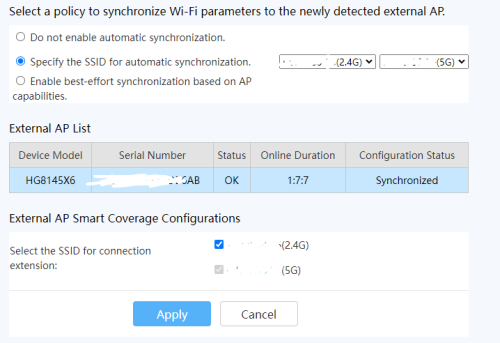 Interesting, similar settings here However, I tried connecting to the mesh using ethernet cable and it is pushing 500Mbps full Guess it is still using 5G as backhaul but only produce 2.4Ghz signal? |
|
|
Jan 10 2024, 02:52 AM
Show posts by this member only | IPv6 | Post
#49
|
|
Senior Member
2,260 posts Joined: Jan 2003 From: Centre of KL
|
QUOTE(QuantumEdge @ Jan 7 2024, 12:26 PM) username: telecomadmin great thankspassword: TIMExxxx where xxxx is last 4 digit of main router's MAC address in capital letter i accidentally reset the router and having issues to enter wan details til i see this message |
|
|
Jan 10 2024, 03:01 AM
Show posts by this member only | IPv6 | Post
#50
|
|
Senior Member
2,260 posts Joined: Jan 2003 From: Centre of KL
|
QUOTE(hakim_radzuan @ Jan 9 2024, 10:29 PM) Hi, may i know how to reconnect the second mesh (AP)? This few days i feel that wifi abit weak in my room. So i try checked on admin page. Seems like AP are disconnected. How to manually reconnect again? As i already turn off and off few times but it still appear as offline. I had the same issue for the past few days whereby its connected but the repeater doesnt workbeen messing with it and accidentally reset the main router by pressing WPS button for more thn 10 second... somehow once reconfigure it back, the repeater works again... damn! |
|
|
Jan 10 2024, 04:25 PM
|
|
Senior Member
699 posts Joined: Oct 2004
|
QUOTE(lkm51 @ Jan 10 2024, 03:01 AM) I had the same issue for the past few days whereby its connected but the repeater doesnt work May i know how to reconfigure it again? I cant find how to add new repeater. 🥲been messing with it and accidentally reset the main router by pressing WPS button for more thn 10 second... somehow once reconfigure it back, the repeater works again... damn! |
|
|
Jan 10 2024, 04:41 PM
Show posts by this member only | IPv6 | Post
#52
|
|
Senior Member
2,260 posts Joined: Jan 2003 From: Centre of KL
|
QUOTE(hakim_radzuan @ Jan 10 2024, 04:25 PM) May i know how to reconfigure it again? I cant find how to add new repeater. 🥲 I factory reset the main routeronce set up the main router back, the repeater works again |
|
|
Jan 11 2024, 12:04 AM
|
|
Senior Member
1,865 posts Joined: Jan 2003 From: XBOX Live
|
is it possible to configure the hg8145x6-10 as a pure AP + mesh configuration ?
the provided credentials for the device has limited configurations and there seems to be no way to login as another user since the page defaults to a password entry |
|
|
Jan 13 2024, 01:30 AM
Show posts by this member only | IPv6 | Post
#54
|

Senior Member
951 posts Joined: Sep 2004 From: Penang
|
QUOTE(lkm51 @ Jan 10 2024, 02:52 AM) great thanks I plan to switch my TIME ONT modem to newly obtain HG8145X6-10 but seen like unable to get my ONT authorized with OLT. Mind to share how you setup your TIME router after reset?i accidentally reset the router and having issues to enter wan details til i see this message I try copy all setting from initial HG8145X6 including valid username and password for pppoe but seem fail to get the ONT authorize. Is the ONT password similar to TIME pppoe password or it should be others? Thx PH This post has been edited by chuah_ph: Jan 13 2024, 01:33 AM |
|
|
Jan 13 2024, 01:35 AM
Show posts by this member only | IPv6 | Post
#55
|
|
Senior Member
951 posts Joined: Sep 2004 From: Penang
|
Anyone mind to share the ONT authorize step if reset up TIME with new router?
Is the ONT password similar to PPPOE password? Thx |
|
|
Jan 13 2024, 10:27 PM
Show posts by this member only | IPv6 | Post
#56
|
|
Senior Member
1,602 posts Joined: Jan 2016
|
QUOTE(chuah_ph @ Jan 13 2024, 01:35 AM) Anyone mind to share the ONT authorize step if reset up TIME with new router? Should be the same, Pwd mode: ASCIIIs the ONT password similar to PPPOE password? Thx However you will need to key the serial number as well (should be the one under the ONU) |
|
|
Jan 16 2024, 03:13 PM
|
|
Junior Member
71 posts Joined: Jun 2009
|
Noob for wifi setup here.
I would like to setup it as mesh unit (correct me if I use wrong term) where I wanna connect it to my current WIFI router D-LINK DIR-878 with wireless, and connect to laptop via LAN cable, is that possible? Why LAN cable? my old laptop wifi not working good. I am not new Time user, I planning to buy it myself. Thanks. |
|
|
Jan 16 2024, 04:26 PM
Show posts by this member only | IPv6 | Post
#58
|
|
Senior Member
2,614 posts Joined: Nov 2020
|
QUOTE(twigky @ Jan 16 2024, 03:13 PM) Noob for wifi setup here. I don't think the dlink and Huawei can mesh togetherI would like to setup it as mesh unit (correct me if I use wrong term) where I wanna connect it to my current WIFI router D-LINK DIR-878 with wireless, and connect to laptop via LAN cable, is that possible? Why LAN cable? my old laptop wifi not working good. I am not new Time user, I planning to buy it myself. Thanks. Repeater may work but not sure if the Huawei even has that option Not a recommended setup Recommend buy other router to replace the dlink |
|
|
Jan 17 2024, 01:54 PM
Show posts by this member only | IPv6 | Post
#59
|
|
Senior Member
1,602 posts Joined: Jan 2016
|
Received my Huawei HG8240H5 just now, tried to setup for time fiber
Didnt expect the ONU is actually running on Unifi's firmware Hence the VLAN WAN mode is stuck on TR069, means 100% not supported by TIME (TIME is on INTERNET mode) Unless one could find the stock fimware for this ONU, it will only support Unifi or any ISP on TM infra Money down the drain... Unifi version of the ONU 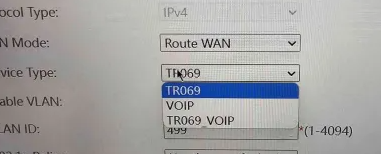 Settings for TIME 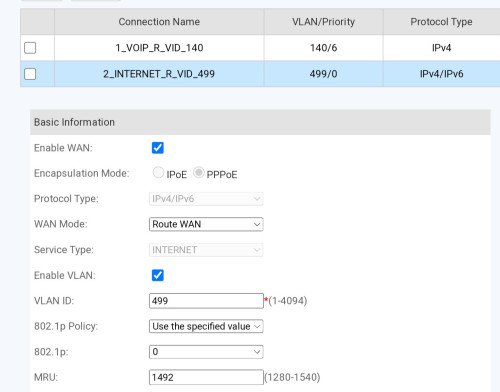 CORRECTION, I got the idea wrong IF you are using ONU+Router in a box You will need to setup VLAN for VOIP and Internet plus OLT serial and pwd However, if you are switching to ONU standalone Just setup the OLT serial and pwd VOIP is optional, if you need the phone And put your PPPOE credentials in the router Versions of the ONU should not matter Dumb me, everything is actually that simple This post has been edited by QuantumEdge: Jan 17 2024, 08:10 PM |
|
|
Jan 22 2024, 03:13 PM
|
|
Probation
5 posts Joined: May 2020
|
QUOTE(QuantumEdge @ Jan 17 2024, 01:54 PM) Received my Huawei HG8240H5 just now, tried to setup for time fiber For VOIP, we need to setup password also right? is it same like PPPoE pass since in hg8145X6 the pass is encrypted.Didnt expect the ONU is actually running on Unifi's firmware Hence the VLAN WAN mode is stuck on TR069, means 100% not supported by TIME (TIME is on INTERNET mode) Unless one could find the stock fimware for this ONU, it will only support Unifi or any ISP on TM infra Money down the drain... Unifi version of the ONU Settings for TIME CORRECTION, I got the idea wrong IF you are using ONU+Router in a box You will need to setup VLAN for VOIP and Internet plus OLT serial and pwd However, if you are switching to ONU standalone Just setup the OLT serial and pwd VOIP is optional, if you need the phone And put your PPPOE credentials in the router Versions of the ONU should not matter Dumb me, everything is actually that simple |
|
|
Jan 22 2024, 05:20 PM
Show posts by this member only | IPv6 | Post
#61
|
|
Senior Member
1,602 posts Joined: Jan 2016
|
QUOTE(fauzanmustaffa @ Jan 22 2024, 03:13 PM) For VOIP, we need to setup password also right? is it same like PPPoE pass since in hg8145X6 the pass is encrypted. VOIP is in IPoEUsing static ip address |
|
|
Jan 26 2024, 12:26 PM
Show posts by this member only | IPv6 | Post
#62
|
|
Senior Member
1,561 posts Joined: Feb 2006 From: Penang island
|
is this router not able to do any port forwarding? it seems like i added the port i wanted to forward and is not open when i check.
i added at IPv4 Port Mapping. i plan to change to a new router, is it possible if i can use these 2 huawei device and become like a mesh to my new router with other brands? |
|
|
Jan 26 2024, 02:50 PM
|
|
Senior Member
2,614 posts Joined: Nov 2020
|
QUOTE(intothefantasy @ Jan 26 2024, 12:26 PM) is this router not able to do any port forwarding? it seems like i added the port i wanted to forward and is not open when i check. which plan are you on? 100/500/1000?i added at IPv4 Port Mapping. i plan to change to a new router, is it possible if i can use these 2 huawei device and become like a mesh to my new router with other brands? |
|
|
Jan 26 2024, 04:59 PM
Show posts by this member only | IPv6 | Post
#64
|
|
Senior Member
1,561 posts Joined: Feb 2006 From: Penang island
|
QUOTE(PRSXFENG @ Jan 26 2024, 02:50 PM) which plan are you on? 100/500/1000? 500 mbps |
|
|
Jan 27 2024, 12:55 PM
Show posts by this member only | IPv6 | Post
#65
|
|
Senior Member
2,614 posts Joined: Nov 2020
|
QUOTE(intothefantasy @ Jan 26 2024, 04:59 PM) 500 mbps Hmm it should work since that plan has public IPBut it may be the router is buggy as well, I don't exactly recall where I read it, probably somewhere in the time fiber thread but the forum search function is broken right now |
|
|
Jan 27 2024, 01:08 PM
Show posts by this member only | IPv6 | Post
#66
|

Senior Member
7,540 posts Joined: Jun 2007 From: Kuala Lumpur 
|
QUOTE(slackinux @ Sep 28 2023, 11:11 AM) Hi, I would like to retreat my statement that Huawei Optixstar HG8145X6-10 not implementing 802.11k/v/r protocol. nice guide, i just key in the max value and testing now My previous test showed that my device didn't switch between SSID from main router and 2nd router due to default setting of the Cascade Link Threshold value is too low, i.e., 200kbps. Meaning that if the device's data transfer rate lower than 200kbps then it will switch to another SSID that is stronger. After I increased the cascade link threshold from 200kbps to 40000kbps, my device able to switch between main router and 2nd mesh unit's SSID seamlessly. Conclusion is Huawei Optixstar HG8145X6-10 is compliant to Easymesh and able to switch between SSID seamlessly.  |
|
|
Jan 29 2024, 02:20 PM
Show posts by this member only | IPv6 | Post
#67
|
|
Senior Member
7,540 posts Joined: Jun 2007 From: Kuala Lumpur
|

any one know what is the 3rd option for ? |
|
|
Feb 20 2024, 12:11 AM
Show posts by this member only | IPv6 | Post
#68
|
|
Junior Member
6 posts Joined: Jul 2019
|
Time just setup this Huawei Optixstar HG8145X6-10 at my condo but these bad wifi dead spots. Any recommendations for a good value and good performing wifi extender? Ideally 2.4 and 5ghz dual with log latency.
And something not too technical to setup.  |
|
|
Feb 20 2024, 10:49 AM
|
|
Junior Member
6 posts Joined: Jul 2019
|
New Time subscriber here.
I have one Huawei Optixstar HG8145X6-10 but the wifi range doesn't seem great so I have some wifi deadspots. Is anyone using a second HG8145X6-10 router for Mesh? if so, please share your thoughts and if you'd recommend this setup. thanks |
|
|
Feb 25 2024, 09:03 PM
|
|
Junior Member
72 posts Joined: Mar 2008 From: Kuala Lumpur
|
anybody have the telecomadmin password pls
|
|
|
Feb 26 2024, 08:36 PM
Show posts by this member only | IPv6 | Post
#71
|
|
Senior Member
2,614 posts Joined: Nov 2020
|
QUOTE(sam325 @ Feb 25 2024, 09:03 PM) anybody have the telecomadmin password pls refer tohttps://forum.lowyat.net/index.php?showtopi...ost&p=108905517 |
|
|
Feb 27 2024, 10:46 AM
|
|
All Stars
14,313 posts Joined: Jan 2011
|
QUOTE(Wombat0 @ Feb 20 2024, 10:49 AM) New Time subscriber here. the given huawei mesh wifi routers are just simply trash.... I have one Huawei Optixstar HG8145X6-10 but the wifi range doesn't seem great so I have some wifi deadspots. Is anyone using a second HG8145X6-10 router for Mesh? if so, please share your thoughts and if you'd recommend this setup. thanks it has poor coverage. even u use the second unit as mesh and u put the second unit super close to the main unit (parent node), u still get poor speed and high latency... if u have budget, please go for any tri-band mesh... even a wifi 5 tri-band mesh will be better than a wifi 6 dual-band mesh like the huawei one given by time. |
|
|
Feb 27 2024, 10:47 AM
|
|
All Stars
14,313 posts Joined: Jan 2011
|
QUOTE(Wombat0 @ Feb 20 2024, 12:11 AM) Time just setup this Huawei Optixstar HG8145X6-10 at my condo but these bad wifi dead spots. Any recommendations for a good value and good performing wifi extender? Ideally 2.4 and 5ghz dual with log latency. just buy any wifi 5 (if ur speed is 500Mbps and bleow) tri-band (if u are on budget) or just go straight for wifi 6 tri-band mesh it will be good for ur use case...And something not too technical to setup. |
|
|
Feb 27 2024, 02:21 PM
|

All Stars
15,192 posts Joined: Oct 2004
|
Does this router have resale value? I have two units wanna sell off.. haha
|
|
|
Feb 27 2024, 02:26 PM
Show posts by this member only | IPv6 | Post
#75
|
|
Senior Member
1,602 posts Joined: Jan 2016
|
QUOTE(jack2 @ Feb 27 2024, 02:21 PM) Does this router have resale value? I have two units wanna sell off.. haha It is really basic, so I'm guessing RM200 for two units?Try tossing it on carousell |
|
|
Feb 27 2024, 02:34 PM
|
|
All Stars
15,192 posts Joined: Oct 2004
|
QUOTE(QuantumEdge @ Feb 27 2024, 02:26 PM) It is really basic, so I'm guessing RM200 for two units? got people wanna buy meh? buy for what since fibre optic co is giving for free one.Try tossing it on carousell |
|
|
Mar 1 2024, 06:03 PM
|

Senior Member
3,864 posts Joined: Jun 2022
|
Just upgraded from the Huawei router to TPLINK AX72.
Download speed increase from about 240-260Mbps to 270Mbps to near 300Mbps. Upload speed from 160Mbps to 260++Mbps. My kid's laptop did much better at nearer spot (and newer hardware). Later i upgrade my PC to TPLink TXE75E Pcie Wifi card and test again. Mobile phone about same as before, coz old phone i guess...3 years+. |
|
|
Mar 1 2024, 11:44 PM
Show posts by this member only | IPv6 | Post
#78
|
|
All Stars
14,313 posts Joined: Jan 2011
|
QUOTE(jack2 @ Feb 27 2024, 02:34 PM) got people wanna buy meh? buy for what since fibre optic co is giving for free one. Very hard. I tried to sell my 2 x unifi free wifi 6 mesh also no one wants to buy. |
|
|
Mar 1 2024, 11:46 PM
Show posts by this member only | IPv6 | Post
#79
|
|
All Stars
14,313 posts Joined: Jan 2011
|
QUOTE(CommodoreAmiga @ Mar 1 2024, 06:03 PM) Just upgraded from the Huawei router to TPLINK AX72. Urs is tri-band or? Download speed increase from about 240-260Mbps to 270Mbps to near 300Mbps. Upload speed from 160Mbps to 260++Mbps. My kid's laptop did much better at nearer spot (and newer hardware). Later i upgrade my PC to TPLink TXE75E Pcie Wifi card and test again. Mobile phone about same as before, coz old phone i guess...3 years+. Anyway all third party brand wifi mesh will outperform the free mesh given by tm. |
|
|
Mar 2 2024, 08:21 AM
|
|
Senior Member
3,864 posts Joined: Jun 2022
|
QUOTE(westlife @ Mar 1 2024, 11:46 PM) Urs is tri-band or? Dual band AX72. I also discovered i have yet to update the driver for the USB Wifi dongle my PC in my room after that..Anyway all third party brand wifi mesh will outperform the free mesh given by tm.  Now it can reach even higher 300Mbps to 400Mbps...but this is done using speedtest.net in the browser...i have downloaded the speedtest windows app and it shows nearly max at 500Mbps/500Mbps....does this means i have wasted money to buy a new PCIE 6E Wifi card (yet to upgrade due the casing cannot fit).   This post has been edited by CommodoreAmiga: Mar 2 2024, 08:21 AM |
|
|
Mar 2 2024, 03:54 PM
Show posts by this member only | IPv6 | Post
#81
|
|
All Stars
14,313 posts Joined: Jan 2011
|
QUOTE(CommodoreAmiga @ Mar 2 2024, 08:21 AM) Dual band AX72. I also discovered i have yet to update the driver for the USB Wifi dongle my PC in my room after that.. technically all wifi 5 and above wifi products will be able to hit beyond 500Mbps no issue.Now it can reach even higher 300Mbps to 400Mbps...but this is done using speedtest.net in the browser...i have downloaded the speedtest windows app and it shows nearly max at 500Mbps/500Mbps....does this means i have wasted money to buy a new PCIE 6E Wifi card (yet to upgrade due the casing cannot fit). it is ur dual-band device that causes the lost of some bandwidth as one of ur 5Ghz band is shared for data transfer as well as the communication between the parent and child nodes... if it is tri-band, the speed should be consistent as it has additional 5Ghz band that is dedicated for communication between ndoes. |
|
|
Apr 6 2024, 10:12 AM
Show posts by this member only | IPv6 | Post
#82
|

Junior Member
84 posts Joined: Oct 2018
|
Hi. Any way tp change the Internet Access Mode from WiFi Repeater to Mesh?
And the connection from Gateway to Repeater - only 2.4G? Can it be switched to 5G? 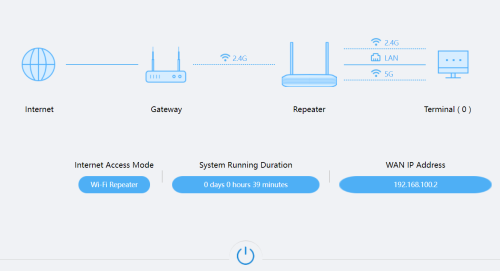 |
|
|
Apr 9 2024, 02:53 PM
|
|
Senior Member
663 posts Joined: Jan 2003
|
Hey all,
anyone have been facing issue with their TIME fibre where there's no internet for period of time. I'm using my own Deco m9 connected to TIME Modem. TIME won't be able to troubleshoot unless i use their router. There recommend me to subscribe another two years to get this Huawei HG8145X6 for free. I'm not sure changing the router helps. |
|
|
Apr 12 2024, 03:06 PM
|
|
Junior Member
502 posts Joined: Dec 2004
|
-delete-
This post has been edited by warrior: Apr 13 2024, 02:16 PM |
|
|
May 14 2024, 12:40 PM
|

Junior Member
60 posts Joined: May 2009
|
Hi All.
I have these two unit last year when TIME upgraded my bandwith from 300Mbps to 500Mbps. But I did not configure it back then. Nor as ONT or router/mesh. I still used the old ONT with my TP Link Deco router/mesh. But I want to try it now. one unit as the ONT with Wifi and the other one as AP/Mesh. But I failed to configure the ONT somehow. I have all the credentials and password. but it always failed saying the ONT failed authenticate to the OLT Service Provider. Can anyone share the steps on how to do it? Thanks in advance. |
|
|
May 14 2024, 03:14 PM
Show posts by this member only | IPv6 | Post
#86
|
|
Senior Member
2,614 posts Joined: Nov 2020
|
QUOTE(ulost16 @ May 14 2024, 12:40 PM) Hi All. what credentials do you have? PPPoE is not enough in this case, you also need the PLOAM password, probably have to copy from old oneI have these two unit last year when TIME upgraded my bandwith from 300Mbps to 500Mbps. But I did not configure it back then. Nor as ONT or router/mesh. I still used the old ONT with my TP Link Deco router/mesh. But I want to try it now. one unit as the ONT with Wifi and the other one as AP/Mesh. But I failed to configure the ONT somehow. I have all the credentials and password. but it always failed saying the ONT failed authenticate to the OLT Service Provider. Can anyone share the steps on how to do it? Thanks in advance. |
|
|
May 14 2024, 05:20 PM
|
|
Junior Member
60 posts Joined: May 2009
|
QUOTE(PRSXFENG @ May 14 2024, 03:14 PM) what credentials do you have? PPPoE is not enough in this case, you also need the PLOAM password, probably have to copy from old one I read from unifi thread, the PLOAM password is basically the ont superadmin password converted into HEX format. Is that correct?I just want to use one single 2in1 ont+router if possible. Save elctricity, less clutter. This post has been edited by ulost16: May 14 2024, 05:21 PM |
|
|
May 14 2024, 06:07 PM
Show posts by this member only | IPv6 | Post
#88
|
|
Junior Member
387 posts Joined: May 2019
|
QUOTE(ulost16 @ May 14 2024, 05:20 PM) I read from unifi thread, the PLOAM password is basically the ont superadmin password converted into HEX format. Is that correct? No it’s not. PLOAM password for time is the same as your PPPoE password. For maxis on TM infra, it’s [accountid]1.I just want to use one single 2in1 ont+router if possible. Save elctricity, less clutter. It’s different for all ISPs. ahrasis liked this post
|
|
|
May 15 2024, 07:50 AM
|
|
Junior Member
60 posts Joined: May 2009
|
QUOTE(ChenKaiWen @ May 14 2024, 06:07 PM) No it’s not. PLOAM password for time is the same as your PPPoE password. For maxis on TM infra, it’s [accountid]1. Thanks for sharing. It’s different for all ISPs. So have you tried it successfully? Btw, i also see ONU password which i have it. What is it for? |
|
|
May 15 2024, 08:35 AM
|
|
Junior Member
387 posts Joined: May 2019
|
QUOTE(ulost16 @ May 15 2024, 07:50 AM) Thanks for sharing. Yes I use my mesh node as my ONT now because I damaged the fibre port on it. Wdym by onu password?So have you tried it successfully? Btw, i also see ONU password which i have it. What is it for? |
|
|
Aug 30 2024, 12:19 AM
|
|
All Stars
10,429 posts Joined: Jan 2003 
|
Is it possible to access the router menu from internet? I can't find the option to enable it. As of now, cannot access the from the public IP of the device.
|
|
|
Aug 30 2024, 07:42 AM
Show posts by this member only | IPv6 | Post
#92
|
|
Senior Member
2,614 posts Joined: Nov 2020
|
QUOTE(abubin @ Aug 30 2024, 12:19 AM) Is it possible to access the router menu from internet? I can't find the option to enable it. As of now, cannot access the from the public IP of the device. please.... dont do that, that's a terrible security risk BladeRider88 liked this post
|
|
|
Aug 31 2024, 02:10 AM
|
|
All Stars
10,429 posts Joined: Jan 2003
|
QUOTE(PRSXFENG @ Aug 30 2024, 07:42 AM) please.... dont do that, that's a terrible security risk Sometimes I just need to remotely do some config. I will disable it after I am done. |
|
|
Aug 31 2024, 07:20 AM
Show posts by this member only | IPv6 | Post
#94
|
|
Junior Member
387 posts Joined: May 2019
|
QUOTE(abubin @ Aug 31 2024, 02:10 AM) Sometimes I just need to remotely do some config. I will disable it after I am done. Then I recommend setting up a VPN to your home using Tailscale etc |
|
|
Aug 31 2024, 11:46 PM
|
|
Senior Member
848 posts Joined: Feb 2005 From: everywhere, yet nowhere. 
|
QUOTE(abubin @ Aug 31 2024, 02:10 AM) Sometimes I just need to remotely do some config. I will disable it after I am done. if you really need to do this, either set up a vpn or ssh with passwordless/public key only login |
|
|
Oct 14 2024, 10:43 PM
Show posts by this member only | IPv6 | Post
#96
|
|
Junior Member
60 posts Joined: Apr 2007
|
Hi guys,
I just bought a HG8145X6-10 thinking to replace my old TIME WIFI 5 router. Can someone guide me through how to connect with the new router? I'm getting red light blinking on LOS after connected LAN 1 from modem to the new router. Not sure what configuration that I miss out  Thanks in advance! |
|
|
Oct 14 2024, 11:49 PM
Show posts by this member only | IPv6 | Post
#97
|
|
Senior Member
1,075 posts Joined: Oct 2022
|
QUOTE(abubin @ Aug 30 2024, 12:19 AM) Is it possible to access the router menu from internet? I can't find the option to enable it. As of now, cannot access the from the public IP of the device. QUOTE(PRSXFENG @ Aug 30 2024, 07:42 AM) please.... dont do that, that's a terrible security risk QUOTE(trix @ Aug 31 2024, 11:46 PM) if you really need to do this, either set up a vpn or ssh with passwordless/public key only login Asus router do this by default I think there is no risk |
|
|
Oct 15 2024, 08:01 AM
Show posts by this member only | IPv6 | Post
#98
|
|
Senior Member
2,614 posts Joined: Nov 2020
|
QUOTE(vapanel @ Oct 14 2024, 11:49 PM) Asus router do this by default Asus does this, and it is a terrible security riskI think there is no risk https://www.snbforums.com/threads/what-can-...-via-wan.62721/ |
|
|
Oct 15 2024, 08:56 AM
Show posts by this member only | IPv6 | Post
#99
|
|
Senior Member
1,075 posts Joined: Oct 2022
|
QUOTE(PRSXFENG @ Oct 15 2024, 08:01 AM) Asus does this, and it is a terrible security risk I am sorry I am a noob. Does the link means that if someone use app inside the house might accidentally exposed the Asus router to outside?https://www.snbforums.com/threads/what-can-...-via-wan.62721/ What if the router is AP only? The real PPPOE router is not exposed This post has been edited by vapanel: Oct 15 2024, 09:06 AM |
|
|
Oct 15 2024, 09:27 AM
Show posts by this member only | IPv6 | Post
#100
|
|
Senior Member
2,614 posts Joined: Nov 2020
|
QUOTE(vapanel @ Oct 15 2024, 08:56 AM) I am sorry I am a noob. Does the link means that if someone use app inside the house might accidentally exposed the Asus router to outside? AP is basically just using it for wifi, it doesn't handle all the routingWhat if the router is AP only? The real PPPOE router is not exposed the tldr is never forward the webui of your router to the public internet because someone will find it and attempt to breach into it |
|
|
Oct 15 2024, 09:41 AM
Show posts by this member only | IPv6 | Post
#101
|
|
Senior Member
1,075 posts Joined: Oct 2022
|
QUOTE(PRSXFENG @ Oct 15 2024, 09:27 AM) AP is basically just using it for wifi, it doesn't handle all the routing Thanks for the tips.the tldr is never forward the webui of your router to the public internet because someone will find it and attempt to breach into it Anyway I already exposed my NAS (using Synology quick connect ) and Asus AP using Asus ddns. Hopefully I am safe. I did enable firewall if that helps. Haha |
|
|
Nov 28 2024, 08:56 PM
|
|
Junior Member
72 posts Joined: Jul 2011
|
I recently purchased a used Huawei Optixstar HG8145X6 device from a TIME user, but I'm having trouble configuring it. When I try to enter PPPoE settings, it doesn't allow me to proceed. I contacted customer care, and they mentioned that the device's serial number is already registered to the previous owner, and it can't be used by another customer.
Is there any way to reset or reconfigure this device so it can be used as a modem+router? Any suggestions or advice would be greatly appreciated! |
|
|
Dec 20 2024, 06:26 PM
Show posts by this member only | IPv6 | Post
#103
|

Newbie
2 posts Joined: Feb 2010
|
QUOTE(QuantumEdge @ Jan 7 2024, 12:26 PM) username: telecomadmin You're the best. thanksss!password: TIMExxxx where xxxx is last 4 digit of main router's MAC address in capital letter |
|
|
Dec 20 2024, 07:14 PM
Show posts by this member only | IPv6 | Post
#104
|

Junior Member
495 posts Joined: Oct 2006 From: GombakVille
|
QUOTE(JooWeb @ Nov 28 2024, 08:56 PM) I recently purchased a used Huawei Optixstar HG8145X6 device from a TIME user, but I'm having trouble configuring it. When I try to enter PPPoE settings, it doesn't allow me to proceed. I contacted customer care, and they mentioned that the device's serial number is already registered to the previous owner, and it can't be used by another customer. Im thinking to replace my old modem into HG8145X6 since got wifi 6 but your situation makes me hold on the purchase for now.Is there any way to reset or reconfigure this device so it can be used as a modem+router? Any suggestions or advice would be greatly appreciated! |
|
|
Dec 26 2024, 02:10 PM
|
|
Newbie
47 posts Joined: Aug 2017
|
Anyone knows how to create ddns in this new router. Is ddns from dyn.com, dynu.com or dnsomatic even possible?
|
|
|
Dec 26 2024, 02:18 PM
|
|
Senior Member
2,614 posts Joined: Nov 2020
|
QUOTE(ahrasis @ Dec 26 2024, 02:10 PM) Anyone knows how to create ddns in this new router. Is ddns from dyn.com, dynu.com or dnsomatic even possible? (at least on older not -10 model, but should be the same)Advanced -> Application -> DDNS The options are: 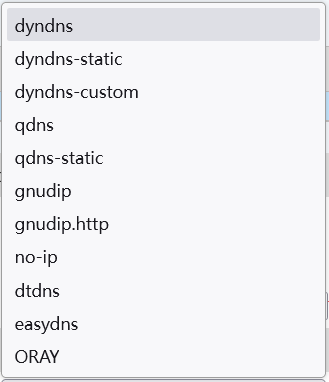 |
|
|
Jan 1 2025, 11:25 AM
Show posts by this member only | IPv6 | Post
#107
|

Junior Member
275 posts Joined: Jan 2003
|
Can anyone tell me if this Huawei optixstar hg8145x6-10 gpon can setup mesh network?
|
|
|
Jan 2 2025, 09:28 AM
Show posts by this member only | IPv6 | Post
#108
|
|
Senior Member
2,614 posts Joined: Nov 2020
|
QUOTE(oHkereD @ Jan 1 2025, 11:25 AM) Can anyone tell me if this Huawei optixstar hg8145x6-10 gpon can setup mesh network? I think can with the same models |
|
|
Jan 2 2025, 11:50 PM
Show posts by this member only | IPv6 | Post
#109
|
|
Junior Member
98 posts Joined: Sep 2011
|
Is there an option to create a Guest Wifi? A separate SSID for Guest, to prevent them for accessing my internal network?
I don't see such option available? Thanks. |
|
|
Jan 4 2025, 08:17 PM
Show posts by this member only | IPv6 | Post
#110
|
|
Junior Member
275 posts Joined: Jan 2003
|
QUOTE(PRSXFENG @ Jan 2 2025, 09:28 AM) I think can with the same models I have the Huawei Optixstar HG8145X6 as main routerHow to I setup Huawei Optixstar HG8145X6-10 as mesh? |
|
|
Jan 4 2025, 10:10 PM
Show posts by this member only | IPv6 | Post
#111
|
|
Senior Member
2,614 posts Joined: Nov 2020
|
QUOTE(oHkereD @ Jan 4 2025, 08:17 PM) I have the Huawei Optixstar HG8145X6 as main router you can try following this postHow to I setup Huawei Optixstar HG8145X6-10 as mesh? https://forum.lowyat.net/index.php?showtopi...ost&p=110257110 |
|
|
Aug 30 2025, 06:18 PM
Show posts by this member only | IPv6 | Post
#112
|
|
Newbie
47 posts Joined: Aug 2017
|
Is it possible to ssh or telnet to this ONT router? My ipv4 mapping was reset and TIME claimed that they did nothing to cause it, so I need to write a script to telnet or ssh to it and upload the backup config, just in case it happens again. I couldn't find any setting that can allow this nor that direct ssh and telnet works. Also TIME only guided the nomral browser login, which we all already knew. Any tips, hints or clues?
This post has been edited by ahrasis: Aug 30 2025, 06:20 PM |
| Change to: |  0.0799sec 0.0799sec
 0.61 0.61
 6 queries 6 queries
 GZIP Disabled GZIP Disabled
Time is now: 21st December 2025 - 05:26 AM |
 Quote
Quote