This post has been edited by davychoo: Jul 27 2023, 10:27 PM
Attached thumbnail(s)


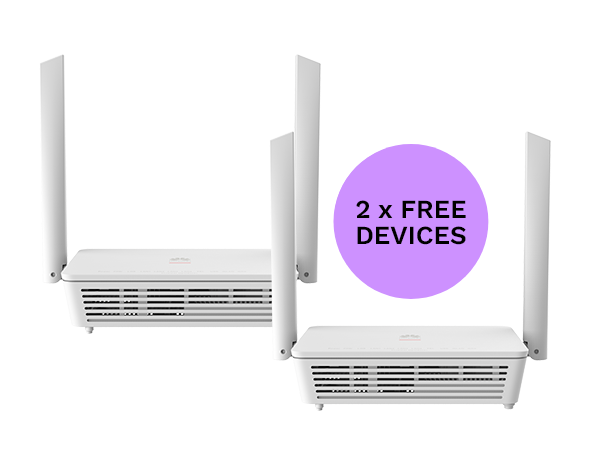
Huawei Optixstar HG8145X6-10 (Time Fiber) Newest!, Time Fiber latest router revealed
|
|
 Jul 27 2023, 10:23 PM, updated 3y ago Jul 27 2023, 10:23 PM, updated 3y ago
Show posts by this member only | Post
#1
|
 
Newbie
6 posts Joined: Dec 2014  
|
Just got today the latest model of Huawei Optixstar HG8145X6-10 from Time Fiber. Check online, and found no one using this. I guess I'm the first person who received this from Time Fiber. The outlook design and antenna is newer look.
This post has been edited by davychoo: Jul 27 2023, 10:27 PM Attached thumbnail(s)
|
|
|
|
|
|
Jul 27 2023, 11:03 PM
Show posts by this member only | IPv6 | Post
#2
|
|
Senior Member
5,650 posts Joined: Mar 2012
|
How's the speed and coverage
old » Click to show Spoiler - click again to hide... « This post has been edited by fireballs: Jul 27 2023, 11:15 PM |
|
|
Jul 28 2023, 12:40 PM
Show posts by this member only | IPv6 | Post
#3
|
|
Newbie
6 posts Joined: Dec 2014
|
So far so good.
QUOTE(fireballs @ Jul 27 2023, 11:03 PM) How's the speed and coverage old » Click to show Spoiler - click again to hide... «   Attached thumbnail(s) 
|
|
|
Jul 28 2023, 12:44 PM
Show posts by this member only | IPv6 | Post
#4
|
|
Newbie
6 posts Joined: Dec 2014
|
QUOTE(fireballs @ Jul 27 2023, 11:03 PM) How's the speed and coverage This is the result for next room, behind the wall.old » Click to show Spoiler - click again to hide... « 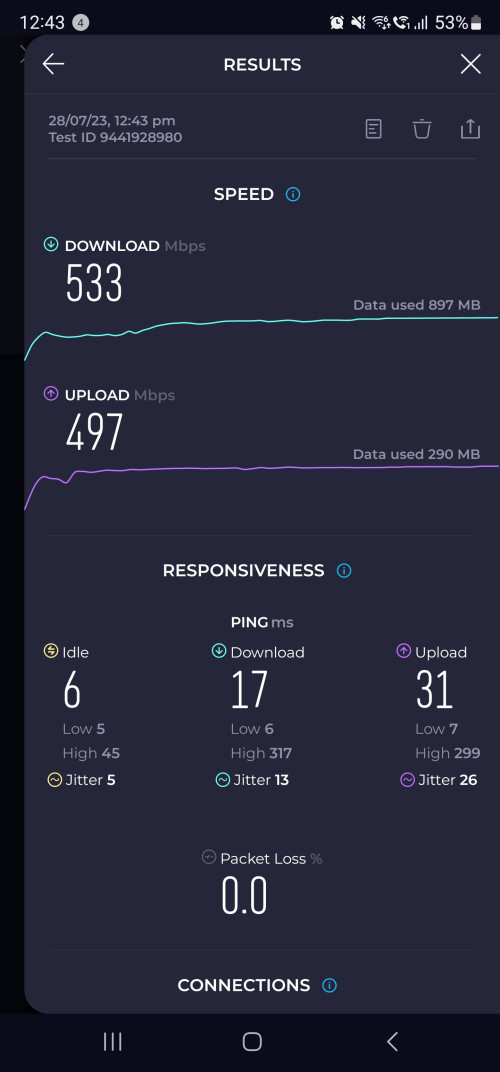 fireballs liked this post
|
|
|
Jul 28 2023, 02:05 PM
Show posts by this member only | Post
#5
|
|
Newbie
6 posts Joined: Dec 2014
|
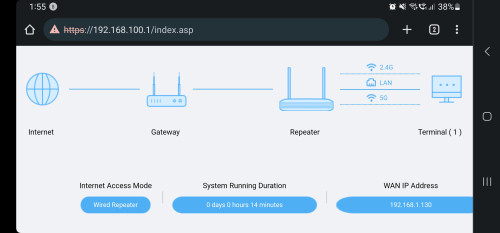 Wired backhaul supported, connected from my Tplink AX73 |
|
|
Aug 18 2023, 10:23 PM
Show posts by this member only | Post
#6
|

Senior Member
614 posts Joined: Sep 2009
|
did time offer it as a free replacement?
|
|
|
|
|
|
Aug 18 2023, 11:36 PM
Show posts by this member only | IPv6 | Post
#7
|
|
Junior Member
382 posts Joined: May 2019
|
QUOTE(I<3LYN @ Aug 18 2023, 10:23 PM) did time offer it as a free replacement? Not sure but it's given to all new install |
|
|
Aug 20 2023, 07:20 AM
Show posts by this member only | IPv6 | Post
#8
|

All Stars
14,299 posts Joined: Jan 2011
|
Looks nice. Always like Huawei mobile broadband devices.
Never use their wifi product yet though. |
|
|
Aug 20 2023, 07:25 AM
Show posts by this member only | IPv6 | Post
#9
|

Junior Member
661 posts Joined: Jan 2010
|
Somehow there's hardly any in depth reviews on units like this?
|
|
|
Sep 18 2023, 07:30 PM
Show posts by this member only | IPv6 | Post
#10
|

Senior Member
562 posts Joined: Dec 2008 From: WonderLand :D
|
Anyone knows how to disable the WPS?
The wps setting doesn't shows up in the wlan configuration page at 192.168.100.1/ |
|
|
Sep 23 2023, 10:21 PM
Show posts by this member only | IPv6 | Post
#11
|
|
Junior Member
407 posts Joined: Dec 2008
|
I just installed Time broadband 500mbps today.
Can Original Huawei HG8145X6-10 use ethernet backhaul to connect 2nd mesh unit? Anyone tried before ?  This post has been edited by slackinux: Sep 23 2023, 10:22 PM |
|
|
Sep 24 2023, 01:38 PM
Show posts by this member only | IPv6 | Post
#12
|
|
Probation
7 posts Joined: Oct 2020
|
QUOTE(slackinux @ Sep 23 2023, 10:21 PM) I just installed Time broadband 500mbps today. Yes you can, I am running this setup.Can Original Huawei HG8145X6-10 use ethernet backhaul to connect 2nd mesh unit? Anyone tried before ? Attached thumbnail(s) 
|
|
|
Sep 25 2023, 11:33 AM
Show posts by this member only | IPv6 | Post
#13
|
|
Junior Member
407 posts Joined: Dec 2008
|
QUOTE(superavenger @ Sep 24 2023, 01:38 PM) Yes you can, I am running this setup. The installer pair the 2nd router using wireless signal.Do I need to make any changes on the main router if I connect 2nd mesh unit via ethernet backhaul? |
|
|
|
|
|
Sep 26 2023, 10:58 AM
|

Senior Member
1,561 posts Joined: Feb 2006 From: Penang island
|
i got this pair of mesh/router but i plan to buy my own router and use 2 of them as mesh, just wondering how can i set them up?
|
|
|
Sep 26 2023, 12:04 PM
Show posts by this member only | IPv6 | Post
#15
|
|
Junior Member
407 posts Joined: Dec 2008
|
QUOTE(intothefantasy @ Sep 26 2023, 10:58 AM) i got this pair of mesh/router but i plan to buy my own router and use 2 of them as mesh, just wondering how can i set them up? I tested the 2nd unit so called mesh enabled router is actually not implementing wireless mesh protocol 802.11k/v/r.It is just a wireless AP or wired AP, i.e., if connected to main router via ethernet cable. I placed the main router at level 2 and placed the 2nd unit at level one. Both having same WiFi SSID. I connect to the level 1 SSID and go up to the level 2. My device forever attach to the level 1 SSID. It will never switch to level 2 SSID seamlessly like other mesh router. Unless you choose to connect level 2 SSID manually then only it connects to level 2 SSID. Therefore, the 2nd unit router given definitely not a mesh unit. It is actually acting as a wireless AP. TIME marketing team is misleading the subscriber with the term "mesh". In networking term, wireless mesh means a network element that implements 802.11k/v/r protocol. This post has been edited by slackinux: Sep 26 2023, 12:06 PM |
|
|
Sep 26 2023, 02:31 PM
|
|
Senior Member
1,561 posts Joined: Feb 2006 From: Penang island
|
QUOTE(slackinux @ Sep 26 2023, 12:04 PM) I tested the 2nd unit so called mesh enabled router is actually not implementing wireless mesh protocol 802.11k/v/r. thanks for the test, now i know how it wors lol but since got it why not use it, i am just now sure how to set them up only as wireless AP if i get new router. i guess just connect LAN cable to the fake "mesh" and access 192.168.100.1 to the page and setup as wireless ap then?It is just a wireless AP or wired AP, i.e., if connected to main router via ethernet cable. I placed the main router at level 2 and placed the 2nd unit at level one. Both having same WiFi SSID. I connect to the level 1 SSID and go up to the level 2. My device forever attach to the level 1 SSID. It will never switch to level 2 SSID seamlessly like other mesh router. Unless you choose to connect level 2 SSID manually then only it connects to level 2 SSID. Therefore, the 2nd unit router given definitely not a mesh unit. It is actually acting as a wireless AP. TIME marketing team is misleading the subscriber with the term "mesh". In networking term, wireless mesh means a network element that implements 802.11k/v/r protocol. |
|
|
Sep 28 2023, 11:11 AM
Show posts by this member only | IPv6 | Post
#17
|
|
Junior Member
407 posts Joined: Dec 2008
|
QUOTE(slackinux @ Sep 26 2023, 12:04 PM) I tested the 2nd unit so called mesh enabled router is actually not implementing wireless mesh protocol 802.11k/v/r. Hi, I would like to retreat my statement that Huawei Optixstar HG8145X6-10 not implementing 802.11k/v/r protocol.It is just a wireless AP or wired AP, i.e., if connected to main router via ethernet cable. I placed the main router at level 2 and placed the 2nd unit at level one. Both having same WiFi SSID. I connect to the level 1 SSID and go up to the level 2. My device forever attach to the level 1 SSID. It will never switch to level 2 SSID seamlessly like other mesh router. Unless you choose to connect level 2 SSID manually then only it connects to level 2 SSID. Therefore, the 2nd unit router given definitely not a mesh unit. It is actually acting as a wireless AP. TIME marketing team is misleading the subscriber with the term "mesh". In networking term, wireless mesh means a network element that implements 802.11k/v/r protocol. My previous test showed that my device didn't switch between SSID from main router and 2nd router due to default setting of the Cascade Link Threshold value is too low, i.e., 200kbps. Meaning that if the device's data transfer rate lower than 200kbps then it will switch to another SSID that is stronger. After I increased the cascade link threshold from 200kbps to 40000kbps, my device able to switch between main router and 2nd mesh unit's SSID seamlessly. Conclusion is Huawei Optixstar HG8145X6-10 is compliant to Easymesh and able to switch between SSID seamlessly.  |
|
|
Sep 30 2023, 12:58 PM
Show posts by this member only | IPv6 | Post
#18
|

Senior Member
2,260 posts Joined: Jan 2003 From: Centre of KL
|
QUOTE(slackinux @ Sep 28 2023, 11:11 AM) Hi, I would like to retreat my statement that Huawei Optixstar HG8145X6-10 not implementing 802.11k/v/r protocol. how do u access this advance page? My previous test showed that my device didn't switch between SSID from main router and 2nd router due to default setting of the Cascade Link Threshold value is too low, i.e., 200kbps. Meaning that if the device's data transfer rate lower than 200kbps then it will switch to another SSID that is stronger. After I increased the cascade link threshold from 200kbps to 40000kbps, my device able to switch between main router and 2nd mesh unit's SSID seamlessly. Conclusion is Huawei Optixstar HG8145X6-10 is compliant to Easymesh and able to switch between SSID seamlessly. i couldnt see this in my menu |
|
|
Sep 30 2023, 01:05 PM
Show posts by this member only | IPv6 | Post
#19
|
|
Junior Member
382 posts Joined: May 2019
|
QUOTE(lkm51 @ Sep 30 2023, 12:58 PM) how do u access this advance page? Same here. Could it be he has the password for superadmin?i couldnt see this in my menu |
|
|
Sep 30 2023, 07:42 PM
Show posts by this member only | IPv6 | Post
#20
|
|
Senior Member
2,611 posts Joined: Nov 2020
|
QUOTE(lkm51 @ Sep 30 2023, 12:58 PM) how do u access this advance page? For me on HG8145X6i couldnt see this in my menu Advanced -> WLAN -> Wi-Fi Coverage -> Wi-Fi Network Management button on the page under the first checkmark checked with normal admin password |
| Change to: |  0.1847sec 0.1847sec
 0.36 0.36
 6 queries 6 queries
 GZIP Disabled GZIP Disabled
Time is now: 15th December 2025 - 12:46 PM |
 Quote
Quote