Welcome Guest ( Log In | Register )

120 Pages « < 27 28 29 30 31 > » Bottom

Outline · [ Standard ] · Linear+

 U Home 5G

views
     
Subrex
post Oct 29 2023, 10:28 AM

New Member
*
Newbie
13 posts

Joined: Feb 2013


QUOTE(MegaThroned @ Oct 26 2023, 11:12 PM)
I use U home for almost 2 month. it seems sometimes Umobile restrict speed for ftp download (i use seedhost.eu). Ookla speedtest can get 1Gbps, but download speed only can reach around 8mbps. Not happened everyday, but i suspect they purposely restrict it. When I turn on VPN, download speed return to normal which is 1++MBps. If anyone facing the same issue, can share too.
Planning to switch to YES after this.
*
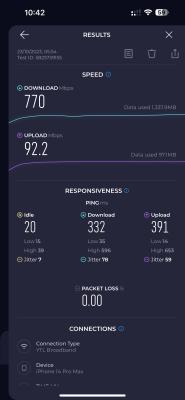
Yours is speed restrict, mine is apps, device restrict...hohoh...until now still figuring on how is this happen. When put in modem(2 modem that i mention in page 25), almost all the apps beside youtube, playstore, chrome, vpn unable to connect. But when i use portable wifi modem - Tenda 4G185 (huawei e5577-321 also have problem), i able to use it like normal. Now i just use tenda since it's the only modem that work. Although the guides and tips by expert in this forum doesn't help me solving my problem, but i've learn how to check and change band on my modem. I also having problem with this telco after 2 months using it. Bought it because of the affordable price and Uncapped speed even that my place only have 4g+ signal.

Edit: i also need vpn to bypass all the unuseable apps. On smart tv, vpn is the only way to able to open youtube. The connection straight get limit on my laptop. Its mind boggling.

This post has been edited by Subrex: Oct 29 2023, 10:38 AM
SUSlurkingaround
post Oct 29 2023, 12:28 PM

Rule of Law
*******
Senior Member
7,066 posts

Joined: Sep 2019
From: South Klang Valley suburb


QUOTE(MegaThroned @ Oct 26 2023, 11:12 PM)
I use U home for almost 2 month. it seems sometimes Umobile restrict speed for ftp download (i use seedhost.eu). Ookla speedtest can get 1Gbps, but download speed only can reach around 8mbps. Not happened everyday, but i suspect they purposely restrict it. When I turn on VPN, download speed return to normal which is 1++MBps. If anyone facing the same issue, can share too.
Planning to switch to YES after this.
*
.
AFAIK, U Home 5G is a Postpaid Broadband/modem-data plan, similar to Postpaid U38/U68/U98 phone (voice+data) plans, and the TnC for Postpaid plans restrict P2P and/or excessive data/bandwidth usage(eg FUP).
....... Bypassing such restriction by "illegally" using a VPN to use P2P and/or excessive data/bandwidth can be detected by U Mobile via it's Deep Packet Inspection software and may result in service suspension or termination, as per the TnC. Eg .......

https://www.taipeitimes.com/News/editorials...8/19/2003804951 - Sat, Aug 19, 2023 - China’s latest crackdown on VPNs software in Tibet = crackdown on Tibet residents using VPNs to bypass the CCP's Great FireWall of censorship.

Does YTL YES allow unrestricted P2P and/or excessive data/bandwidth usage(eg no FUP).? If it does allow, it's 4G/5G network is likely congested, resulting in slow download speed for most subscribers.
.

Note that celcos' mobile 4G/5G networks have limited bandwidth capacity, unlike telcos' Fibre networks, eg U Mobile has only 1.8Gbps(2X20MHz+2X20MHz+2X5MHz) for 4G and 1Gbps for 5G per cell tower to be shared by about 500 mobile subscribers/users; ... whereas TM Unifi Fibre has 10Gbps (10GPON tech) per Fibre cable to be shared by only about 40 subscribers/users in linked/terrace-homes or offices or condos.
....... Hence, TM Unifi Home Fibre can afford to not restrict P2P and or excessive data/bandwidth usage(eg no FUP); ... whereas TM Unifi Mobile cannot afford to do the same.
.

This post has been edited by lurkingaround: Oct 30 2023, 01:46 PM
SUSlurkingaround
post Oct 29 2023, 12:37 PM

Rule of Law
*******
Senior Member
7,066 posts

Joined: Sep 2019
From: South Klang Valley suburb


QUOTE(Subrex @ Oct 29 2023, 10:28 AM)
Yours is speed restrict, mine is apps, device restrict...hohoh...until now still figuring on how is this happen. When put in modem(2 modem that i mention in page 25), almost all the apps beside youtube, playstore, chrome, vpn unable to connect. But when i use portable wifi modem - Tenda 4G185 (huawei e5577-321 also have problem), i able to use it like normal. Now i just use tenda since it's the only modem that work. Although the guides and tips by expert in this forum doesn't help me solving my problem, but i've learn how to check and change band on my modem. I also having problem with this telco after 2 months using it. Bought it because of the affordable price and Uncapped speed even that my place only have 4g+ signal.

Edit: i also need vpn to bypass all the unuseable apps. On smart tv, vpn is the only way to able to open youtube. The connection straight get limit on my laptop. Its mind boggling.
*
.
Did you "illegally" use a VPN to bypass the P2P restriction or did you use excessive data/bandwidth daily or weekly or monthly before you were apps and device restricted by U Mobile.?

.
Note that the monthly FUP limit of 1000GB for U Home 5G may have been translated by U Mobile to an FUP limit of 240GB weekly and 33GB daily.
.

This post has been edited by lurkingaround: Oct 29 2023, 01:14 PM
Subrex
post Oct 29 2023, 11:49 PM

New Member
*
Newbie
13 posts

Joined: Feb 2013


QUOTE(lurkingaround @ Oct 29 2023, 12:37 PM)
.
Did you "illegally" use a VPN to bypass the P2P restriction or did you use excessive data/bandwidth daily or weekly or monthly before you were apps and device restricted by U Mobile.?

.
Note that the monthly FUP limit of 1000GB for U Home 5G may have been translated by U Mobile to an FUP limit of 240GB weekly and 33GB daily.
.
*
I only use vpn to read some raw manga to avoid some malicious pop up link from that website - klto9.com. Never reach the FUP since i also have other telco to switch to, only will use it connect when digi( infinite 150) is down at my area. Most of the time will use digi to connect to smart tv + laptop and umobile for tablet + phone. I only get those problem when i insert the simcard into zte MF286c, huawei b593s-516, xiaomi blackshark 1. The apps that cannot be access are Umobile, digi, all the games that i use to play or still play.

When i download and update those game in playstore, the speed is fast. But i cant even connect to the games when open the games, all of the games show "unable to connect to server". These are all the games that i tried : ygo master duel, monster hunter now, maplestory m, ragnarok mobile, ragnarok x, and more.

[url=https://pictr.com/image/EccEGj]
user posted image[/url]
One of the error show in game that i open
user posted image
The only device that able to function normally. The only problem its that it cannot connect to my laptop.....

My highest usage was last month - 100gb only.
BOTAK_WAI
post Oct 30 2023, 12:21 AM

Blow Water First Class
*******
Senior Member
4,154 posts

Joined: Jan 2003
From: Cheras, KL


QUOTE(Subrex @ Oct 29 2023, 11:49 PM)
I only use vpn to read some raw manga to avoid some malicious pop up link from that website - klto9.com. Never reach the FUP since i also have other telco to switch to, only will use it connect when digi( infinite 150) is down at my area. Most of the time will use digi to connect to smart tv + laptop and umobile for tablet + phone. I only get those problem when i insert the simcard into zte MF286c, huawei b593s-516, xiaomi blackshark 1. The apps that cannot be access are Umobile, digi, all the games that i use to play or still play.

When i download and update those game in playstore, the speed is fast. But i cant even connect to the games when open the games, all of the games show "unable to connect to server". These are all the games that i tried : ygo master duel, monster hunter now, maplestory m, ragnarok mobile, ragnarok x, and more.


user posted image

One of the error show in game that i open
user posted image
The only device that able to function normally. The only problem its that it cannot connect to my laptop.....

My highest usage was last month - 100gb only.
*
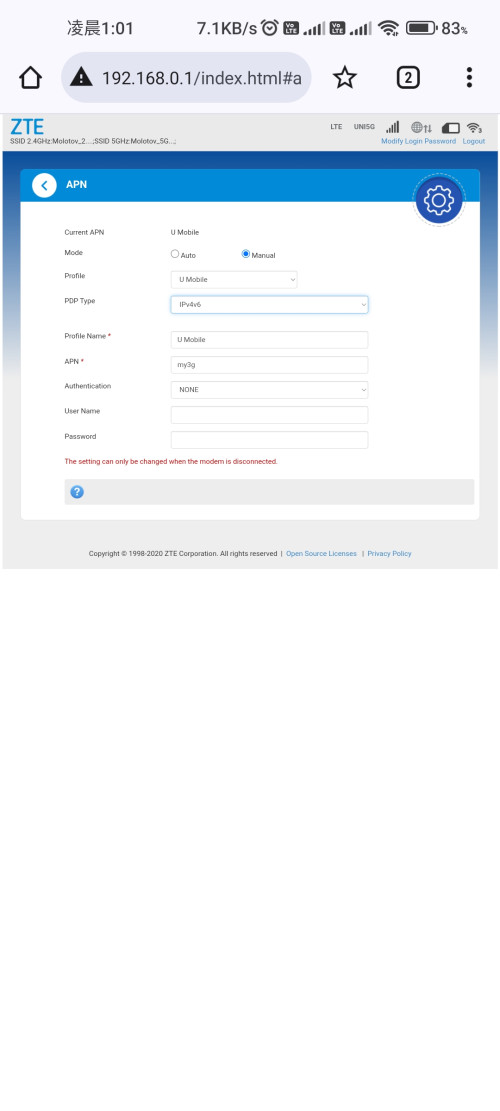
by the way, your apn setting there got choose both IPv4 & IPV6? try playing with that setting and see how it goes. (remember restart client device to refresh IPv6 address)
Subrex
post Oct 30 2023, 01:06 AM

New Member
*
Newbie
13 posts

Joined: Feb 2013


QUOTE(BOTAK_WAI @ Oct 30 2023, 12:21 AM)
by the way, your apn setting there got choose both IPv4 & IPV6? try playing with that setting and see how it goes. (remember restart client device to refresh IPv6 address)
*
I put on ipv4/v6 last time, right now unifi #bebas sim was insert in there. Will try it when im free.

user posted image

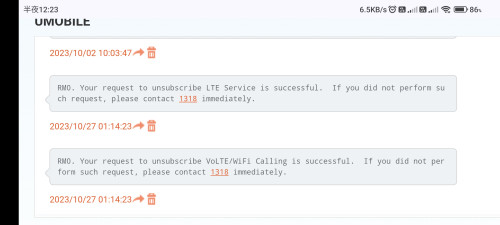
And i just shock that i suddenly get this messages because i didnt even request for it. How did this happen? Is my number a dupe number?

user posted image
w00t
post Oct 30 2023, 10:18 AM

Casual
***
Junior Member
318 posts

Joined: Jan 2003


QUOTE(Subrex @ Oct 30 2023, 01:06 AM)

And i just shock that i suddenly get this messages because i didnt even request for it. How did this happen? Is my number a dupe number?

user posted image
*
It happened to my Uhome 5G SIM too in my Zyxel NR5103e modem router, received those SMS messages which I never initiated on my end. Also noticed intermittent and unstable 5G connection lately happened since could be a coincidence or could be their system having issues or messed up? hmm.gif
Subrex
post Oct 30 2023, 12:43 PM

New Member
*
Newbie
13 posts

Joined: Feb 2013


QUOTE(w00t @ Oct 30 2023, 10:18 AM)
It happened to my Uhome 5G SIM too in my Zyxel NR5103e modem router, received those SMS messages which I never initiated on my end. Also noticed intermittent and unstable 5G connection lately happened since could be a coincidence or could be their system having issues or messed up? hmm.gif
*
I just call the customer service and she said that my sim still function like normal, they're just performing some service shut down for things that mention in the sms. So when you put the sim card in your phone, you will not able to do voLTE/wifi calling anymore. I didn't pay
much attention to what she says after know that my network are fine.
SUSlurkingaround
post Oct 30 2023, 01:35 PM

Rule of Law
*******
Senior Member
7,066 posts

Joined: Sep 2019
From: South Klang Valley suburb


QUOTE(Subrex @ Oct 29 2023, 11:49 PM)
I only use vpn to read some raw manga to avoid some malicious pop up link from that website - klto9.com. Never reach the FUP since i also have other telco to switch to, only will use it connect when digi( infinite 150) is down at my area. Most of the time will use digi to connect to smart tv + laptop and umobile for tablet + phone. I only get those problem when i insert the simcard into zte MF286c, huawei b593s-516, xiaomi blackshark 1. The apps that cannot be access are Umobile, digi, all the games that i use to play or still play.

When i download and update those game in playstore, the speed is fast. But i cant even connect to the games when open the games, all of the games show "unable to connect to server". These are all the games that i tried : ygo master duel, monster hunter now, maplestory m, ragnarok mobile, ragnarok x, and more.


user posted image

One of the error show in game that i open
user posted image
The only device that able to function normally. The only problem its that it cannot connect to my laptop.....

My highest usage was last month - 100gb only.
*
.
The problem could be your device or OS firewall or router settings (eg for ports). .......

https://www.quora.com/Why-cant-I-connect-to...se-the-internet - Why can't I connect to online games, but I can use the internet? - 4y ago - eg, .......
Marius Malmstrøm
Former Furniture Fitter (2005–2005) 5y

Probably has something to do with either your router or your firewall,
one of those are probably blocking the ports necessary for playing online games.

1. Try turning off your firewall and see if that helps,
if that is indeed the problem, either try allowing the game throught the firewall or try using another firewall.

2. If that doesn’t help, check out your router settings to see if it blocks certain ports, this page might help you view/change settings: How to Configure a Router


PS. Depending on what game you’re trying to play,
different ports needs to be opened,
if you’re trying to play World of Warcraft,
these ports needs to be open:
Configuring Router and Firewall Ports

.

Subrex
post Oct 30 2023, 05:02 PM

New Member
*
Newbie
13 posts

Joined: Feb 2013


QUOTE(lurkingaround @ Oct 30 2023, 01:35 PM)
.
The problem could be your device or OS firewall  or router settings (eg for ports). .......

https://www.quora.com/Why-cant-I-connect-to...se-the-internet - Why can't I connect to online games, but I can use the internet? - 4y ago - eg, .......
Marius Malmstrøm
Former Furniture Fitter (2005–2005) 5y

Probably has something to do with either your router or your firewall,
one of those are probably blocking the ports necessary for playing online games.

1. Try turning off your firewall and see if that helps,
if that is indeed the problem, either try allowing the game throught the firewall or try using another firewall.

2. If that doesn’t help, check out your router settings to see if it blocks certain ports, this page might help you view/change settings: How to Configure a Router
PS. Depending on what game you’re trying to play,
different ports needs to be opened,
if you’re trying to play World of Warcraft,
these ports needs to be open:
Configuring Router and Firewall Ports

.
*
The weird thing is that it was working like normal for 2 months. I bought it during July and plug in to huawei b593 and it's working fine, then the problem starts after tower been fixed because of network down due to tower problem at 23 sept.

Thanks for helping me finding some guides to fix the problem though, i will try it out tonight. If its still the same, i will bring it to my friend place at other town to see if it's the same or not during my off day.

UPDATE: Checked my firewall setting and all of the port filtering, port fowarding, URL filtering, UPnP, DMZ are disable. Also tried the changing ipv4 v6 and it didn't work.

This post has been edited by Subrex: Oct 31 2023, 06:38 AM
halimhamdan
post Oct 30 2023, 06:50 PM

New Member
*
Newbie
10 posts

Joined: Nov 2016
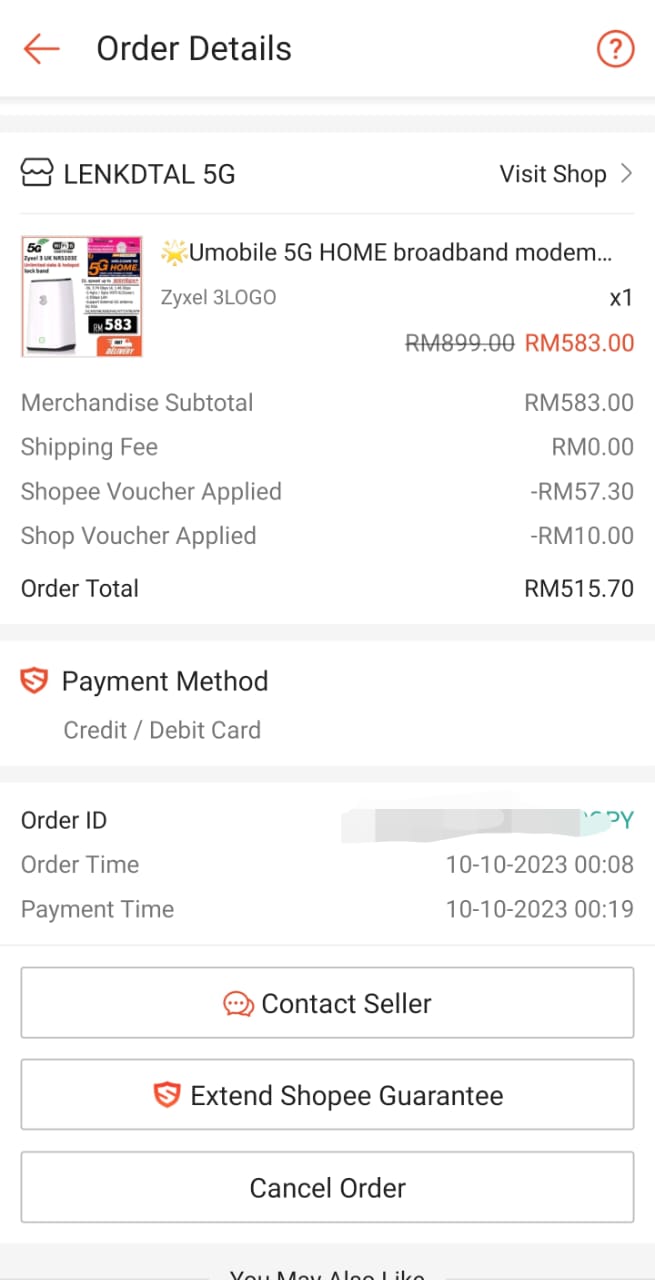
Hi currently moved to johor new area. Only got umobile 5g. What modem you guys recommend ya? I saw zyxel with 3 logo fron Lenkdtal is currently at 575. Is it worth it? Yeacomm from amirul is abit expensive. So looking for another option here. Thanks!
BOTAK_WAI
post Oct 30 2023, 08:04 PM

Blow Water First Class
*******
Senior Member
4,154 posts

Joined: Jan 2003
From: Cheras, KL


QUOTE(halimhamdan @ Oct 30 2023, 06:50 PM)
Hi currently moved to johor new area. Only got umobile 5g. What modem you guys recommend ya? I saw zyxel with 3 logo fron Lenkdtal is currently at 575. Is it worth it? Yeacomm from amirul is abit expensive. So looking for another option here. Thanks!
*
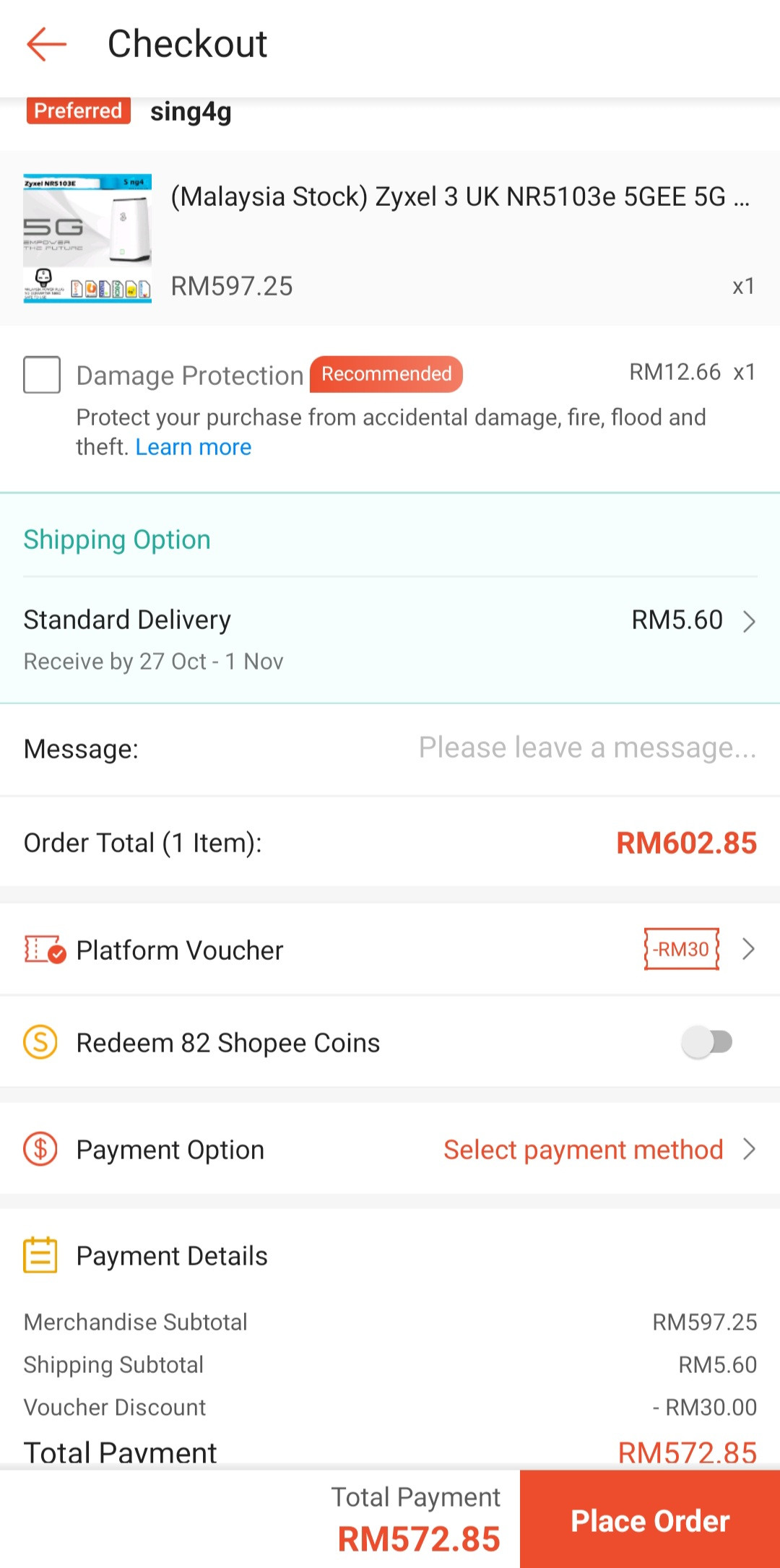
don't forget to use 10% rebate voucher from shopee

user posted image

since u are from johor area…can direct go to Sing4g shop je

user posted image

This post has been edited by BOTAK_WAI: Oct 30 2023, 08:08 PM
halimhamdan
post Oct 30 2023, 08:50 PM

New Member
*
Newbie
10 posts

Joined: Nov 2016
QUOTE(BOTAK_WAI @ Oct 30 2023, 08:04 PM)
don't forget to use 10% rebate voucher from shopee

user posted image

since u are from johor area…can direct go to Sing4g shop je

user posted image
*
Which one is recommended ya? The one from lendtkal good enough ?
haki
post Nov 3 2023, 07:41 PM

On my way
****
Senior Member
546 posts

Joined: Jul 2009
From: Shah ALam/Dungun - Haki Solution (0021307359-W)


QUOTE(waja7968 @ Aug 12 2023, 09:55 AM)
If not mistaken the other variant of 888 is using Qualcomm X62 modem.

5G CPE that using Qualcomm X65 or X70 modem very hard to find (may be too expansive and not exists yet)

I also noticed from forum Qualcomm X55 modem had issue, what issue I not sure, may be too hot ?
*
Im using zte mc889 x62.. performing quite well compare to H122 and yeacomm. I already tried all three modem..

haki
post Nov 3 2023, 08:50 PM

On my way
****
Senior Member
546 posts

Joined: Jul 2009
From: Shah ALam/Dungun - Haki Solution (0021307359-W)


QUOTE(GameSky @ Oct 15 2023, 04:17 PM)
any portable 5G mifi recommended for umobile uhome? Around 700-ish if possible ..

saw few good price olax 5G portable, but kinda suspicious on the battery if it's good enough
*
Im using ZTE MU5120.. good mifi..
netken
post Nov 3 2023, 08:53 PM

Regular
******
Senior Member
1,298 posts

Joined: May 2005
From: HamuHamu Chan DeKukuMalu
QUOTE(halimhamdan @ Oct 30 2023, 08:50 PM)
Which one is recommended ya? The one from lendtkal good enough ?
*
i got this from him - so far so goodAttached Image
seattlesound
post Nov 4 2023, 12:03 PM

New Member
*
Junior Member
26 posts

Joined: Jul 2013


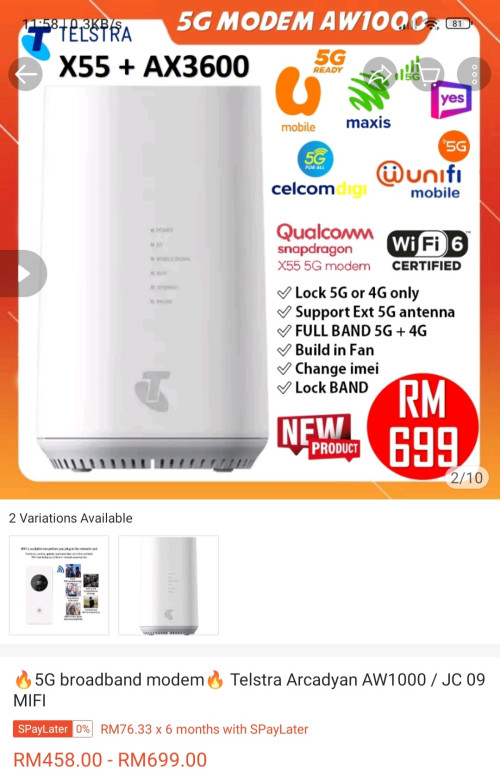
How bout this model? Is it good? No 5g error like some zyxel shenanigan?
https://shp.ee/zhkz2p5

user posted image
BOTAK_WAI
post Nov 4 2023, 04:36 PM

Blow Water First Class
*******
Senior Member
4,154 posts

Joined: Jan 2003
From: Cheras, KL


QUOTE(seattlesound @ Nov 4 2023, 12:03 PM)
How bout this model? Is it good? No 5g error like some zyxel shenanigan?
https://shp.ee/zhkz2p5

user posted image
*
u try and let us know.

Telstra is an aussy telco.
GameSky
post Nov 4 2023, 06:03 PM

Nyancat too much
*******
Senior Member
6,381 posts

Joined: Jun 2005
From: meow meow
bought the digitaliq 5g router with battery ..or another name is olax, kinda like oem branded.

so far not bad, battery is around 4-6 hours.. for speed not bad, it's x55 sd chipset.
cloudwan
post Nov 5 2023, 02:16 PM

- Knob -
*******
Senior Member
8,525 posts

Joined: Jan 2003
From: The Jungle Of Pahang


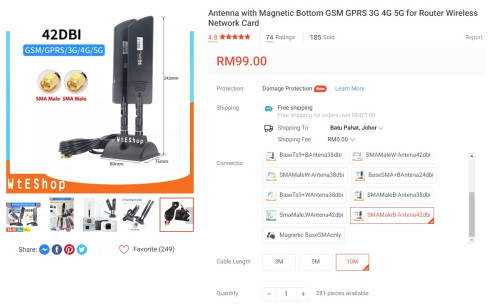
Guys any recommendation on external SMA antenna to use with Tplink NX510v to maybe boost the 5G signal?
I won't say the signal nowadays is bad but i do notice the speed are kinda stuck at around 350mbps coming from around 600mbps when i 1st used it hmm.gif hmm.gif

Would anything like this helps? Or are these kind of antenna is just a waste of money?

user posted image

120 Pages « < 27 28 29 30 31 > » Top
 

Change to:
| Lo-Fi Version
0.0213sec    0.65    6 queries    GZIP Disabled
Time is now: 9th December 2025 - 06:44 PM