Outline ·
[ Standard ] ·
Linear+
Need help to setup Linksys MX4200 wifi mesh
|
TSconanlky
|
 Jun 11 2023, 07:29 PM, updated 3y ago Jun 11 2023, 07:29 PM, updated 3y ago
|

|
Currently I’m using Unifi 100mbps and I managed get a Linksys MX4200 Wi-Fi mesh and trying to set it up as my router but facing an issue. It cannot detect internet from my modem after the modem reboot. During the whole setup the customer service from the Linksys said that I cannot get a proper IP address thus even I used my laptop hardwired connect to the modem also not able to online. When I come over low yat forum and look at a few post just wonder is it because of Unifi 100mbps only have dynamic IP address thus I cannot install any other Wi-Fi mesh as router which need a fixed IP address? Is it I’m just need to upgrade my package to 300mbps and above then able to use this Wi-Fi mesh as router?
|
|
|
|
|
|
go626201
|
Jun 11 2023, 07:35 PM
|
|
|
QUOTE(conanlky @ Jun 11 2023, 07:29 PM) Currently I’m using Unifi 100mbps and I managed get a Linksys MX4200 Wi-Fi mesh and trying to set it up as my router but facing an issue. It cannot detect internet from my modem after the modem reboot. During the whole setup the customer service from the Linksys said that I cannot get a proper IP address thus even I used my laptop hardwired connect to the modem also not able to online. When I come over low yat forum and look at a few post just wonder is it because of Unifi 100mbps only have dynamic IP address thus I cannot install any other Wi-Fi mesh as router which need a fixed IP address? Is it I’m just need to upgrade my package to 300mbps and above then able to use this Wi-Fi mesh as router? Have you set the vlan setting? |
|
|
|
|
|
TSconanlky
|
Jun 11 2023, 07:47 PM
|
|
|
QUOTE(go626201 @ Jun 11 2023, 07:35 PM) Have you set the vlan setting? I didn’t set the vlan setting, is it necessary? |
|
|
|
|
|
PRSXFENG
|
Jun 11 2023, 08:12 PM
|
|
|
QUOTE(conanlky @ Jun 11 2023, 07:47 PM) I didn’t set the vlan setting, is it necessary? it is you need to choose PPPoE mode and enter your Unifi credentials, and setup Unifi VLAN |
|
|
|
|
|
MyProLife
|
Jun 11 2023, 08:36 PM
|
|
|
Summon westlife another linksys mesh user here
You might be missing the VLAN settings, but it is necessary for Unifi based infra because it is a way to separate different kind of service
If you bought from local store, should have preset for unifi infra, if not, make a custom VLAN settings to match your unifi settings (id 500 and 600)
|
|
|
|
|
|
TSconanlky
|
Jun 12 2023, 01:56 AM
|
|
|
QUOTE(MyProLife @ Jun 11 2023, 08:36 PM) Summon westlife another linksys mesh user here You might be missing the VLAN settings, but it is necessary for Unifi based infra because it is a way to separate different kind of service If you bought from local store, should have preset for unifi infra, if not, make a custom VLAN settings to match your unifi settings (id 500 and 600) I bought it from Lazada Linksys page, I try to search under the connectivity under the router setting but the VLAN tab are not available. In the Linksys apps I have follow the step and I click on the VLAN setting after that it show please wait forever. Now ended up not sure where to set the VLAN. This post has been edited by conanlky: Jun 12 2023, 02:03 AM |
|
|
|
|
|
westlife
|
Jun 12 2023, 08:42 AM
|
|
|
QUOTE(conanlky @ Jun 12 2023, 01:56 AM) I bought it from Lazada Linksys page, I try to search under the connectivity under the router setting but the VLAN tab are not available. In the Linksys apps I have follow the step and I click on the VLAN setting after that it show please wait forever. Now ended up not sure where to set the VLAN. Under the app, can just find this. 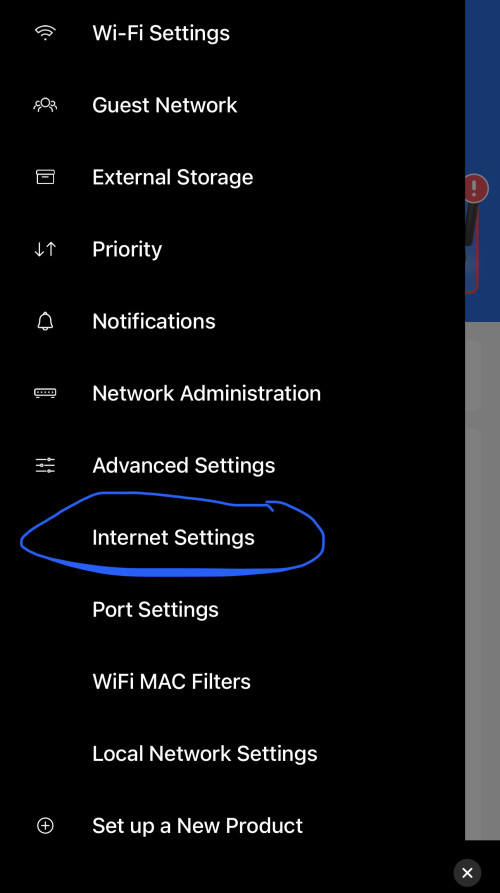 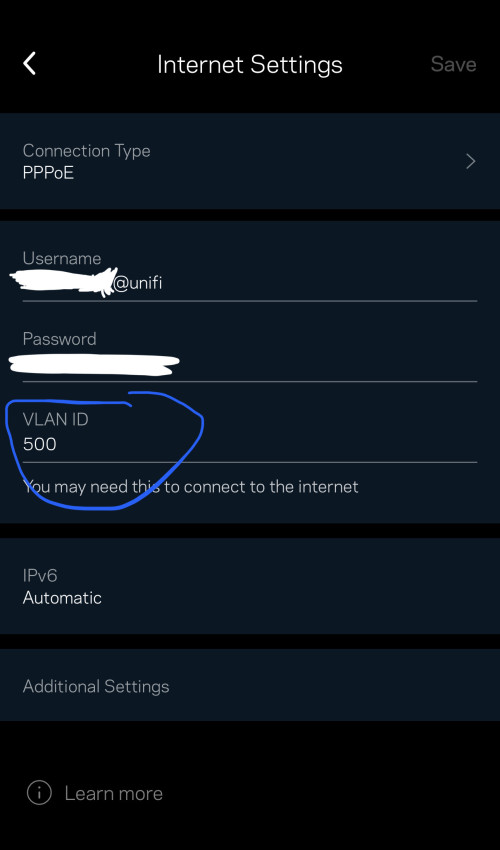 As long as ur mesh is MR or Velop series, sure should have this setting to change. |
|
|
|
|
|
TSconanlky
|
Jun 22 2023, 12:57 PM
|
|
|
Thanks for all the help. I'm able to setup the wifi mesh after get the information from you guys.
|
|
|
|
|
|
@POTUS
|
Jun 22 2023, 04:11 PM
|
Getting Started

|
Guys, does your velop wifi congested frequently? My 3 point need to restart at least once a week
|
|
|
|
|
|
westlife
|
Jul 29 2023, 05:59 PM
|
|
|
QUOTE(@POTUS @ Jun 22 2023, 04:11 PM) Guys, does your velop wifi congested frequently? My 3 point need to restart at least once a week not for me. i am using linksys MR8300 x 2 + 1 x velop. works very well. never restart before. 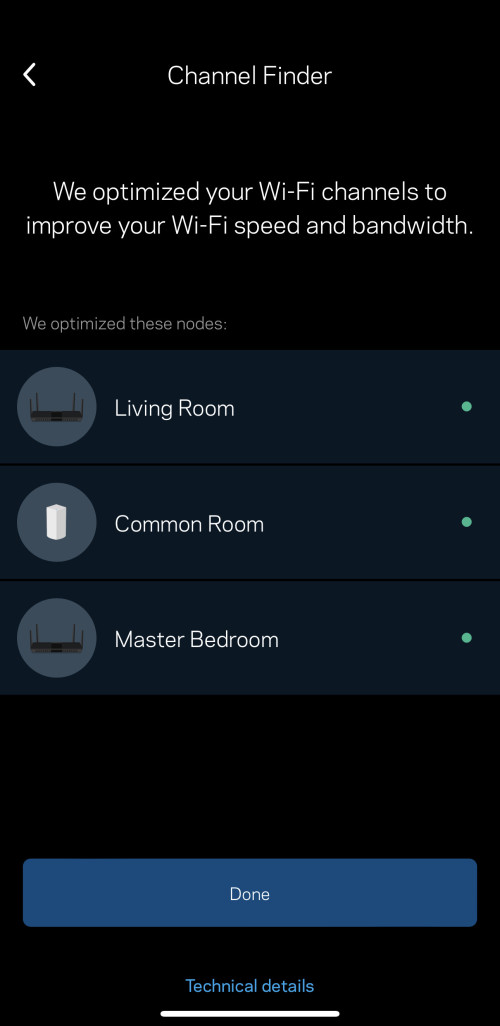 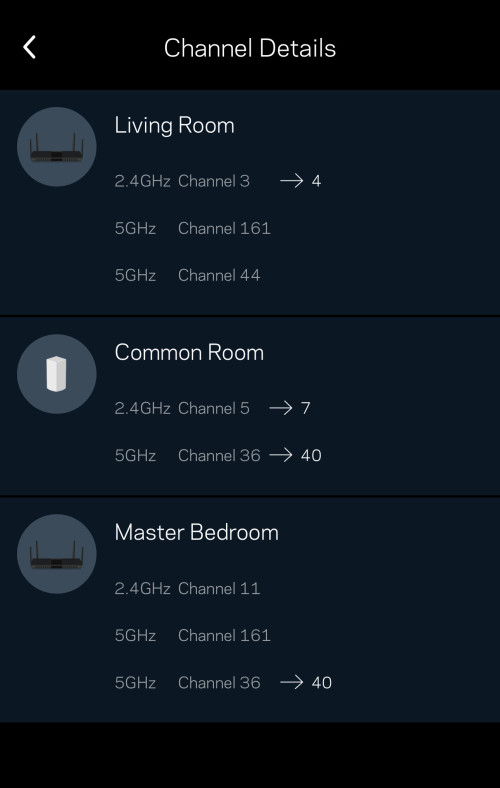 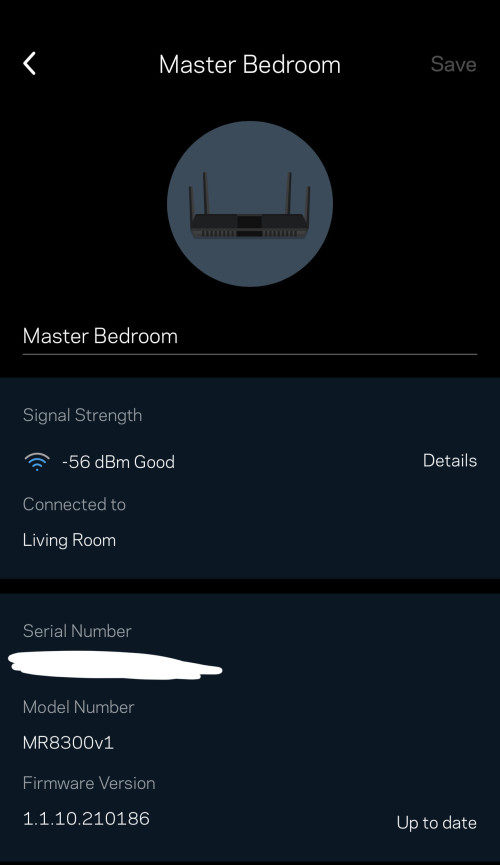   This post has been edited by westlife: Jul 29 2023, 05:59 PM This post has been edited by westlife: Jul 29 2023, 05:59 PM |
|
|
|
|



 Quote
Quote


 0.0175sec
 0.37
0.37
 5 queries
 GZIP Disabled