Welcome Guest ( Log In | Register )

Outline · [ Standard ] · Linear+

 How network DHCP works ?

views
     
TSnarf03
post Jun 10 2023, 03:54 PM, updated 3y ago

Look at all my stars!!
*******
Senior Member
4,547 posts

Joined: Dec 2004
From: Metro Prima, Kuala Lumpur, Malaysia, Earth, Sol


I know DHCP supposed to provide ip to machines, but need to know how they handle when things dont go well.

ie
1) do DHCP communicate with each other ? assuming many DHCP in the network with the same setting, will they fight or work together ?
2) multiple DHCP in a network, what will happen when a new machine come in ? get ip from a random DHCP ? any idea which 1 get priority?
3) if a machine already used a fixed ip, but that fixed ip is in dynamic ip address range, will that IP get offered ?
SUSRich Dad
post Jun 10 2023, 03:57 PM

New Member
*
Junior Member
27 posts

Joined: Feb 2022
From: Knowhere


Go bek to skool.
pijat_xx
post Jun 10 2023, 03:59 PM

Getting Started
**
Junior Member
94 posts

Joined: Jun 2008
Depends on your configuration.. 1 network only got 1 dhcp server.. if you want to make a fail over or split brain dhcp configuration then u will need 2 dhcp server configure. Most modern network already have vlan configure. Each vlan will have their own network setting configure in the dhcp server.
acbc
post Jun 10 2023, 04:00 PM

Look at all my stars!!
*******
Senior Member
9,050 posts

Joined: Jan 2003
DHCP is not smart. Most of the time will cause IP conflicts if not configured properly.

1. Communication is between router and client only.

2. Priority will be randomly if 2 DHCP servers exists on the same LAN.

3. U will need to reserve fixed IPs in the DHCP config first. On some router, need to set DHCP ranges first.
neuromancerx
post Jun 10 2023, 04:13 PM

Enthusiast
*****
Junior Member
879 posts

Joined: Jan 2007
QUOTE(narf03 @ Jun 10 2023, 03:54 PM)
I know DHCP supposed to provide ip to machines, but need to know how they handle when things dont go well.

ie
1) do DHCP communicate with each other ? assuming many DHCP in the network with the same setting, will they fight or work together ?
2) multiple DHCP in a network, what will happen when a new machine come in ? get ip from a random DHCP ? any idea which 1 get priority?
3) if a machine already used a fixed ip, but that fixed ip is in dynamic ip address range, will that IP get offered ?
*
1. Yes if they are part of cluster. No if they are independent from each other
2. Client will use the first DHCP OFFER information that it get.
3. Depends. Some DHCP server have the option to check (usually using ping) if that IP is being use in the network before it offer that ip.
Roadwarrior1337
post Jun 10 2023, 04:15 PM

Enthusiast
*****
Junior Member
979 posts

Joined: Jan 2022
QUOTE(neuromancerx @ Jun 10 2023, 04:13 PM)
1. Yes if they are part of cluster. No if they are independent from each other
2. Client will use the first DHCP OFFER information that it get.
3. Depends. Some DHCP server have the option to check (usually using ping) if that IP is being use in the network before it offer that ip.
*
No3 is incorrect. Dhcp server will register the machines and IPs it has assigned to so it doesn’t assign the same ip to a different machine. All machine record will be registered into the dhcp table
soonwai
post Jun 11 2023, 01:58 AM


********
All Stars
11,459 posts

Joined: Oct 2007
From: KL


QUOTE(narf03 @ Jun 10 2023, 03:54 PM)
I know DHCP supposed to provide ip to machines, but need to know how they handle when things dont go well.

ie
1) do DHCP communicate with each other ? assuming many DHCP in the network with the same setting, will they fight or work together ?
2) multiple DHCP in a network, what will happen when a new machine come in ? get ip from a random DHCP ? any idea which 1 get priority?
3) if a machine already used a fixed ip, but that fixed ip is in dynamic ip address range, will that IP get offered ?
*
1) No, they won't communicate with each other. You should only have one DHCP server in a network (subnet or vlan.)
2) It'll get an assignment from one of the many DHCP servers. You can detect and block rogue DHCP servers on the router and managed switches.
3) No, the machine won't be offered an IP address since it didn't ask for one. The router can be configured to ignore the fixed IP machine (static ARP and ARP learning off.)
3) I think it will but you should get a warning on the DHCP server. Unsure what happens after that, perhaps it will offer another IP.

Bonus: Fire the idiot who repeatedly plugs his Asus from the house into your network.

Update to 3):
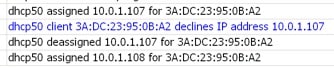
I set my Mac mini to fixed IP 10.0.1.107
...and the next address that my router's DHCP server will issue to 10.0.1.107.
This is what happens when I connect my iPhone on DHCP auto.
user posted image
Router is oblivious and issues .107 but the iPhone rejects the used addresss, declines and the router offers another one.
Had to try this out. Either I forgot or they didn't teach this in skool.

QUOTE(Rich Dad @ Jun 10 2023, 03:57 PM)
Go bek to skool.
*
Here: https://forum.lowyat.net/Kopitiam
Don't come back.

This post has been edited by soonwai: Jun 11 2023, 03:46 AM
neuromancerx
post Jun 11 2023, 07:42 PM

Enthusiast
*****
Junior Member
879 posts

Joined: Jan 2007
QUOTE(Roadwarrior1337 @ Jun 10 2023, 04:15 PM)
No3 is incorrect. Dhcp server will register the machines and IPs it has assigned to so it doesn’t assign the same ip to a different machine. All machine record will be registered into the dhcp table
*
We are taking about a client that manually configured their static ip using DHCP pool range. I know MS DHCP had the conflict detection option.

https://www.msnoob.com/enable-address-confl...hcp-server.html
dcheah
post Jun 21 2023, 05:15 PM

OldSkool
******
Senior Member
1,459 posts

Joined: Jan 2005
From: Kajang


QUOTE(narf03 @ Jun 10 2023, 03:54 PM)
I know DHCP supposed to provide ip to machines, but need to know how they handle when things dont go well.

ie
1) do DHCP communicate with each other ? assuming many DHCP in the network with the same setting, will they fight or work together ?
2) multiple DHCP in a network, what will happen when a new machine come in ? get ip from a random DHCP ? any idea which 1 get priority?
3) if a machine already used a fixed ip, but that fixed ip is in dynamic ip address range, will that IP get offered ?
*
There are few methods available to setup a network with DHCP available, lets focus on just 2 methods.

Method # A (DHCP Server from Router)

1) NO, Router's DHCP will not communicate with each other and will cause IP address conflicts. If you have multiple routers with DHCP enabled then your Clients will use the NEAREST/FASTEST DHCP router to get an IP address.

If Router#1 have DHCP range --> 192.168.0.1~254 -----> Your Clients will get that IP range.
If Router#2 have the same DHCP range in Router#1, your Clients might get the same IP range thus causing IP address conflicts among devices.

Think of it as 2 person have the same Serial Number of a Concert ticket with the same seat... rclxub.gif

By having multiple DHCP Router in the same network will also causes bandwidth issues, as DHCP's protocol is using UDP and DHCP is always broadcasting in the network and having multiple DHCP will also causes traffic congestions in the network.


2) If you have multiple routers with DHCP enabled then your Clients will use the NEAREST/FASTEST DHCP router to get an IP address. Router's DHCP doesn't have the features to configure priority. Whichever Router DHCP response the request for an IP address... that device will get its IP address from.


3) YES, if a computer have manual Static IP address configured and that IP address was also in the same range of the DHCP then the chances of IP address conflict is high. It is always recommended not have a Static IP address in the same range of DHCP.


Suggestions:

a) Always ensure there is only a single DHCP Server in the network.

b) Ensure the DHCP range only covers what is needed, if your house only have 10 devices and maybe you allows your visitors/friends to use the WiFi/Internet; then configure the range to 20 addresses.

c) Always leave the first 10 address empty and the last 10 address empty, not in DHCP range.
---> Example:

---> Router's IP address is = 192.168.0.1
---> DHCP Start address must be at = 192.168.0.10
---> DHCP End address must be at = 192.168.0.30

With the above example, you will have at least 20 addresses available for 20 devices.

If you need further explanation or wanted to know about Method #2 (DHCP Server with Microsoft Windows Server), then just let me know...

Hope this explains and helps. cool2.gif


Change to:
| Lo-Fi Version
0.0169sec    0.95    5 queries    GZIP Disabled
Time is now: 21st December 2025 - 02:04 PM