


 Jun 2 2023, 09:36 PM, updated 3y ago


Specifications
*CPU: Intel® Alder Lake-N100 Processor (12th Gen); 4 Cores, 4 Threads, Base: 0.8GHz, Max Turbo Frequency: 3.4Ghz, 6MB Intel® Smart Cache; Turbo Power: 25W.
*GPU: Intel® Arc & Iris® Xe Graphics Supported; Max Dynamic Frequency: 750MHz, Triple 4KUHD@60Hz Monitors via 2x HDMI & USB-C; HDR Supported too.
*RAM: Optional 8/16GB 'Crucial' Single Channel DDR5 4800MHz; Supports up to 16GB.
*Sound: Senary Audio (Audio, Voice, Speech) with Windows Sonic for Headphones support.
*Storage: 512GB PCIe 3.0 x4 M.2 NVMe SSD Preinstalled; Supports additional 2.5" 7mm HDD/SDD up to 2TB; Maximum read/write speed of 3500MB/s.
*Colors: Navy Blue / Pearl White / Millennial Grey / Senior Grey. My review unit is the Navy Blue option.
*Operating System: Genuine Microsoft Windows 11 Pro 64 Bit Pre-installed
*Wireless Connections: Intel Wi-Fi 6 AX101; Bluetooth 5.2
*Cooling: Patented Heat sink + Dual-Fans design
*Dimensions (HxWxD): 39mm X 124mm X 113mm
*Weight: 321g
*Ports*
***3 USB Type-A 3.2
***1x CLR CMOS or RTC Key
***1x 3.5mm Audio (HP & Mic)
***1x Power (Output 12V 3A [36W])
***2x 2.5Gbps Ethernet (Intel i225-v)
***2x HDMI V2.0; Max Res: 4K@60Hz per port.
***1x 10Gbps USB Type-C which supports DisplayPort Alt Mode
*Box Contents*
***2x HDMI Cables (Average length and a short one for Monitor mounting)
***1X 36W Power Adapter (EU/US/UK/JP)
***1x Multilingual User Manual
***1x Vesa Mounting Bracket & Screws
From the above specs, we see that the EQ12 has 1 less USB Type-A port but gains an arguably more versatile USB Type-C port. It's also slightly wider and longer than the Mini S12 Pro. Lastly, Beelink's infographics below suggests an 87% performance increase between the DDR4 3200MHz stick present in the Mini S12 Pro and the DDR5 4800MHz stick in this S12. One might wonder why this wasn't labeled the "Pro" model and the other just the EQ12? you know for simplicity sakes....
 Well, that is because there's an EQ12 Pro variant where an Intel Core i3-N305 processor is used instead. This review is based on the EQ12.

Build Quality
The EQ12's exterior is made primarily from differently textured lightweight ABS plastic. And similarly like the Mini S12 Pro, we've got high gloss, acrylic lenses, and even a laser faceted bit on the top giving it a "more expensive" look. In typical Beelink fashion, you still have 4 rubber stops, one at each edge to prevent sliding around on even the sleekest table surface. You'll also have the silicone puller tab that helps pull the bottom plate off, no prying tool leaving marks needed. On the front, the red power button houses a single status LED that glows white when powered on.
Box & Hardware Images
» Click to show Spoiler - click again to hide... «


Before we move on to some benchmark scores, here are the System default information, some installed updates, and build information. The last image is where I'm fully updated.
System Default, Updates, & Build Information
Basically, it shipped with Windows 11 Pro V21H2, Build 22000.918 and I updated it to V21H2 Build 22000.2003. I kept checking up till tonight and Windows update still refuses to provide the more recent V22H2 Build 22621.1702. Unsure why but reckon given time, it'll get pushed to it eventually or a future version installed. OOTB, we had 437GB of usable SSD storage which got reduced to 424GB after all Windows updates and some key software are installed. No games. Increasing storage shouldn't be an issue as you can install an additional 2.5" 7mm HDD/SDD up to 2TB.
» Click to show Spoiler - click again to hide... «
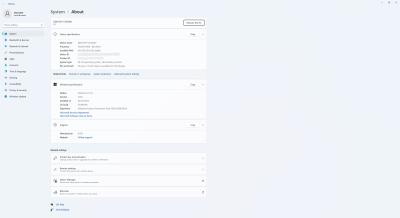


Edit V22H2 got pushed so all's good.
» Click to show Spoiler - click again to hide... «

Some default BIOS Settings [Tweak with caution]
» Click to show Spoiler - click again to hide... «


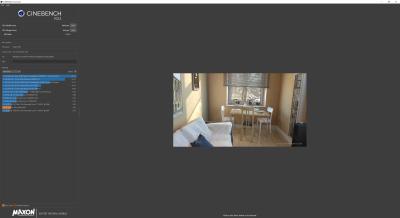
Onto some Benchmarking numbers; SSD Information, & R/W Speeds. All this time the EQ12 is connected via HDMI (USB-C works too) to a single Lenovo L32p-30 4K Monitor and runs at 4K@60Hz resolution. Left BIOS settings as stock, no GPU or CPU overclocks either.
» Click to show Spoiler - click again to hide... «

HWiNFO
» Click to show Spoiler - click again to hide... «

Crystal Disk Info
» Click to show Spoiler - click again to hide... «

Cinebench R23 Single & Multi-Core
» Click to show Spoiler - click again to hide... «


UNIGINE: Superposition
» Click to show Spoiler - click again to hide... «


RealBench
» Click to show Spoiler - click again to hide... «

Web Browser Performance (Microsoft Edge)
» Click to show Spoiler - click again to hide... «


SSD Speeds; Crystal Disk Mark Software
Image 1 is NVMe SSD Test Peak Performance; Image 2 tests NVMe Real World Performance; Image 3 tests Samsung Fit USB3.0 Flash Drive Peak Performance.
» Click to show Spoiler - click again to hide... «


LAN & Internet Speedtest
Unfortunately, at this time I'm still in the middle of upgrading my home broadband speeds and no 2.5Gbps ethernet equipped router here. However, the EQ12 has 2x 2.5Gbps Ethernet (Intel i225-v) ports and according to CNX-Software, both Ethernet ports performed as expected with downloads averaging 2.37Gb/s and upload averaging 2.34 Gb/s.
» Click to show Spoiler - click again to hide... «


Media Playback
The EQ12 with its hardware accelerated AV1 decoding support (important for transcoding too..Plex Server users rejoice!) handled all my test files with ease, right up to the 1.4GB 4K UHD 400Mbps Level 6.1 Main10 HEVC Jellyfish video bitrate test file. It smoothly played this while I continued web browsing & simultaneously played a 4K video on YouTube. Switching fine between the windowed and fullscreen modes.
» Click to show Spoiler - click again to hide... «


Power Consumption
Intel's 12th Gen Alder Lake-N100 low power figures hold true here. I was able to notice under 7Wwhile in idle mode (not sleeping) and about 34W while running RealBench's 15 minutes Stress Test. Max temperature recorded hovered around 55 - 65C, topping out at 81C. Fans handled it all like a champ, very silent and temp cooled down within a few minutes of the stress test's completion. Speaking about sleeping mode, something to note is the rear USB ports support always on feature, while the front ones do not.
» Click to show Spoiler - click again to hide... «


Conclusion
Just like the Beelink Mini S12 Pro, the Beelink EQ12 does not disappoint. With its processor offering a base TDP of just 6W, you get a silent, low power consuming device that can easily handle the majority of your home & office needs and can be left to run 24/7 as a DIY NAS or Plex server. Especially if you map those 2GbE ethernet ports properly. Else, you can fall back on 600Mbps Wi-Fi 6 support. This computer is suitable for browsing, multimedia playback with VLC or KODI, office applications, editing applications and very light 3D games. I've used this over several days, left it running idle overnight, etc and honestly everything just works. Wrote and formatted this entire review on this machine.

Purchase Links
Official Beelink Website (Ships Worldwide); Current Promo ($20 or $60 Off) expires June 30th.
SocMed URLs
For more information, please pay attention to this space. I'd like to thank Beelink for providing this review unit. They are viewing the results at the same time as you are. As usual, fellow forummers, do feel free to comment below should you require further specific information, or a test done on the Beelink EQ12 Mini PC. Let me know, I'll be glad to assist.

This post has been edited by voncrane: Jun 2 2023, 10:01 PM
 Quote
Quote


 0.0270sec
 1.09
1.09
 6 queries
 GZIP Disabled