Welcome Guest ( Log In | Register )

Outline · [ Standard ] · Linear+

C How does C/C++ store integer in binary file?, Endianness in x86

views
     
TSTullamarine
post May 24 2023, 08:07 AM, updated 3y ago

Getting Started
**
Validating
163 posts

Joined: Apr 2020
The C code writes two integer to a binary file called "integer.bin".

CODE
#include <stdio.h>

int main()
{
   int i;
   int j;
   FILE *fptr;

fptr = fopen("C:\\Users\\BOO\\Projects\\integer.bin","wb");
i=0x1234;
j=0x12345678;
   putw(i,fptr);
   putw(j,fptr);
   fclose(fptr);
 
   return 0;
}


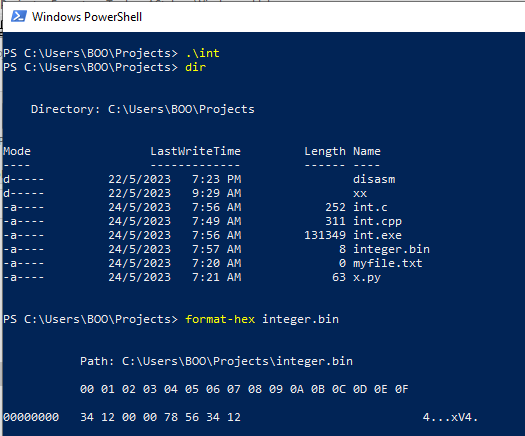
I use format-hex cmd-let in PowerShell to hexdump the 8-byte "integer.bin".

The results is quite awkward, for 0x1234, it is " 34 12 00 00", but for 0x12345678, the "34 12" is not on the left-hand size, it is becoming as "78 56 34 12"..... No wonder I pening, pening kepala rclxub.gif when doing my disassembler (passing the 32-bit integer as 64-bit parameter).
user posted image

Can someone know explain? Are you also new to this?

By the way, there is no way to save integer to file in Python, either text or byte mode only, means have to convert number to string then save to file, in Python.
jibpek
post May 24 2023, 08:13 AM

Enthusiast
*****
Junior Member
710 posts

Joined: Jul 2012
x86 is little endian.

Lower order of a byte stored in lower address space.

It has been a long debate between little or big endian, but I found little endian makes more sense. Because we can easily read a 64bits / 32 bits data without even knowing their size from the same address space.
cytyler
post May 24 2023, 08:16 AM

Casual
***
Junior Member
399 posts

Joined: Nov 2014
For 0x1234:

In memory, the least significant byte is 34, and the most significant byte is 12.
When written to the file in binary format, the bytes are written in little-endian order.
Therefore, the hexdump shows 34 12 00 00, with the least significant byte 34 appearing first.

For 0x12345678:

In memory, the least significant byte is 78, and the most significant byte is 12.
When written to the file in binary format, the bytes are written in little-endian order.
Therefore, the hexdump shows 78 56 34 12, with the least significant byte 78 appearing first.


--

To save int only can save to text, binary

This post has been edited by cytyler: May 24 2023, 08:18 AM
anakkk
post May 24 2023, 08:22 AM

Look at all my stars!!
*******
Senior Member
2,120 posts

Joined: Apr 2013
walao, still got people play with c/c++? I know those who are good at C and C++ already above 40
TSTullamarine
post May 24 2023, 08:23 AM

Getting Started
**
Validating
163 posts

Joined: Apr 2020
QUOTE(jibpek @ May 24 2023, 08:13 AM)
x86 is little endian.

Lower order of a byte stored in lower address space.

It has been a long debate between little or big endian, but I found little endian makes more sense. Because we can easily read a 64bits / 32 bits data without even knowing their size from the same address space.
*
QUOTE(cytyler @ May 24 2023, 08:16 AM)
For 0x1234:

In memory, the least significant byte is 34, and the most significant byte is 12.
When written to the file in binary format, the bytes are written in little-endian order.
Therefore, the hexdump shows 34 12 00 00, with the least significant byte 34 appearing first.

For 0x12345678:

In memory, the least significant byte is 78, and the most significant byte is 12.
When written to the file in binary format, the bytes are written in little-endian order.
Therefore, the hexdump shows 78 56 34 12, with the least significant byte 78 appearing first.
--

To save int only can save to text, binary
*
Thanks to both for you reply. Some how I cannot make my C code work to write 64-bit integer to file.

Can you show how this long integer will be store in binary file: 0x0000001234567890

Or demonstrate any number in 64-bit integer, preferably with leading zero.

Thanks once again!

This post has been edited by Tullamarine: May 24 2023, 08:24 AM
TSTullamarine
post May 24 2023, 08:27 AM

Getting Started
**
Validating
163 posts

Joined: Apr 2020
QUOTE(anakkk @ May 24 2023, 08:22 AM)
walao, still got people play with c/c++? I know those who are good at C and C++ already above 40
*
I just show example by modifying a bit from tutorial code only, I do C#, not C/C++, hehe.

@WongGei is good in C++. Last time I and my colleague used Symbian C++ in early 2000, yes, we are old already, in our 40s.
cytyler
post May 24 2023, 08:28 AM

Casual
***
Junior Member
399 posts

Joined: Nov 2014
QUOTE(Tullamarine @ May 24 2023, 08:23 AM)
Thanks to both for you reply. Some how I cannot make my C code work to write 64-bit integer to file.

Can you show how this long integer will be store in binary file: 0x0000001234567890

Or demonstrate any number in 64-bit integer, preferably with leading zero.

Thanks once again!
*
#include <stdio.h>

int main()
{
unsigned long long long_integer = 0x0000001234567890;
FILE *fptr;

fptr = fopen("C:\\Users\\BOO\\Projects\\integer.bin", "wb");


fwrite(&long_integer, sizeof(unsigned long long), 1, fptr);

fclose(fptr);

return 0;
}

jibpek
post May 24 2023, 08:29 AM

Enthusiast
*****
Junior Member
710 posts

Joined: Jul 2012
QUOTE(Tullamarine @ May 24 2023, 08:23 AM)
Thanks to both for you reply. Some how I cannot make my C code work to write 64-bit integer to file.

Can you show how this long integer will be store in binary file: 0x0000001234567890

Or demonstrate any number in 64-bit integer, preferably with leading zero.

Thanks once again!
*
Run your C++ code in a big endian CPU like PowerPC

Or use the Big Endian directive __BIG_ENDIAN
anakkk
post May 24 2023, 08:31 AM

Look at all my stars!!
*******
Senior Member
2,120 posts

Joined: Apr 2013
QUOTE(Tullamarine @ May 24 2023, 08:27 AM)
I just show example by modifying a bit from tutorial code only, I do C#, not C/C++, hehe.

@WongGei is good in C++. Last time I and my colleague used Symbian C++ in early 2000, yes, we are old already, in our 40s.
*
nice, I learn C too but not talented with programming, hard to get all the things connected, gave up and become hardware guy :X
TSTullamarine
post May 24 2023, 08:37 AM

Getting Started
**
Validating
163 posts

Joined: Apr 2020
QUOTE(cytyler @ May 24 2023, 08:28 AM)
#include <stdio.h>

int main()
{
    unsigned long long long_integer = 0x0000001234567890;
    FILE *fptr;

    fptr = fopen("C:\\Users\\BOO\\Projects\\integer.bin", "wb");
    fwrite(&long_integer, sizeof(unsigned long long), 1, fptr);

    fclose(fptr);

    return 0;
}
*
Thanks for the brilliant code.

I got this output:
user posted image

I think @jibpek is right, lower order byte at lower address.


QUOTE(jibpek @ May 24 2023, 08:29 AM)
Run your C++ code in a big endian CPU like PowerPC

Or use the Big Endian directive __BIG_ENDIAN
*
That will be a nice discovery. But I don't have any big endian CPU.

BTW, I think you're right about this:

x86 is little endian.

Lower order of a byte stored in lower address space.


Thanks!

jibpek
post May 24 2023, 08:40 AM

Enthusiast
*****
Junior Member
710 posts

Joined: Jul 2012
QUOTE(Tullamarine @ May 24 2023, 08:37 AM)
Thanks for the brilliant code.

I got this output:
user posted image

I think @jibpek is right, lower order byte at lower address.
That will be a nice discovery. But I don't have any big endian CPU.

BTW, I think you're right about this:

x86 is little endian.

Lower order of a byte stored in lower address space.


Thanks!
*
Sorry I didn't read your question properly earlier, and didn't answer properly as well.

Your intentions is not about writing in big or little endian. You only would like to write the 64bits integer.

Besides, the processor directive given earlier is only to determine the endian, not to write in particular order.

Generating code against the CPU architecture will have huge performance impact.
TSTullamarine
post May 24 2023, 08:40 AM

Getting Started
**
Validating
163 posts

Joined: Apr 2020
It is good to ask questions, not only sharing my limited knowledge.

There are many teachers / sifu here who know better than me. Without asking, I won't know so many know answer to difficult question.

Thanks all.
flashang
post May 24 2023, 08:52 AM

Casual
***
Junior Member
355 posts

Joined: Aug 2021


QUOTE(Tullamarine @ May 24 2023, 08:40 AM)
It is good to ask questions, not only sharing my limited knowledge.

There are many teachers / sifu here who know better than me. Without asking, I won't know so many know answer to difficult question.

Thanks all.
*
IMHO, most of the info should be able to find from computer architecture theories.

smile.gif


tboxmy
post Jun 13 2023, 06:49 PM

Casual
***
Junior Member
478 posts

Joined: Oct 2006


Such an interesting questing. Allow me to share some info and a suggestion.

1. 64 bit unsigned integer or uint64 minimum value = 0 and max (2^64)-1
2. format-hex tool is available in MS Windows Power tools to display input as hexadecimal values.
3. The solution requires saving data as binary, and looks like another app will pick it up.
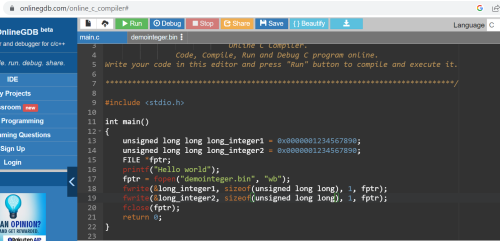
4. Without a C compiler at hand, can imagine how little endian will result, Better still, accessed compiler at https://www.onlinegdb.com/online_c_compiler#

Suggestion:
1. Store the integer in a fixed length to allow consistency of value retrieval
2. Working on top of code by @ cytyler, storing of values can be demonstrated

CODE

#include <stdio.h>

int main()
{
   unsigned long long long_integer1 = 0x0000001234567890;
   unsigned long long long_integer2 = 0x0000001234567890;
   FILE *fptr;
   printf("Hello world");
   fptr = fopen("demointeger.bin", "wb");
   fwrite(&long_integer1, sizeof(unsigned long long), 1, fptr);
   fwrite(&long_integer2, sizeof(unsigned long long), 1, fptr);
   fclose(fptr);
   return 0;
}


Output

CODE

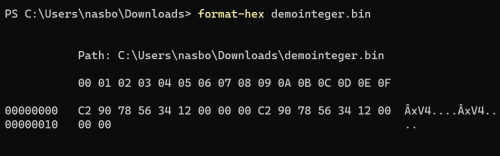
C2 90 78 56 34 12 00 00 00 C2 90 78 56 34 12 00
00 00


Hope it helps.

user posted image

user posted image
KLKS
post Jun 14 2023, 06:04 PM

Getting Started
**
Junior Member
292 posts

Joined: Jan 2003


an unsigned long long is 8 bytes, where did the 0xC2 come from?
flashang
post Jun 14 2023, 10:02 PM

Casual
***
Junior Member
355 posts

Joined: Aug 2021


QUOTE(KLKS @ Jun 14 2023, 06:04 PM)
an unsigned long long is 8 bytes, where did the 0xC2 come from?
*
This is the result from @tboxmy code :

demointeger.bin (16 bytes)

90 78 56 34 12 00 00 00 90 78 56 34 12 00 00 00

Don't know why (and how) to get the different result.

smile.gif


FlierMate
post Jun 15 2023, 05:20 PM

On my way
****
Validating
543 posts

Joined: Nov 2020
tboxmy
tboxmy
post Jun 16 2023, 06:20 PM

Casual
***
Junior Member
478 posts

Joined: Oct 2006


QUOTE(flashang @ Jun 14 2023, 10:02 PM)
This is the result from @tboxmy code :

demointeger.bin (16 bytes)

90 78 56 34 12 00 00 00 90 78 56 34 12 00 00 00

Don't know why (and how) to get the different result.

smile.gif
*
user posted image

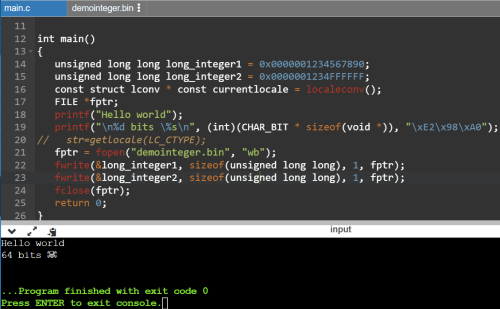
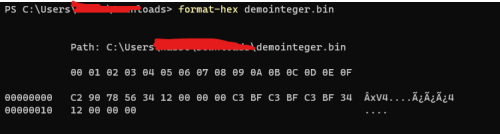
1. I dont have a PC with C compilers anymore...sigh! The online Compiler in use is https://www.onlinegdb.com/online_c_compiler# where I suspect it compiles to UTF.
2. When compile with LANG or LC_ALL default on Linux would be LANG=C. However, where LANG=en_US.UTF-8 then the hex values will differ as what I have shown. LC_TYPE value is connected too, need to check if you plan to use utf8 (which is widely used on global wide applications).
3. If you execute/run this a.out or binary, it should display the unicode as shown in attachment.
4. The unicode should display as shown by E2 98 A0, where you can refer at https://www.utf8-chartable.de/unicode-utf8-...rt=9728&names=-

CODE

#include <limits.h>
#include <locale.h>
#include <stdio.h>

int main()
{
  unsigned long long long_integer1 = 0x0000001234567890;
  unsigned long long long_integer2 = 0x0000001234FFFFFF;
  const struct lconv * const currentlocale = localeconv();
  FILE *fptr;
  printf("Hello world");
  printf("\n%d bits \%s\n", (int)(CHAR_BIT * sizeof(void *)), "\xE2\x98\xA0");
//   str=getlocale(LC_CTYPE);
  fptr = fopen("demointeger.bin", "wb");
  fwrite(&long_integer1, sizeof(unsigned long long), 1, fptr);
  fwrite(&long_integer2, sizeof(unsigned long long), 1, fptr);
  fclose(fptr);
  return 0;
}


Lots of this is just off my mind. Do read up for actual reasons.

This post has been edited by tboxmy: Jun 16 2023, 06:35 PM
tboxmy
post Jun 16 2023, 06:25 PM

Casual
***
Junior Member
478 posts

Joined: Oct 2006


user posted image

Using the online hex viewer, https://www.scadacore.com/tools/programming...-hex-converter/

Attached is the output, and how that would have shown 0x0000001234567890 in its utf-8 instead of ansi ascii.
Hope that helps.

This post has been edited by tboxmy: Jun 17 2023, 09:43 PM
flashang
post Jun 17 2023, 09:53 AM

Casual
***
Junior Member
355 posts

Joined: Aug 2021


QUOTE(tboxmy @ Jun 16 2023, 06:25 PM)
user posted image

Using the online hex viewer, https://www.scadacore.com/tools/programming...-hex-converter/

Attached is the output, and how that would have shown 0x0000001234567890 in its utf-8 instead of ansi.
Hope that helps.
*
after read carefully, is the format-hex add additional characters.

The first line should be the "original hex" and follow by formatted hex / text.

The demointeger.bin should be 16 bytes.

This online hex viewer show the file content :

HexEd.it - Browser-based Online and Offline Hex Editing
https://hexed.it/

smile.gif


2 Pages  1 2 >Top
 

Change to:
| Lo-Fi Version
0.0210sec    0.41    5 queries    GZIP Disabled
Time is now: 24th December 2025 - 01:14 AM