Yes, enjoy outstanding range with ultra-fast transfer rate! This is the best TUF WiFi Router yet. Meet ASUS TUF Gaming AX6000 Dual Band WiFi 6 Gaming Router. Excellent build quality with sturdy plastic housing. Powerful 2.0 GHz quad-core processor and ultra-wide coverage with AiMesh. Comes with 4×4 connections with 160 MHz bandwidth. Mobile Game Mode for a lag-free, low-latency mobile gaming experience. Dual 2.5G ports and 4 Gigabit LAN with link aggregation. USB 3.0 port for all your devices. And large heatsink inside the body to cool down everything…
In short, TUF Gaming AX6000 is one of the best yet budget dual band WiFi 6 gaming routers from Asus. Outstanding range with superior speed. Highly recommended! Interested? Get yours at Lazada or Shopee.
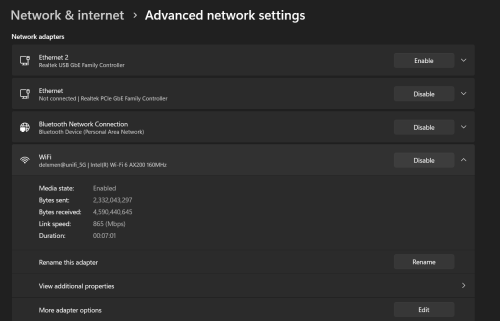
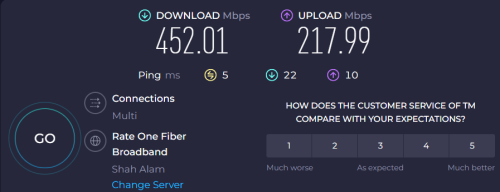
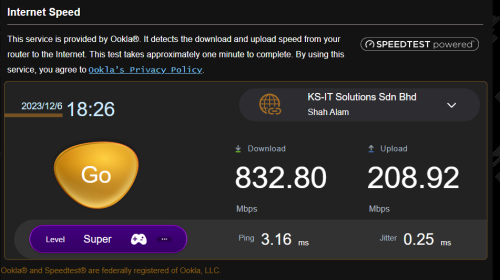
I've bought this router, but the wifi speed 5Ghz is not meet my expectations. My unifi speed 800mbps plan. With the LAN cable , I'm able to get 800mbps solid, but through wifi just manage to get 300-450mbps testing close to the router. There 20++ IOT devices connect to the router. I have disable smart connect and enable adaptive Qos. But the speed still same. Run the 5Ghz signal to 160hz frequency & play around with channel result the same thing. Hmmmm....so I'm not sure which settings should I change in order to get better speed. Appreciate if someone can help.
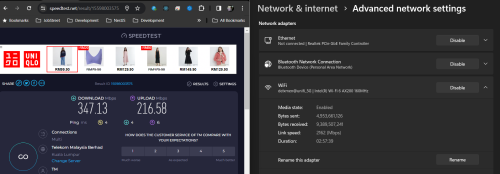
Nope, my BTU directly connect to the router TUF-AX6000. Refer the speed test and the network speed shown. It's connect 5Ghz network not 2.4Ghz.
You are getting 2.2G link speed now. So connection is okay but the speed is not. Please check with ASUS support in this case. It should get max speed 800M when close to router. FYI, I didn't change any settings on the wireless router.


 Apr 26 2023, 09:48 AM, updated 3y ago


 Quote
Quote

 0.0192sec
 0.85
0.85
 6 queries
 GZIP Disabled