Welcome Guest ( Log In | Register )

Outline · [ Standard ] · Linear+

 Archer AX72 unifi setup error. unifi wallgarden, orange light and IP all 0.0.0.0,tm wallg

views
     
TSmystvearn
post Apr 6 2023, 06:09 PM, updated 3y ago

...
*******
Senior Member
6,639 posts

Joined: Jan 2003
From: "New Castle"


Hi,

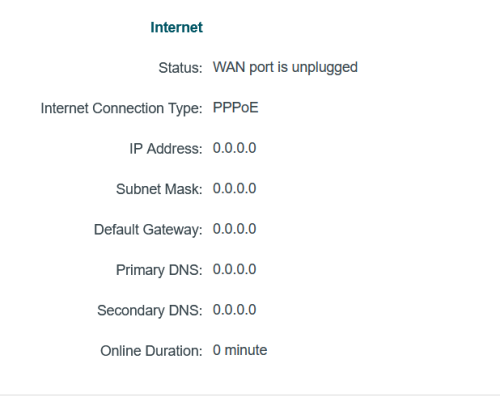
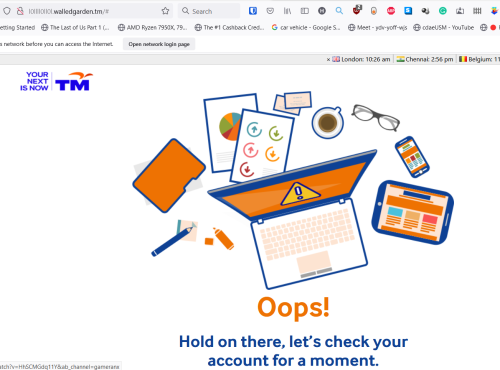
I just bought a new Archer AX72 router to replace my AX10 router. Unfortunately, I get error No IP, More like all 0.0.0.0. When I follow the easy setup process, I get this wallgarden unifi popup in new tab.
user posted image
user posted image

I reset the router, tried again. I even copy pasted the settings from the AX10 to the new router. Still same problem. Do I need to turn off the modem for a long time? I did it for 2 minutes as indicated, started, still same problem. Then I proceeded with just changing the cables between my old AX10 and new AX72.

Any ideas?


Attached thumbnail(s)
Attached Image Attached Image
Dragonflyz
post Apr 6 2023, 06:16 PM

Getting Started
**
Junior Member
239 posts

Joined: Apr 2005
From: BM, Penang, Malaysia


WAN port is unplugged!

Else, show photo of your setup.
acbc
post Apr 6 2023, 06:18 PM

Look at all my stars!!
*******
Senior Member
9,050 posts

Joined: Jan 2003
Connect cable from the fibre modem to the router's WAN port.

In the setup, select Unifi and enter your username and password.

If need to set-up manually, be sure to enter the correct VLAN too..
lalakiki
post Apr 6 2023, 06:24 PM

Casual
***
Junior Member
452 posts

Joined: Oct 2006
ur wan port OR lan cable got plug to WAN port or not?
MyProLife
post Apr 6 2023, 06:31 PM

I bully wumao & MPKL
*******
Senior Member
2,075 posts

Joined: Sep 2021
From: nowhere

Pppoe password problem

If in doubt, call tm for refresh of new password

If in doubt, check whether you missed a bill or two till got your unifi service suspended

This post has been edited by MyProLife: Apr 6 2023, 06:33 PM
TSmystvearn
post Apr 6 2023, 10:22 PM

...
*******
Senior Member
6,639 posts

Joined: Jan 2003
From: "New Castle"


QUOTE(Dragonflyz @ Apr 6 2023, 06:16 PM)
WAN port is unplugged!

Else, show photo of your setup.
*
QUOTE(acbc @ Apr 6 2023, 06:18 PM)
Connect cable from the fibre modem to the router's WAN port.

In the setup, select Unifi and enter your username and password.

If need to set-up manually, be sure to enter the correct VLAN too..
*
QUOTE(lalakiki @ Apr 6 2023, 06:24 PM)
ur wan port OR lan cable got plug to WAN port or not?
*
QUOTE(MyProLife @ Apr 6 2023, 06:31 PM)
Pppoe password problem

If in doubt, call tm for refresh of new password

If in doubt, check whether you missed a bill or two till got your unifi service suspended
*
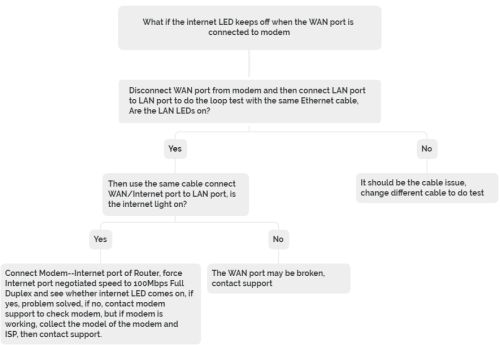
Cable plugged in. Still keluar that error. Cable cabut also that error. Cuba different cables, also I say not plugged in. How?

I have the unifi login details. Aso my working AX10 router. Just copy and setting from there. Not working.
MyProLife
post Apr 6 2023, 10:50 PM

I bully wumao & MPKL
*******
Senior Member
2,075 posts

Joined: Sep 2021
From: nowhere

user posted image

wan problem, contact tplink
TSmystvearn
post Apr 7 2023, 12:19 AM

...
*******
Senior Member
6,639 posts

Joined: Jan 2003
From: "New Castle"


QUOTE(MyProLife @ Apr 6 2023, 10:50 PM)
user posted image

wan problem, contact tplink
*
Ok
Alpha_Tay
post Apr 7 2023, 02:13 PM

Beware The Spammer Star!
******
Senior Member
1,725 posts

Joined: Jan 2003
check router system log for more detail.
TSmystvearn
post Apr 7 2023, 07:06 PM

...
*******
Senior Member
6,639 posts

Joined: Jan 2003
From: "New Castle"


QUOTE(Alpha_Tay @ Apr 7 2023, 02:13 PM)
check router system log for more detail.
*
Ok


Change to:
| Lo-Fi Version
0.0162sec    0.45    6 queries    GZIP Disabled
Time is now: 21st December 2025 - 05:48 AM