Welcome Guest ( Log In | Register )

Outline · [ Standard ] · Linear+

 Apple Smart Home Journey, Apple Homekit and etc

views
     
xkaizoku
post Nov 30 2023, 12:11 PM

Getting Started
**
Junior Member
220 posts

Joined: Sep 2021
Hi, I am interested to add smart control to my house autogate as well using HomeKit. But is this possible if I have no backup battery installed in the autogate motor?

I read your post and the devices needed are the raspberry pi (RM700+) and the ewelink device (RM30). Is the raspberry pi worth the money? as it seems like for that price, I can get a decent desktop spec to run homebridge.

Can you further elaborate on this set-up for better understanding? Thanks.

What is the difference between homebridge and home assistant?

This post has been edited by xkaizoku: Nov 30 2023, 12:13 PM
xkaizoku
post Jan 1 2024, 12:18 PM

Getting Started
**
Junior Member
220 posts

Joined: Sep 2021
QUOTE(epicure @ Dec 19 2023, 04:46 PM)
Hi there

You don’t need a backup battery in the autogate panel, it’s just there as backup in case of power failure

To me, its very worth the money for a Pi4. I managed to grab a 8GB model, somewhat future-proofing. To me its worth it cos it’s self contained, and i just keep it in my electrical riser/cabinet with active cooling (2 android box cooler fans running 4 hour shifts). It doesnt take up space, and it’s running headless. I just SSH into it now and then to update node.js and the plugins.

Homebridge just brings your non-homekit compatible devices into homekit. It’s my preferred choice, as i like to control everything in HomeKit cos of its simplicity. I only fall back on manufacturer’s apps if theres a fault.

Homeassistant is very powerful but to me kinda messy. You can bring many devices into home assistant and controlled within homeassistant. Homekit devices can br brought into homeassistant too. But if you are a tinkerer, you can dabble into HA, and then even Node-RED. I just don’t have that type of time anymore with work and kids.
*
Okay thanks, there seems to be a new model Pi 5. Did you buy the desktop kit that comes with the power supply?

How did you do the active cooling rotating 4 hour shifts?

I read up some guides and it seems like:
1) Set-up homebridge in Pi
2) Use iPhone to scan HomeKit QR on the screen of Homebridge to add 'accessory'.
3) From here, I add ewelink plug-ins to Homebridge. Then, how does the ewelink autogate receiver connect to homebridge? Abit confused here.

Can you briefly sketch/type out your overall set-up design? Like which hub/device connect to what to where. Does the Pi just needs to connect to power supply or lan cable to router as well? Is the apple tv/pod hub necessary in this case if using homebridge?

Thanks a lot.

Do you plan to buy and try the Tapo Doorbell model?

This post has been edited by xkaizoku: Jan 1 2024, 12:20 PM
xkaizoku
post Jan 4 2024, 08:24 PM

Getting Started
**
Junior Member
220 posts

Joined: Sep 2021
QUOTE(epicure @ Jan 4 2024, 03:56 PM)
Yup there is a Pi5 now, but i think it works the same, basically faster and more expensive.. haha. I just got the Pi4, with the power brick and usb cable. I didnt get the keyboard etc.

For the 4 hour shifts, its quite simple. I have 2 cooler fans (the android TV type), below the pi4. They are both powered via 5V1A usb adapters on separate wifi sockets. So, every 4 hours, one wifi socket turns on, the other turns off. This goes on every four hours. Before i installed these larger fans, i had the pi fan installed inside the Pi, and it brought the running temperature down from 90 degrees to 60 degrees. Still kinda how. Now with the larger fans, its running at 48 degrees. One day i probably will install larger fans. The cooler the better.

For homebridge, u just follow the guide to install onto your SD card or SSD (i use this as i read long term sd cards can fail). Then once u run it, u scan the homebridge QR code with your iphone and add it as a bridge into homekit. THen you go back to homebridge, and then install the ewelink plugin. The plugin will allow you to key in your ewelink credentials. You must have installed the ewelink autogate switch already inside the ewelink app. THe plugin will auto add the devices into homebridge, and thus, homekit.

*
ok thanks, so need to set up switch inside ewelink first. Can I know how to connect the ewelink receiver to the autogate board? I saw that the product does not come with wires too.

QUOTE(epicure)
Hmmm. Not able to sketch now but ill kinda list it out below, hopefully its easy to understand

1. Apple Home Hub (Apple TV or Homepod/Homepod Mini) - the main apple hub
1.a. Apple Homekit devices connected/controlled directly by the Home Hub e.g. Aqara, Tuya, (via their hub, or matter over thread or matter over wifi)

2. Homebridge via Pi4 connected to router using Lan cable
2.a Non compatible homekit devices brought into Homekit via homebridge plugins e.g. ewelink (sonoff), xiaomi, cctvs (dahua, hikvision etc via ffmpeg or cameraui or etc)

Don't really understand 😅, so 1 & 1a is for Apple Hub and Homekit devices while 2 & 2a is a different (not connected) line with Pi4 as the hub and non-compatible homekit devices. If I plan to use the ewelink switch, only need to buy the switch and pi4 with power adapter and cable right? + lan cable

Is your pi4 in a casing or just the board itself with the fan underneath? The Pi4 should be in open space? Would be nice if you can attach a photo of your setup

Did some research again and the board itself for pi4 8gb is rm420 while pi5 8gb is rm440 + power adapter around rm50. Funny this is all 8gb models are out of stock lol. Do I need to buy the hdmi cable as well to connect to monitor for set-up?

Very interested in getting into these smart devices but those hubs are pricey.

This post has been edited by xkaizoku: Jan 4 2024, 08:46 PM

xkaizoku
post Jan 13 2024, 05:45 PM

Getting Started
**
Junior Member
220 posts

Joined: Sep 2021
QUOTE(epicure @ Jan 5 2024, 09:55 AM)

Hi there hmm
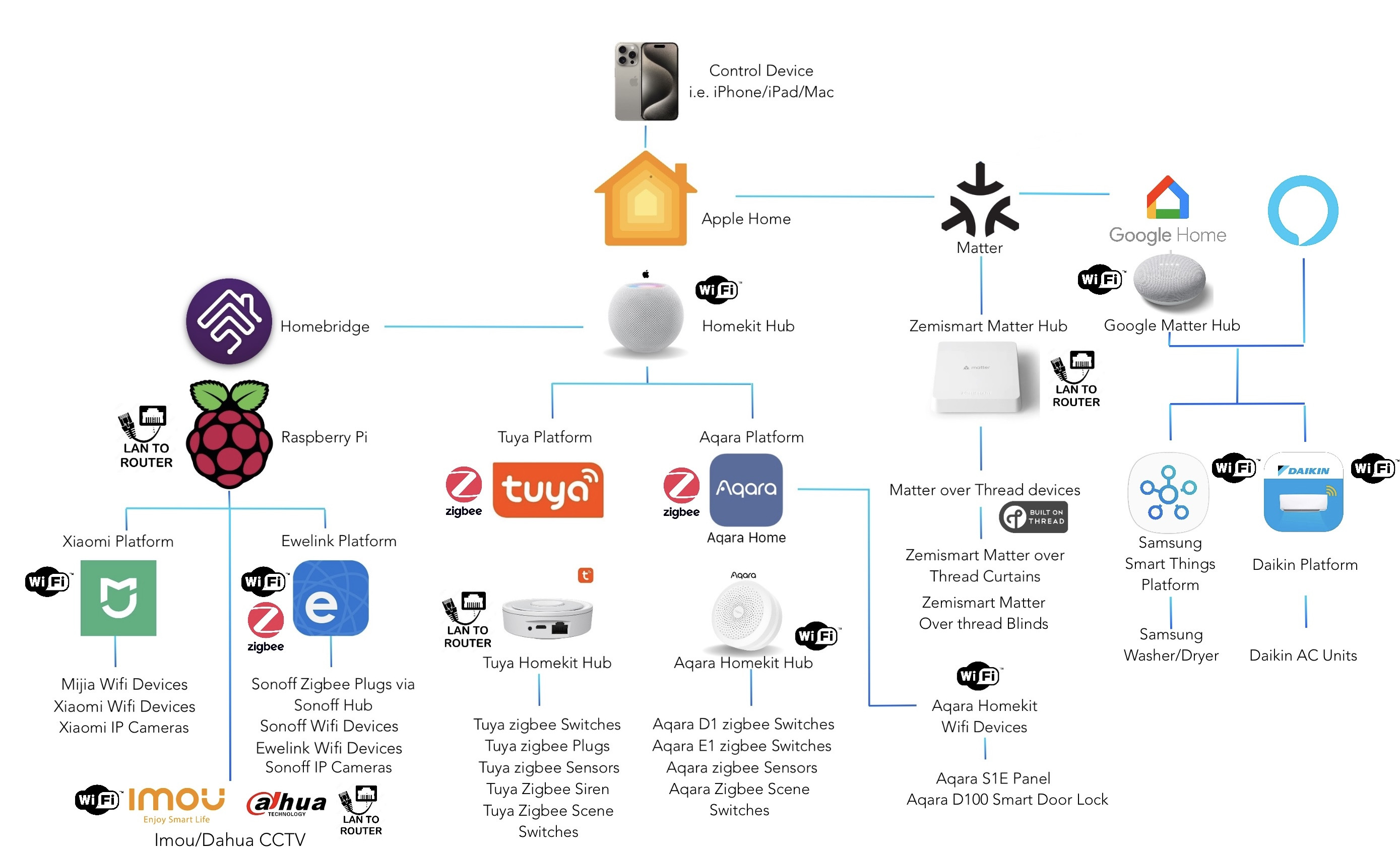
I made a diagram for you, but its not fully comprehensive, but should be easy enough to understand

Below is my setup. I use my iPhone/iPad/mac to control the smart home system via Apple Home app. I can also use Google Home or Alexa to control it, but it depends on which platform offers interplatform compatibility. Since i dont have a Google matter over thread border router, i cant control my curtains via google home. But essentially, brands like Tuya allow you to control your devices in Google/Alexa (mostly but not all).

But all in all, i can control the devices in
1. Apple Home app (my preferred choice)
2. Manufacturer app - Tuya app, Aqara App, Mi Home app, Ewelink App, etc
3. Google Home app - Some devices
4. Alexa App - some devices

user posted image
*
thanks! very detailed picture

From what I see, the HomeBridge (Pi Hub) is drawn to the homekit hub. So I cannot direct skip the homekit hub? Like Homebridge link to Apple Homekit app in iPhone directly.

This post has been edited by xkaizoku: Jan 13 2024, 05:46 PM
xkaizoku
post Jan 15 2024, 07:19 PM

Getting Started
**
Junior Member
220 posts

Joined: Sep 2021
QUOTE(epicure @ Jan 15 2024, 03:02 PM)
No you need a homekit hub.. so cheapest way is homepod mini. All homekit hubs can also act as border routers
*
awww man, homepod is not released yet in Malaysia. Cheapest is the Apple TV 4K with ethernet port at RM799/899.

Thanks for clarifying. So I would need the ewelink receiver, Pi4 & Apple Hub. Not really worth it anymore if I need an Apple hub as well. Cost easily exceeds RM1K.

Learnt a lot from your thread. Keep updating it!
xkaizoku
post Jan 16 2024, 05:48 PM

Getting Started
**
Junior Member
220 posts

Joined: Sep 2021
QUOTE(epicure @ Jan 16 2024, 08:53 AM)
I got my homepod mini from Shopee it's much cheaper.

Also, to control the gate u just need a zigbee switch, like the one in my post above with a tuya homekit hub. Then you don't need to buy a pi5.
*
Which shopee do you buy it from? It is not sold on Shopee Malaysia, maybe in the future since Apple is bringing it into MY soon.

So what you are saying is the ewelink receiver can be paired with the tuya/zigbee hub which is compatible with HomeKit?
or the zigbee switch (instead of ewelink) pair with tuya/zigbee hub? and lastly pair the tuya/zigbee hub to the Homepod/Apple TV?

The zigbee switch is like a switch socket right? Not installed on the autogate board.

I also plan to connect my tapo cameras to Apple Home. But tapo will not link with tuya hub right? Like I would still need a Pi for homebridge?

This post has been edited by xkaizoku: Jan 16 2024, 06:03 PM


Change to:
| Lo-Fi Version
0.0204sec    0.92    6 queries    GZIP Disabled
Time is now: 1st December 2025 - 03:11 PM