

Unifi Port Forwarding Problem On FiberHome Router
Unifi Port Forwarding Problem On FiberHome Router
|
|
 Mar 12 2023, 10:22 PM, updated 3y ago Mar 12 2023, 10:22 PM, updated 3y ago
Show posts by this member only | Post
#1
|
 
Newbie
4 posts Joined: Nov 2010 From: Kota Kinabalu, Sabah  
|
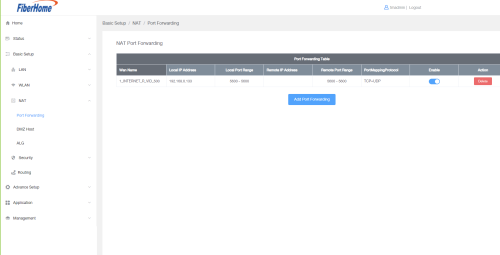
I just upgraded my connection and it came with a new router, FiberHome SR1041F. I've been trying to work out how to port forward on it, have added all the necessary info and it should be done but all the checks have failed. Have tried all I know to try, set exceptions in my firewall etc but it's still not working. Anyone have successfully port forwarded on the new routers?
|
|
|
|
|
|
Mar 12 2023, 10:26 PM
Show posts by this member only | Post
#2
|

Senior Member
1,494 posts Joined: Dec 2012
|
What is your Unifi package, if below 300Mbps TM is using CGNAT. With CGNAT it is difficult to port forward. sadlyfalways liked this post
|
|
|
Mar 13 2023, 06:51 PM
Show posts by this member only | Post
#3
|
|
Newbie
4 posts Joined: Nov 2010 From: Kota Kinabalu, Sabah
|
QUOTE(GOPI56 @ Mar 12 2023, 10:26 PM) What is your Unifi package, if below 300Mbps TM is using CGNAT. With CGNAT it is difficult to port forward.   mine is 100M... mine is 100M... |
|
|
Mar 13 2023, 07:29 PM
Show posts by this member only | Post
#4
|

Senior Member
2,608 posts Joined: Nov 2020 
|
QUOTE(truelovej @ Mar 13 2023, 06:51 PM) mine is 100M...1. call tm and request for it, but you need to have a good reason and they will COME ONSITE to verify your needs before giving you it 2. move to another ISP, but seeing as you said you just upgraded your connection, you may be locked in a contract truelovej liked this post
|
|
|
Mar 13 2023, 08:27 PM
Show posts by this member only | Post
#5
|
|
Newbie
4 posts Joined: Nov 2010 From: Kota Kinabalu, Sabah
|
QUOTE(PRSXFENG @ Mar 13 2023, 07:29 PM) well you got 2 options Awwww well... good to know. Thanks for the info. Least I know to give up ahah.1. call tm and request for it, but you need to have a good reason and they will COME ONSITE to verify your needs before giving you it 2. move to another ISP, but seeing as you said you just upgraded your connection, you may be locked in a contract |
|
|
Mar 13 2023, 11:44 PM
Show posts by this member only | IPv6 | Post
#6
|
|
Junior Member
932 posts Joined: Dec 2019
|
QUOTE(truelovej @ Mar 13 2023, 08:27 PM) Awwww well... good to know. Thanks for the info. Least I know to give up ahah. What are you trying to port forward? If you have some know how there's a way to do it, but you'll have to rent a remote server |
|
|
|
|
|
Mar 14 2023, 12:07 AM
Show posts by this member only | Post
#7
|
|
Junior Member
136 posts Joined: Aug 2005
|
QUOTE(truelovej @ Mar 12 2023, 10:22 PM) I just upgraded my connection and it came with a new router, FiberHome SR1041F. I've been trying to work out how to port forward on it, have added all the necessary info and it should be done but all the checks have failed. Have tried all I know to try, set exceptions in my firewall etc but it's still not working. Anyone have successfully port forwarded on the new routers? i also tried configuring port forwarding on this model a few weeks ago and did not succeed (although i have experience configuring port forwarding on tens of other models). i suspect we should also configure the firewall / ACL to allow the packets to even enter, but fiberhome's web GUI looks like it was designed by an unpaid intern, and somehow there is zero documentation available on fiberhome routers online - as usual TM gave us the cheapest P.O.S. router they can find. i doubt their procurement unit even tested if all basic features were working, much less if the GUI was intuitive enough for users to figure out by themselves due to the lack of proper documentation.ssh & telnet are also not working on my side - can enable (got login prompt once enabled), but username & password rejected - even when the same pair of username & password is accepted by web GUI. share your findings here for further discussion. |
|
|
Mar 14 2023, 01:21 AM
Show posts by this member only | Post
#8
|

Senior Member
4,454 posts Joined: Apr 2006
|
QUOTE(truelovej @ Mar 13 2023, 08:27 PM) Awwww well... good to know. Thanks for the info. Least I know to give up ahah. TM's forcing to upgrade to 300mbps+ for that public ip, I wonder how the contract will turn out if you try to upgrade Unless can really prove to them you need it urgently Another free way is using cloudflare tunnel, have it running 24/7 on rpi zero w for example |
|
|
Mar 14 2023, 01:45 PM
Show posts by this member only | Post
#9
|
|
Newbie
4 posts Joined: Nov 2010 From: Kota Kinabalu, Sabah
|
well I'm not desperate enough that I must have it la. Just for gaming and movies so I can live without haha.
Thank you all for your input. If anyone finds an easy way please do share! |
|
|
Sep 10 2023, 09:03 AM
Show posts by this member only | IPv6 | Post
#10
|
|
Probation
1 posts Joined: Nov 2021
|
How to Port Forwarding On FiberHome Router with ISP Unifi Fiber ™ After open port, you need to set up on SERVICE CTRL 1. Go to Advance Setup > Service Ctrl 2. Click on the section ADD ACCESS CONTROL 3. Settings as mentioned below Protocol: (choose according to your need or choose ALL) Access Control: WAN IP Protocol Type: IPv4 Source IP: (leave blank) 4. Finished mywife and nightzstar liked this post
|
|
|
Oct 14 2023, 01:50 AM
Show posts by this member only | IPv6 | Post
#11
|

Junior Member
87 posts Joined: Dec 2009
|
QUOTE(Maghfirare @ Sep 10 2023, 09:03 AM) How to Port Forwarding On FiberHome Router with ISP Unifi Fiber ™ Damnnn!!! thanks bro for this tip After open port, you need to set up on SERVICE CTRL 1. Go to Advance Setup > Service Ctrl 2. Click on the section ADD ACCESS CONTROL 3. Settings as mentioned below Protocol: (choose according to your need or choose ALL) Access Control: WAN IP Protocol Type: IPv4 Source IP: (leave blank) 4. Finished  Im not port forwarding but just setting things up to accessing this router from the internet....and keep failing! Googling around and stumbled on this page....just kinda blindly add this access control and voilaaa!!!! I got fiberhome login page on internet  Damnn again, i hate this router so much  |
|
|
Oct 18 2023, 07:53 PM
Show posts by this member only | IPv6 | Post
#12
|

Senior Member
1,693 posts Joined: Sep 2009
|
QUOTE(mywife @ Oct 14 2023, 01:50 AM) Damnnn!!! thanks bro for this tip Can advice how you do it? CF zero trust tunnel or you just set up within the router? Im not port forwarding but just setting things up to accessing this router from the internet....and keep failing! Googling around and stumbled on this page....just kinda blindly add this access control and voilaaa!!!! I got fiberhome login page on internet Damnn again, i hate this router so much This post has been edited by wanttobuylaptop: Oct 18 2023, 07:53 PM |
|
|
Oct 19 2023, 04:45 PM
Show posts by this member only | IPv6 | Post
#13
|
|
Junior Member
87 posts Joined: Dec 2009
|
QUOTE(wanttobuylaptop @ Oct 18 2023, 07:53 PM) Can advice how you do it? CF zero trust tunnel or you just set up within the router? Nope, no tunnelling. Just setup ddns on the router using free ddns service from NoIP. On public IP here so you can get away with tunneling stuff I guess. hirumikenzaki liked this post
|
|
|
Oct 28 2023, 01:38 AM
Show posts by this member only | IPv6 | Post
#14
|
|
Probation
32 posts Joined: Oct 2019
|
Double-check the IP address of the device you're forwarding to. Make sure it's static.
Ensure that the device is running the service you're trying to forward (e.g., a web server on port 80). Verify that your ISP isn't blocking the port you're trying to forward. Some ISPs restrict certain ports for security reasons. Check for any additional security or parental control settings on your router that might interfere with port forwarding. If you've tried all of these steps and are still experiencing issues, you may want to contact your ISP's customer support or the router manufacturer for further assistance. |
|
|
Feb 28 2024, 09:24 PM
Show posts by this member only | IPv6 | Post
#15
|
|
Junior Member
88 posts Joined: Mar 2017
|
Sorry if bumping old thread is not allowed, but anyone figured out how to port forward with this router yet?
|
| Change to: |  0.0248sec 0.0248sec
 0.21 0.21
 5 queries 5 queries
 GZIP Disabled GZIP Disabled
Time is now: 8th December 2025 - 07:27 AM |
 Quote
Quote